







Recover the editable score before relying on a PDF
To recover MuseScore scores, preserve the surviving native file and check available crash recovery or hidden backups before re-entering notes. A PDF can preserve the printed music while lacking the original editable score. Therefore, identify whether you need notation objects, playback information, or simply a readable reference, and choose a recovery route that can actually supply that content.
A missing score in the recent list does not prove that the file was deleted. First inspect its original folder and any existing cloud copy you own. Also record the MuseScore version, because backup naming and storage behavior differ between releases. Instructions for an older release should not become an assumed path for every current installation.
Record the musical revision you need
Write down the score title, instrumentation, approximate measure count, and the last meaningful change. For example, note a revised ending, a new part, or corrected articulations. These details help distinguish candidates whose filenames and thumbnails look alike. A backup can open successfully while still predating the passage that matters for your rehearsal or publication.
Copy the native score, nearby backup directories, and existing exports into a separate recovery workspace. Show hidden files and full extensions when inspecting the original folder. Then retain the original names in a note before renaming any working copies. This preserves useful clues about the source and version while letting you test candidates safely.
Free route 1: restore an offered crash session
- Preserve the available score and recovery candidates before cleanup where possible.
- Start the relevant MuseScore version and inspect any session-recovery offer.
- Restore the affected score and compare the missing measures or notation changes.
- Use Save As to create a clearly named native score in a known recovery folder.
A crash-recovery offer depends on surviving session data. It does not guarantee every unsaved edit. Also save the recovered result deliberately rather than assuming it now lives in the original score directory. The safest acceptance check is to reopen the newly saved native file and inspect the exact passage you needed, not merely observe that a familiar score window appeared.
Inspect the full score and its parts
Check the affected measures in the full score, then inspect the relevant part views. A recovered score can contain the notes while showing different layout or part settings. Also verify repeats, endings, and rehearsal marks around the changed passage. These elements influence how performers navigate the music and may not be obvious from a quick look at the first page.
Listen to playback as a supporting check, but do not rely on it alone. A score can sound plausible while containing incorrect spelling, missing slurs, or changed articulations. Conversely, a playback-device difference does not necessarily mean the notation is damaged. Separate the musical document from the sound environment so that you do not rebuild valid notation to solve an unrelated playback issue.
- Show hidden files and inspect the original score directory and any existing backup subfolder.
- Identify candidates associated with the affected score and installed MuseScore version.
- Copy a candidate elsewhere and adjust only the working copy’s backup suffix if needed.
- Open the native candidate and compare the intended musical revision.
MuseScore backup conventions have changed across releases. Older documentation describes a trailing comma, while later versions can use a trailing tilde and a hidden backup directory. Therefore, inspect actual files and relevant documentation instead of applying one filename recipe blindly. Renaming helps the application recognize a genuine backup; it cannot repair an empty file or generate missing notation.
Choose content over apparent recency
A candidate saved after an accidental deletion may preserve the same unwanted state. Compare the specific measure range, instrumentation, and corrected markings that distinguish the desired revision. Keep both the current score and useful older candidates. You may need a passage from one and later layout work from another rather than replacing the whole score with the first file that opens.
If you transfer measures between candidates, inspect ties, slurs, tuplets, dynamics, and instrument assignments afterward. A pasted passage can require contextual adjustment even when the notes appear correct. Save the combined recovery as a new score and record the sources. That makes the reconstruction reviewable instead of presenting it as a single untouched historical file.
Free route 3: retrieve an existing score you own online
- Sign in through the normal MuseScore interface or website with the account that owns the score.
- Identify the existing cloud score by title and musical content.
- Download or save an authorized local native copy where the account and interface permit it.
- Compare its revision and preserve it separately from the damaged local score.
An existing online copy can help only if the score was actually saved there. A locally saved composition does not automatically have an unlimited online version history. Also distinguish a cloud-linked document from a downloaded local copy. The latter may become a separate file, so record which source you retrieved and avoid assuming later local edits automatically exist in the cloud.
Compare the online revision carefully
Inspect the ending and a distinctive recent change before choosing the cloud copy as the baseline. The online score may represent an earlier publication or review milestone. That can still be useful, but it should not silently replace a later local revision. Keep a note of any missing measures or annotations that you will need to restore from another candidate.
If another authorized device holds the intended local score, preserve a copy from that device before synchronizing or overwriting it. Then compare the native content in a separate working folder. A visible title or thumbnail is not enough to identify the exact revision. The musical passage that distinguishes the versions provides the stronger check.
Free route 4: import an existing MusicXML export
- Locate an existing MusicXML or compressed MusicXML export from the relevant composition.
- Open a copy in a new MuseScore document using suitable import settings.
- Compare notes, rhythms, instruments, expressions, and layout with the intended score.
- Save the imported result as a separate native recovery document and note the limitations.
MusicXML can preserve substantial editable notation, but the imported score may differ in engraving, layout, playback, or application-specific details. Therefore, treat it as a strong salvage source that still needs musical review. Do not assume that a successful import restores the original native document exactly, especially when the score uses complex notation or carefully adjusted parts.
Check the notation that imports imperfectly
Inspect tuplets, cross-staff notation, percussion mapping, lyrics, repeats, and unusual text where relevant. Then compare a representative page and the final measures with a reliable PDF or printout. This focuses review on the composition’s actual complexity. A simple melody may transfer well, while a dense ensemble score can require more detailed correction after import.
If only MIDI survives, it may help recover pitches and timing while omitting much of the written notation and layout. If only a PDF survives, it provides a visual reference for manual re-entry or a separate recognition workflow. Neither should be described as direct restoration of the original editable score. State what the source actually contains before choosing a reconstruction plan.
Diagnose a score that appears incomplete
Confirm that you opened the intended native file rather than a part, an older export, or another document with the same title. Then inspect the instrument list, measure range, and view settings. A missing staff or page can reflect a display or layout choice, while genuinely absent measures require a historical candidate. These possibilities deserve different next steps.
Separate layout changes from missing music
A recovered score can have different page breaks or spacing while retaining all notation. Check measure numbers and musical content before assuming that a shorter page count means missing bars. Conversely, a familiar page count does not prove completeness. The score may contain empty measures where a passage disappeared, so inspect the actual affected section.
For parts, compare the underlying full score and the part’s visible instruments. Then inspect any relevant layout settings. Avoid re-entering music into a part merely to compensate for a visibility or selection problem. That can introduce duplicate content while leaving the original configuration issue unresolved. Work in a copy until the source of the discrepancy is clear.
A worked recovery after deleting an ending
Suppose you accidentally remove an eight-measure ending and save the score. Preserve the current file before opening other candidates. Then compare the hidden backup and any earlier native milestone. Identify the version containing the intended cadence, dynamics, and final barline. A candidate with the right notes but an older orchestration may still require careful reconciliation.
Preserve later corrections while restoring the passage
Keep the current score’s valid later edits, such as corrected articulations elsewhere. Transfer the verified ending into a new working copy, then inspect measure numbering, repeats, ties, and instrument assignments around the join. This targeted recovery avoids discarding useful work merely because the older score contains the missing passage.
Next compare the full score and affected parts, then play through the transition into the restored ending. Also review the printed layout for collisions and page turns. The musical and engraving checks answer different questions. Together they provide a stronger acceptance test than simply confirming that the missing measures now appear in the document.
Validate musical content and performance instructions
Check the measure count, instrumentation, key and time signatures, tempo marks, repeats, and the passage that motivated recovery. Then inspect articulations, dynamics, lyrics, and staff-specific changes. A native score can be structurally readable while representing an older musical decision. Therefore, compare the recovered content with a known reference or your documented revision target.
Test the intended deliverable
Export a fresh PDF to a new directory and inspect every page needed for the rehearsal or publication. Check part names, page order, final measures, and any difficult page turns. If playback matters, test the relevant sounds separately. A sound-library issue should not automatically disqualify a notation recovery whose written content is correct.
Also verify that the saved native score reopens independently of the previous session. Then keep the accepted document, PDF, and any MusicXML milestone clearly identified as belonging to the same recovery revision. Mixing a newly recovered full score with older part PDFs can create practical rehearsal errors even when each individual file opens normally.
Identify a score candidate through musical content
A title and thumbnail are weak revision identifiers for a composition that changed repeatedly. Choose a distinctive passage, the final measure count, and a recent notation correction. Then inspect those details in each native candidate. For an ensemble work, also compare the instrument list. This gives you a concrete basis for selecting the score that supports the next rehearsal or editing task.
Compare the changed passage across voices and staves
A recovered melody can look correct while an inner voice or accompaniment remains older. Inspect the full measure range across the relevant staves, including rests, ties, and voice assignments. Then compare the passage with a reliable reference. This catches partial recovery that a quick melody-only review can miss and helps you identify exactly which material still needs reconstruction.
Also inspect the measures immediately before and after a restored section. A pasted passage can affect ties, slurs, repeats, or layout at the join. Save a new recovery copy before making adjustments, and record any rebuilt connections. The aim is a coherent musical document, not merely a visible block of recovered notes in an otherwise incompatible context.
A full score can appear complete while a part has missing content, different instrument visibility, or poor page layout. Open the relevant parts after recovering the native document and compare the affected passage. Inspect the part name and instrumentation as well as the notes. These checks connect the recovered source with the material performers will actually read.
Check rehearsal marks, measure numbers, repeats, endings, and cues that help players navigate the work. A missing navigation element can cause practical confusion even when every pitch survives. Compare these markings with the intended revision and with the full score. Then inspect page turns around the changed section, especially when inserting or removing measures altered the part’s pagination.
If only part PDFs survive, retain them as references for the relevant instruments. They may reveal notation absent from an older full-score candidate. However, rebuilding the full score from parts is reconstruction and can leave uncertainty about shared layout or playback settings. Record the sources and compare overlapping musical information rather than assuming one part describes the entire composition.
Assess MusicXML import in a notation-specific way
After importing an existing MusicXML source, identify the notation features that are most complex in this score. For a vocal piece, inspect lyrics and melismas. In keyboard music, check voices, beams, and cross-staff notation. Finally, inspect percussion instrument mapping where relevant. This targeted review is more useful than a generic statement that the import succeeded.
Check duration and notation separately
A passage can play with roughly correct timing while using different written rhythms or note spelling. Inspect rests, tuplets, ties, and enharmonic choices. Then compare the phrase with a reliable printed reference. Playback helps detect missing material, but the written score still needs its own review because performers rely on notation that an audio comparison cannot fully verify.
Also inspect text and expressions that do not affect playback directly. A rehearsal instruction, technique marking, or editorial note can be important even when the imported music sounds right. Keep a list of required corrections and save the imported candidate separately from the original export. This preserves a clear record of what the interchange file supplied and what you rebuilt in the native score.
Use MIDI as a limited pitch-and-time source
An existing MIDI file can supply useful musical events when no native or MusicXML candidate survives. Import a copy into a new document and inspect how the application interprets rhythm and instrumentation. Then compare it with a printed or audio reference. MIDI does not generally preserve the full engraving and expression structure of the original score, so plan for a more substantial notation review.
Avoid treating quantization as historical recovery
An import may require interpretation of timing into written note values. That interpretation can produce a playable result without matching the original notation. Review ambiguous rhythms and voices deliberately. If you rewrite them to match a PDF or musical intent, record that as reconstruction rather than claiming that the original notation objects survived in the MIDI.
For a complex ensemble piece, consider recovering one verified passage or instrument at a time. This makes errors easier to isolate and helps you compare the result with reliable references. Keep intermediate native milestones so a later correction does not erase an earlier useful reconstruction. The goal is a reviewable musical source whose uncertainties are visible, not a quick import that merely fills the staves.
Verify the recovered edition before distributing it
Create a fresh PDF from the accepted native score and inspect its title, instrumentation, page order, and final measures. Then compare the changed passage in both the full score and relevant parts. This ensures that the distributed files belong to the same recovery revision. A valid native document and an older PDF can each open normally while presenting different music.
Keep reference audio in its proper role
Listen through the important transitions and ending, but distinguish playback-environment differences from notation errors. An unavailable sound library can change timbre without changing the score’s notes. Conversely, a familiar sound can conceal a missing articulation or wrong written spelling. Use audio as supporting evidence and written notation as the primary check for the performer’s document.
Finish with a short note identifying the native candidate, imported sources, reconstructed passages, and any remaining engraving issues. Preserve a review PDF and the accepted editable score together. This gives the next rehearsal correction a reliable baseline and prevents a partial reconstruction from circulating as an unquestioned final edition.
Compare the recovered score with the intended edition
A composition can have several legitimate editions with different orchestration, cuts, or rehearsal markings. Identify the intended edition before adopting a candidate. Compare the title information, instrumentation, distinctive passage, and ending. A technically complete older edition may still be wrong for the next rehearsal. Keep it as useful evidence, but document the differences instead of silently treating it as the current score.
Inspect ties and slurs around restored measures
After transferring a recovered passage, inspect connections that cross its boundaries. A tie, slur, hairpin, or lyric extension can begin outside the copied range. Compare the surrounding measures in the full score and relevant parts, then save the corrected result separately. This focused review catches musical continuity problems that a simple measure-count check cannot reveal.
For a score rebuilt from mixed sources, keep a brief passage-level source note. Identify which sections came from native backup, MusicXML, or manual re-entry. Then review any reconstructed notation against a reliable reference. The note need not be long, but it makes the recovery easier to verify and prevents a later editor from assuming that every section preserves the same historical source.
Preserve the accepted edition for the next rehearsal
Save the native milestone and regenerate the full score and required parts together. Then inspect their revision identifiers and final pages. This keeps the distributed set consistent and reduces the risk of performers receiving an older part beside a newer score. Retain the source candidates separately in case a later musical question requires comparison with the original evidence.
When storage recovery may help a missing score
PandaOffice Drecov can be considered for deleted saved native scores, existing backups, or prior exports on readable storage. It cannot recreate notation that never reached disk or retrieve an online score that the account cannot access. Try native recovery and existing copies first, and reduce writes to the affected storage while assessing deleted-file options.
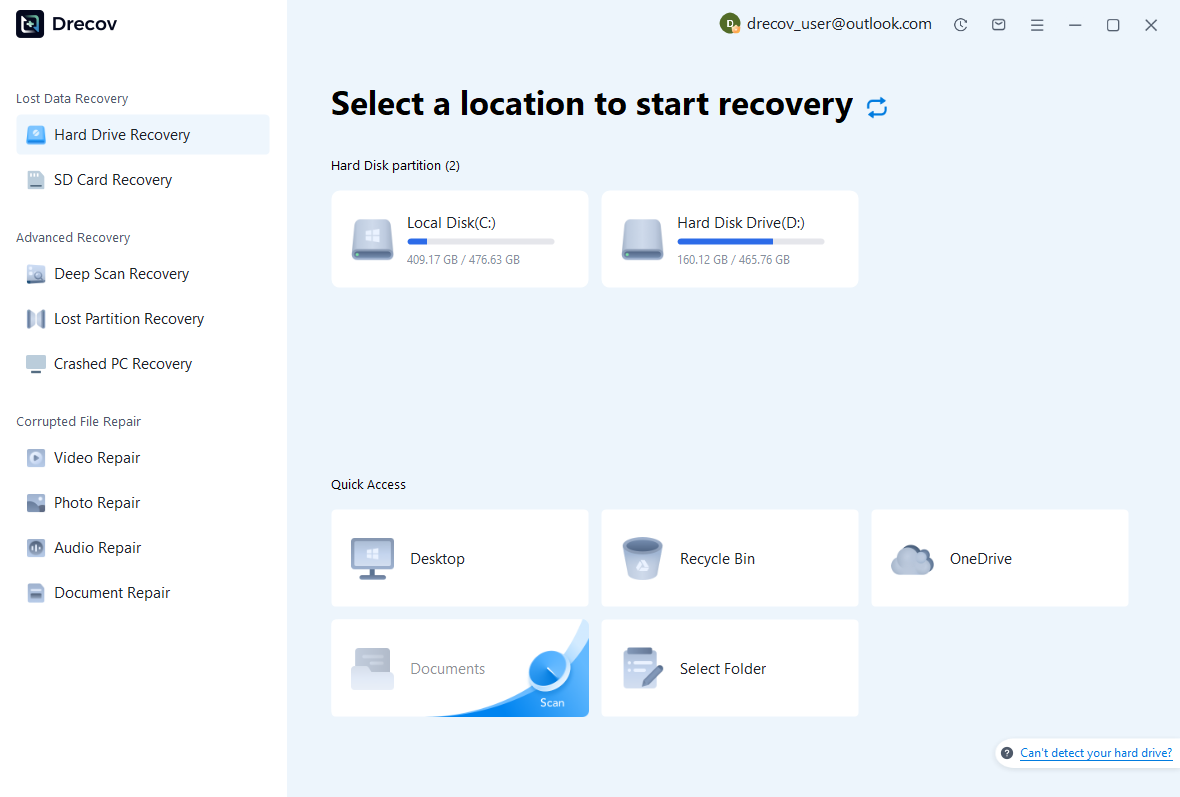
Step 1: identify the score’s actual location
Select the drive or partition that held the native score, hidden backup folder, or export. Record the original path and MuseScore version so you know which candidates to compare. Keep recovery output elsewhere. Repeated read failures or storage disconnections require assessment before you proceed with a routine software file scan.
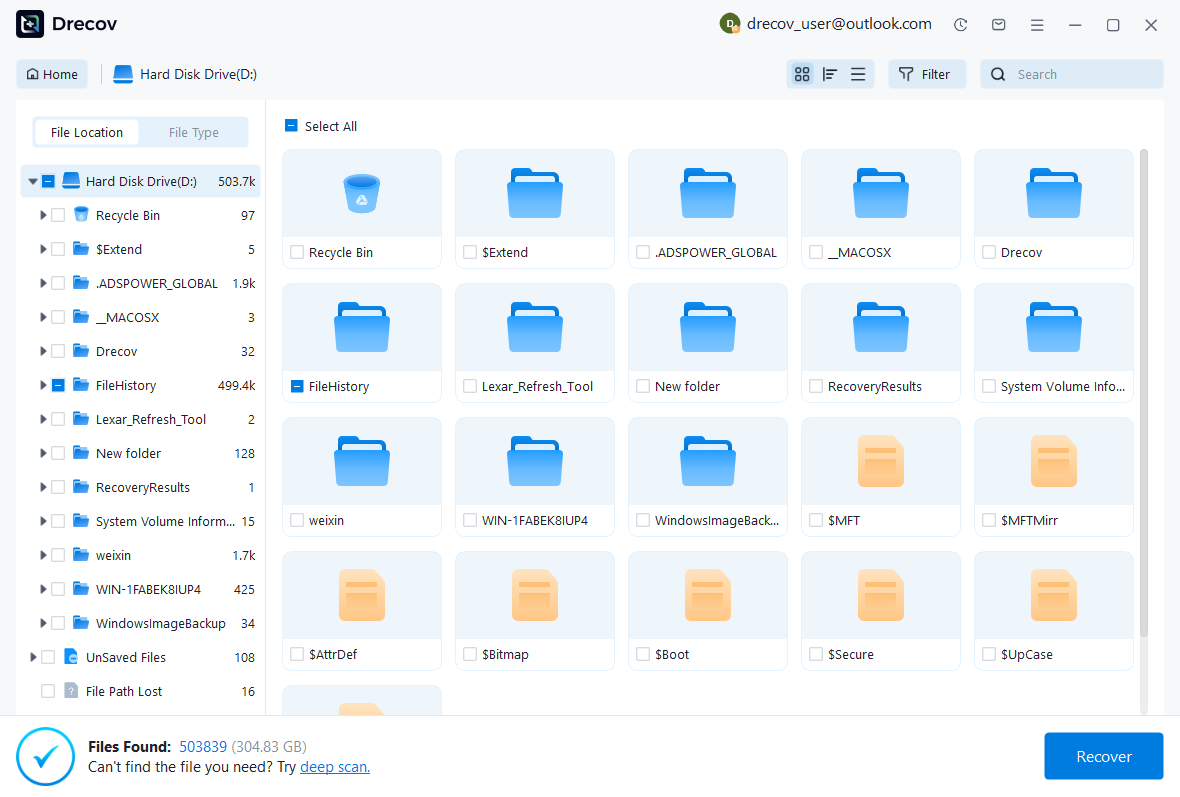
Step 2: compare native and interchange candidates
Review available names, sizes, paths, dates, and supported previews. Preserve plausible native scores alongside useful MusicXML or PDF references. Their roles differ: the native score may retain application-specific editing information, while an export may support limited salvage. A scan result alone cannot establish that the intended notation and parts survived intact.
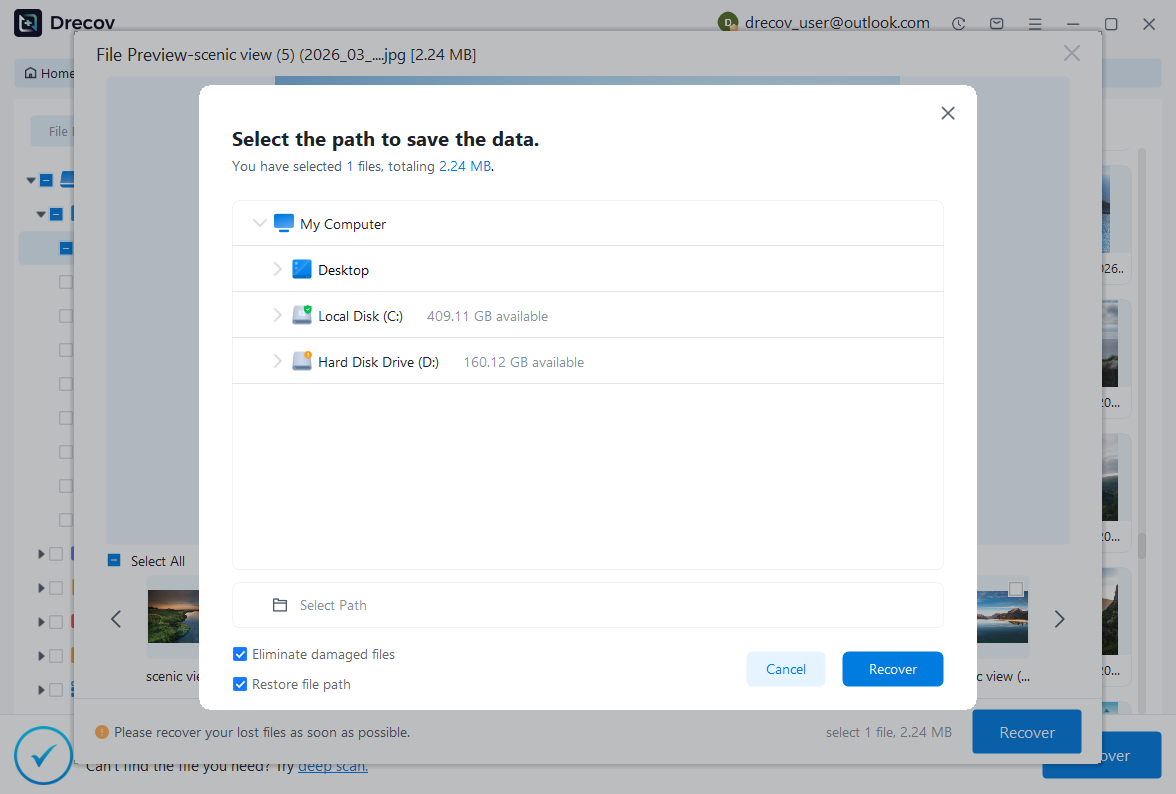
Step 3: restore elsewhere and inspect the music
Recover selected files to another healthy destination and open working copies in a suitable MuseScore version. Compare the affected measures, instrumentation, repeats, parts, and layout. Then save a new native score and export a review PDF. Keep incomplete candidates separate from the accepted composition so they cannot overwrite useful recovered work.
Preserve an accepted musical milestone
Once the checks pass, close and reopen the recovered score and compare its final passage again. Then record which candidate supplied the baseline and which sections you reconstructed or imported. Keep a native copy and a review export together. This gives you a reliable starting point for the next rehearsal correction instead of a folder of ambiguously named scores.
Test backup behavior on a short example
Use a disposable score to verify where your installed version places backups and how their names appear with hidden files visible. Make a harmless change, save it, and open a copied historical candidate. This test establishes the actual behavior of your installation without experimenting on the newly recovered composition.
If only a printed or audio reference survives, state that the editable score still needs reconstruction. Those sources can preserve valuable musical information, but they do not automatically restore notation objects and part settings. A clear description of the recovered material helps you plan the remaining work and prevents an incomplete score from reaching performers as if it were final.
Related recovery resources
Explore the relevant recovery options: Hard drive recovery, External hard drive recovery.
For another recovery case and its practical checks, read the related recovery guide.
Check the vendor guidance for the installed version: official recovery documentation 1, official recovery documentation 2.