







Losing critical files from a flash drive can disrupt your workflow and cause immense stress. Whether you accidentally deleted important work documents or formatted a drive by mistake, finding a reliable data recovery usb memory stick solution is paramount. Many users searching for answers initially look into tools like recuva data recovery software to rescue their lost files. However, modern file systems and flash memory controllers require advanced algorithmic handling to ensure complete file restoration. This article provides a comprehensive overview of usb memory stick data recovery and introduces PandaOffice Drecov data recovery software as a premier solution for your digital retrieval needs.
Understanding the Basics of USB Memory Stick Data Recovery
A usb memory stick relies on NAND flash memory to store digital information. Unlike traditional hard drives with moving magnetic platters, flash memory manages data through electrical blocks and sectors. Consequently, when files disappear, the underlying data often remains intact but becomes inaccessible to the operating system operating system logic.
Common Challenges in Flash Drive Retrieval
Several issues complicate file retrieval from a usb memory stick. File system corruption, accidental formatting, sudden power surges, and improper ejection can turn your drive into raw unallocated space. Furthermore, hardware degradation over time blocks standard read operations.
Introducing PandaOffice Drecov Data Recovery Software
The latest edition of PandaOffice Drecov data recovery software provides a streamlined, signature-based architecture to scan physical blocks directly. It bypasses the standard operating system abstraction layer by interfacing with the storage controller through low-level SCSI pass-through commands. This deep interaction allows the software to read raw sectors even if the Master Boot Record is destroyed or the partition table shows up as unallocated RAW space.
Furthermore, the utility features an advanced hardware-acceleration toggle within the backend engine. This option leverages multi-threaded CPU processing to index over 500 distinct file extensions simultaneously. Consequently, the total time required for a data recovery usb memory stick procedure drops by up to 40 percent compared to older legacy utilities.
⚠ Warning: Install it on a drive different from the one where your data was lost to prevent overwriting.
For additional troubleshooting resources, you can learn about Solutions to recuva data recovery software issues which highlights web-based data retrieval fixes. Alternatively, you can follow a complete guide on how to repair a USB drive and recover data step-by-step to handle more severe storage controller errors.
Step-by-Step Recovery Method Using PandaOffice Drecov
The latest edition of PandaOffice Drecov data recovery software provides a streamlined, signature-based architecture to scan physical blocks directly.
Step 1: Connect the Flash Drive and Launch the Software
Insert your storage device into a functional USB 3.0 or USB-C port. Open the application with administrator privileges to ensure full access to the low-level storage stack.
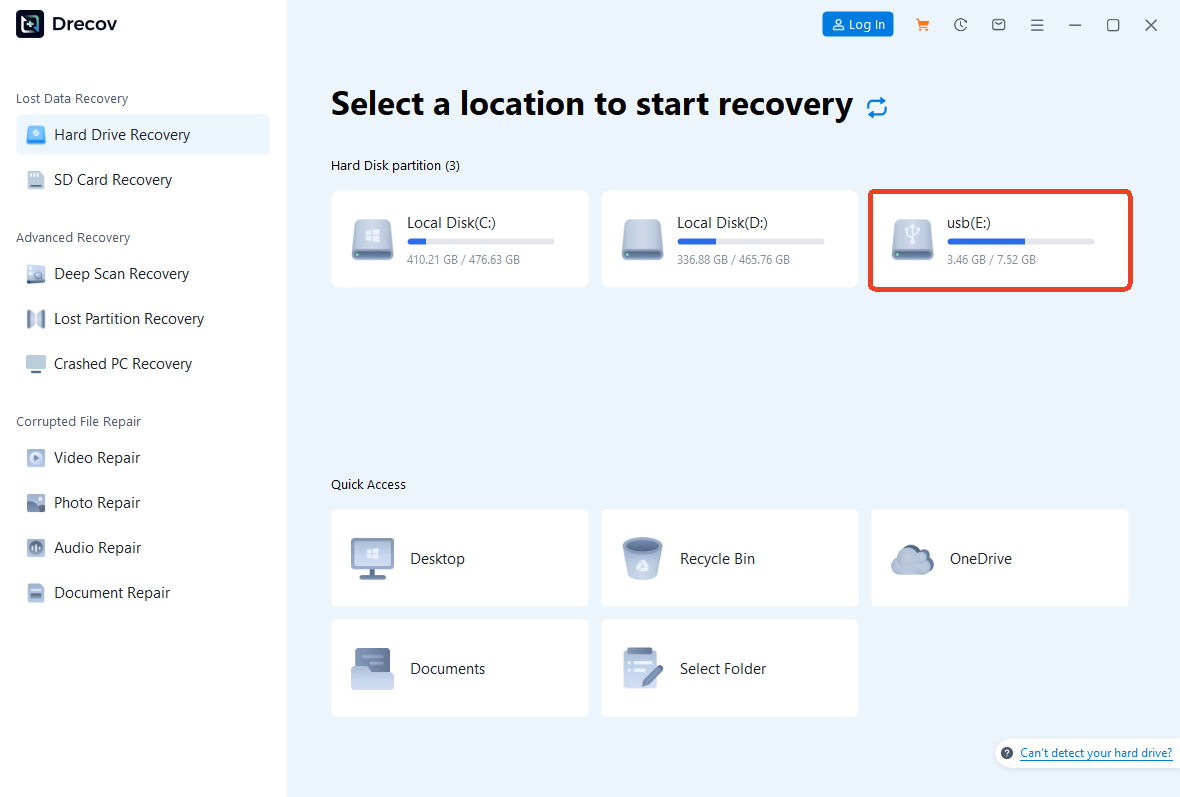
Step 2: Select the Target Device
Navigate the main user interface to locate your specific drive under the External Devices tab.
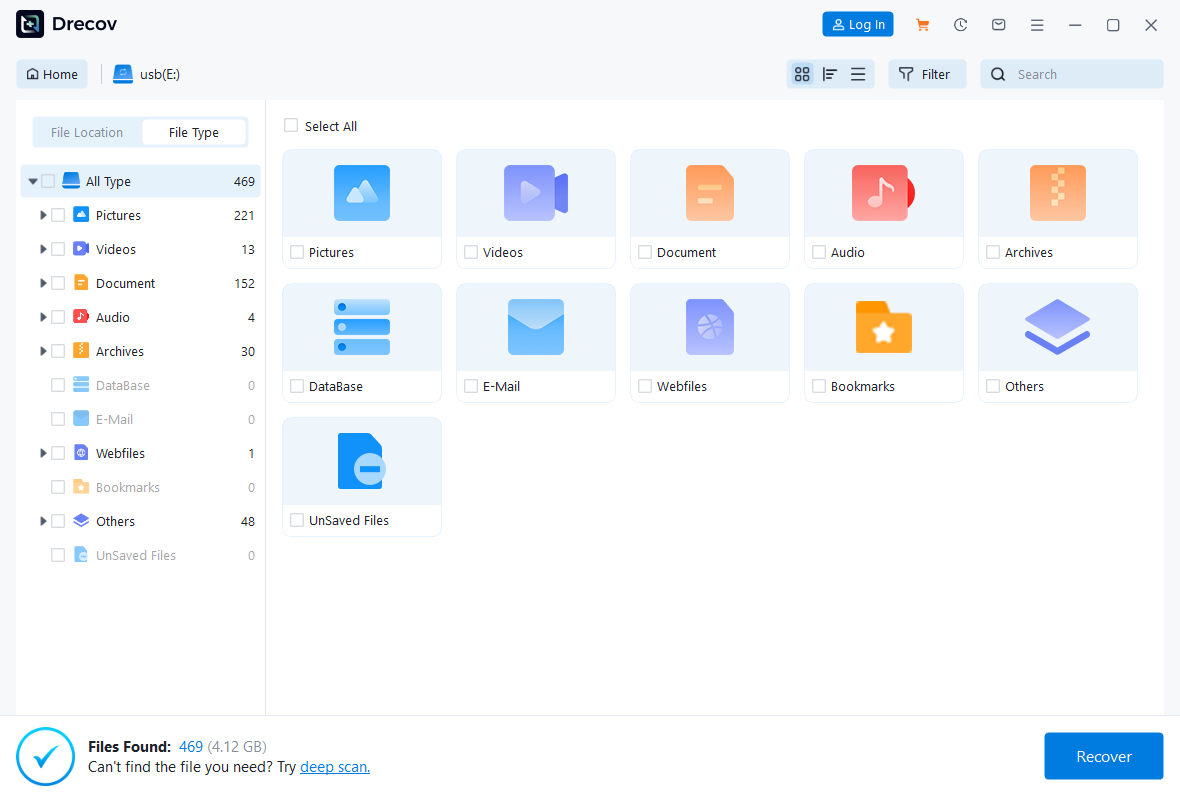
Step 3: Execute the Deep Scan Mode
Click the Scan button to initiate a sector-by-sector analysis. The application employs advanced heuristics to piece together fragmented file headers. Meanwhile, you can monitor the real-time progress bar at the top of the interface.
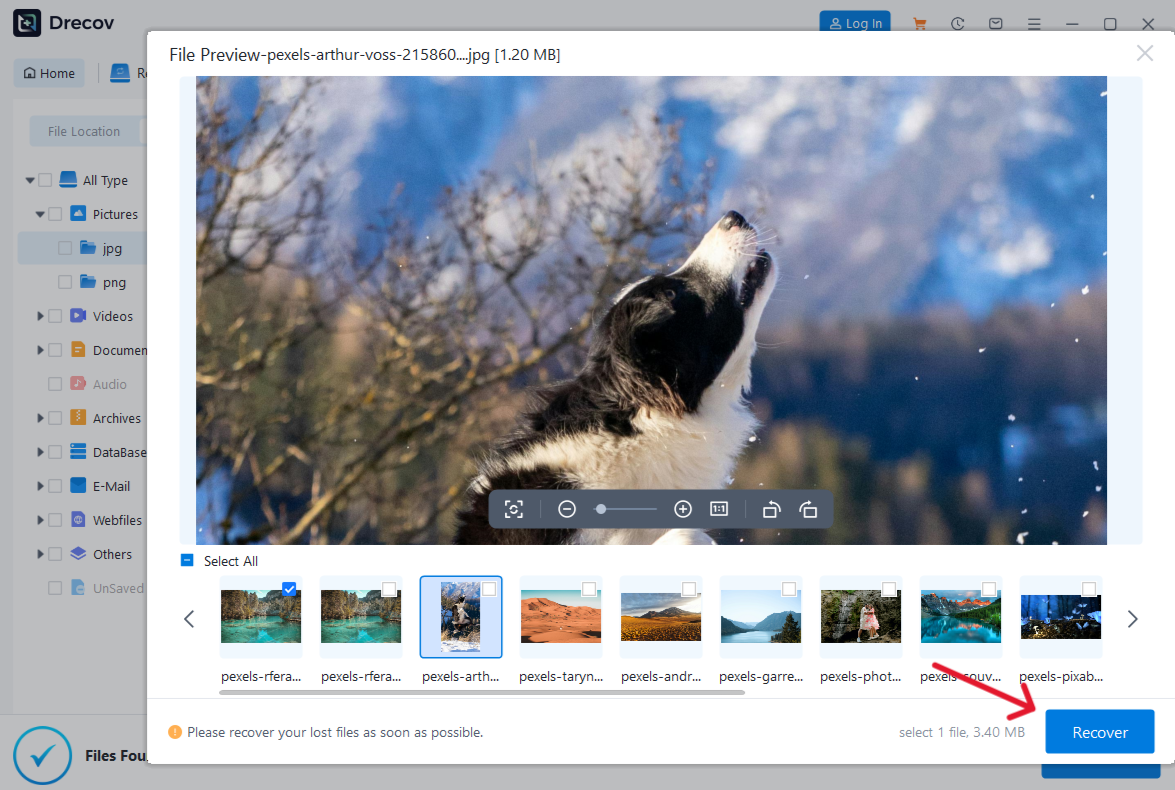
Step 4: Filter and Preview Files
Use the file extension filters to sort through discovered images, documents, and archives. Press the Spacebar hotkey to open a live preview window for individual items before committing to restoration.
Step 5: Save Files to a Secure Location
Select the checkboxes next to your missing files and click Recover. Choose a target folder on your local primary hard disk drive to prevent overwriting the source drive.
Alternative and Complementary Methods for File Retrieval
While PandaOffice Drecov data recovery software offers a highly reliable automated solution, alternative options exist for technical users.
Windows Built-in Command Line Utility
You can attempt data recovery usb memory stick fixes via the command prompt. This method uses native system tools to fix minor file allocation table issues without third-party downloads.
- Pros: Totally free; requires no installation; safe for minor file system metadata corruption.
- Cons: Command-line interfaces lack a visual preview; typing incorrect commands can accidentally erase data blocks; ineffective against physical damage.
Recuva Data Recovery Software
Recuva remains a widely recognized tool for basic file undeletion tasks, developed originally by Piriform. It functions primarily at the logical file system layer, meaning it scans the Master File Table on NTFS drives or the File Allocation Table on FAT32 media to locate pointers marked as deleted by Windows.
- Pros: Simple user interface; fast scanning speeds for recently deleted items.
- Cons: Struggles with deeply corrupted raw partitions; lacks frequent updates for modern Windows 11 file architectures.
Tips and Best Practices for Maximizing Data Integrity
- Stop Using the Drive Immediately: Avoid saving new files to the affected storage media to prevent permanent data overwriting.
- Safe Ejection: Always use the Safely Remove Hardware taskbar option before unplugging your device.
- Avoid Direct Writes: Never restore files back onto the same usb memory stick during an active recovery session.
- Regular Backups: Maintain duplicate copies of your critical folders on cloud storage platforms or external drives.
If you encounter browser-related data loss or accidentally close important research pages during your workflow, review this tutorial on how to delete recently closed tabs in seconds to manage your browser workspace efficiently. For deep technical context on storage standards, the Microsoft Learn Storage Documentation provides extensive insight into file system behaviors and partition architecture.
Frequently Asked Questions
What makes a data recovery usb memory stick process successful?
Success depends heavily on whether new information has overwritten the old deleted files. Keeping the drive idle guarantees a higher probability of full file reconstruction.
Can usb memory stick data recovery work on a drive that asks to be formatted?
Yes. A drive asking to be formatted typically indicates a corrupted RAW file system. PandaOffice Drecov data recovery software can bypass the logical partition error to read raw data blocks safely.
Is recuva data recovery software better than PandaOffice Drecov?
Recuva works well for quick, everyday deletions. However, PandaOffice Drecov provides superior deep scanning algorithms for severely corrupted or formatted external flash media.
What should I do if my usb memory stick is not recognized by my computer?
Try changing the USB port or checking Windows Disk Management. If the hardware controller is completely dead, software utilities cannot communicate with the device.
Can I run PandaOffice Drecov data recovery software on macOS?
Yes, the software supports cross-platform recovery for both Windows NTFS/FAT32 systems and macOS HFS+/APFS configurations.
Conclusion
Executing a successful data recovery usb memory stick operation requires the right blend of immediate action and powerful software. While tools like recuva data recovery software offer basic assistance, utilizing PandaOffice Drecov data recovery software ensures a much deeper scan into damaged flash memory sectors. Prioritize safe device ejection habits, avoid overwriting vulnerable storage blocks, and maintain routine backups to secure your digital assets against unexpected data loss.





