








Identify Which Contacts Are Actually Missing
Thunderbird contacts can appear missing after a profile change, migration, disconnected online address book, or an actual deletion. First, open the Address Book and inspect the individual books rather than only a combined view. Search for a distinctive known contact and check whether the book itself exists. A missing local book requires a different response from an online collection that cannot currently synchronize.
Record when the contacts last appeared, the Windows account in use, and any recent Thunderbird update or profile move. Also note whether the missing data includes individual cards, mailing lists, or both. These clues help you choose a focused recovery route. Do not immediately remove accounts or reconnect every device, because synchronization changes can spread an unverified state before you preserve useful evidence.
Preserve the Current Contacts and Profile
Export existing useful address books through the supported interface before importing replacements. Keep a separate copy of the current Thunderbird profile using the appropriate closed-application backup process. A profile contains more than contacts, including sensitive account information, so store the copy privately. Do not upload it to an unrelated recovery website or share it merely to ask whether a contact file looks readable.
Label the preserved exports with their source book and date. Also record the current card count where useful, but do not treat count alone as proof of completeness. Two collections can have the same number of cards while contain different people. A good comparison uses distinctive names, addresses, mailing-list membership, and relevant fields rather than only a large total displayed in the interface.
Free Method 1: Check the Correct Thunderbird Profile
Thunderbird stores personal information in profiles separate from the application program files. An update or migration can leave more than one profile available. Use the supported profile-management interface to inspect the existing profiles and their locations. Preserve them before changing defaults or opening an older state. A profile with the expected account names and history may also hold the missing address books.
Test a preserved profile copy through a supported workflow rather than overwriting the current profile blindly. Keep the current state available and avoid deleting profile files during diagnosis. If the old profile contains the needed contacts, export the relevant address book or import the appropriate data through Thunderbird’s supported tools. This can recover useful cards without replacing unrelated current mail or account settings.
Separate Contacts from Mail Migration
A successful mail migration does not prove the address books moved too. Inspect them explicitly. Conversely, an intact contact collection does not establish that all messages or calendars returned. Keep the recovery target narrow: identify the required books and fields, then move those through an appropriate workflow. This reduces the chance of disrupting a working current profile merely to recover one missing collection.
When comparing profiles, note whether a book is local or connected to a remote service. The remote book may depend on an account configuration rather than a complete local historical copy. A profile can preserve connection settings without guaranteeing that deleted server-side contacts remain available. Confirm the actual data source and retention options before treating an old profile as a universal contact backup. For the storage-level causes behind this step, use the Email file recovery.
Free Method 2: Import Existing Address-Book Exports
Search your own folders and authorized archives for prior address-book exports. Thunderbird’s supported import choices can include structured contact formats and delimited text, depending on the workflow and version. Inspect the source and date before importing. A historical export can recover genuine contact data, but it may omit newer cards or contain fields that need careful mapping in the destination.
Import into a separate temporary book when practical. This lets you compare the result before merging it into the current collection. Keep the source export unchanged and record the import choices. A successful import message does not establish correct field placement. A display name placed into the wrong column can produce a collection that looks populated but is difficult or unsafe to use for real correspondence.
Validate CSV Field Mapping and Encoding
For CSV or other delimited text, inspect the delimiter, character encoding, and field mapping. Check names with accented characters and contacts with multiple addresses. Also inspect organization, telephone, and notes fields that matter to your use. A row count can remain correct while the data shifts into the wrong fields, so compare several representative cards directly with the original export.
Do not use a spreadsheet save as a neutral intermediary without preserving the source. A spreadsheet may reinterpret telephone numbers, postal codes, or identifiers and remove leading zeros. If editing is necessary, work on a copy and verify the exported text afterward. Contact recovery should preserve meaning, not merely produce a file that the import dialog accepts.
Free Method 3: Recover from an Existing Thunderbird Backup
If you previously exported or backed up Thunderbird data, inspect the package and its date. Use the supported import workflow appropriate to that source. Thunderbird’s import tool can work with another installation, a profile folder, or certain files, but the choices and size limits matter. Read the current confirmation summary and select only the relevant data when the workflow offers that control.
Preserve the current profile before importing a historical backup. A full profile restore can affect mail, accounts, calendars, and preferences beyond the missing contacts. Prefer a supported targeted transfer when it meets the goal. If you need to inspect an older profile first, use a separate test state and export the useful book from there rather than replacing the live profile without comparison.
Keep a Consistent Copy of Profile Data
When making a file-level profile backup, follow the documented closed-application process so the copied files represent a coherent state. A live copy of database-related files can be incomplete or inconsistent. Preserve the whole relevant profile rather than guessing that one familiar filename always contains every address book. File formats and book organization can change across Thunderbird versions and user-created collections.
Do not rename an old contact database extension into a newer format and assume conversion occurred. Renaming changes the filename, not its structure. Use a compatible supported migration or import route and test copies. If a file requires expert analysis, keep its source and companion data intact. This preserves more options than repeatedly editing the only surviving database until it stops producing an error. For the exact application behavior, consult the official recovery documentation.
- Export useful current books and preserve a coherent copy of the current profile.
- Inspect existing profiles, address-book exports, and historical backup packages.
- Import candidates into a separate comparison book or supported test profile.
- Validate fields and membership before merging anything into the live collection.
Check Online Address Books without Spreading Mistakes
If the missing contacts belong to an online address-book service, inspect that service through your authorized account. Confirm the account identity, available books, and any documented deleted-contact or history feature. Service capabilities and retention vary, so check what actually exists. A disconnected book or expired authentication can resemble deletion while the authoritative remote collection remains intact.
Preserve useful local and remote data before reconnecting or replacing books. A two-way synchronization relationship can propagate changes in both directions. Therefore, avoid treating a reconnect as a harmless refresh when you do not yet understand which side contains the intended state. Establish the authoritative collection first, then follow the service’s supported recovery and reconnection process deliberately.
Distinguish Server Recovery from Local File Recovery
A local profile copy may retain useful contact data, but it does not automatically restore a server’s deleted history or access permissions. Likewise, a server-side restore may recover cards without preserving your local arrangement or every mailing-list relationship. Test the actual result and record its scope. Keep the two recovery sources separate until you understand which information each provides.
If another authorized device still displays useful contacts, preserve them through an appropriate export before allowing additional synchronization. Do not assume that a visible cached card will remain after the next refresh. Capture only data you are entitled to keep, store it privately, and compare it with the accepted collection. This route preserves existing evidence rather than trying to reconstruct contacts from memory later.
Merge Contacts without Duplicating Every Card
Before combining books, decide how you will recognize the same person. An email address is often useful, but one person can have several addresses and several people can share an organizational mailbox. Compare names, organization, and relevant notes as well. Keep the imported book separate until you can distinguish true duplicates from legitimate separate records and newer replacements.
Do not immediately delete every repeated display name. A personal and work card may serve different purposes, and an older address can remain useful historical information. Instead, inspect representative duplicates and choose a consistent rule for the collection. Save a new export before major cleanup so you can reverse an overly aggressive merge without starting the entire recovery again.
Preserve Mailing Lists and Membership
Mailing lists need their own checks. A recovered set of individual cards does not guarantee that the intended group membership returned. Inspect important lists and compare known members. Also look for lists with similar names in different books. Merging cards without understanding those relationships can leave a list incomplete or point it toward an outdated address even when all the people seem present elsewhere.
Use a local composition test when appropriate, without sending a message. Check how Thunderbird resolves a few intended recipients and a representative list. Confirm that it selects the correct addresses and expected members. Then discard the test draft if it is no longer needed. This verifies practical behavior without distributing private contact data or sending an unintended recovery test to real people. A comparable recovery case with useful validation checks is Recover Joplin Notes: Revisions, JEX Archives, and Missing Attachments.
Validate Card Fields and Character Integrity
Inspect several representative contacts: one with multiple email addresses, one with an organization, one with non-English characters, and one with important notes. Compare the imported fields with the source. A collection can look readable while silently losing secondary addresses or truncating notes. Your acceptance test should reflect the fields you actually use rather than only the default visible name column.
Check telephone and postal information for leading zeros and international prefixes. Also inspect line breaks and punctuation in notes when those carry meaning. If the source used a different encoding or delimiter, correct the import in a fresh temporary book rather than repeatedly editing the live collection. This makes the result reproducible and avoids mixing several imperfect import attempts into one confusing address book.
Use Old Messages Only for Limited Reconstruction
Existing correspondence can help reconstruct a missing email address or confirm which address a person used. However, it does not recreate a full contact card, consent preference, telephone number, or mailing-list membership automatically. Treat this as manual reconstruction from available evidence. Preserve the original recovered books separately and record which fields you rebuilt from messages or other authorized records.
Avoid mass-sending messages to verify addresses. A local review of known correspondence and a comparison with trusted records is a more controlled check. If an address remains uncertain, mark it for later confirmation through your normal process. Contact recovery should not turn incomplete evidence into a confident current recipient list without distinguishing verified information from guesses or obsolete historical addresses.
Diagnose a Contact File That Exists but Is Unreadable
Preserve the file and relevant profile context before attempting any repair. Record the exact error and the Thunderbird version that last used the data. A database from one generation may need a supported migration path, while a partially copied current file may be inconsistent. Keep these possibilities separate. The existence of a familiar contact-related filename does not prove that it is complete or directly importable.
Use supported application workflows first, and test copies in a separate environment. Avoid generic database edits that rewrite the only candidate. A tool that lists some readable strings may reveal useful fragments without recovering book structure or list membership. Label any extracted information as partial salvage and validate it card by card before merging it into an accepted collection.
Recognize Storage and Privacy Boundaries
If the profile directory was deleted, minimize writes to its original storage and prefer existing healthy backups. Overwriting and SSD TRIM can make deleted file data unavailable. A scan cannot guarantee intact address books, especially when the underlying database and associated files no longer form a coherent state. Preserve candidates together and retain their original source paths where possible. When the missing project was stored on a portable device, also review the Hard drive recovery.
Keep recovered profile data private throughout the process. It may include credentials, account settings, message metadata, and personal contact details beyond the immediate recovery target. Use a protected local destination and share only the specific information required for an authorized support case. A recovery workflow does not require publishing the entire profile or uploading it to a service merely to inspect a filename.
Compare Two Address Books before Merging Them
Suppose your current book contains recent clients while an older export holds missing long-term contacts. Import the export into a separate book and compare representative cards. Start with people you know exist in both collections. Check whether the addresses match, whether one card contains a newer organization, and whether the older card preserves useful notes. This establishes a merge rule before you touch the whole collection.
Do not treat every repeated name as a duplicate. A shared family name, organizational mailbox, or personal and business identity can require separate cards. Likewise, two spellings can refer to the same person. Use the fields relevant to your collection and preserve an export before cleanup. A careful merge can recover useful information without deleting legitimate distinctions or multiplying every card indiscriminately.
Preserve Secondary Addresses and Useful Notes
A restored card can show the primary email correctly while omit secondary addresses or notes. Compare those fields explicitly on a few representative contacts. If a source format does not preserve a field you need, keep the original export and profile candidate while investigating another supported route. A populated name list is a lower standard than a contact collection that retains the information you actually use.
When combining fields from two cards, verify which information is current. An older telephone number may be valuable history but unsuitable as the main contact. Keep uncertain values labeled rather than replacing known current information automatically. This is especially important when the recovery source predates a job change or migration that altered several addresses at once.
Test Non-English Names and Delimited Exports
Use names with accents or non-Latin characters to check encoding after import. Also inspect commas, quotation marks, and line breaks in notes. These features can reveal a delimiter or escaping mismatch that ordinary short names hide. If the import is wrong, discard the temporary book and repeat from the preserved source with corrected settings rather than manually repairing hundreds of uncertain cards.
Telephone and postal fields need similar attention. Leading zeros and international prefixes can disappear if an intermediary application interprets them numerically. Compare the actual source strings and imported fields. Keep a raw untouched export, and use a new working copy for any cleanup. This preserves evidence and makes it possible to repeat the import correctly if you discover another mapping problem later.
Verify Mailing Lists as Relationships
A recovered mailing list can retain its name while lose members or resolve them to outdated addresses. Inspect important groups separately from individual cards. Compare several known members and look for duplicate list names in different books. A card merge that seems sensible in isolation can change the practical recipient set, so membership deserves its own acceptance check. The vendor also documents the relevant backup or restore workflow in its official recovery documentation.
Use a local composition test without sending. Enter a representative list or known contact and inspect the resolved recipients carefully. Confirm that Thunderbird selects the intended addresses. Then discard the test when finished. This checks real usage while avoiding unintended messages to private contacts, and it can reveal a list relationship that a simple card-count comparison would miss.
Separate Online Book Access from Historical Data
If the missing collection belongs to a remote service, record whether the issue is authentication, book selection, or actual deletion. A restored profile can preserve connection settings without returning historical server content. Conversely, an online restore can recover cards while your local arrangement remains different. Compare these sources deliberately and preserve useful exports before allowing synchronization to reconcile uncertain states.
If another authorized device still shows the contacts, export the useful collection through an appropriate supported route before further refreshes. Keep that export private and label its date and device context. It may contain cached historical information rather than a fully current authoritative collection. Compare fields and membership with the accepted source before merging, rather than treating device visibility as proof that every card remains valid.
Keep a Reversible Contact Recovery Record
Record the source of each imported book, the date of the export, and the merge rule you used. Keep a verified export before and after major cleanup. This makes later correction possible if you discover that a group lost a member or a field mapped incorrectly. It also prevents a temporary comparison book from becoming a permanent second collection that duplicates results in everyday searches.
After acceptance, reopen Thunderbird and inspect a few representative cards and lists again. Confirm that the stored collection behaves as expected and export a fresh verified copy. Retain raw candidates until review is complete. The practical endpoint is a private contact collection with understandable fields, membership, and provenance, rather than a large number of imported rows that merely makes the address-book window look full.
When a Disk Scan May Help Find Saved Contact Data
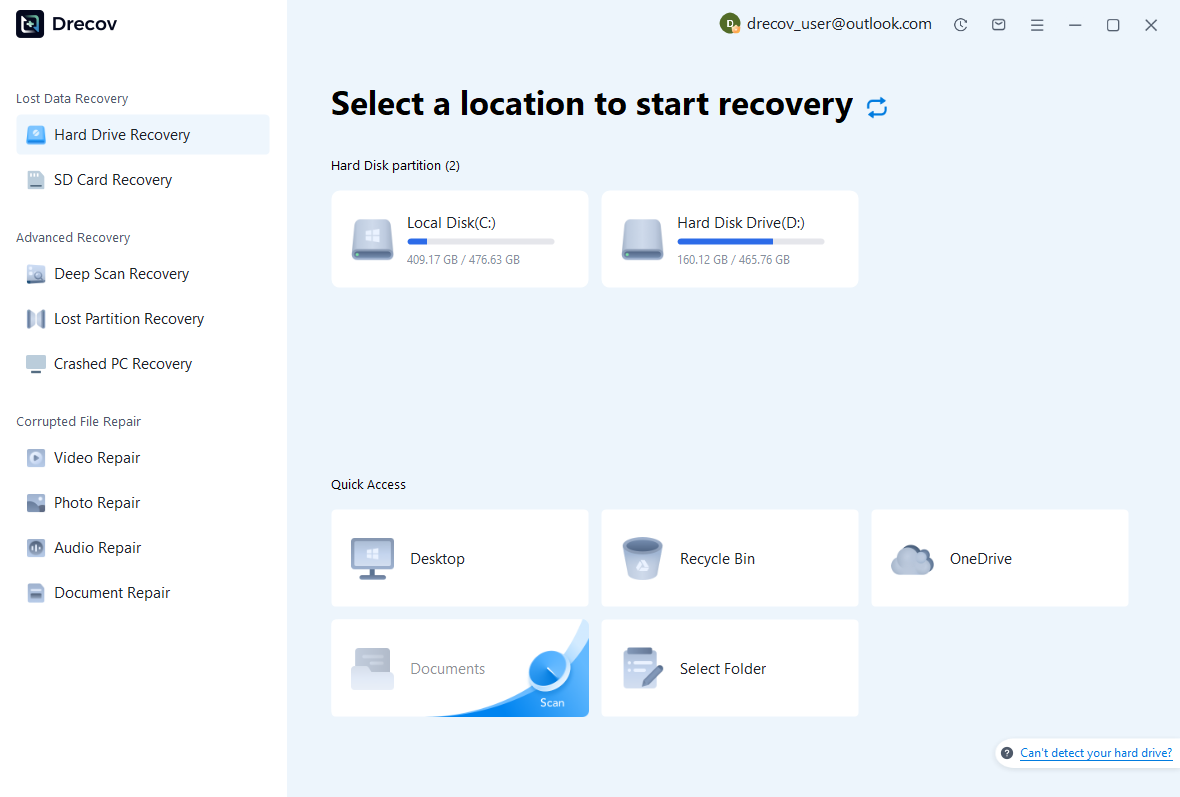
PandaOffice Drecov may help locate missing saved profile files, address-book exports, and prior backup packages on accessible storage. It cannot restore deleted server history automatically or reconstruct every contact field from an email address alone. Supported previews vary, and a recovered file extension does not prove book integrity. Validate candidates through Thunderbird’s supported workflows and compare actual cards and list membership before acceptance.
Step 1: Select the Original Profile or Export Volume
Identify the storage that held the missing profile, contact export, or backup package. Prepare a different healthy and private destination for recovered candidates. Avoid reinstalling Thunderbird or creating new profile data on the source during the search. Record the target’s role and original path so a full profile, an individual book, and a CSV export remain distinguishable during comparison. Before changing the only candidate, compare the procedure with the official recovery documentation.
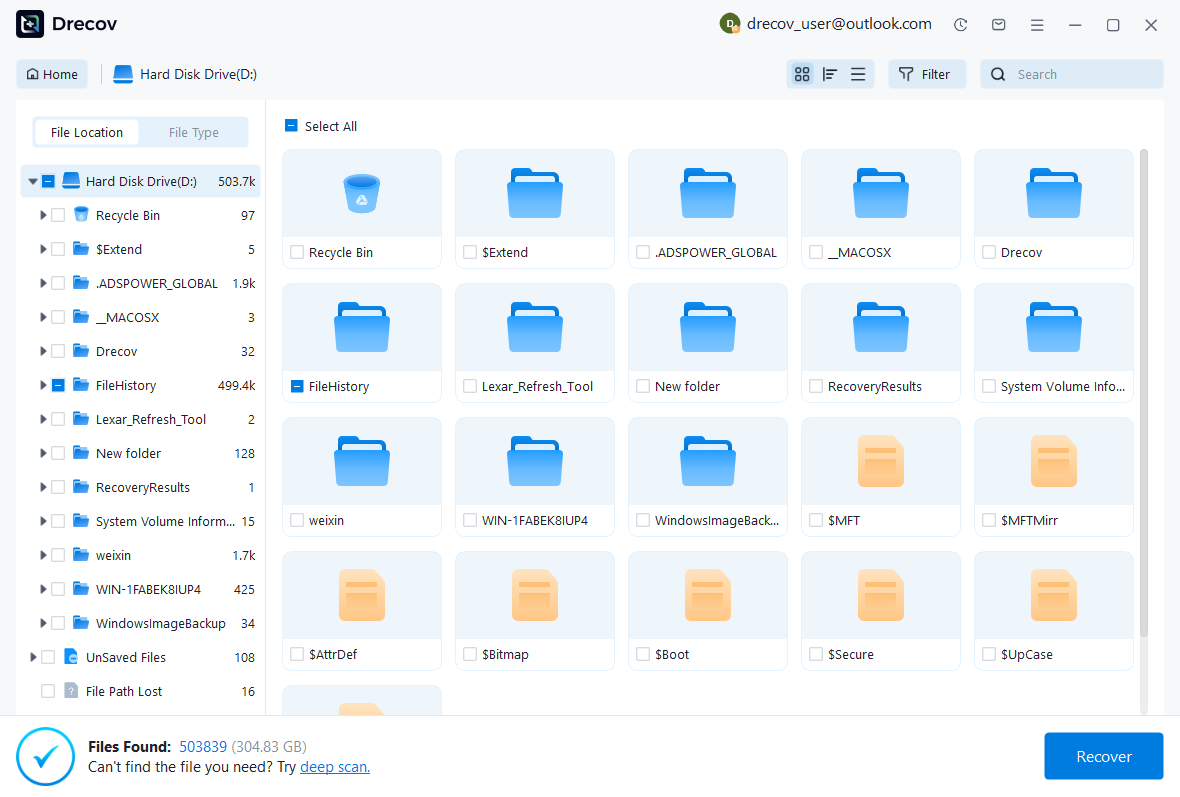
Step 2: Compare Exports and Profile Candidates
Review available names, paths, dates, sizes, and supported previews. Keep multiple candidates around the incident and preserve relevant companion files or package structure. A file containing recognizable names may still lack complete cards or mailing lists. Retain source notes and avoid confusing an older exported collection with a current local database or a connection to an online book.
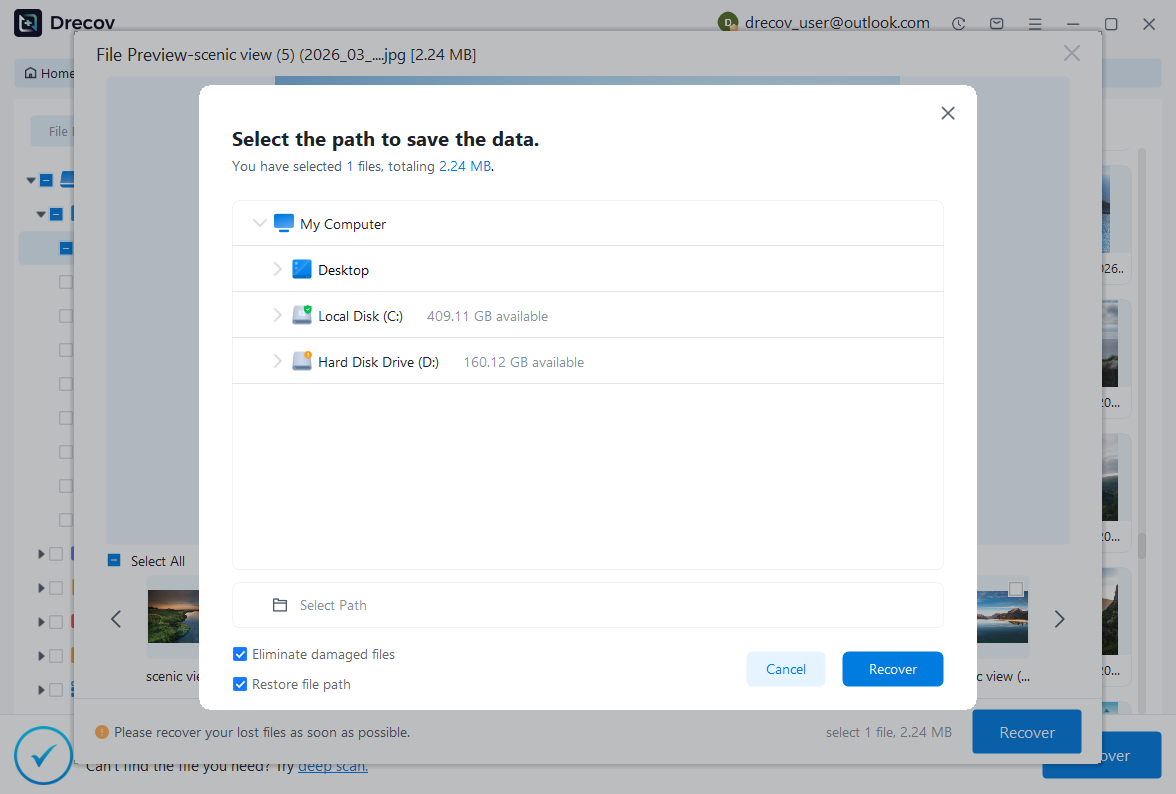
Step 3: Recover Elsewhere and Validate in Thunderbird
Save candidates to the separate destination and test copies through supported import or profile workflows. Preserve the current live collection first. Inspect representative fields, non-English characters, secondary addresses, and mailing-list membership. Compare duplicates before merging, and keep raw recovered files unchanged until you have exported a verified accepted collection with any reconstructed or uncertain information clearly documented.
Keep a Verified Collection and a Reversible Merge Record
After acceptance, export the useful address books and preserve a coherent profile backup according to the documented process. Record which source supplied the recovered contacts and which duplicates you merged. Keep the temporary comparison book until review is complete. This provides a reversible recovery path instead of leaving the live collection as the only copy of a complicated merge.
For future protection, make dated exports before migrations and major cleanup. Test an import in a disposable book and inspect the fields you rely on. Also verify any online service’s actual retention behavior rather than assuming synchronization supplies historical protection. The goal is a private, understandable contact collection that you can restore without sacrificing current cards or duplicating every person.
- Verify book identity, representative card fields, and meaningful character encoding.
- Check secondary addresses, mailing-list membership, and duplicate-handling decisions.
- Test recipient resolution locally without sending recovery-test messages.
- Save independent exports and document reconstructed fields or uncertain historical addresses.