







Last month, a client called me in a panic. He had searched “how to delete OneDrive account,” followed a few random tutorials, clicked a couple of buttons—and suddenly, years of work files were gone. Photos disappeared. Business contracts vanished. His desktop looked clean… too clean.
Sound familiar? You might be here because OneDrive keeps syncing files you don’t want online, or perhaps your storage is full. Maybe you are switching to Google Drive or Dropbox, or privacy concerns keep you awake at night. Whatever your reason, learning how to delete OneDrive account the right way matters. Deleting incorrectly isn’t just about removing an app—it can trigger permanent cloud deletion and synchronized file removal across all your linked devices.
In this guide, I will walk you through the exact process, from unlinking your PC to permanent account closure and data recovery.
1. What Is Microsoft OneDrive?
Microsoft OneDrive is a cloud storage service integrated into Windows 10, Windows 11, and Microsoft 365. Think of it as a digital locker in the cloud. When you save a file on your PC, OneDrive automatically uploads it to Microsoft’s servers.
By default, OneDrive installs in:
C:\Users\YourUsername\OneDrive
It automatically syncs core folders like:
- Desktop
- Documents
- Pictures
1.1 How OneDrive Sync Works
Imagine OneDrive as a mirror. Whatever you delete on your PC, the mirror deletes in the cloud. Whatever you delete in the cloud, your PC deletes too. That’s why learning how to delete OneDrive account safely is crucial. Sync is powerful—but it is also ruthless.
2. Why People Want to Delete OneDrive Account
People don’t randomly search how to delete OneDrive account. Usually, one of these four triggers is involved:
- Storage Limit Issues: Free accounts only offer 5GB. Windows will constantly nag you with notifications once this limit is hit.
- Privacy Concerns: Many users prefer local storage to keep their sensitive data off third-party servers.
- Switching Services: Moving to competitors like Google Drive, Dropbox, or Proton Drive.
- Work/School Account Removal: Organizations often require the removal of Microsoft 365 accounts after employment or graduation ends.
2.1 What Happens When You Delete OneDrive Account?
Before you pull the trigger, you must understand the hierarchy of “deletion.” These three actions result in very different outcomes:
| Action | Result | Data Status |
| Unlink PC | Stops the sync connection only. | Files stay in the cloud and on your disk. |
| Uninstall App | Removes the software from Windows. | Files remain in the cloud. |
| Delete Account | Closes the Microsoft identity. | All cloud data is wiped permanently. |
When you how to delete OneDrive account permanently, Microsoft keeps your data in a “retention” state for a short period (usually 30 days) before purging it forever.
3. The Hybrid Approach: Stop Syncing Without Deleting
Sometimes, you don’t need to go nuclear. If your goal is just to stop the “nagging” or free up local space, you can use a staged approach instead of learning how to delete OneDrive account permanently.
3.1 Pause Syncing
If you just need a break while performing heavy tasks, right-click the OneDrive icon, click the Gear Icon (Settings), and select Pause syncing. You can choose 2, 8, or 24 hours.
3.2 Selective Syncing (The Best Middle Ground)
You can choose to keep some folders only in the cloud and others only on your PC:
- Open OneDrive Settings.
- Go to the Account tab and click Choose folders.
- Uncheck the folders you don’t want on your hard drive. Note: This removes the local copy but keeps the cloud copy safe.
4. Preparation: The “No-Regrets” Checklist
Never search how to delete OneDrive account and start clicking without a backup. Follow these steps first:
- Manual Download: Log in to OneDrive.com and download any “Cloud-only” files (marked with a blue cloud icon) to a physical external drive.
- Disable Sync: Right-click the OneDrive icon (cloud) in your taskbar → Settings → Account → Unlink this PC.
- Check Local Copies: Ensure your “Documents” and “Pictures” folders actually contain the files and aren’t just empty shells pointing to the cloud.
5. How to Delete OneDrive Account: Step-by-Step Guide
Step 1: Unlink and Shut Down
Before removing the account from the web, you must kill the local process.
- Press Windows + R, type
%localappdata%\Microsoft\OneDrive\OneDrive.exe /shutdownand hit Enter. - This prevents the app from trying to “sync” the deletion of your account as a command to delete local files.
Step 2: Uninstall the Application
For Windows 11 users:
- Go to Settings > Apps > Installed Apps.
- Find Microsoft OneDrive, click the three dots, and select Uninstall.
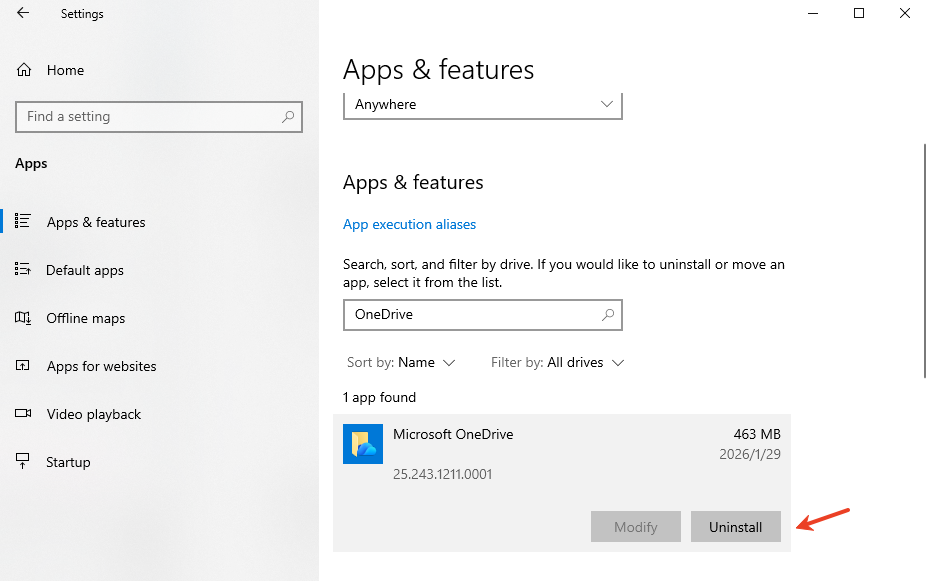
Step 3: Permanent Account Deletion (The Nuclear Option)
If you want to fully close the account:
- Visit account.microsoft.com and sign in.
- Go to Your Info > Close account.
- Warning: This will also delete your Outlook email and Xbox data. If you only want to stop using OneDrive, Step 1 and 2 are sufficient.
6.Troubleshooting: Common Issues When Deleting
Many users encounter hurdles when they try to how to delete OneDrive account. Here is how to fix them:
- “File in Use” Error: If Windows refuses to uninstall OneDrive, it’s likely because a file is still syncing. Use Task Manager (Ctrl+Shift+Esc) to end any process named “OneDrive” or “Microsoft OneDrive Setup” before trying again.
- The OneDrive Folder Won’t Delete: Sometimes a ghost folder remains in File Explorer. You may need to navigate to the Registry (
HKEY_CLASSES_ROOT\CLSID\{018D5C66-4533-4307-9B53-224DE2ED1FE6}) and set the System.IsPinnedToNameSpaceTree value to 0. - Greyed Out “Unlink” Button: This usually happens on work or school computers with strict IT policies. You must contact your administrator to release the device from the organization’s cloud policy.
7. How to Recover Data if Something Goes Wrong
Sometimes, the process fails. You might realize your “Desktop” folder was hosted entirely in the cloud, and now it’s empty. If you delete OneDrive account and lose files, don’t panic.
Can You Recover Files?
Yes. When a file is deleted, the system marks that space as “available” but the data remains on the disk until new files overwrite it. To get them back, you need a professional tool.
Recommended Tool: PandaOffice D-Recov
When clients ask me for a solution after a failed how to delete OneDrive account attempt, I recommend PandaOffice D-Recov. It is designed for high-stakes recovery.
Why it works:
- Deep Scan Technology: It analyzes raw disk sectors to find files that the Recycle Bin has already “forgotten.”
- Local & Private: Scanning happens on your machine. Your data is never uploaded to another cloud.
- Versatile: It supports 100+ formats, including DOCX, JPG, and MP4.
How to use it:
- Step 1: Select Location. Choose your local C: drive or the drive where OneDrive was located.

- Step 2: Scan. Let the Deep Scan find fragmented data.
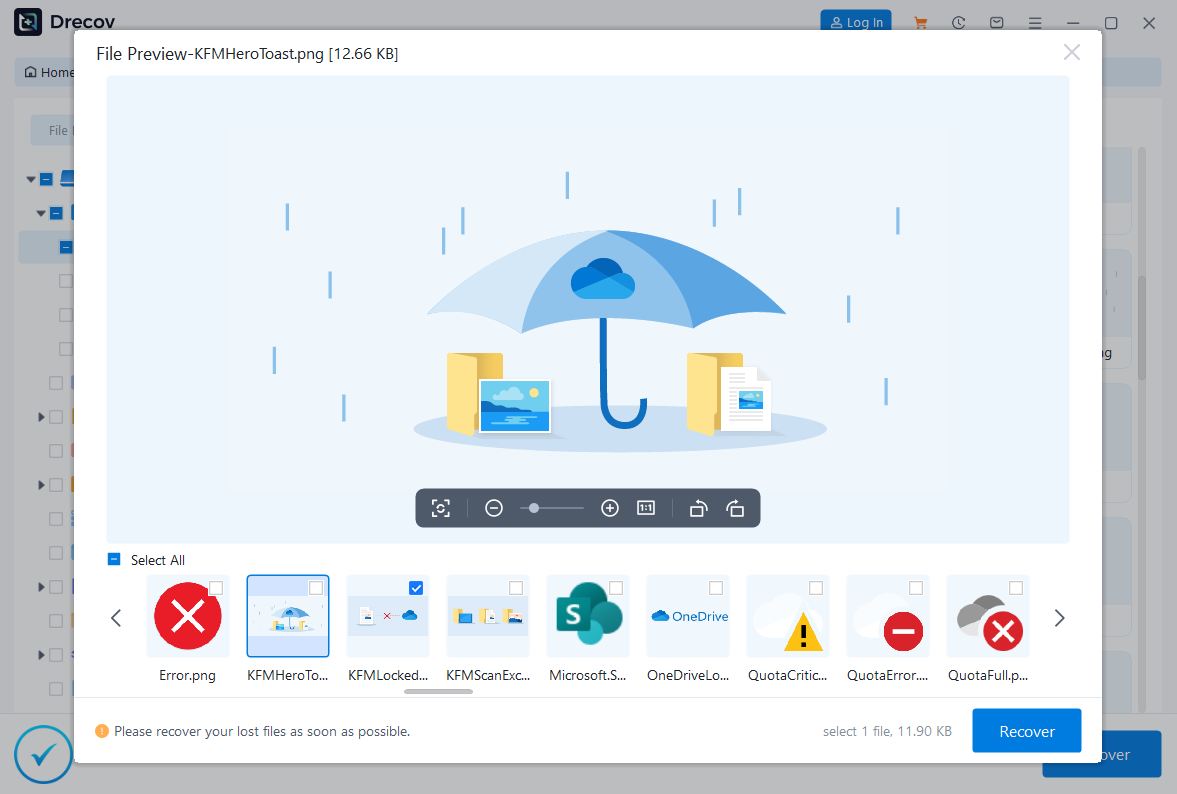
- Step 3: Recover. Preview the files and save them to a different drive (like a USB stick) to avoid overwriting.
Expert Tip: While PandaOffice Drecov provides the most reliable deep-sector scanning for local cache retrieval, your data loss scenario might have specific nuances—such as accidental permanent deletion from the cloud bin or corrupted sync metadata. For a comprehensive list of alternative manual and technical solutions, check out our extended guide on [Recover Deleted Files Like a Pro] to ensure no file is left behind.
Delete OneDrive Account FAQs
Q: How to delete OneDrive account without deleting my Microsoft/Outlook account?
A: You cannot “delete” the OneDrive storage quota specifically, but you can Unlink this PC and uninstall the app. This effectively removes OneDrive from your life while keeping your email active.
Q: Does uninstalling OneDrive delete my files?
A: No. Uninstalling the app leaves your files in the cloud and leaves any “locally available” files on your hard drive.
Q: How long does Microsoft keep my data?
A: For personal accounts, deleted files stay in the online Recycle Bin for 30 days.
Conclusion
Learning how to delete OneDrive account is more than just a technical chore; it is about taking full control of your digital footprint. As we have explored, the process involves more than a simple “uninstall” click. You must distinguish between unlinking a device, removing the application, and the permanent closure of your Microsoft cloud identity.
To ensure a smooth transition, always remember these three golden rules:
- Have a Safety Net: Deletion is often final, but data recovery tools like PandaOffice D-Recov provide a vital insurance policy if things go sideways.
- Verify First: Ensure every critical file has a solid green “Always keep on this device” icon before you disconnect.
- Unlink Before Deleting: Always break the sync connection to prevent the cloud from “mirroring” your local deletions.






