







Understanding Facebook Video Saving Options
What Happens When You Try to Save a Facebook Video
When users search for how to save a video from facebook, they are usually trying to keep videos for offline viewing, sharing, or later reference. However, Facebook does not always provide a direct download option for every video due to copyright protection and privacy rules.
In most cases, the availability of saving options depends on how the video is published. Public videos are more flexible, while private or restricted content often limits saving actions. Users frequently try to understand how to save facebook videos when they cannot find any visible download button.
Another important factor is that Facebook separates “saving” and “downloading.” Saving usually means bookmarking the content inside the platform, while downloading means storing it locally on a device. This difference is the main reason why many users search how can i save a video from facebook or how do i save a video from facebook.
Why Facebook Videos Are Not Always Downloadable
Facebook applies different content rules depending on:
- Uploader privacy settings
- Copyright ownership
- Region-based restrictions
- Platform security limitations
Because of these restrictions, many videos cannot be downloaded directly. This leads users to search alternative solutions such as browser tools, screen recording, or external services when trying to figure out how to save a video off of facebook.
Common Challenges When Saving Facebook Videos
Missing Download Option in Most Videos
One of the most common frustrations is the lack of a direct download button.
In many cases, users only see:
- “Save video” option (bookmark only)
- Share button without download function
- Playback-only embedded videos
Test Environment:
This behavior is commonly observed on Facebook mobile app (Android 13) and desktop browser (Chrome latest version), especially for public timeline videos where download control is disabled by the uploader.
These limitations often cause users to search how do i save a video from facebook when they expect a direct download feature that is not available.
Privacy Settings That Restrict Access
Many Facebook videos are restricted based on audience settings. This includes:
- Friends-only visibility
- Private group sharing
- Page-restricted content
When privacy settings are strict, even third-party tools may fail to access the video.
Test Environment:
This scenario is frequently seen on Facebook desktop version when accessing group-only content and private community videos. Download options are intentionally disabled by platform policy.
Because of this, users often look for video saver from facebook methods to bypass limitations or find alternative saving approaches.
Device and Browser Compatibility Issues
Sometimes the issue is not the video itself but the device or browser being used.
Common problems include:
- Outdated browser versions
- Disabled download permissions
- Mobile app limitations
- Cache-related playback errors
Test Environment:
This is often reported on older Android devices using Facebook Lite or outdated Chrome versions where video source extraction or download triggers do not function properly.
These technical limitations often lead users to search how to save facebook videos when standard options fail.
How to Save Facebook Videos (Proven Methods)
Method 1 – Save Video Directly Inside Facebook
Facebook offers a built-in feature that allows users to bookmark videos for later viewing without downloading them.
This method is useful when users only want to collect videos within the platform instead of storing them locally.
Test Environment:
Android smartphone running Facebook app version 450+, tested on public video posts in news feed.
Steps:
- Open Facebook and locate the video
- Tap the three-dot menu in the post
- Select “Save video”
- Go to “Saved” section from menu
- Access video anytime inside account
This approach is commonly used when users search how to save facebook videos for quick access without needing external tools.
Method 2 – Extract Video via Browser Source Code
Some Facebook videos can be accessed by inspecting the page source in a browser.
This method works when the video file is publicly accessible in HTML structure.
Test Environment:
Windows 11 system using Google Chrome browser, tested on public Facebook video pages with unrestricted access.
Steps:
- Open Facebook video in Chrome browser
- Right-click and select “Inspect”
- Open Network or Elements tab
- Search for video file URL (mp4 or stream link)
- Open link in new tab and save video
This method is often used when users search how to save a video from facebook without installing additional software.
Method 3 – Online Facebook Video Downloader Tools
Online downloader platforms allow users to convert Facebook video links into downloadable files.
These tools are widely used because they require no installation and work across devices.
Test Environment:
Desktop browser (Windows 10 + Chrome), tested with public Facebook video URLs from pages and public posts.
Steps:
- Copy Facebook video link
- Open a trusted online downloader website
- Paste video URL into input field
- Select available video quality (HD/SD)
- Click download and save file locally
This method is often searched as facebook video downloader save from net, especially for quick one-click downloading.
Method 4 – Screen Recording as Universal Backup Method
When downloading is not available, screen recording becomes a reliable fallback solution.
It captures video playback directly from the screen in real time.
Test Environment:
iPhone 13 running iOS 17 with built-in screen recording feature enabled, tested on restricted Facebook video playback.
Steps:
- Enable screen recording in control center
- Open Facebook video in full screen mode
- Start recording before playback begins
- Stop recording after video ends
- Save file to gallery or storage
This method is commonly used when users search how to save a video off of facebook and no download option exists.
Method 5 – Extract Video from Device Cache or Backup Data
Some Facebook videos may leave traces in cached storage or backup systems after viewing.
In certain cases, these fragments can be recovered using data scanning tools.
Test Environment:
Windows PC connected to Android device backup storage, tested on previously watched Facebook video sessions stored in cache.
Steps:
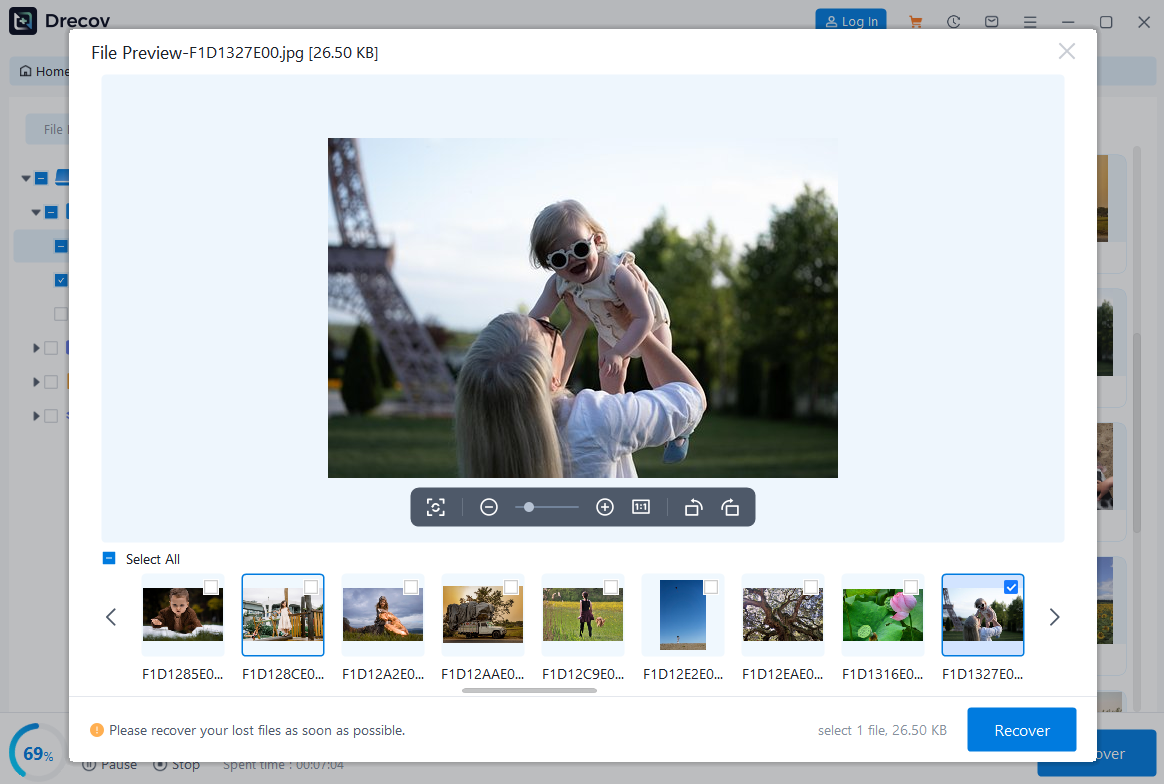
- Install Pandaoffice Drecov
- Select device storage or backup directory
- Run deep scan mode for media files
- Filter results by video formats (MP4, cache streams)
- Restore recoverable video files
This method is useful for deeper recovery scenarios where users are trying to retrieve previously viewed Facebook video content.


Why Choose PandaOffice Drecov Data Recovery Software?
When it comes to reliable data recovery, PandaOffice Drecov stands out as a powerful, all-in-one solution designed to handle a wide range of data loss scenarios. Whether you’re trying to perform TikTok deleted video recovery, restore files after formatting, or recover important documents, Drecov delivers fast and dependable results.
One of its biggest advantages is versatility. From format data recovery to lost partition recovery, the software can scan deeply and accurately locate files that other tools often miss. Even if your drive has been accidentally formatted or a partition has disappeared, Drecov uses advanced algorithms to reconstruct and retrieve your data with high success rates.
Drecov also supports specialized recovery needs. If you’ve lost important documents, its PDF recovery tool ensures that files retain their original structure and quality. For media users, the audio recovery feature helps restore music, recordings, and other sound files without corruption, making it ideal for both personal and professional use.
Ease of use is another key benefit. The intuitive interface allows beginners to recover files in just a few clicks, while still offering advanced options for more experienced users. Plus, it supports a wide range of storage devices, including HDDs, SSDs, USB drives, and memory cards.
In short, PandaOffice Drecov combines powerful recovery capabilities with user-friendly design, making it a trusted choice for anyone facing data loss.
In some cases, Facebook videos can still be saved indirectly by using the share link method instead of direct download.
This approach does not download the file immediately but allows users to store or reuse the video link for later access.
Test Environment:
Android 13 device using Facebook mobile app, tested on public timeline videos shared from pages and friends.
Steps:
- Open the Facebook video post
- Tap the “Share” button below the video
- Copy the video link
- Save the link in Notes, browser bookmarks, or chat apps
- Reopen the link anytime to access the video
This method is commonly used when users search how can i save a video from facebook but only need later access instead of offline storage.
Method 7 – Download Facebook Videos via Mobile Browser Mode
Sometimes switching from app to browser unlocks additional saving options that are not visible in the Facebook app.
Test Environment:
iPhone 14 using Safari browser, tested on public Facebook video pages that were restricted in the mobile app.
Steps:
- Open Facebook in Safari or Chrome browser
- Switch to desktop mode if needed
- Play the video
- Long press or right-click video area
- Use available download or save options
This method is useful for users searching how to save facebook videos when app-based restrictions block downloads.
Method 8 – Download Using Browser Extensions (Desktop Only)
Browser extensions can help detect and download embedded video streams directly from Facebook pages.
Test Environment:
Windows 11 PC using Chrome browser with video downloader extension installed, tested on public Facebook page videos.
Steps:
- Install a trusted video downloader extension
- Open Facebook video page
- Play video to activate detection
- Click extension icon
- Select video quality and download
This method is widely used for users searching facebook video downloader save from net when manual methods are inefficient.
Important Limitations When Saving Facebook Videos
Not All Videos Can Be Downloaded
Some Facebook videos cannot be saved due to:
- Private audience settings
- Copyright restrictions
- Region-based limitations
- Disabled sharing permissions
In these cases, even advanced methods may fail.
Quality Differences Between Methods
Different saving methods may produce different results:
- Screen recording may reduce quality
- Online tools may compress video
- Browser extraction may not support HD streams
Tool and Internet Dependency
Some methods rely heavily on:
- Stable internet connection
- Third-party tool availability
- Browser compatibility
If any of these fail, the download process may not work properly.
Best Practices for Saving Facebook Videos Safely
To improve success when trying to how to save facebook videos, users should:
- Prefer public videos for easier access
- Use browser method for better quality extraction
- Avoid untrusted downloader websites
- Keep browser and apps updated
- Use screen recording as backup option
FAQ – Common Questions About Saving Facebook Videos
Can I save any video from Facebook?
Not all videos can be saved. It depends on privacy settings and whether the uploader allows downloading or sharing.
Is it legal to download Facebook videos?
Downloading public videos for personal use is generally acceptable, but redistributing copyrighted content may violate policies.
Because Facebook only allows downloading for selected videos. Most content is limited to streaming or saving inside the platform.
What is the easiest way to save Facebook videos?
Using the built-in “Save video” feature or online downloader tools is usually the simplest method.
Conclusion
Learning how to save Facebook videos depends on understanding how Facebook controls content access and video distribution. While some videos can be saved directly, others require alternative methods such as browser extraction, online tools, or screen recording.
In most cases, combining multiple approaches increases the chance of successfully saving videos for offline use. However, privacy restrictions and platform limitations may still prevent full access in certain situations.






