








Decide Whether the Editable Graph or Published Material Is Missing
A Substance 3D Designer graph recovery starts by identifying the surviving file type. An SBS package contains editable source, while an SBSAR is a published compiled asset with a different purpose. Exported textures provide another narrower result. First, decide whether you need the node graph, exposed parameter behavior, external resources, or a usable material output. These targets are related but not interchangeable.
If Designer remains open with useful work, save a new source package to healthy storage before reloading or replacing dependencies. Preserve the current package even when one graph has errors. Also record a distinctive recent node change and the outputs that matter. A material can look familiar while its editable network belongs to an older revision or depends on missing source resources.
Preserve Packages and Their Dependency Context
Copy the available SBS packages, linked images, referenced packages, and useful output files while keeping folder relationships traceable. Record the Designer version and any project configuration that affects resource resolution. A main package can remain readable while a referenced custom graph disappears. Recovering only one filename may therefore leave important procedural behavior unavailable.
Write down the graph identifiers, expected inputs and outputs, and a few exposed parameter values. These provide an acceptance checklist. A successful package load is only a starting point. You need to establish whether the specific graph still computes the intended material and whether the controls required for later revisions remain available and meaningful.
Free Method 1: Restore Existing Auto-Backup SBS Copies
Check Designer’s Auto Backup preferences and inspect the existing autosave folder associated with the package. The documented workflow retains periodic SBS copies and limits their number according to settings. Preserve candidates before repeated sessions or cleanup replace useful evidence. The actual configuration and files matter more than assuming default retention guarantees every historical edit.
Restore a copied autosave in a preserved project layout that matches the original package location. Adobe advises opening autosaves after returning them to the original SBS package location, rather than opening them in the autosave folder. Preserve the current SBS first so that this test does not overwrite useful newer work. Keep the raw autosave candidate unchanged for comparison.
Compare Actual Nodes and Parameter Behavior
Open candidate copies and inspect the graph section involved in the last change. Compare connections, exposed parameters, and outputs. A newer autosave may preserve an unwanted deletion, while an earlier one retains the missing procedural branch. Keep both until you understand their differences. A thumbnail or one rendered material sphere cannot establish which editable structures survived.
Test a representative parameter change in a disposable copy. Confirm that the material responds as intended and does not rely on a missing reference. Then return to the accepted configuration before saving the recovery master. This checks useful procedural behavior rather than only whether a cached-looking image appears in the viewport when the package first opens. For the storage-level causes behind this step, use the Hard drive recovery.
Free Method 2: Inspect Existing SBS Milestones and Temporary Copies
Search dated working folders, authorized deliveries, and established source history for the SBS package. Check earlier names and actual recent-package paths. A moved directory can make a package seem missing without deletion. Preserve several plausible source candidates in separate folders so you can compare them without repeatedly replacing the active package or confusing their origins.
Designer also documents a temporary-folder role that can include a copy of the open SBS with changes since manual saving. Inspect actual existing material in the configured location when relevant, and preserve it before cleanup. Do not assume every temporary cache file is a complete source package. Distinguish readable SBS candidates from image cache data and validate useful copies through the application.
Check Existing History without Inventing It
A repository or backup service can return genuine earlier source only if someone saved or submitted it. Inspect the relevant milestone and recover a coherent package set to a separate location. Creating history now cannot reconstruct a previously unsaved graph. Keep the current state available while comparing an earlier source with newer outputs or notes that document the missing changes.
If a synchronized service offers historical versions, confirm the retained date and contents. Synchronization alone can propagate a mistaken overwrite. Restore a separate candidate where possible and check graph identity and dependencies before replacing a shared master. This protects legitimate newer work while allowing a focused recovery of a deleted branch or earlier procedural design.
Free Method 3: Repair Package References and Linked Resources
When the main SBS opens but parts of the graph fail, inspect missing references and resource paths. Locate the exact referenced package or image revision. A broken relationship can leave intact source unavailable to the current graph. Restore the intended folder structure in a copied project where practical, then inspect the affected node and its expected inputs or outputs.
Do not substitute a similarly named graph automatically. Different revisions can expose different parameters or change internal behavior. Compare the referenced graph identifier and interface with the calling graph. A node that computes after substitution may still produce a different material. Preserve both candidates and document any deliberate replacement as a source update rather than direct recovery of the historical dependency.
Inspect Embedded and Linked Content Separately
Check whether the relevant resource lives inside the package or points to an external file. The recovery search should follow that actual relationship. A linked image may remain in a source folder that you did not copy with the SBS. Conversely, a resource already embedded in the package may not require an external replacement at all. Inspect before reorganizing assets or creating unnecessary substitutes.
For image inputs, compare resolution, content, and interpretation. A low-resolution preview can compute without preserving the quality needed for delivery. Keep the exact verified resource where available and label any substitute. Then inspect representative output regions, especially seams and fine details, because a plausible overall material can conceal a mismatched source texture or altered scaling assumption. For the exact application behavior, consult the official recovery documentation.
- Preserve the active SBS and inspect existing periodic backup candidates.
- Restore copies in the correct package context before evaluating their graphs.
- Locate missing referenced packages and linked resources by exact identity.
- Validate procedural controls and outputs separately from published material availability.
Understand Why an SBSAR Is Not the Original Node Graph
A surviving SBSAR can retain a usable compiled material and exposed controls, depending on how it was published. It does not provide the original editable graph in Designer. Use it for its supported material-consumption purpose and inspect which parameters remain available. Do not rename it to SBS or promise that importing it restores the original internal node connections.
Likewise, exported bitmap maps can preserve useful material outputs without reconstructing procedural logic. Keep those outputs as a partial recovery or reference. If you rebuild a new graph from them, label that work as reconstruction. A useful replacement can meet a production goal without falsely implying that every source node, function, and editable relationship returned from compiled or flattened data.
Choose a Practical Partial Result
If the delivery needs only a verified material package, a surviving SBSAR may be enough. If the next revision requires changes to hidden internal logic, you need source or new graph construction. Define that distinction before spending time on a recovery route incapable of supplying the required information. The best candidate depends on the actual work that must continue.
Preserve both the compiled asset and any earlier editable SBS. You may use the earlier graph as a reconstruction base while comparing the published material’s appearance and controls. Keep their sources and dates clear. This provides more options than discarding an older source because it lacks one recent change or claiming the compiled asset makes source recovery unnecessary in every case.
Diagnose an SBS That Exists but Refuses to Load
Record the exact error and Designer version, then test a copy. A version incompatibility can resemble file damage, so compare the environment with the package’s origin. Keep the original source unchanged before saving through a different version. A successful migration can be useful, but it may alter interpretation or available features and should remain distinct from restoring the original historical environment.
Test a known-good package in the same installation. If several unrelated packages fail, investigate the environment before rewriting the affected source. If only one candidate fails, compare earlier SBS copies and their dependencies. Do not repeatedly edit internal package content or replace arbitrary sections in the only surviving file merely to make the error message change.
Isolate a Failing Graph in a Copied Package
Inspect which graph or dependency triggers the problem. A package can contain multiple useful resources even when one branch needs attention. Preserve intact sections and compare the affected branch with a known earlier source. If you reconstruct it, do so in a new package and validate its interface and output rather than silently deleting a requirement that mattered to the material.
Keep a concise record of diagnostic changes. A graph that computes after removing a node may no longer represent the intended surface. Record whether the change repaired a reference, migrated a feature, or replaced source logic. This makes the accepted result understandable and gives you a route back if later review finds a difference in parameter behavior or fine detail. A comparable recovery case with useful validation checks is Recover Clip Studio Paint Artwork: Recovery Data, Backup Copies, and Layer Checks.
Work through a Procedural Tile Material
Suppose the missing graph generates terracotta tiles with configurable grout width, chipped edges, and color variation. A backup opens with the correct tile layout but lacks the newest chip branch. First, inspect the graph connections and exposed controls. Then compare an output from the later published material. This identifies what the backup recovered directly and what the output can only show as visual reference.
Preserve the source and compiled asset separately before rebuilding. If you recreate the chip branch, save it in a new package revision and compare several parameter settings. A default material sphere can hide a flaw that appears at a wider grout width or another random seed. Validate the graph across the intended control range instead of accepting one attractive render.
Check Output Identifiers and Intended Usage
A graph can produce images while its output identifiers or usage relationships differ from the consuming application. Inspect the actual outputs required by the workflow. Compare channels, resolution, and naming with the accepted package. A material that looks correct in Designer may fail downstream if the destination interprets a map differently or cannot find the expected output.
Export a representative test to a new folder and load it through the intended destination where practical. Check scale, surface response, and important detail. Keep output diagnosis separate from source recovery: a wrong export configuration does not necessarily mean the graph is lost, while a correct bitmap preview does not prove that all editable nodes and dependencies remain available.
Test Referenced Functions and Custom Graphs
A material can depend on a shared function or custom graph whose interface changed between revisions. Inspect those dependencies alongside the main graph. A similarly named replacement can compute yet alter randomization, scaling, or blending behavior. Preserve the original dependency candidates and compare them with the version used by the calling package before accepting a substitution.
If the exact dependency is unavailable, document any reconstruction and test its effect across the material’s meaningful parameter range. A limited replacement may meet the immediate output goal while lose some editing flexibility. State that boundary clearly. This supports a practical production choice and prevents a green computation status from becoming an unsupported claim of complete procedural-source restoration.
Preserve the 3D Preview Context without Confusing It with Source
A changed preview mesh, environment, or lighting can make an intact material appear unfamiliar. Inspect those settings separately from graph data. Use a suitable consistent preview while comparing candidates, then check the actual output maps. A viewport presentation difference should not trigger unnecessary edits to a recovered graph that already computes the intended material. When the missing project was stored on a portable device, also review the External hard drive recovery.
If the production saved a scene-state file or another preview configuration, preserve it as supporting context. It can help reproduce the accepted presentation without replacing the SBS source. Keep these roles clear in the recovery package. The material graph, its dependencies, and its viewing environment provide different evidence and can survive or fail independently.
Save a Reproducible Parameter Baseline
Record accepted exposed values and relevant random seeds or other controls. Then test a small intentional variation in a disposable copy and return to the baseline. This confirms that the recovered graph retains useful behavior rather than only a fixed cached result. Save and reopen the accepted source to verify that the configuration you intend to keep actually reached storage.
For complex packages, prioritize the controls and outputs needed by the current production. You do not need to exhaust every possible parameter combination, but document what you tested. A focused acceptance record is stronger evidence than claiming every graph works because one package opens. Keep unresolved dependencies and manually rebuilt branches on a short list for later review.
Protect Missing Source Storage before Scanning
If the SBS or its backups were deleted, minimize new writes to that volume. Avoid generating large texture exports or new package versions there during the search. Existing healthy source packages should take priority when they can meet the goal. Overwriting and SSD TRIM can make deleted data unavailable, so a scan cannot guarantee that editable graph source remains recoverable.
A drive with repeated access failures needs separate diagnosis. Reduce repeated reading and consider specialist help for physical failure symptoms. A broken storage device is different from a package reference pointing to an old folder. Keep the recovery target clear and choose the least disruptive source capable of supplying it, rather than repeatedly computing graphs against unstable media.
Verify a Procedural Material Beyond Its Default Preview
For the terracotta graph, inspect the default material and a small set of intended parameter variations. Change grout width, a meaningful surface control, and a relevant random seed in a disposable copy. Then return to the accepted baseline. A graph that computes once can still hide a missing dependency or expression that appears only when a control moves beyond its initial value.
Compare output dimensions and identifiers while testing. A material can retain a convincing shaded appearance but expose outputs under names the destination no longer expects. Preserve the original package and note any new correction. This separates source restoration from an interface change you introduced to make the recovered material usable in the current pipeline.
Check Referenced Packages as a Coherent Set
A main SBS and a custom function can each open independently while represent incompatible revisions. Compare the calling graph’s expected inputs and the referenced graph’s actual interface. Then inspect the resulting material at representative settings. A green computation status is useful but does not prove the historical procedural behavior returned, especially when a replacement dependency changed parameter meaning. The vendor also documents the relevant backup or restore workflow in its official recovery documentation.
Keep the exact source pair when available and preserve alternatives separately. If you rebuild one function, document its assumptions and limits. Test its effect on a simple region and the complete material. This provides evidence that the reconstructed dependency serves the intended use without pretending that the original internal implementation survived in a compiled asset or image export.
Compare Source Recovery with a Compiled Delivery
A surviving SBSAR can help verify appearance and exposed controls, but it cannot supply the original editable node graph. Keep that compiled delivery beside the earlier SBS as a reference with a different role. If the immediate goal is material use, the compiled asset may be enough. If the next task changes hidden logic, editable source or new reconstruction remains necessary.
Record which controls and outputs you actually tested in the compiled asset and reconstructed source. Do not assume identical parameter names guarantee identical ranges or behavior. A focused comparison can reveal whether the earlier source needs one specific branch restored or a broader redesign. This makes the remaining work concrete and protects useful source that might otherwise be discarded for being older.
Test Portability before Removing Old Resources
Copy the accepted source package to a fresh test location and inspect dependency resolution. A graph may work only because an old absolute image path remains available on your recovery machine. Identify and repair that relationship in a copy before cleaning historical folders. Then recompute representative outputs to confirm that the package includes or correctly references the resources it genuinely needs.
Save the accepted parameter baseline and reopen the stored source. Keep an output reference and a short dependency note with it. If a better backup appears later, compare only the unresolved branches or resources instead of replacing the whole verified package blindly. This gives the next artist a reproducible procedural asset and a clear distinction between direct recovery, supported material use, and newly reconstructed logic.
When a Disk Scan May Help Find Designer Source Files
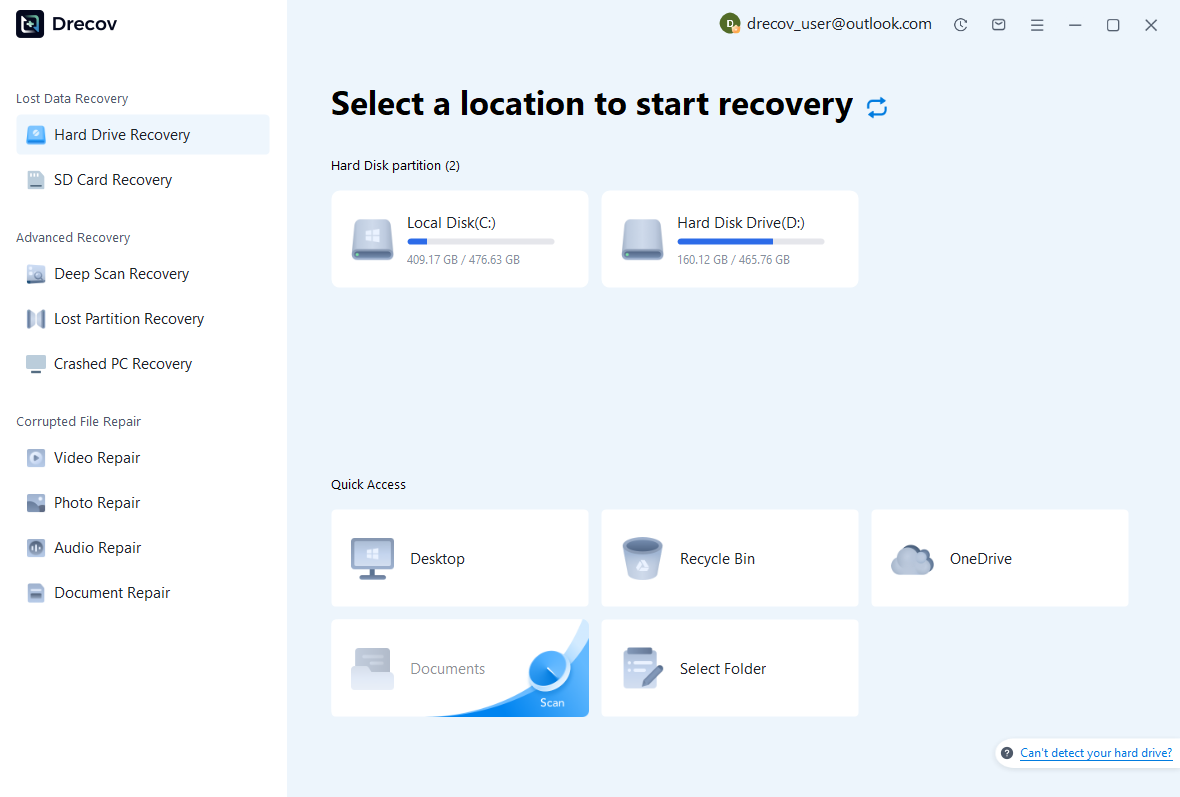
PandaOffice Drecov may help locate missing saved SBS packages, actual autosave copies, referenced source packages, and texture resources on accessible storage. It cannot decompile an SBSAR into the original editable graph or recreate unsaved nodes that never reached disk. Candidate integrity and dependency compatibility matter. Validate recovered source in Designer and test the procedural behavior required by the asset.
Step 1: Select the Original Package or Backup Volume
Identify the storage that held the source SBS, its autosave folder, referenced packages, or missing images. Prepare another healthy destination and avoid writing new computation output onto the source. Record the role and original path of each target. Editable source, compiled material, and flattened maps provide different recovery levels and may live in separate locations. Before changing the only candidate, compare the procedure with the official recovery documentation.
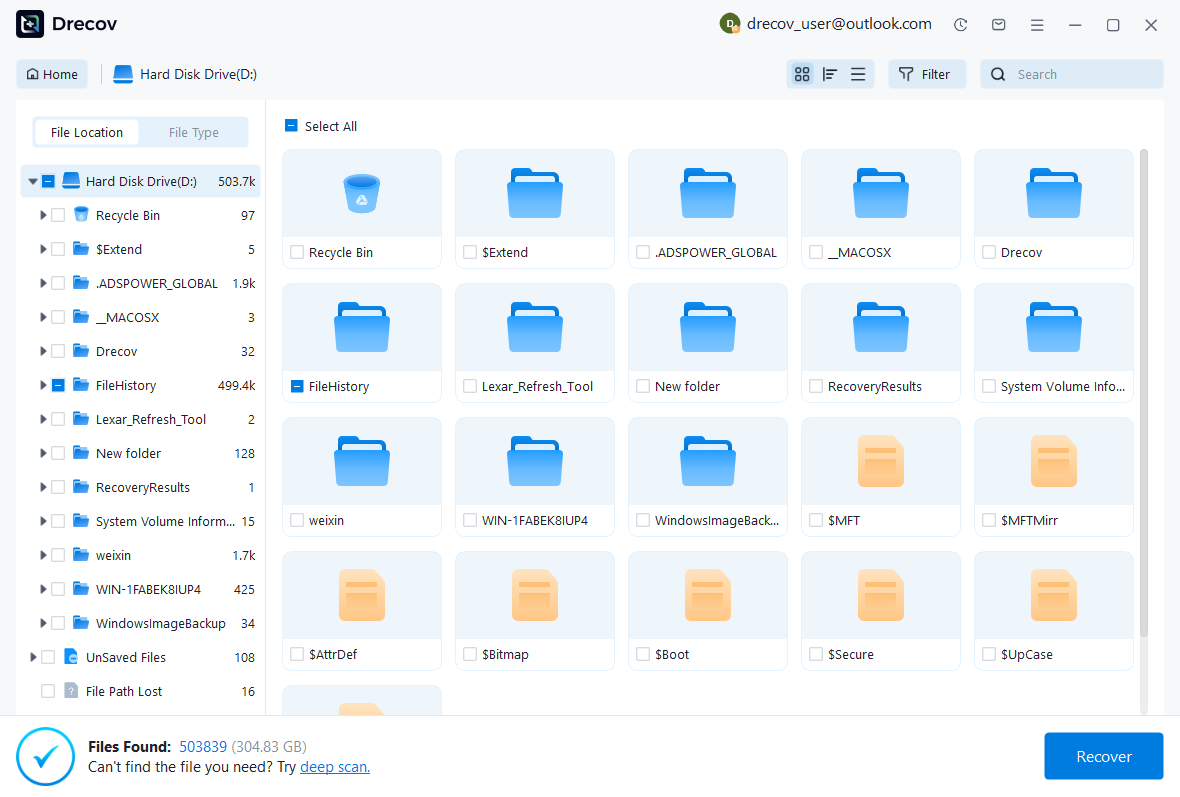
Step 2: Compare Source and Dependency Candidates
Review available filenames, paths, dates, sizes, and supported previews. Keep several plausible source milestones and preserve their referenced packages where possible. A material thumbnail cannot establish complete graph structure or correct parameter relationships. Retain source notes so you can compare candidates without confusing an earlier editable graph with a later compiled output.
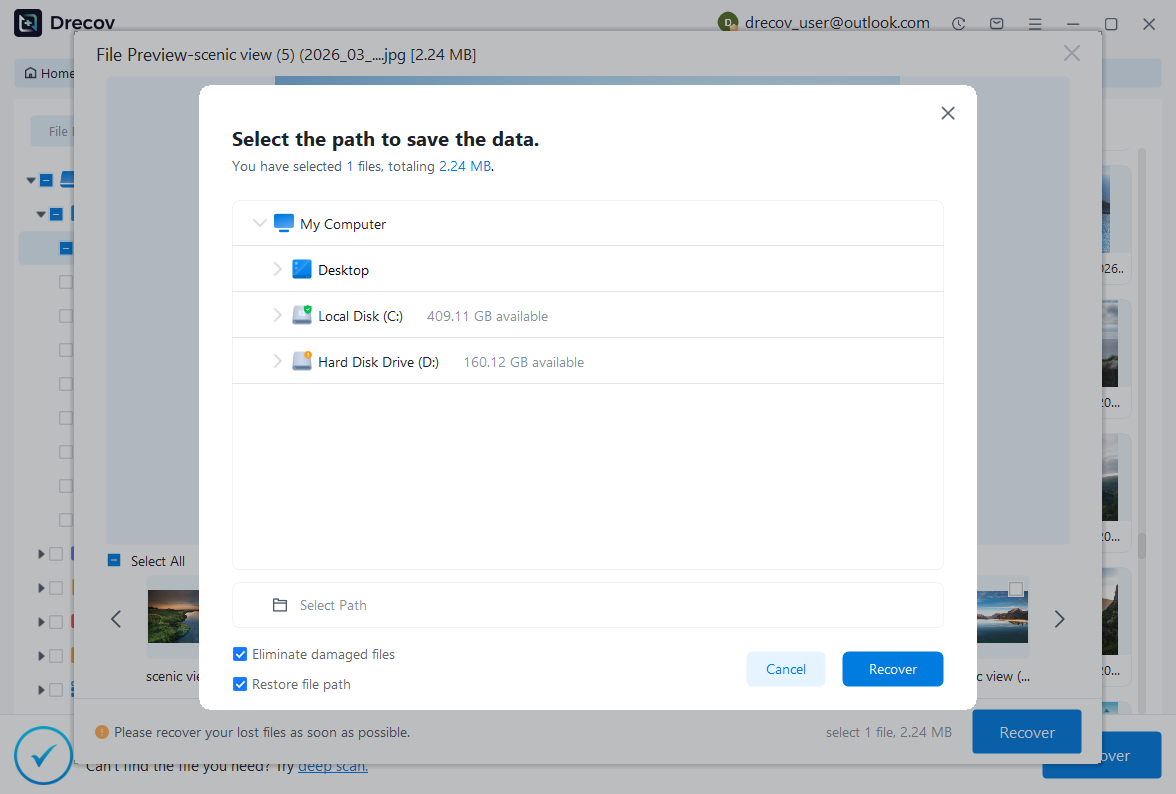
Step 3: Recover Elsewhere and Validate in Designer
Save candidates to the separate destination and restore test copies in an appropriate package context. Inspect graph connections, references, resources, outputs, and meaningful exposed controls. Compute a representative result and test a limited downstream export. Preserve raw recovered files until acceptance, and label reconstructed branches or substituted dependencies separately from source that returned directly.
Keep an Editable Package and Verified Material Output
Save and reopen the accepted SBS with its required dependencies and parameter baseline. Keep a reference output and any useful compiled asset in clearly distinguished locations. Add a short note describing tested controls and unresolved source gaps. This produces a reproducible material package rather than a graph that works only because an old external folder remains reachable.
For future protection, test actual automatic backup retention and recovery placement with disposable packages. Save deliberate milestones before major graph restructuring or dependency updates. Back up editable SBS source independently of published outputs. A verified source package and a usable SBSAR protect different needs, so retain both when later editing and immediate material delivery matter.
- Verify editable graph structure, referenced packages, and resource identity.
- Test meaningful controls, output identifiers, and the required map channels.
- Reopen the accepted SBS and compare a representative downstream result.
- Preserve independent source milestones and document reconstructed procedural logic.