







Losing access to your TikTok account or accidentally wiping out your carefully crafted content can feel like a digital disaster. Whether you uninstalled the app in a moment of frustration, deactivated your account, or accidentally wiped your local drafts, finding a reliable way to restore everything is a top priority. Many creators realize too late that deleting the application or account often removes locally cached files and saved videos.
Fortunately, knowing how to get tiktok back after deleting it is entirely possible with the right approach. While official cloud backups can restore your profile data, local video files require a more robust solution. PandaOffice Drecov data recovery software provides an efficient, reliable way to scan your device storage and retrieve those precious files that standard app reinstalls leave behind.
Understanding the Basics of How to Get TikTok Back After Deleting It
When people search for how do i get tiktok back if i deleted it, they usually fall into two categories. Some users want to recover their actual profile and account settings. Conversely, other users want to know how to get tiktok back if you deleted the app while ensuring they do not lose their local drafts and downloaded media.
[TikTok Deletion Scenarios]
 ├── Account Deactivation ──► 30-day grace period for official recovery
 └── App Uninstallation   ──► Wipes local cache & drafts ──► Requires PandaOffice Drecov
Common Technical Challenges
- Vanishing Local Drafts: TikTok stores draft videos locally on your device storage rather than on its global servers. Consequently, deleting the app permanently removes the drafts folder.
- The 30-Day Account Window: TikTok grants a temporary grace period for deactivated accounts. If you exceed this duration, your account data disappears from the server side forever.
- Missing Cached Media: Even if you download your favorite clips, unexpected storage corruption or app removal can make you wonder if i deleted tiktok can i get it back along with all my saved media.
Introducing PandaOffice Drecov Data Recovery Software
PandaOffice Drecov data recovery software is a professional-grade storage retrieval tool engineered to scan deep within device partitions. Whether you connect your smartphone storage or look into your desktop backup drives, this utility bypasses standard file system limitations to locate deleted mp4 and mov assets. It is highly effective for scenarios involving deleted tiktok videos or missing application caches.
⚠ Warning: Install it on a drive different from the one where your data was lost to prevent overwriting.
Furthermore, this tool helps users navigate complex digital environments, similar to troubleshooting technical glitches like the Steam No Licenses Error Fix Guide or managing complex external media configurations such as the PS3 ISO Games USB Installation Guide.
Proven Solutions to Get TikTok Back After Deleting It
Losing access to your favorite social platform can disrupt your entire creative routine. Fortunately, resolving these issues is straightforward when you use the correct recovery path based on your specific situation.
Method 1: Reactivating the Official Account Profile
If you recently deactivated your profile, the platform provides a built-in grace period to reverse your decision. Follow these steps to restore your online presence before your data is permanently purged from the servers.
- Step 1: Open the App Store on iOS or the Google Play Store on Android to download and install the official TikTok application.
- Step 2: Launch the application and tap the profile icon in the bottom right corner.
- Step 3: Select your original login method, such as your phone number, email address, or linked social media credentials.
- Step 4: Enter your security credentials to access the account authentication screen.
- Step 5: Tap the Reactivate button on the confirmation pop-up window to fully restore your public profile.
Method 2: Recovering Local Media via PandaOffice Drecov Data Recovery Software
Many creators wonder how to get tiktok back if you deleted the app without losing their precious unsaved work. Because uninstallation completely wipes your local application cache, standard cloud syncing will not restore missing drafts. Utilizing PandaOffice Drecov data recovery software is the most reliable strategy to scan your physical storage blocks and rescue deleted tik tok videos.
⚠ Warning: Install it on a drive different from the one where your data was lost to prevent overwriting.
Step 1: Connect Your Storage Device to the Computer
Remove the MicroSD card from your mobile device and insert it into a card reader. Alternatively, connect your phone or the drive where you mirror your mobile backups directly to your PC using a high-quality data cable.
Step 2: Launch the Recovery Program and Choose the Drive Target
Open the main executable of PandaOffice Drecov data recovery software on your computer screen. Select the specific drive letter corresponding to your connected storage media from the main device list.

Step 3: Initiate the Deep Sector Scan
Click the Scan button to allow the algorithm to search for raw media headers. The application will scan sector by sector to look for lingering video fragments from tiktok deleted videos.
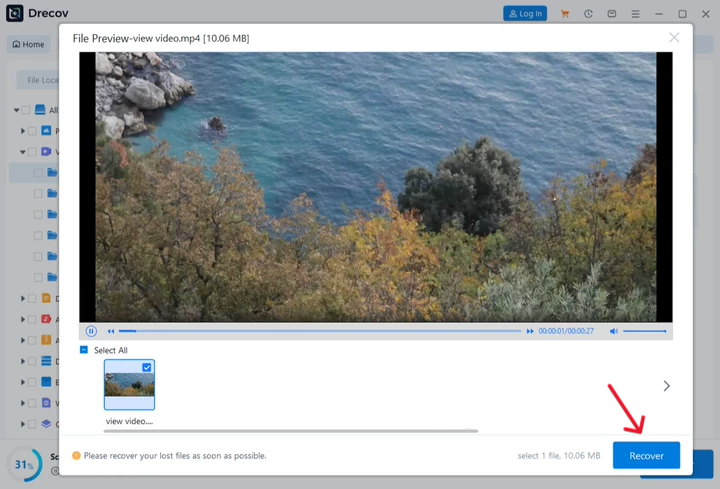
Step 4: Preview and Extract Your Recovered Files
Filter the scan results by selecting the video format category. Locate your missing clips, select them, and click the Recover button to save them to a secure directory on your local PC hard drive. Avoid saving the files back to the same source drive to prevent data overwriting.
Alternative Methods to See Deleted Videos on TikTok
If you are hunting for a specific tiktok deleted video checker tool or simply want to explore native manual workarounds, several clever recovery strategies exist outside of external programs. While dedicated recovery algorithms offer the highest success rate for local storage blocks, these alternative methods leverage cloud synchronization and platform backups to track down your missing creations.
Method 3: Auditing Your Mobile Device Trash Folders
Before exploring advanced solutions, double-check your native smartphone storage system. If you enabled automated camera backups, your videos might still be waiting for you in a temporary storage bin.
- For Android Users: Launch the Google Photos application, tap the Library tab at the bottom of your screen, click the Trash container, and look for files tagged under the TikTok folder.
- For iOS Users: Open the native Photos application, scroll down to the Utilities menu, select the Recently Deleted album, and check for your missing media.
Method 4: Reviewing Your Liked Videos Archive
Sometimes content disappears from your main profile view but remains accessible via your historical engagement logs. If your privacy configurations allowed public likes before the app uninstallation, log into your profile through a desktop web browser. Navigate straight to the Heart icon tab on your main dashboard to see if a cached version of your upload remains available for download.
Comparison of Methods
| Method | Recovery Success Rate | Technical Complexity | Main Advantage |
|---|---|---|---|
| PandaOffice Drecov Data Recovery Software | High for local files and drafts | Moderate | Restores actual physical mp4 data even without internet |
| Account Reactivation | Perfect for profile status | Low | Quickest official route for account settings |
| TikTok Data Request | Moderate for older links | Low | Provides raw text and historical web links |
Tips & Best Practices
Maximizing your chances of file restoration requires immediate action and the right technical habits. For instance, just as managing data flows on modern AI platforms requires care as outlined in the ChatGPT File Download Fix Guide, mobile application recovery depends on strict storage discipline.
Optimizing Recovery Success
- Stop Using the Device Immediately: New app installations or camera usage can overwrite the sectors where your recently deleted on tiktok data resides.
- Keep Regular Backups: Enable automated cloud backups for your native device camera roll to ensure your recover deleted tiktok videos workflow is streamlined.
- Check External Memory Safely: Always unmount your memory card via the software menu before pulling it out of a card reader.
Common Pitfalls to Avoid
- Do not download unverified third-party tools promising a magical tiktok deleted video checker tool, as these are often phishing scams.
- Avoid clicking on random links from strangers on social platforms who claim they can hack the database to retrieve your content.
How to get tiktok back after deleting it FAQs
You cannot view private videos deleted by other users. However, you can use PandaOffice Drecov data recovery software to find files that you personally downloaded or created which were subsequently wiped from your device.
How to find deleted videos on tiktok using a browser?
You can search public internet archive engines or look up your specific username on video indexing websites. This approach helps you find deleted tiktok videos that were cached by search crawlers before removal.
How to find deleted tiktok videos from my phone storage?
Navigate to the root directory of your device file system using a file manager app. Look inside the Android Data or iOS App container folders to see if any cached thumbnail images or temp video blocks remain.
Can I retrieve drafts after deleting the TikTok application?
No, the native application deletes the entire drafts folder during uninstallation. Your best option is to connect your device storage to a computer and run PandaOffice Drecov data recovery software to extract the raw video data from the free space sectors.
How long does TikTok save my data before permanent deletion?
The official platform holds your entire profile infrastructure for exactly 30 days after you initiate deactivation. After this period concludes, the database purges the account entirely.
Conclusion
Understanding how to get tiktok back after deleting it comes down to acting quickly and using the right recovery tools. While basic profile restoration can be handled through standard login procedures within the 30-day grace period, recovering lost drafts and local media files requires specialized software.
Utilizing PandaOffice Drecov data recovery software provides the deepest possible scan of your device storage to locate and rebuild missing video files safely. To prevent future heartbreaks, always export your drafts to your camera roll and maintain an external backup system for your content creation pipeline.






