







Hello, I was looking at getting my wife a new laptop for christmas, since her’s is already pretty old. So I was looking around and saw some that have eMMC flash memory. But I have no idea what it is, and my google searches on returned wedsite that explained it in a way that didn’t make it any clearer for me. Is it similar to RAM? Or is like a hard drive replacement thing? Thank you in advance for any answers I get.—from Reddit
Understanding eMMC Storage and Its Core Meaning
What Is eMMC Storage and How It Works
eMMC storage stands for embedded MultiMediaCard, a type of flash memory commonly used in budget laptops, tablets, and smartphones. Unlike traditional storage drives, it is directly soldered onto the motherboard, making it compact and energy-efficient.
To understand what is emmc storage, it’s helpful to compare it to SD cards. Both use similar flash memory technology, but eMMC integrates storage and controller into a single package. This design reduces manufacturing costs and improves device portability.
The emmc storage meaning revolves around simplicity and affordability. It is not designed for high-end performance but rather for everyday computing tasks such as browsing, streaming, and document editing.
Unlike removable storage, eMMC cannot be easily upgraded or replaced. This makes it important to choose the right capacity from the beginning.
Where eMMC Storage Is Commonly Used
Devices that typically use eMMC include:
- Entry-level laptops and Chromebooks
- Budget smartphones and tablets
- Embedded systems and IoT devices
For example, many affordable laptops feature emmc 64gb storage or even 32gb emmc storage capacity, which is enough for lightweight usage but may feel limited for heavy workloads.
Why Understanding eMMC Storage Matters
Knowing what is an emmc storage helps users make informed purchasing decisions. Since it cannot be upgraded easily, selecting the right device requires understanding its limitations and strengths.
⚠️ Warning: Choosing a device with insufficient eMMC capacity may lead to storage issues quickly, especially after system updates.
Key Characteristics and Performance of eMMC Storage
Speed and Performance Compared to Other Storage Types
eMMC storage offers moderate performance, sitting between traditional hard drives and modern SSDs. It is faster than HDDs in some random access scenarios but significantly slower than SSDs.
Typical characteristics include:
- Sequential read/write speeds lower than SSDs
- Limited multitasking capability
- Suitable for basic computing tasks
Understanding what is emmc storage capacity is essential because performance can also depend on available space. When storage is nearly full, performance tends to degrade.
Storage Capacity Options and Limitations
Devices with eMMC storage usually come with:
- 32GB eMMC storage capacity (entry-level devices)
- 64GB or 128GB configurations
- Rarely exceeding 256GB
For instance, emmc 64gb storage is common in budget laptops, but users may find it insufficient after installing operating systems and essential applications.
Advantages of eMMC Storage
- Lower cost compared to SSD
- Compact design suitable for thin devices
- Low power consumption
These benefits make eMMC ideal for portable and budget-friendly devices.
Disadvantages of eMMC Storage
- Limited capacity and upgrade options
- Slower speeds compared to SSD
- Reduced lifespan under heavy workloads
eMMC Storage vs SSD: Key Differences and Practical Comparison
Performance Comparison Between eMMC and SSD
The debate between emmc storage vs ssd is common when choosing a device. SSDs use more advanced controllers and faster interfaces, resulting in significantly higher performance.
Key differences include:
- SSDs offer faster boot times
- Better multitasking performance
- Higher data transfer speeds
In contrast, eMMC is designed for cost efficiency rather than speed.
Cost and Accessibility Differences
eMMC storage is more affordable, which is why it appears in entry-level devices. SSDs, while more expensive, provide better long-term value due to performance and durability.
For users with basic needs, eMMC may be sufficient. However, those requiring speed and storage flexibility should consider SSD-based systems.
Use Case Comparison
eMMC is suitable for:
- Web browsing
- Streaming content
- Light office work
SSD is better for:
- Gaming
- Video editing
- Professional workloads
Understanding what is emmc storage and how it compares helps users avoid mismatched expectations.
Which One Should You Choose?
The choice depends on your usage:
- Choose eMMC for affordability and portability
- Choose SSD for performance and scalability
⚠️ Warning: If you plan to install large applications or store media files, relying solely on eMMC may lead to storage shortages.
Practical Solutions and Methods for eMMC Storage
Even though eMMC storage is limited in speed and capacity, there are practical ways to maximize its performance and lifespan. Understanding these methods can help you avoid slowdowns and storage issues over time.
Optimize eMMC Storage Usage
- Keep Enough Free Space
eMMC devices perform best when at least 20–30% of storage is free. Avoid filling it to capacity to prevent slowdowns and maintain consistent performance. - Move Media to External Storage
Photos, videos, and large files can be stored on SD cards or external drives to save internal eMMC space. Cloud storage services can also help offload heavy files. - Regular Cleanup
Use built-in disk cleanup tools or lightweight applications to remove temporary files, cache, and redundant data. This keeps the system responsive and prevents unnecessary slowdowns. - Limit Heavy Applications
Avoid installing large software that demands high-speed storage, such as video editing tools or high-end games, which may overtax eMMC and reduce its lifespan.
Recovering Lost Data from eMMC Storage
Data loss can occur due to accidental deletion, formatting, or system errors. While eMMC is soldered to the motherboard, recovery is still possible with specialized software.
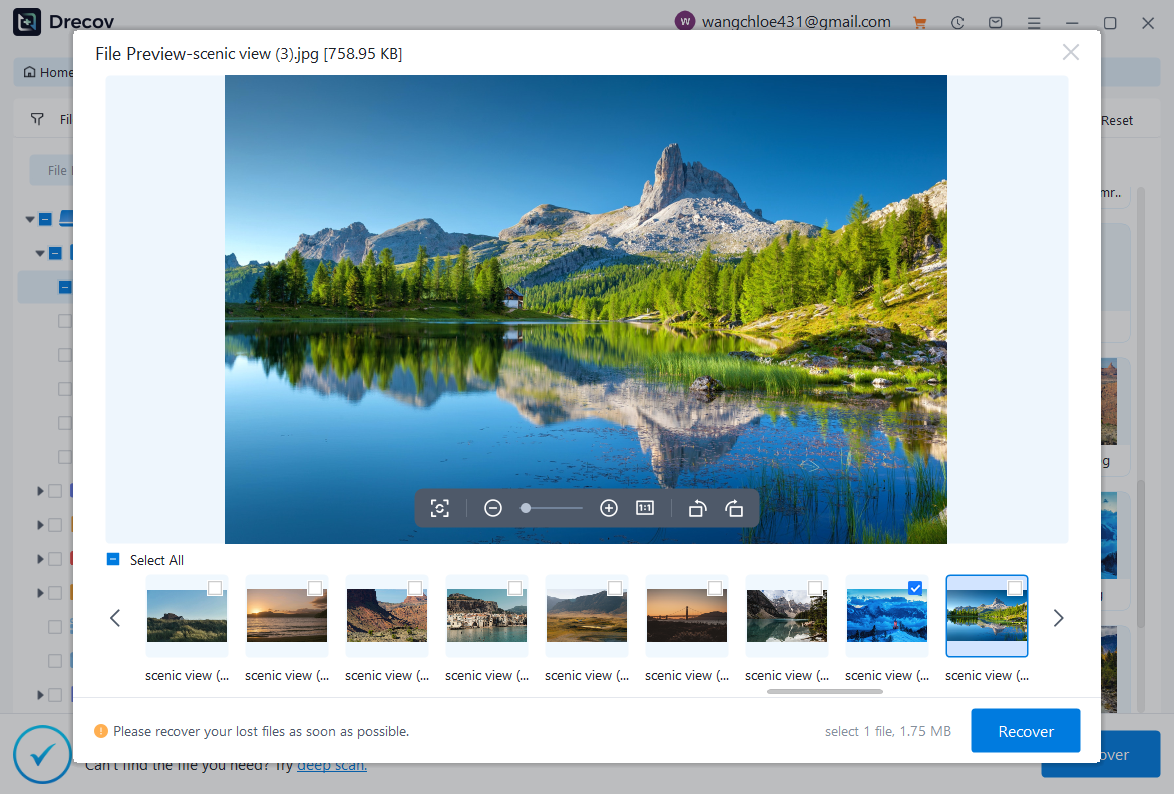
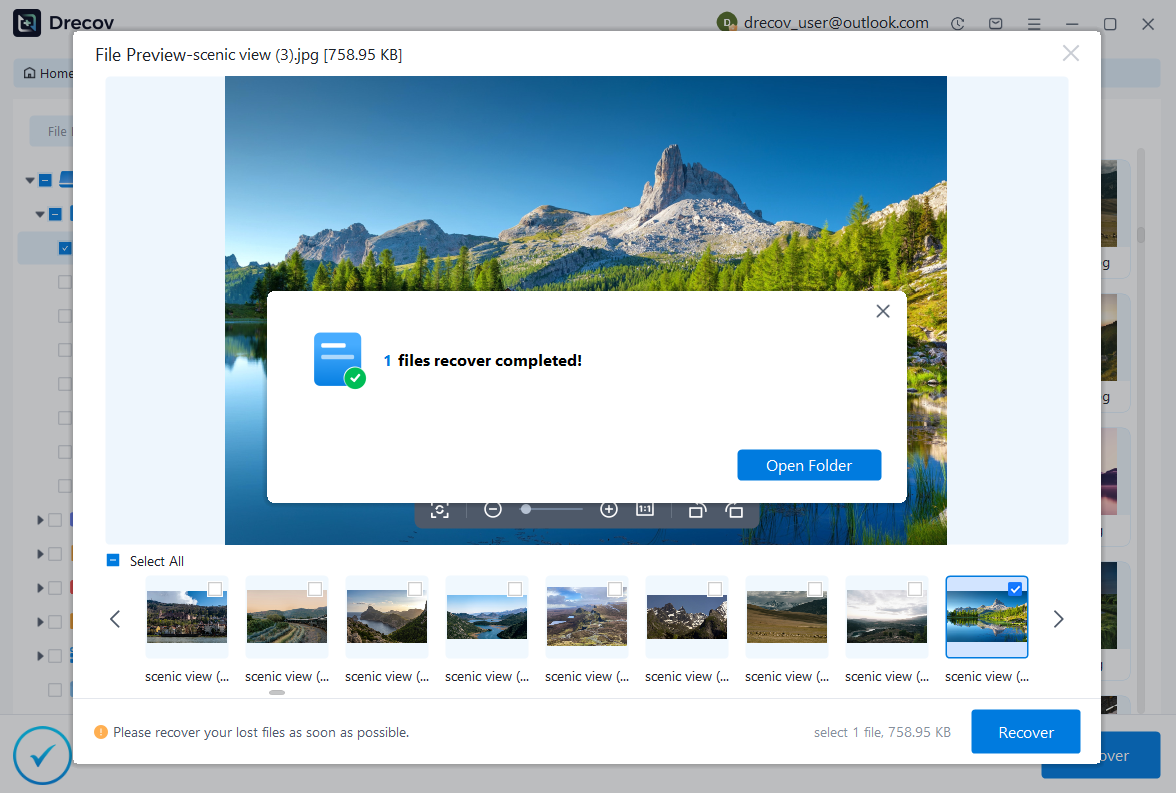
Steps to Recover Data Using PandaOffice Drecov:
- Install Drecov Software – Ensure it supports embedded storage recovery.
- Scan the Device – Run a deep scan to detect deleted or lost files.
- Preview and Select Files – Check images, videos, documents, and more.
- Recover and Save – Save recovered files to an external device to prevent overwriting.

Why Choose PandaOffice Drecov?
PandaOffice Drecov is a versatile and reliable solution for recovering a wide range of lost or inaccessible files. Whether you need audio recovery, video recovery, or excel recovery files, PandaOffice Drecov provides fast and efficient results, ensuring your important data is safely restored.
For creative professionals, it supports file recovery Illustrator projects, allowing designers to retrieve unsaved or accidentally deleted artwork without compromising file integrity. Businesses and individuals can also benefit from its restore Windows previous date feature, which helps recover documents or spreadsheets that were lost due to system errors or accidental deletions.
When external storage devices fail, such as a Lacie hard drive not showing up, PandaOffice Drecov can detect and restore files from these drives, ensuring you do not lose critical data. Even deleted files in the recycle bin can be recovered using its advanced recycle bin recovery software capabilities.
Additionally, the software supports recovering data from lost partitions, making lost partition recovery straightforward and reliable. Its intuitive interface allows users to perform audio recovery, video recovery, and excel recovery effortlessly, even for large or complex files.
With PandaOffice Drecov, you get a professional, all-in-one recovery solution that covers nearly every type of file and storage scenario. Its robust algorithms, combined with easy-to-use tools, make it the go-to choice for anyone who wants to restore lost or corrupted data quickly and securely.
⚠️ Tip: Stop using the device immediately after data loss to improve recovery success.
Usage Strategies for eMMC Devices
- Lightweight Applications Only – Stick to browsers, office tools, and streaming apps.
- Cloud Storage Integration – Use Google Drive, OneDrive, or Dropbox to offload heavy files.
- Regular Backups – Schedule automated backups to protect important data.
- System Updates Caution – Large updates may fill storage quickly; check free space before updating.
Maintenance Tips for eMMC Storage
- Avoid Constant Full Usage
Running the eMMC at nearly full capacity continuously can shorten its lifespan. Keep critical system partitions clean and monitor storage health. - Minimize Write Cycles
Frequent writes can wear out flash storage faster. Use external storage for large downloads or temporary files, and avoid unnecessary file operations. - Firmware Updates
Some devices offer firmware updates that optimize eMMC performance. Check your device manufacturer’s support page periodically.
Future Trends and Considerations
The role of eMMC storage is evolving as device requirements increase. While it remains popular in budget devices, newer technologies like UFS (Universal Flash Storage) and SSDs are gradually replacing eMMC in performance-sensitive applications.
- Emerging UFS Technology – Offers higher read/write speeds and better multitasking, ideal for mid-range smartphones and tablets.
- Integration in IoT Devices – eMMC continues to thrive in low-power embedded systems due to its energy efficiency and compact size.
- Long-Term Device Planning – Users should assess whether eMMC meets future storage needs or consider devices with expandable or SSD storage for longevity.
Frequently Asked Questions About eMMC Storage
Q1: Can eMMC be upgraded?
No. eMMC is soldered to the motherboard, so upgrading requires replacing the entire device.
Q2: Is eMMC slower than SSD?
Yes. SSDs have faster read/write speeds, better multitasking capability, and longer lifespan under heavy workloads.
Q3: How much eMMC storage is enough?
- 32GB: Minimal, suitable for basic tasks.
- 64GB–128GB: Adequate for light usage and web browsing.
- 256GB: Rare, more suitable for users needing extra storage without SSD speed.
Q4: Can eMMC devices handle gaming or video editing?
Not ideal. eMMC is designed for light workloads; performance may degrade under intensive tasks.
Conclusion: Key Takeaways on eMMC Storage
- Affordability & Portability – Ideal for budget laptops, tablets, and smartphones.
- Performance Limitations – Slower than SSD, not suitable for heavy workloads.
- Capacity Matters – Choose wisely; eMMC cannot be upgraded.
- Practical Use & Maintenance – Keep free space, use cloud storage, and avoid heavy applications.
- Data Recovery Possible – Tools like PandaOffice Drecov can help retrieve lost files even on soldered eMMC devices.
- Future-Proofing – Consider long-term needs; SSD or UFS devices may offer better scalability.
💡 Pro Tip: For users prioritizing speed, storage flexibility, and longevity, SSD devices are a better long-term investment, while eMMC is excellent for entry-level portability.





