







Introduction to OGG Files
What Is an OGG File and Why Is It Used?
If you have ever downloaded music, game sound effects, podcasts, or online audio content, you may have encountered files with the .ogg extension. Many users ask questions such as what is a ogg file, whats an ogg file, or what’s an ogg file when they discover this format for the first time.
An OGG file is a multimedia container format developed by the Xiph.Org Foundation. It is most commonly associated with compressed audio stored using the Vorbis codec. The format was created as an open-source alternative to proprietary audio technologies, allowing developers and users to distribute audio without licensing restrictions.
The popularity of OGG stems from its ability to provide high-quality sound while maintaining relatively small file sizes. This makes it suitable for music streaming, online radio broadcasts, video games, and various digital media applications.
Unlike some traditional audio formats, OGG is not limited to audio content alone. The container can also support video streams, subtitles, and metadata. However, when people refer to OGG files, they usually mean audio recordings encoded with OGG Vorbis.
Today, OGG continues to serve as a practical solution for developers and content creators who need a flexible and royalty-free audio format. Understanding its purpose and capabilities helps users decide whether it is suitable for their projects and media libraries.
The History Behind the OGG Audio File Format
The development of OGG began in response to growing concerns about patent restrictions and licensing costs associated with many digital media technologies. During the late 1990s, the demand for compressed audio formats increased rapidly as internet bandwidth remained limited.
The Xiph.Org Foundation introduced OGG as part of its mission to create open multimedia standards. The goal was to provide a free alternative that anyone could implement without paying royalties. This philosophy helped attract software developers, open-source communities, and digital media enthusiasts.
Initially, the format gained recognition through the OGG Vorbis codec. Vorbis was designed to compete directly with MP3 by offering comparable or superior audio quality at similar bitrates. Over time, additional codecs such as Opus and Theora expanded the capabilities of the OGG ecosystem.
Many gaming companies adopted OGG because it allowed efficient audio compression without licensing expenses. Several well-known game engines and independent developers integrated OGG support into their products.
As streaming services evolved and internet speeds improved, newer audio technologies emerged. Nevertheless, OGG remains relevant due to its open nature, excellent sound quality, and continued support across numerous software platforms.
Key Features That Make OGG Popular
Several characteristics contribute to the enduring popularity of the OGG format.
First, OGG provides efficient compression. Users can store high-quality audio while reducing storage requirements. This balance between quality and file size makes it attractive for streaming and downloads.
Second, the format is completely open-source. Developers can implement support without worrying about licensing fees or legal restrictions. This freedom encourages widespread adoption across different operating systems and software applications.
Third, OGG supports metadata. Artists, album information, track numbers, and other details can be embedded directly into the file. This improves media organization and playback experiences.
Another important feature is flexibility. OGG functions as a container rather than a single codec. As a result, it can accommodate multiple types of media streams.
Finally, OGG demonstrates strong performance at lower bitrates. In many listening tests, OGG Vorbis delivers excellent sound quality even when file sizes remain relatively small.
These advantages explain why the format continues to appear in software applications, games, digital media projects, and online streaming services worldwide.
Understanding the OGG File Format
What Is OGG File Format and How Does It Work?
Many users searching for what is ogg file format want to understand the technical principles behind this technology.
An OGG file acts as a container that organizes multimedia data into manageable streams. The container itself does not determine how audio is compressed. Instead, it works alongside codecs that encode and decode the actual media content.
The most common codec associated with OGG is Vorbis. When audio is encoded using Vorbis, the resulting file usually receives the .ogg extension. During playback, compatible software reads the container structure and decodes the audio stream for listening.
The OGG architecture separates content from compression methods. This design allows developers to introduce new codecs without redesigning the entire container framework.
Because of its efficient structure, OGG supports streaming applications particularly well. Audio can begin playing before the entire file has downloaded, making it useful for internet broadcasting and online media platforms.
The format also includes mechanisms for synchronization, error recovery, and metadata storage. These features help ensure reliable playback across different devices and software environments.
Understanding this structure clarifies why OGG remains a versatile and adaptable solution for digital audio distribution.
OGG Containers vs Audio Codecs Explained
One of the most common misconceptions involves confusing containers with codecs.
A container functions like a package that holds multimedia information. A codec, on the other hand, determines how the media itself is compressed and stored.
For example, an OGG file may contain:
- Vorbis audio
- Opus audio
- FLAC audio
- Theora video
- Metadata information
The container manages how these elements are organized, while the codec controls compression efficiency and playback quality.
This distinction becomes important when compatibility issues arise. A media player may support OGG containers but fail to decode a specific codec stored inside the file.
For average users, understanding the difference helps explain why some OGG files open successfully while others produce playback errors.
⚠️ Warning: Renaming an audio file extension does not convert the underlying codec. Simply changing “.ogg” to “.mp3” will not make the file compatible with MP3 players.
Common Applications of OGG Audio Files
The ogg audio file format appears in many modern technologies.
Gaming is one of the largest areas of adoption. Game developers often use OGG files for background music, character voices, and sound effects because the format provides efficient compression and flexible licensing terms.
Streaming services and internet radio stations also benefit from OGG’s low-bandwidth requirements. The format enables smooth playback while minimizing data consumption.
Educational platforms frequently distribute lectures and recorded training materials using OGG. Since the format is supported by numerous open-source tools, institutions can reduce software costs.
Podcasters sometimes choose OGG when targeting audiences that use Linux-based operating systems or open-source media environments.
In addition, software developers integrate OGG support into multimedia applications, mobile programs, and embedded systems. The format’s adaptability makes it useful across a broad range of industries.
As digital media continues to evolve, OGG remains a dependable option for audio storage and online content delivery.
Benefits and Limitations of OGG Files
Advantages of Using OGG Audio Files
OGG offers numerous benefits that explain its continued use in modern audio applications.
One major advantage is sound quality. OGG Vorbis often performs exceptionally well at medium and low bitrates, preserving audio detail while reducing storage requirements.
Another benefit involves licensing freedom. Since OGG is open-source, developers can distribute software containing OGG support without paying royalties.
Storage efficiency is equally important. Users can save large music collections while consuming less disk space than some uncompressed alternatives.
Cross-platform compatibility further enhances usability. OGG playback is supported by many applications on Windows, macOS, Linux, Android, and other systems.
The format also supports advanced metadata handling, enabling improved organization of music libraries and digital archives.
For content creators, these advantages make OGG an attractive choice when balancing audio quality, cost, and flexibility.
Drawbacks and Compatibility Challenges
Despite its strengths, OGG does present certain limitations.
The biggest challenge involves compatibility. Although support has improved significantly, some older hardware devices and media players still prioritize MP3 or AAC formats.
Users sharing files with broad audiences may encounter situations where recipients lack suitable playback software. In these cases, converting files to more universally recognized formats may be necessary.
Another issue relates to professional audio workflows. Certain industry-standard production tools focus primarily on WAV, AIFF, or FLAC rather than OGG.
Additionally, because OGG functions as a container, codec compatibility can sometimes create confusion. A player may support one OGG-based codec but not another.
⚠️ Warning: Before distributing OGG files to clients or customers, verify that their target devices support the required codec.
While these limitations exist, they rarely outweigh the benefits for users working in open-source, gaming, streaming, or digital media environments.
OGG Compared With MP3, WAV, and AAC
To better understand what is a ogg file, it helps to compare OGG with other widely used audio formats.
| Format | Compression Type | Audio Quality | File Size | Licensing |
|---|---|---|---|---|
| OGG Vorbis | Lossy | High | Small | Open-source |
| MP3 | Lossy | Good | Small | Historically patented |
| AAC | Lossy | Very High | Small | Proprietary |
| WAV | Uncompressed | Excellent | Large | Open standard |
MP3 remains the most universally compatible format. Nearly every media player, smartphone, and audio device can play MP3 files without additional software.
AAC is commonly used by streaming services and mobile platforms because it offers excellent audio quality at lower bitrates.
WAV files preserve original audio data and are often preferred for professional recording and editing. However, their large file sizes make them less suitable for online distribution.
OGG occupies a unique position. It provides impressive sound quality while remaining free from licensing restrictions. For developers, content creators, and open-source projects, OGG often represents an ideal balance between quality and flexibility.
When selecting a format, consider your intended audience, storage limitations, and compatibility requirements.
How to Open, Play, Convert, and Recover OGG Files
Method 1: Open OGG Files Using Built-In Media Players
Most modern operating systems offer some level of support for OGG playback.
Test Environment
- Windows 11 Pro 24H2
- Windows Media Player
- Microsoft Movies & TV App
- Sample OGG Vorbis audio file
To open an OGG file:
- Locate the OGG file in File Explorer.
- Double-click the file.
- If a compatible application is associated with OGG files, playback will begin automatically.
- If no application opens, right-click the file.
- Select Open With.
- Choose a compatible media player.
On Linux systems, OGG support is typically included by default in popular media applications. Many distributions provide native playback capabilities immediately after installation.
macOS users may need additional software depending on the version and installed codecs.
Using built-in players offers a simple and convenient solution for casual listening. However, advanced codec support may vary between operating systems.
Method 2: Play OGG Files With Third-Party Audio Software
When built-in applications fail to recognize an OGG file, third-party media players often provide broader codec compatibility.
Test Environment
- Windows 11 Pro
- VLC Media Player
- MPC-HC
- Foobar2000
- Multiple OGG audio samples
Popular media players generally support:
- OGG Vorbis
- OGG Opus
- OGG FLAC
- Various container configurations
General playback process:
- Install a media player that supports OGG.
- Launch the application.
- Select Open File.
- Browse to the OGG file location.
- Load the file for playback.
Third-party players often include advanced features such as:
- Equalizers
- Audio enhancement tools
- Playlist management
- Metadata editing
- Streaming support
These applications frequently receive codec updates, making them a reliable choice when dealing with uncommon audio formats.
Users who regularly work with multimedia content often prefer dedicated media software because of its flexibility and extensive format support.
Method 3: Convert OGG Files to Other Audio Formats
Sometimes compatibility requirements make conversion necessary.
For example, a car stereo, portable music player, or older device may not support OGG playback.
Test Environment
- Windows 11 Pro
- FFmpeg
- Audacity
- Online audio conversion platform
- OGG Vorbis audio samples
Common conversion targets include:
- MP3
- WAV
- AAC
- FLAC
- M4A
General conversion procedure:
- Open a conversion application.
- Import the OGG file.
- Select the desired output format.
- Choose bitrate and quality settings.
- Start the conversion process.
- Verify playback of the converted file.
When converting audio, users should pay attention to bitrate settings. Lower bitrates reduce file size but may affect sound quality.
For archival purposes, FLAC or WAV may be preferable. For maximum compatibility, MP3 remains a practical option.
⚠️ Warning: Repeated conversion between lossy formats can gradually reduce audio quality.
Always retain the original OGG file whenever possible.
Method 4: Recover Deleted or Lost OGG Files Using PandaOffice D-Recov
Audio files can disappear for many reasons:
- Accidental deletion
- Formatting errors
- Storage device corruption
- System crashes
- Virus attacks
- Unexpected power failures
If important OGG recordings are lost, data recovery software may help restore them.
Test Environment
- Windows 11 Pro
- NTFS SSD
- Deleted OGG music collection
- PandaOffice D-Recov latest version
Steps to Recover Lost OGG Files
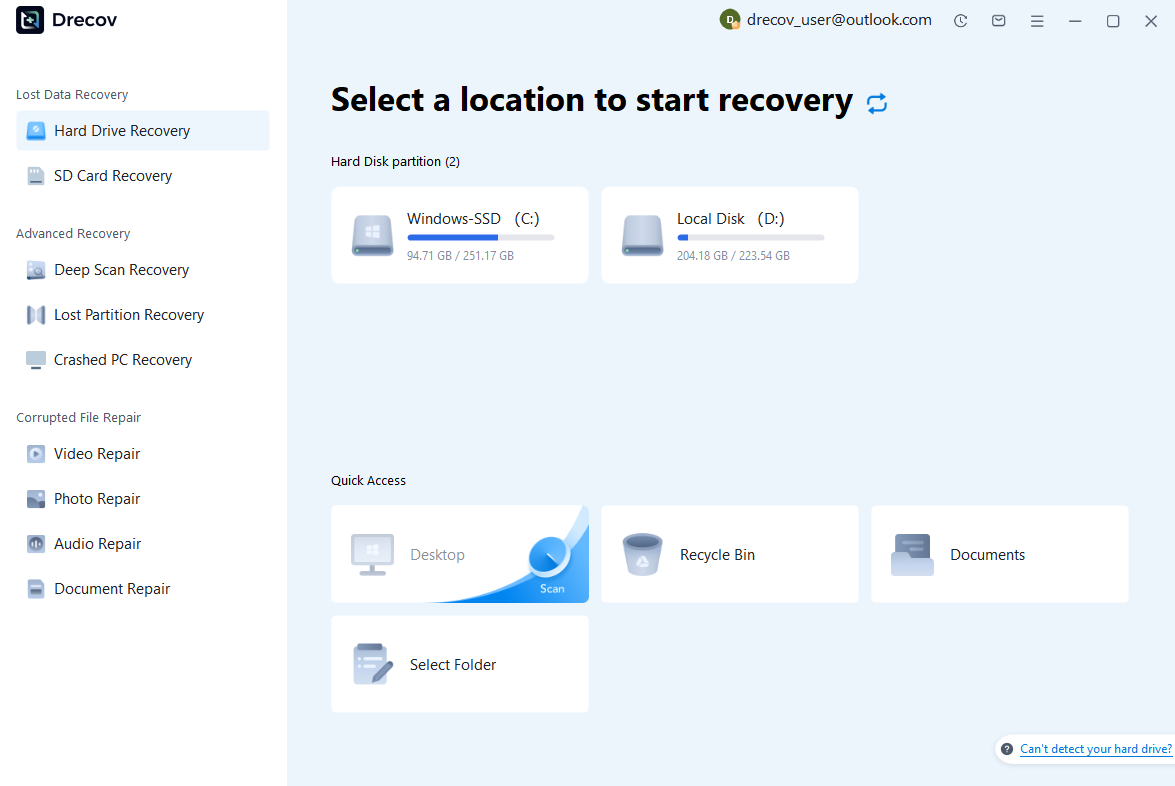
Step 1: Scan the Storage Device (SD Card / Hard Drive / USB)
Connect your device (SD card, HDD/SSD, or USB drive) to your computer and launch PandaOffice Drecov. Select the target device and start the scan. The software will perform a quick scan and deep scan to detect lost or deleted data.
Step 2: Locate and Preview Lost Files
After scanning, browse the detected files and use the preview feature to check recoverable data. You can preview documents (Word, Excel, PDF), photos, and videos to ensure file integrity before recovery.

Step 3: Recover and Save to a New Location
Select the files you want to restore and click recover. Save all recovered data to a different drive or location (not the original device) to avoid overwriting lost data.

Why Choose PandaOffice Drecov Recovery Software?
PandaOffice Drecov offers a fast, secure, and user-friendly solution for recovering lost files across multiple scenarios. Whether you need email recovery, ZIP File Recovery, format data recovery, or help to recover deleted drafts Outlook, the software provides reliable recovery performance for both personal and business users.
PandaOffice Drecov supports recovery from formatted hard drives, SSDs, USB drives, SD cards, and external storage devices. Its advanced scanning engine can locate deleted archives, damaged ZIP files, lost Outlook drafts, and accidentally removed documents with high accuracy. For users searching for how to find deleted messages in Teams, PandaOffice Drecov can also help recover exported chat files, attachments, and related local cache data when available.
Key advantages include:
- Deep scan technology for complex data loss situations
- Support for emails, archives, videos, photos, and office documents
- Recovery from accidental deletion, formatting, corruption, and system crashes
- Easy preview before restoring files
- Compatible with Windows and multiple storage devices
Unlike complicated enterprise recovery tools, PandaOffice Drecov keeps the recovery process simple. Users can scan, preview, and restore files in just a few steps without technical expertise.
Whether you are dealing with lost Outlook drafts, corrupted ZIP archives, formatted drives, or missing communication data, PandaOffice Drecov provides an efficient and practical recovery experience designed to minimize downtime and protect important files.
Disk imaging ensures that even partially corrupted drives can be preserved. This is often the safest approach before attempting any aggressive repair operations for fix bad sectors on hard drive situations.
For users managing large music libraries, podcasts, or game audio assets, recovery software can significantly improve the chances of retrieving valuable content.
⚠️ Warning: Never restore recovered files back to the same drive being scanned, as this may overwrite remaining recoverable data.
Frequently Asked Questions About OGG Files
What’s an OGG File and Is It the Same as MP3?
Many people asking whats an ogg file or what’s an ogg file assume it is simply another version of MP3.
The two formats are similar because both use lossy compression to reduce file size. However, they use different encoding technologies.
OGG Vorbis often provides competitive audio quality at comparable bitrates and is distributed under open-source licensing terms.
Although both formats serve similar purposes, they are not technically identical.
Can OGG Files Store Video Content?
Yes.
Many users associate OGG exclusively with audio, but the OGG container can also hold video streams.
Theora is one example of a video codec that can operate inside an OGG container.
An OGG file may therefore contain:
- Audio
- Video
- Metadata
- Subtitle information
However, audio remains the most common use case encountered by everyday users.
Why Won’t My Device Open an OGG File?
Several factors may prevent playback:
- Unsupported codec
- Missing software
- Corrupted file structure
- Incomplete download
- Damaged storage media
Troubleshooting steps include:
- Testing another media player.
- Verifying file integrity.
- Updating audio codecs.
- Converting the file to another format.
- Recovering the file if corruption occurred after storage failure.
Most playback problems can be resolved through one of these approaches.
Is the OGG Audio File Format Still Used Today?
Absolutely.
The ogg audio file format remains widely used in:
- Video games
- Open-source software
- Streaming applications
- Educational platforms
- Digital archives
- Independent media projects
Although formats such as AAC and MP3 dominate consumer markets, OGG continues to maintain a strong presence in technical and professional environments where open standards are important.
Its combination of audio quality, compression efficiency, and licensing freedom ensures ongoing relevance.
Final Thoughts on OGG File Format
Key Takeaways About OGG Audio Files
Understanding what is ogg file format helps users make informed decisions when managing digital audio.
The OGG format offers:
- High-quality audio compression
- Efficient file sizes
- Open-source licensing
- Flexible container architecture
- Strong support across many platforms
These characteristics have allowed OGG to remain a trusted multimedia solution for decades.
Whether you encounter game audio, online streams, podcasts, or downloaded music, there is a good chance OGG technology is working behind the scenes.
Choosing the Right Audio Format for Your Needs
There is no single audio format that works perfectly for every situation.
Choose OGG when you need:
- Open-source technology
- Efficient compression
- High audio quality
- Flexible media support
Choose MP3 when compatibility is your highest priority.
Choose WAV or FLAC when preserving original audio quality is more important than storage space.
By understanding what is a ogg file, whats ogg file, and the broader role of the OGG ecosystem, users can confidently work with audio files, troubleshoot playback issues, convert formats when necessary, and recover lost recordings if data loss occurs.





