







If you have landed here, chances are you have seen people on Reddit talking about .dd files, and now you are wondering how to open a .dd file in windows reddit style—efficiently and without a headache. Perhaps you downloaded a disk image, recovered data from an old drive, or someone told you to “just mount the image,” only for you to realize Windows doesn’t have a “Open” button for this specific format.
You are certainly not alone. A .dd file is not like a standard document or a video file. It is a raw disk image, which means it contains an exact, byte-by-byte copy of a storage device. It captures everything from the visible files to the hidden system structures and even deleted data fragments. Because of this complexity, Windows does not open it by default.
In this comprehensive guide, we will explore the most effective, Reddit-approved methods to handle these files, ranging from simple mounting to professional data recovery.
Understanding the Raw Power of .DD Files
Before we dive into the “how-to,” it helps to understand exactly what you are dealing with. In the world of forensics and data recovery, the .dd format is the gold standard. It originates from the Unix dd command, often referred to as “disk destroyer” by enthusiasts because of its power to overwrite data if used incorrectly.
Common Uses for .DD Files
- Forensic Analysis: Investigators use .dd images to preserve a digital “crime scene” without altering the original hardware.
- Full Disk Backups: Creating a perfect clone of a failing hard drive.
- Data Recovery: Extracting information from a storage device that is physically dying but can still be read once.
- Reverse Engineering: Analyzing how specific file systems or operating systems store data.
Because a .dd file is a “dumb” copy—meaning it doesn’t have a header telling Windows what it is—the operating system simply sees a massive block of binary data. To see the files inside, we need a translator.
Extract Files From Corrupted .DD Image: The Professional Approach
Sometimes, you aren’t just trying to learn how to open a .dd file in windows reddit; you are trying to save data from a disaster. If your image was created from a failing drive, it might be damaged. In such cases, standard mounting tools will fail. This is where you need to extract files from corrupted .dd image using specialized algorithms.
When a disk image is corrupted, the file system metadata (the “map” of where files are located) is often the first thing to go. Professional software bypasses this map and scans the raw sectors for “file signatures” (like the specific header that identifies a JPEG or a PDF). By searching for these signatures directly, you can bypass the “open” command entirely and pull data straight from the digital wreckage.
How to Handle Corruption
- Do Not Write to the Image: Always work on a copy of the .dd file to prevent further data loss.
- Use a Hex Editor: For those with technical skills, tools like HxD can help you verify if the file contains any data at all or if it is just a string of zeros.
- Check for Encryption: If the original drive was encrypted with BitLocker or VeraCrypt, the .dd image will also be encrypted. You will need the original keys to “unlock” the data inside the image.
Reddit Recommendation for DD File Opener: OSFMount and 7-Zip
When users search for a Reddit recommendation for dd file opener, two names consistently appear: OSFMount and 7-Zip. These tools represent the “Quick and Easy” side of the spectrum.
Method 1: Using OSFMount
OSFMount is a favorite among tech communities because it allows you to “map” the .dd file as if it were a physical USB drive plugged into your computer.
- Step 1: Download and install the latest version of OSFMount.
- Step 2: Launch the application and click on “Mount new…”
- Step 3: Browse to your .dd file location.
- Step 4: Select “Mount as virtual disk” and ensure you check the “Read-only drive” box. This is a critical safety step to ensure you don’t accidentally modify the image.
- Step 5: Assign a drive letter (e.g., Z:) and click OK.
If the file system inside the .dd file is healthy (NTFS or FAT32), a new drive will appear in your File Explorer, and you can browse it just like a normal folder.
Method 2: 7-Zip
Surprisingly, the popular compression tool 7-Zip can often “peek” inside .dd files.
- Step 1: Right-click your .dd file.
- Step 2: Select 7-Zip > Open Archive.
- Step 3: If 7-Zip recognizes the file system, it will list the folders and files. You can then drag and drop them to your desktop.
PandaOffice Drecov Data Recovery Software: The All-in-One Solution
While free tools are great, they often struggle with complex scenarios, such as missing partitions or proprietary file systems. If the Reddit-recommended tools didn’t work, PandaOffice Drecov data recovery software is a robust alternative designed specifically for deep-dive recovery.
PandaOffice Drecov excels because it treats the .dd file not just as a container, but as a source of raw data. It can reconstruct files even when the file system is completely destroyed.
⚠ Warning: Install it on a drive different from the one where your data was lost to prevent overwriting.
Step-by-Step Recovery with PandaOffice Drecov
Follow these steps to recover your files efficiently:
- Step 1: Load the Image File. Open the software and look for the option to “Load Disk Image” or “Recover from Image File.” Navigate to your .dd file and select it.

- Step 2: Choose Scan Type. For a healthy .dd file, a Quick Scan is sufficient. However, if you are trying to extract files from corrupted .dd image, select the Deep Scan mode. This will take longer but is much more thorough.

- Step 3: Preview the Recoverable Data. One of the best features of PandaOffice Drecov is the preview window. Before you commit to saving anything, you can view photos, documents, and text files to ensure they aren’t corrupted.
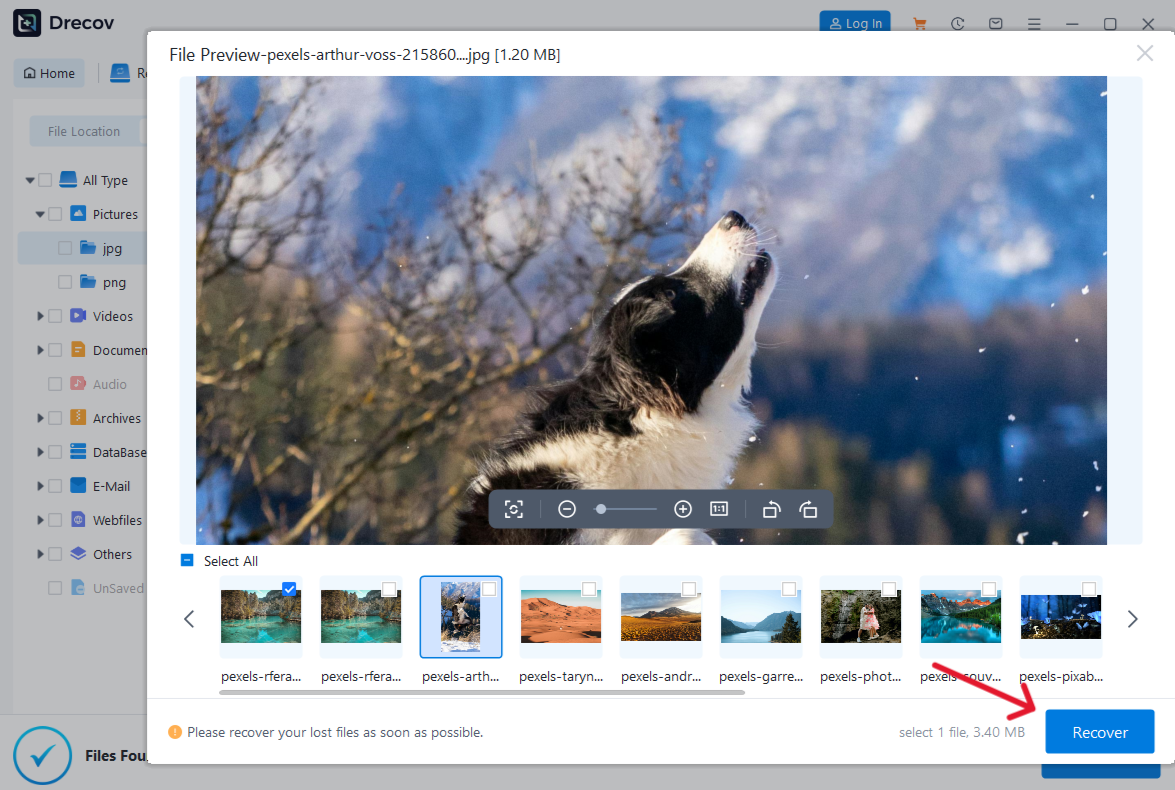
- Step 4: Select Destination and Recover. Select the files you want to keep and click Recover.
Warning: Never save the recovered files back onto the same drive where the .dd image is stored if you are low on space. Always use an external drive or a different partition.
After you have successfully managed your disk images, you might find these other technical guides helpful for maintaining your Windows environment:
- Learn how to remove OneDrive from File Explorer to declutter your system.
- If you’ve lost data on a physical device, check out this complete guide to recover deleted files from a USB flash drive.
- For creative professionals, here is a guide to Illustrator file recovery for those pesky .ai crashes.
Advanced Method: Using FTK Imager for Forensic Integrity
If you are a power user or a student of digital forensics, FTK Imager is the gold standard. It is free and provides an incredibly detailed view of the .dd file.
How to use FTK Imager
- Open FTK Imager and go to File > Add Evidence Item.
- Choose Image File and point it to your .dd file.
- In the “Evidence Tree” on the left, you can see every partition, including unallocated space.
- Right-click any folder or file and select Export Files to save them to your Windows machine.
This tool is particularly useful if the .dd file contains multiple partitions or “ghost” data that other tools might ignore.
Converting .DD to .ISO: Is it Worth It?
A common suggestion on Reddit is to convert the .dd file to an .iso file. While this makes the file easier for Windows to recognize natively, it is often unnecessary.
Conversion can be risky. Since .dd is a raw copy and .iso is a specific optical disc standard, “force-converting” them can sometimes lead to alignment issues where the data becomes unreadable. Instead of converting, it is almost always better to mount the file using the methods described above.
If you absolutely must convert, use a tool like AnyToISO or a command-line utility in a Linux environment.
The Linux Fallback: The “Reddit Pro” Way
If you search for how to open a .dd file in windows reddit, you will inevitably find a commenter saying, “Just use Linux.”
While this sounds intimidating, you can actually use the Windows Subsystem for Linux (WSL) to handle .dd files without leaving Windows. Linux has native, kernel-level support for almost every file system in existence.
The Basic Linux Mount Command
If you have WSL installed, you can use the following logic:
- Open your terminal.
- Create a mount point:
sudo mkdir /mnt/dd_image - Mount the file:
sudo mount -o loop /path/to/your/file.dd /mnt/dd_image
This is often the only way to open .dd files that were originally formatted for Linux (like EXT4 or BTRFS).
Common Pitfalls and How to Avoid Them
Working with disk images is inherently technical, and mistakes can happen. Here are the most common issues users face:
1. “The File is Too Large”
Remember that a .dd file of a 1TB hard drive will be exactly 1TB, even if the drive only had 10GB of actual files on it. Ensure you have enough disk space on your Windows machine before moving or processing these files.
2. “Access Denied” Errors
This usually happens because Windows is trying to protect the system. Always run your tools (OSFMount, FTK Imager, or PandaOffice Drecov) as an Administrator. Right-click the program icon and select “Run as administrator.”
3. “The Disk Must Be Formatted”
When you mount a .dd file, Windows might pop up a window saying, “You need to format the disk in drive X: before you can use it.”
DO NOT CLICK FORMAT. This happens because Windows doesn’t recognize the file system (e.g., it’s a Mac or Linux image). Formatting will wipe the data inside your .dd file. If you see this, close the prompt and use a recovery tool like PandaOffice Drecov instead.
Final Comparison of Methods
| Method | Best For | Technical Level | Success Rate |
| OSFMount | Normal, healthy images | Beginner | High |
| 7-Zip | Quick file extraction | Very Easy | Medium |
| PandaOffice Drecov | Extract files from corrupted .dd image | Beginner | Very High |
| FTK Imager | Forensic analysis | Advanced | High |
| WSL / Linux | Non-Windows file systems | Expert | Highest |
How To Open A .DD File In Windows Reddit FAQs
1. Can I open a .dd file with Windows Explorer?
No. Windows Explorer does not recognize the raw .dd format. You must use a mounting tool or recovery software to assign it a drive letter or extract its contents.
2. What happens if I rename .dd to .iso?
In some cases, if the .dd file was originally an optical disc image, renaming it might allow some tools to open it. However, for hard drive images, this usually does nothing and can occasionally confuse software.
3. Is it safe to use free tools for data recovery?
Yes, tools like OSFMount and FTK Imager are highly respected in the industry. However, for user-friendly interfaces and automated “deep scanning” of corrupted images, paid tools like PandaOffice Drecov often provide a more seamless experience.
4. How long does it take to scan a .dd file?
This depends on the size of the file and the speed of your drive. A 500GB image might take anywhere from 30 minutes to several hours to “Deep Scan” for lost files.
5. Why is my .dd file showing as 0 bytes?
This indicates a failed imaging process or a corrupted file system. You should try to re-acquire the image from the source device if possible.
Conclusion
Navigating the world of raw disk images doesn’t have to be a nightmare. Whether you are following a Reddit recommendation for dd file opener or using professional software like PandaOffice Drecov data recovery software, the key is patience and using the right tool for the job.
By understanding that a .dd file is a sector-by-sector clone, you can approach it with the respect it deserves. Start with the simplest methods—mounting with OSFMount—and only move to more complex recovery options if the file appears corrupted or unreadable.
With the steps outlined in this guide, you now have the knowledge to rescue your data and master how to open a .dd file in windows reddit style.






