







The landscape of artificial intelligence has shifted dramatically. As we navigate through 2026, the question is no longer just “which AI is smarter?” but rather “which AI fits your digital survival strategy?” In the heat of the ChatGPT vs Gemini rivalry, users are finding themselves at a crossroads of productivity and data integrity. Whether you are generating complex code or managing massive datasets in Google Workspace, understanding these tools is essential. However, with great power comes the risk of technical glitches. From system crashes to “insight evaporation” during updates, the need for robust data recovery has never been more pressing.
What Are ChatGPT and Gemini?
Origins and Development
Let’s start with the basics. When people compare ChatGPT vs Gemini, they’re really comparing two tech giants: OpenAI and Google. Both are pushing the boundaries of artificial intelligence, but they come from very different philosophies.
ChatGPT burst onto the scene in late 2022 and quickly became the face of generative AI. Built on the GPT model family, it transformed how people interact with machines. Fast forward to 2026, and ChatGPT now boasts hundreds of millions of users and a massive ecosystem of tools, plugins, and integrations.
Gemini, on the other hand, is Google’s answer to the AI revolution. Developed by Google DeepMind, it wasn’t just designed as a chatbot—it was built to integrate deeply into Google’s existing ecosystem. Think Gmail, Docs, Drive, and even Search. Instead of being a standalone tool, Gemini acts like an invisible assistant woven into your daily digital life.
Core Purpose and Evolution
Here’s where things get interesting. ChatGPT aims to be a universal AI assistant—a single workspace where everything happens. You write, code, analyze files, and even generate images or videos all in one place. It’s like having a Swiss Army knife for productivity.
Gemini, however, plays a different game. Its goal is to enhance existing workflows rather than replace them. If you’re already living inside Google Workspace, Gemini feels less like a tool and more like a natural extension of your environment. It reads your emails, understands your documents, and connects the dots across your digital life.
Key Differences at a Glance
Feature Comparison Overview
At first glance, both tools seem nearly identical. They can write, summarize, code, and answer questions. But dig deeper, and the differences become obvious.
- ChatGPT excels in creative writing, coding, and structured outputs.
- Gemini dominates in real-time search and Google integration.
- Both support multimodal inputs, but Gemini was designed with it from day one.
ChatGPT GPT-5 vs Gemini 3 Pro performance
Performance is where things get spicy. In 2026 benchmarks, ChatGPT GPT-5 vs Gemini 3 Pro performance reveals a fascinating split. ChatGPT GPT-5 leads in synthetic coding tasks and desktop automation, achieving record-breaking scores on benchmarks like SWE-bench. It essentially operates your computer like a human would, making it a favorite for power users.
Conversely, Gemini 3 Pro has gone “all-in” on reasoning and context. With a context window that can now scale up to 2 million tokens, Gemini can process an entire library of documents or hours of video in one go. While ChatGPT is the “agent” that does work for you, Gemini is the “analyst” that understands everything you’ve ever written.
Pricing and Subscription Plans
Free vs Paid Plans
Both platforms offer free tiers, but the real action happens in paid plans.
| Plan Type | ChatGPT | Gemini |
| Free | Limited GPT-5 access | Gemini Flash (Fast) |
| Mid-tier | $20/month (Plus) | $19.99/month (AI Premium) |
| Premium | $200/month (Pro) | $249.99/month (Ultra/Business) |
Value for Money
Gemini includes 2TB of Google One storage in its subscription, which is a huge bonus if you already use Google services. ChatGPT, however, packs more creative features into its subscription—like the latest DALL-E 4 image generation and Sora-powered video tools.
Handling Technical Risks: Recovering Lost Data During AI Software Updates
As AI models evolve, we frequently see massive version migrations. However, these updates aren’t always seamless. Many users have reported cases of “insight evaporation,” where saved prompts, custom GPT configurations, or locally cached AI interactions vanish after a browser refresh or a software patch.
Recovering lost data during AI software updates
When you are caught in the middle of a version jump—say, moving from GPT-5.2 to 5.4—your local cache can become corrupted. If you find your local drafts or exported AI datasets have disappeared, follow these technical recovery steps immediately:
- Step 1: Isolate the Drive. If the data loss occurred on a local directory (where you save your AI exports), stop writing new files to that drive immediately to avoid overwriting the “deleted” sectors.
- Step 2: Check Temporary Folders. On Windows, navigate to
%AppData%\Local\Google\Chrome\User Data\Default\Cache(for Gemini users) or the equivalent for your browser. Sometimes, cached JSON files containing your last session can be extracted before they are cleared. - Step 3: Verify Cloud Versions. For Gemini users, check the Google Activity Dashboard. For ChatGPT, ensure your “Chat History & Training” setting wasn’t toggled off, which can sometimes hide history across devices.
- Step 4: Use Specialized Recovery Software. If the files were deleted during a system crash or an automated cleanup script, standard “Undelete” functions won’t work. You will need a professional-grade tool like PandaOffice Drecov to perform a deep sector analysis.
PandaOffice Drecov data recovery software: Your Safety Net
When manual methods fail, PandaOffice Drecov data recovery software stands out as the premier solution for 2026’s complex data environments. It is specifically optimized to handle the fragmented file structures often left behind by AI applications and browser databases.
⚠ Warning: Install it on a drive different from the one where your data was lost to prevent overwriting.
How to Use PandaOffice Drecov for AI Data Recovery
If you’ve lost critical research drafts or coding scripts during an AI update, follow this guide to get them back:
- Step 1: Select the Source. Choose the drive or specific folder (e.g., your “Downloads” or “Documents” folder) where your AI data was stored. Click “Scan” to begin the process.

- Step 2: Deep Scan Analysis. Drecov will perform a “Deep Scan,” which looks past the file system’s surface. It identifies over 2,000 file types, including the
.json,.txt, and.pyfiles common in AI workflows.- Warning: Do not interrupt the scan. Even if the progress bar seems slow, the software is rebuilding file headers from raw data bits.

- Step 3: Preview and Filter. Use the filter sidebar to search for specific file extensions or names. Drecov allows you to preview documents and images before recovery to ensure they aren’t corrupted.
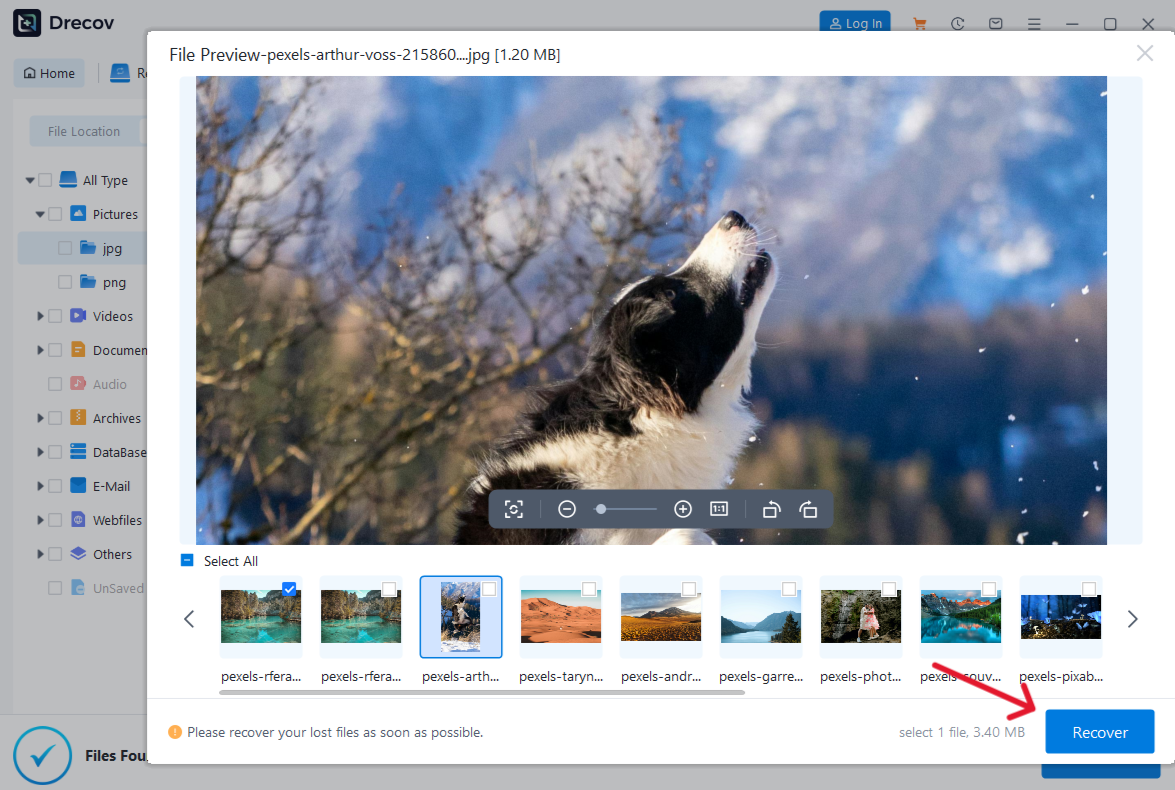
- Step 4: Execute Recovery. Select the files you need and click “Recover.” Save these files to an external drive or a secure cloud location.
Once you have successfully restored your files, you might want to clean up your AI environment to prevent future bloat. Learn how to delete ChatGPT history safely without losing your local backups.
To truly master these tools, you need to know how to troubleshoot them when they fail. If you find that the latest update has caused issues with your interface, check out our ChatGPT 5 not showing up complete guide.
Furthermore, if you are struggling with specific features like voice-to-text or lost drafts, you can remove ChatGPT speak and recover lost drafts with Drecov to ensure your productivity remains uninterrupted. For those new to the ecosystem, our how to use ChatGPT: the 2026 data recovery guide provides a comprehensive roadmap.
Features Comparison: ChatGPT vs Gemini
Writing and Content Creation
If you’re a writer, ChatGPT remains the gold standard. It understands tone, style, and nuance better than most competitors. Whether you’re crafting blog posts or brainstorming ideas, it delivers consistent, human-like results. Gemini is no slouch, but its writing tends to be more factual and concise. It’s great for summaries, but sometimes lacks that creative “soul.”
Coding and Technical Tasks
In the ChatGPT vs Gemini coding battle, ChatGPT Plus/Pro users enjoy a significant advantage with its “Computer Use” feature. It can literally open your IDE, run a debugger, and fix the code in real-time. Gemini 3 Pro is excellent at explaining code and handling massive repositories, but it lacks the same level of autonomous execution.
Multimodal Capabilities
This is where Gemini takes the lead. Because it was built natively multimodal, it doesn’t “translate” images into text; it “sees” them. You can upload a 1-hour video of a lecture, and Gemini can tell you exactly what was written on the whiteboard at the 42-minute mark. ChatGPT handles images and voice beautifully, but its video capabilities are still catching up to Google’s native integration.
User Experience and Accuracy
Ease of Use
ChatGPT offers a centralized, “chat-first” experience. It’s a destination. Gemini is an “environment.” It lives in your sidebars, your email compose window, and your mobile OS. For those who want AI to follow them everywhere, Gemini is the winner. For those who want a focused workspace, ChatGPT is superior.
Accuracy and Reasoning Power
In 2026, both models have significantly reduced “hallucinations.” However, Gemini 3 Pro has a slight edge in real-time accuracy because it is plugged directly into the Google Search index. If you ask about a news event that happened ten minutes ago, Gemini is more likely to provide a factual, cited answer. ChatGPT is better at logical puzzles and “thinking through” complex, multi-step problems without losing the thread.
Conclusion
The ChatGPT vs Gemini debate doesn’t have a single winner—it has a “best for you.”
- Choose ChatGPT if you are a developer, a creative writer, or someone who needs a highly capable autonomous agent to manage tasks across your desktop.
- Choose Gemini if you are a researcher, a student, or a corporate professional who lives in Google Workspace and needs to process massive amounts of information quickly.
Regardless of your choice, remember that AI is a tool, not a vault. Always keep your local data protected, and keep a license of PandaOffice Drecov handy for those moments when the “cutting edge” of technology cuts a little too deep into your file system. By following the recovery steps outlined above and maintaining a proactive backup strategy, you can enjoy the benefits of the AI revolution without the fear of permanent data loss.






