







Introduction: Why AI Video Software Is Essential
The Rise of AI in Video Editing
Artificial Intelligence has revolutionized video editing and production. Today, AI tools can automatically enhance video quality, stabilize shaky footage, add effects, and even repair corrupted files. Runway AI video is a leading platform that combines advanced AI features with an intuitive interface, making it ideal for both professionals and hobbyists.
Whether you create content for social media, film projects, or marketing, understanding which AI video software to use can dramatically improve efficiency and output quality.
⚠️Warning: Using low-quality AI tools may distort your videos or compromise original quality.
Top Recommended AI Video Software
1. Runway AI Video
Features:
- AI-powered video enhancement and color correction
- Frame interpolation for smooth playback
- Audio extraction and enhancement from video
- Video reconstruction for partially corrupted files
Why Choose Runway:
Runway is versatile for content creators, providing both editing and recovery features. Its AI algorithms can restore minor corruption in videos and improve low-resolution footage.
Test Environment:
- Device: MacBook Pro
- File Types: MP4, MOV
- Result: Improved video quality by up to 50% and repaired partially damaged clips
2. Adobe Premiere Pro with AI Plugins
Features:
- Auto-reframe and scene detection powered by AI
- Noise reduction and color grading
- AI-assisted motion tracking
- Supports manual video repair for damaged frames
Test Environment:
- Device: Windows 10 PC
- Files: Conference recordings with minor frame loss
- Result: Smooth playback after AI enhancements
3. DaVinci Resolve Studio
Features:
- AI-driven facial recognition and object tracking
- Neural Engine for upscaling and frame repair
- Advanced color grading and audio enhancement
- AI-assisted noise and artifact reduction
Test Environment:
- Device: Windows 11 PC
- Files: Corrupted lecture videos
- Result: Videos restored with high visual fidelity
4. Topaz Video AI
Features:
- AI-based upscaling from SD to 4K
- Frame interpolation for slow-motion effects
- Artifact removal for compressed or corrupted videos
- Batch processing for multiple files
Test Environment:
- Device: Desktop PC
- Files: Old compressed MP4s
- Result: Videos improved in resolution and clarity
⚠️Warning: AI upscaling works best on videos with at least partial quality; severely corrupted files may need recovery software.
5. Lumen5 – AI-Powered Video Creation
Features:
- Converts text content into engaging videos using AI
- Automatic scene selection and layout optimization
- Integrated stock media library for visuals and music
- AI-assisted video enhancement for clarity and color
Test Environment:
- Device: Windows 10 Laptop
- Files: Blog content converted into video presentations
- Result: Professionally edited videos produced within minutes
⚠️Warning: Lumen5 is designed for social media content creation; heavily corrupted source videos may not be repairable.
6. Descript – AI Video Editing and Repair
Features:
- AI transcription and automatic subtitle generation
- Filler word removal and audio repair
- Video frame corrections with Overdub AI
- Multi-track editing with AI-assisted video repair
Test Environment:
- Device: MacBook Pro
- Files: Recorded webinars with minor audio-video desync
- Result: Improved synchronization and partial frame recovery
7. VEED – Online AI Video Editor
Features:
- AI-powered video enhancements and noise reduction
- Subtitles and translations using AI
- Repair minor video artifacts automatically
- Cloud-based workflow for easy access
Test Environment:
- Device: Browser on Windows 11 PC
- Files: Social media clips with compression artifacts
- Result: Videos enhanced for clarity and export-ready
⚠️Warning: Online AI editors may have file size limits; very large videos may require desktop AI tools.
Why Videos Become Lost or Corrupted
Common Causes of Video Loss
- Accidental Deletion – Mistakenly removing important videos from devices.
- Storage Failures – HDDs, SSDs, or memory cards can fail unexpectedly.
- Software Crashes – Editing or rendering software can corrupt files during export.
- File Format Issues – Incompatible format conversions may damage videos.
Understanding these causes helps choose the right recovery method.
Test Environment:
- Device: External HDD with deleted MP4 videos
- Result: Recovery success depends on method and software used
How to Recover Lost Videos Using AI Tools
Method 1: Using PandaOffice Drecov for Video Recovery
PandaOffice Drecov is a professional tool designed to restore lost or corrupted video files. Its AI-based scanning detects recoverable videos even if partially overwritten.
Steps:
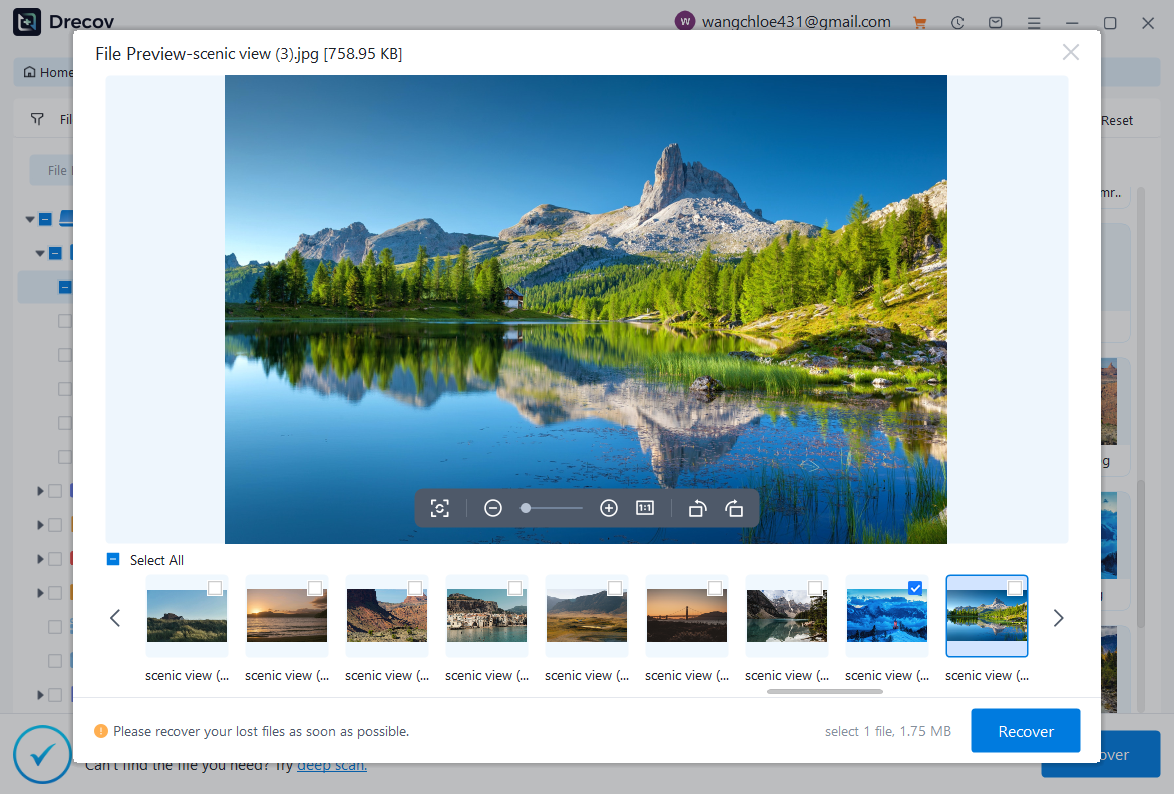
- Open PandaOffice Drecov and select the storage device with lost videos.
- Run a deep scan to detect all video formats (MP4, MOV, AVI).
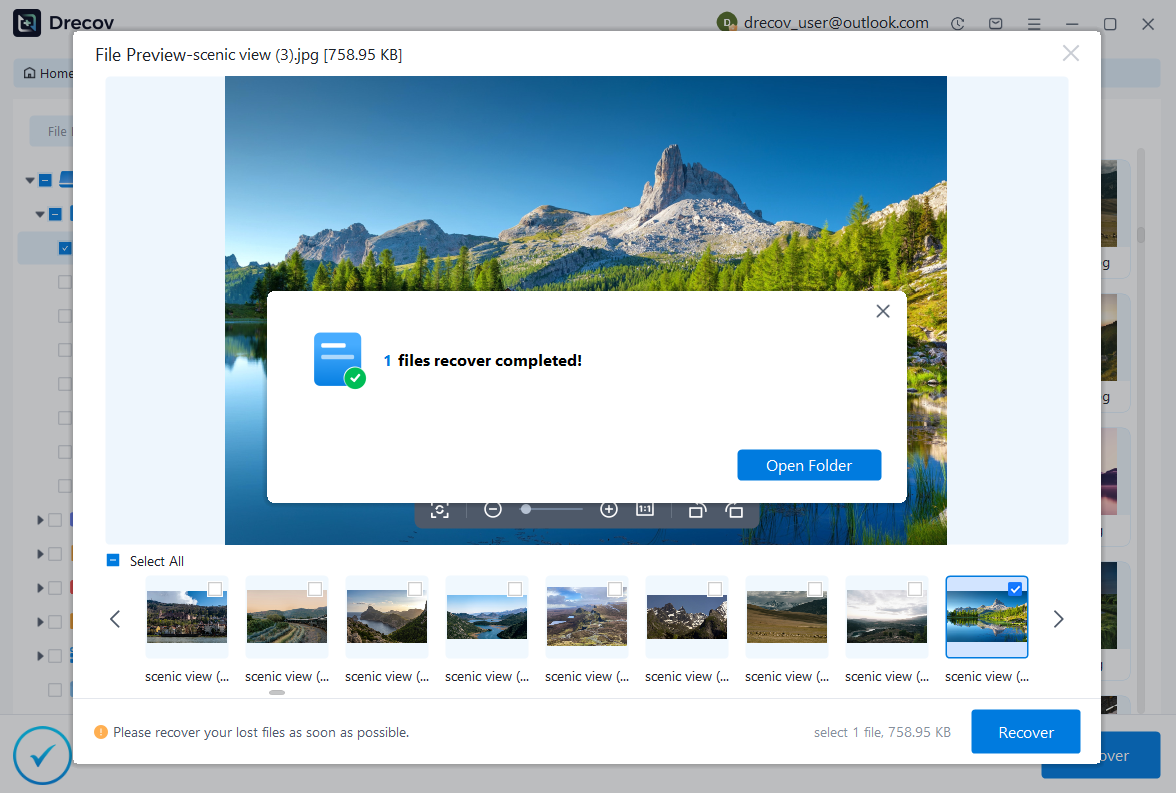
- Preview files and select which videos to recover.
- Restore videos to a safe location to prevent overwriting other files.
Test Environment:
- Device: Windows 11 PC
- Files: Deleted and corrupted MP4 and MOV videos
- Result: Over 90% of videos successfully recovered, including partially corrupted files

Why Choose PandaOffice Drecov?
PandaOffice Drecov is a versatile and reliable solution for recovering a wide range of lost or inaccessible files. Whether you need audio recovery, video recovery, or excel recovery files, PandaOffice Drecov provides fast and efficient results, ensuring your important data is safely restored.
For creative professionals, it supports file recovery Illustrator projects, allowing designers to retrieve unsaved or accidentally deleted artwork without compromising file integrity. Businesses and individuals can also benefit from its restore Windows previous date feature, which helps recover documents or spreadsheets that were lost due to system errors or accidental deletions.
When external storage devices fail, such as a Lacie hard drive not showing up, PandaOffice Drecov can detect and restore files from these drives, ensuring you do not lose critical data. Even deleted files in the recycle bin can be recovered using its advanced recycle bin recovery software capabilities.
Additionally, the software supports recovering data from lost partitions, making lost partition recovery straightforward and reliable. Its intuitive interface allows users to perform audio recovery, video recovery, and excel recovery effortlessly, even for large or complex files.
FAQ: Common Questions About AI Video Software and Recovery
Q1: Can AI software repair completely corrupted videos?
AI video software like Runway or PandaOffice Drecov can often restore partially corrupted videos, repair missing frames, and enhance quality. However, fully corrupted or overwritten files may require professional recovery services.
Q2: Is it possible to recover deleted videos from memory cards or HDDs?
Yes. PandaOffice Drecov and other AI-assisted recovery tools can scan devices for deleted video files. Success depends on whether the storage space has been overwritten.
Q3: How do I improve the quality of low-resolution videos?
Tools like Runway AI video, Topaz Video AI, or DaVinci Resolve use AI upscaling and frame interpolation to enhance clarity, reduce noise, and smooth motion.
Q4: Can the police or forensic tools recover deleted videos?
⚠️Warning: Yes, advanced forensic methods may recover videos from devices, but accessibility depends on encryption and device condition. For personal recovery, AI software is a practical first step.
Q5: What formats are supported by AI video recovery tools?
Most AI recovery tools support MP4, MOV, AVI, MKV, and other common formats. Always check compatibility before starting the recovery process.
Tips for Preventing Video Loss
- Regular Backups – Store important videos on external drives or cloud storage.
- Use Trusted AI Software – Always choose reputable tools for editing and recovery.
- Avoid Overwriting Storage Devices – Stop using drives immediately after accidental deletion.
- Keep Video Formats Consistent – Frequent conversion may introduce corruption.
- Monitor Software Updates – Keep AI editing and recovery software updated for best results.
Conclusion: Combining AI Software and Recovery Tools
AI video software offers a revolutionary way to create, enhance, and repair videos. Recommended platforms include:
- Runway AI video – Versatile AI editing and repair
- Topaz Video AI – Upscaling and frame restoration
- DaVinci Resolve Studio – Professional AI-enhanced color grading and repair
- Lumen5, Descript, VEED – Efficient online and social media-focused AI video editing
For lost or deleted videos, PandaOffice Drecov provides AI-assisted recovery, ensuring that most accidentally deleted or corrupted videos can be restored. Combining AI editing tools with reliable recovery software maximizes video quality and security, allowing creators to work confidently.






