







This is on my android phone. Fairly inexpensive Motorola specifically. I don’t remember it happening on any of my other, better phones. I have a family plan of YouTube premium. I’m not the head of it, my friend is. I’m on YouTube for probably 3 hours a day. Sometimes this happens 3 times in one day. Other times it doesn’t happen for a few days. But its been happening for 2 months or so now. I have checked to make sure the app is up to date on the app store. It says it is. Shutting down the app usually fixes it. If not, clearing the cache, and force stopping it fixes it too. But it’s a pain. What is wrong and what can I do to fix it?—from Reddit
Understanding the Problem
What Causes the YouTube Screen to Stay Black
Experiencing the issue can be frustrating, especially when audio plays but no visuals appear. Many users encounter situations where the youtube screen stays black while trying to watch videos on different devices.
This issue can occur on desktops, mobile phones, tablets, or smart TVs. In most cases, the problem is not caused by YouTube itself but by external factors such as browser errors, network instability, or device limitations. When a black screen appears, it often indicates that the video player failed to load correctly.
Another common scenario is when users ask, why is my youtube screen black even though the video seems to be playing. This usually happens when rendering fails, meaning the video loads but cannot be displayed properly due to hardware or software conflicts.
Modern streaming platforms rely on codecs, scripts, and browser compatibility. If any of these elements fail, the result may be a youtube black screen instead of normal playback.
⚠️Warning: Repeated black screen errors may indicate deeper system issues such as outdated drivers or corrupted browser data.
Understanding how this issue works helps you choose the right solution instead of wasting time on ineffective fixes.
Main Reasons Behind Errors
Technical Factors That Trigger Black Screen in YouTube
There are several reasons why a black screen youtube issue occurs. Identifying the root cause is essential to apply the correct fix.
One of the most common causes is browser cache corruption. Over time, stored data may conflict with YouTube’s updated scripts, resulting in a youtube black screen during playback. Clearing cache often resolves this.
Another key factor is internet instability. A slow or interrupted connection may load the video partially, causing the issue while audio continues or stops entirely.
Browser extensions also play a major role. Ad blockers, VPN tools, or script filters can interfere with video loading, leading to a black screen in youtube. Disabling these extensions often fixes the problem.
Hardware acceleration issues are another frequent cause. While this feature improves performance, it can sometimes conflict with graphics drivers, resulting in black screen youtube errors.
⚠️Warning: Avoid installing unknown “fix tools” from third-party sites, as they may compromise your device security.
Lastly, outdated apps or browsers can cause compatibility issues, especially when YouTube updates its video player. This leads many users to wonder, why is my youtube screen black even though everything seems normal.
Proven Ways to Fix YouTube Black Screen Issues
Refresh the Page or Restart the App
Sometimes the simplest fix works best. Refreshing the page or restarting the YouTube app can resolve temporary glitches causing a youtube black screen.
If you’re using a browser, press F5 or reload the page. On mobile, close the app completely and reopen it.
Test Environment:
- Device: Windows 11 PC / iPhone 13
- Scenario: Video loaded with black screen
- Result: Refreshing restored normal playback
Clear Browser Cache and Cookies
Corrupted cache is a major reason for the issues. Clearing stored data forces the browser to load fresh resources.
Steps:
- Open browser settings
- Navigate to privacy section
- Clear cache and cookies
- Restart browser
This fix often resolves cases where the youtube screen stays black due to outdated files.
Test Environment:
- Device: MacBook Air
- Browser: Chrome
- Result: Playback restored after clearing cache
⚠️Warning: Clearing cookies will log you out of accounts, so save your credentials.
Disable Browser Extensions
Extensions like ad blockers can interrupt video scripts, leading to a black screen in youtube.
Disable all extensions temporarily and reload YouTube. Then re-enable them one by one to identify the problematic one.
Test Environment:
- Device: Desktop PC
- Browser: Chrome with multiple extensions
- Result: Ad blocker caused issue; disabling fixed it
Check Internet Connection
A weak connection can result in partial loading, causing a youtube black screen. Switch networks or restart your router to improve stability.
You can also try lowering video quality to reduce bandwidth usage.
Test Environment:
- Device: Laptop
- Network: 5 Mbps vs 50 Mbps
- Result: Stable connection eliminated black screen
Repair Corrupted Video Files with PandaOffice Drecov
If you encounter a black screen youtube issue with downloaded videos, the file itself may be damaged. In such cases, recovery tools are necessary.
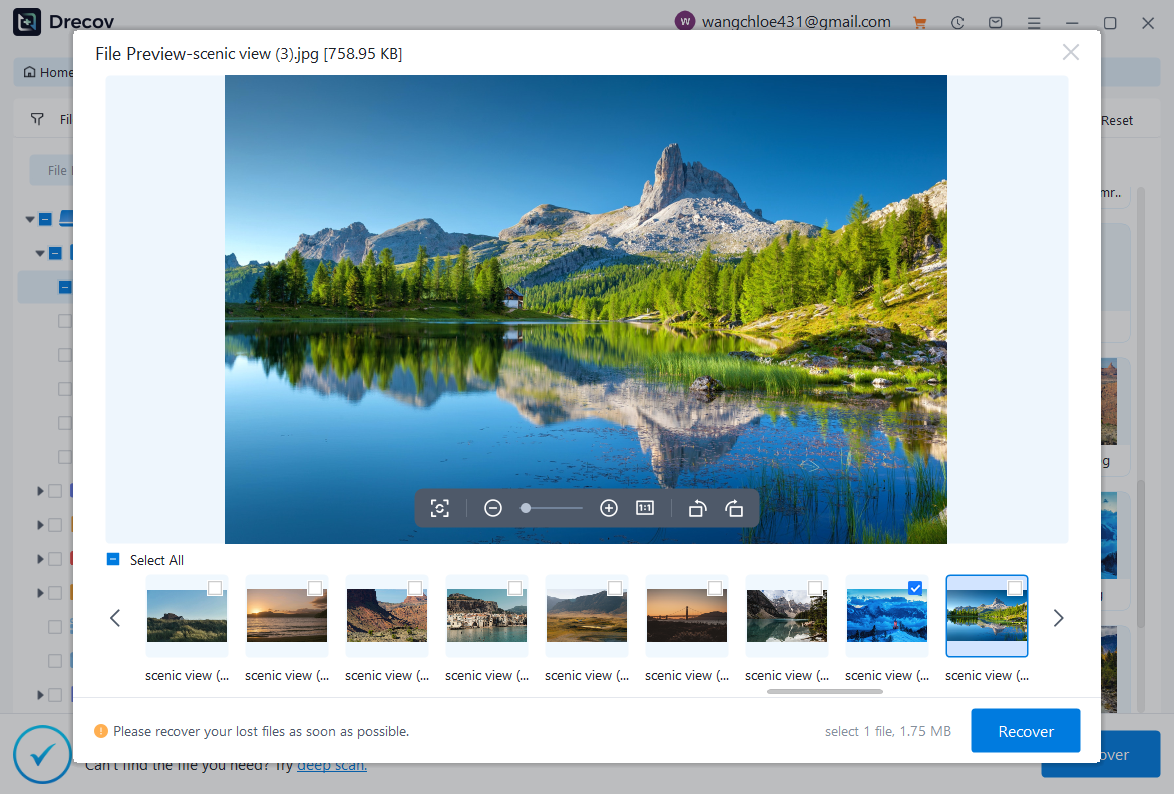
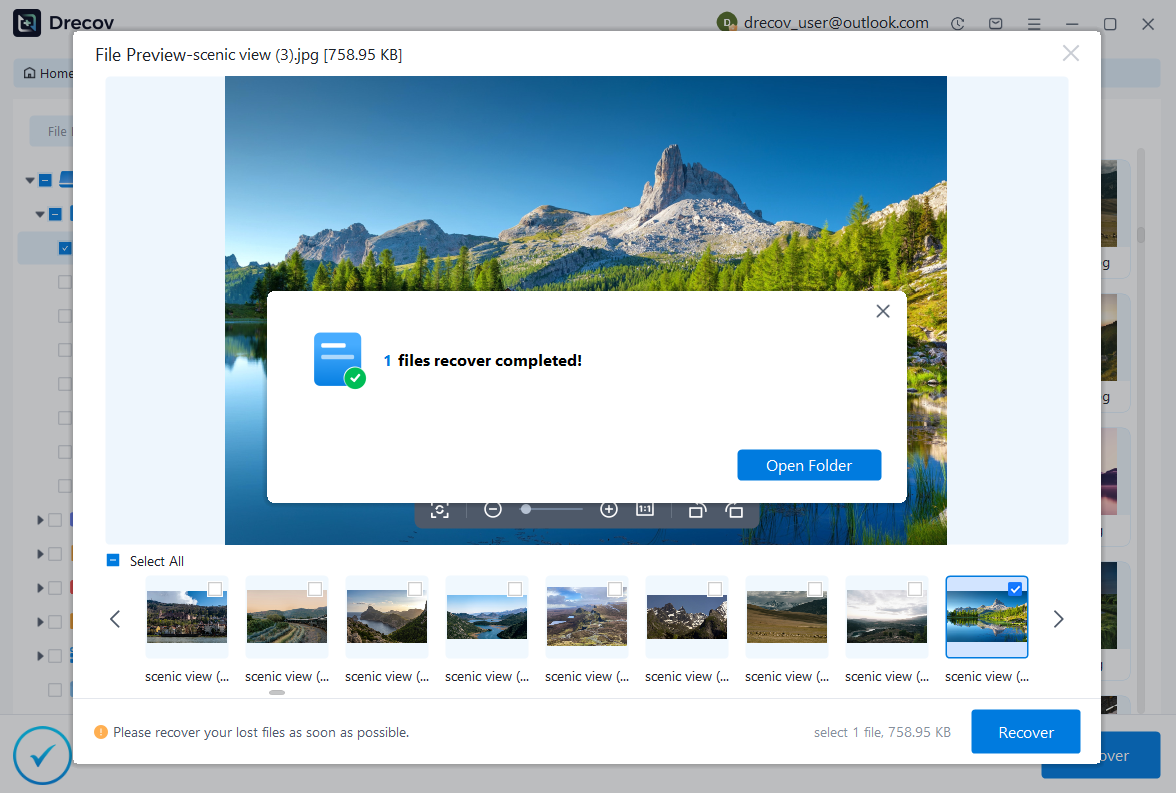
PandaOffice Drecov helps repair corrupted video files by scanning and reconstructing damaged data. It supports multiple formats and works on various storage devices.
Steps include selecting the damaged video location, scanning, previewing recoverable files, and restoring them safely.
Test Environment:
- Device: Windows 11 PC
- Storage: External hard drive with corrupted MP4
- Result: Most videos restored and playable
⚠️Warning: Always save repaired files to a different location to avoid overwriting original data.

Why Choose PandaOffice Drecov?
PandaOffice Drecov is a versatile and reliable solution for recovering a wide range of lost or inaccessible files. Whether you need audio recovery, video recovery, or excel recovery files, PandaOffice Drecov provides fast and efficient results, ensuring your important data is safely restored.
For creative professionals, it supports file recovery Illustrator projects, allowing designers to retrieve unsaved or accidentally deleted artwork without compromising file integrity. Businesses and individuals can also benefit from its restore Windows previous date feature, which helps recover documents or spreadsheets that were lost due to system errors or accidental deletions.
When external storage devices fail, such as a Lacie hard drive not showing up, PandaOffice Drecov can detect and restore files from these drives, ensuring you do not lose critical data. Even deleted files in the recycle bin can be recovered using its advanced recycle bin recovery software capabilities.
Additionally, the software supports recovering data from lost partitions, making lost partition recovery straightforward and reliable. Its intuitive interface allows users to perform audio recovery, video recovery, and excel recovery effortlessly, even for large or complex files.
Update Browser or YouTube App
Outdated software often causes compatibility issues leading to youtube screen stays black.
Ensure your browser or app is updated to the latest version. Updates fix bugs and improve performance.
Test Environment:
- Device: Android phone
- App: Old version → Updated
- Result: Black screen issue resolved after update
Advanced Fixes for Persistent the Issues
Disable Hardware Acceleration in Browser
Hardware acceleration can sometimes conflict with your system’s graphics card, leading to the issue. While it is designed to improve performance, it may cause rendering failures in certain environments.
To disable it, go to your browser settings → Advanced → System → Turn off “Use hardware acceleration when available.” Restart the browser and reload YouTube.
This method is especially effective when the youtube screen stays black but audio continues to play.
Test Environment:
- Device: Windows 10 PC
- Browser: Chrome latest version
- Result: Video playback returned to normal after disabling feature
Update Graphics Drivers
Outdated or incompatible graphics drivers are a major reason behind the problems. If your system cannot properly render video content, it may display a blank screen.
Visit your GPU manufacturer’s website (NVIDIA, AMD, Intel) and download the latest drivers. After installation, restart your device and test YouTube again.
Test Environment:
- Device: Desktop PC with outdated GPU driver
- Action: Updated to latest version
- Result: Black screen issue completely resolved
⚠️Warning: Always download drivers from official sources to avoid malware risks.
Switch to a Different Browser or Device
If the issue persists, try accessing YouTube using another browser or device. This helps determine whether the problem is system-specific.
For example, if why is my youtube screen black appears on Chrome, try Edge or Firefox. If it works elsewhere, the issue is likely browser-related.
Test Environment:
- Device: Laptop
- Browsers: Chrome vs Edge
- Result: Issue only occurred in Chrome
Sign Out and Back Into Your Account
Account-related glitches can sometimes cause a youtube black screen. Signing out and logging back in refreshes your session and clears temporary errors.
This is particularly useful if the problem only happens on your account but not on others.
Test Environment:
- Device: Desktop PC
- Account: Google account logged in
- Result: Playback restored after re-login
Reset Browser Settings
If multiple fixes fail, resetting your browser can eliminate hidden conflicts causing the issues.
This will restore default settings, disable extensions, and remove temporary configurations that may interfere with playback.
Test Environment:
- Device: Windows laptop
- Browser: Chrome reset to default
- Result: Issue resolved after reset
⚠️Warning: Resetting browser will remove saved settings and extensions.
Frequently Asked Questions About YouTube Black Screen
Why is my YouTube screen black but sound works?
This usually happens due to rendering issues, browser conflicts, or hardware acceleration problems. Disabling acceleration or updating drivers often fixes it.
Can internet speed cause a YouTube black screen?
Yes. A slow or unstable connection may load audio first while video fails, resulting in a youtube screen stays black situation.
How do I fix black screen in YouTube on mobile?
Update the app, clear app cache, or reinstall it. These steps usually resolve the problems on smartphones.
Is YouTube black screen caused by extensions?
Yes. Extensions like ad blockers frequently cause the errors. Disabling them can restore playback.
Can corrupted videos cause black screen issues?
Yes. If downloaded videos are damaged, they may show a youtube black screen during playback. Tools like PandaOffice Drecov can help repair them.
Conclusion: Resolving YouTube Black Screen Efficiently
A black screen youtube issue may seem complex, but it is usually caused by simple factors such as cache errors, outdated software, or unstable connections. By identifying whether the issue comes from your browser, device, or network, you can quickly apply the right solution.
Start with basic fixes like refreshing the page, clearing cache, or updating your browser. If the issue persists, move to advanced methods such as disabling hardware acceleration, updating drivers, or resetting your browser.
For corrupted video files, using a reliable repair tool like PandaOffice Drecov ensures that damaged content becomes playable again.
Understanding the issue allows you to troubleshoot efficiently and avoid unnecessary frustration. By following this guide, you can restore smooth video playback and enjoy uninterrupted streaming.
⚠️Warning: Avoid using unofficial tools or scripts claiming to “instantly fix” YouTube issues, as they may compromise your system.






