







Being a stupid middle schooler, I had no clue what archive meant. I am in college now and I’d love to have those photos I once had on my feed back again. Is it possible to recover those photos? Should I contact instagram? Worst thing about it is, I deleted the photos completely from my phone years ago and don’t even have the pictures anymore, any help?—from Reddit
Understanding Instagram Photo Recovery and Why It Matters
How Instagram Stores and Deletes Photos
When you upload images to Instagram, they are stored both locally (on your device) and remotely (on Instagram’s servers). However, deleting a photo does not always mean it is permanently erased. Instagram introduced a “Recently Deleted” feature that temporarily stores removed content for recovery within a limited time window.
This mechanism is especially useful for users looking to recover deleted Instagram photos on Instagram, as it provides a built-in safety net. However, once this retention period expires, recovery becomes more complex and often requires external solutions or backups.
Additionally, photos may still exist in device caches, cloud backups, or synced storage services. Understanding where your data resides is key when attempting to recover Instagram deleted photos effectively.
From a data recovery perspective, deleted files are not immediately wiped; instead, the storage space is marked as reusable. This means recovery is possible—if you act quickly and avoid overwriting the data.
Why Users Need to Recover Deleted Instagram Photos
There are many real-world scenarios where users urgently need to recover deleted Instagram photos. Accidental deletion is the most common reason, especially when cleaning up old posts or managing archives. A single tap mistake can result in losing valuable content.
Another frequent situation involves account issues, such as temporary bans, hacking, or syncing errors. In these cases, users often search for answers like how can I recover deleted photos on Instagram after regaining account access.
Content creators, influencers, and businesses rely heavily on Instagram images for branding and marketing. Losing posts can mean losing engagement history, campaign assets, or customer trust. Therefore, knowing how do I recover deleted Instagram photos becomes essential for maintaining digital continuity.
Moreover, sentimental value plays a major role. Personal memories, travel photos, or special moments shared on Instagram are often irreplaceable. This emotional factor makes recovery not just a technical task, but a meaningful one.
Common Reasons Instagram Photos Get Deleted or Lost
Accidental Deletion and User Errors
The most straightforward cause is human error. Users may unintentionally delete photos while browsing their gallery or managing posts. This often happens during bulk deletion or when organizing archived content.
Another common mistake occurs when users confuse “Archive” and “Delete” options. While archived photos remain recoverable within Instagram, deleted ones require additional steps to restore.
In such cases, users typically search queries like how do you recover deleted Instagram photos, hoping for a quick fix. Fortunately, if the deletion is recent, recovery is often possible through built-in features.
App Glitches and Synchronization Issues
Sometimes, photos may disappear due to software bugs or syncing problems between devices and Instagram servers. These glitches can make images appear deleted even when they are not.
For example, after updating the app or switching devices, users may notice missing posts. This leads to confusion and prompts searches such as how to recover a deleted photo on Instagram.
In reality, the photos may still exist on the server but are temporarily inaccessible. Logging out and back in, clearing cache, or reinstalling the app can sometimes resolve the issue.
⚠️Warning: Avoid reinstalling the app without checking backups, as cached data may be lost permanently.
Account Issues or Policy Violations
Instagram may remove content that violates its policies. In such cases, recovery is limited unless the removal was a mistake and successfully appealed.
Hacked accounts can also lead to deleted photos. Attackers may remove content or change settings, making recovery more difficult.
Users facing these issues often try to recover deleted Instagram photos on Instagram, but success depends on the specific circumstances and timing.
How to Recover Deleted Instagram Photos: Proven Methods
Method 1: Restore Photos from Instagram “Recently Deleted” Folder
Test Environment:
- Device: iPhone 14 / Android 13 smartphone
- App Version: Latest Instagram version (2026)
- Scenario: Photo deleted within last 30 days
Instagram’s “Recently Deleted” feature is the easiest way to recover deleted Instagram photos on Instagram without external tools.
Steps:
- Open Instagram and go to your profile.
- Tap the menu (three lines) in the top-right corner.
- Navigate to “Your Activity” → “Recently Deleted.”
- Select the photo you want to restore.
- Tap “Restore” and confirm your identity.
This method is highly effective if the deletion occurred recently. Photos typically remain here for up to 30 days (or 24 hours for stories).
⚠️Warning: After the retention period, photos are permanently removed and cannot be restored via this method.
Method 2: Recover Instagram Photos from Device Gallery or Trash
Test Environment:
- Device: Android (Samsung Galaxy S22) / iPhone (iOS 17)
- Storage: Local gallery with recycle bin enabled
- Scenario: Photo saved locally before uploading
If your Instagram photo was saved on your device before posting, you may be able to recover Instagram deleted photos from your phone’s gallery.
Steps:
- Open your device’s Photos or Gallery app.
- Go to the “Trash,” “Recently Deleted,” or “Recycle Bin” folder.
- Browse for the deleted Instagram image.
- Select and restore it.
Many modern smartphones automatically store deleted files for 30–60 days before permanent deletion.
This is one of the simplest answers to how can I recover deleted photos on Instagram, especially when local copies exist.
⚠️Warning: If storage cleanup tools were used, the file may already be permanently erased.
Method 3: Restore Photos Using Cloud Backup Services
Test Environment:
- Device: iPhone with iCloud / Android with Google Photos
- Backup: Auto-sync enabled
- Scenario: Photos backed up before deletion
Cloud services like iCloud and Google Photos often store copies of your images. This makes them a reliable option when trying to recover deleted Instagram photos.
Steps:
- Open your cloud storage app (Google Photos or iCloud Photos).
- Check the main library or “Trash” section.
- Locate the deleted Instagram photo.
- Restore or download it back to your device.
Cloud backups are particularly useful for users wondering how do I recover deleted Instagram photos when the app itself cannot help.
Method 4: Use Data Recovery Software (PandaOffice Drecov)
Test Environment:
- Device: Windows 11 PC + Android phone
- Tool: PandaOffice Drecov
- Scenario: Photo permanently deleted and not in backups
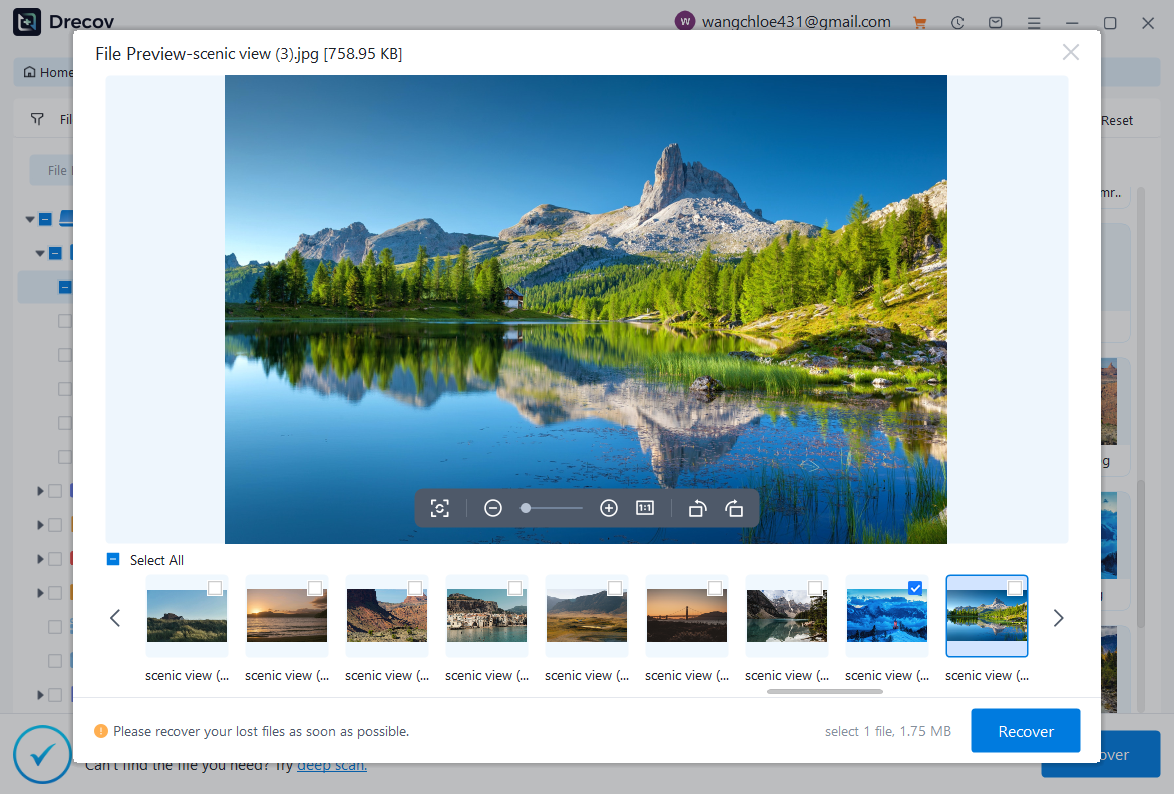
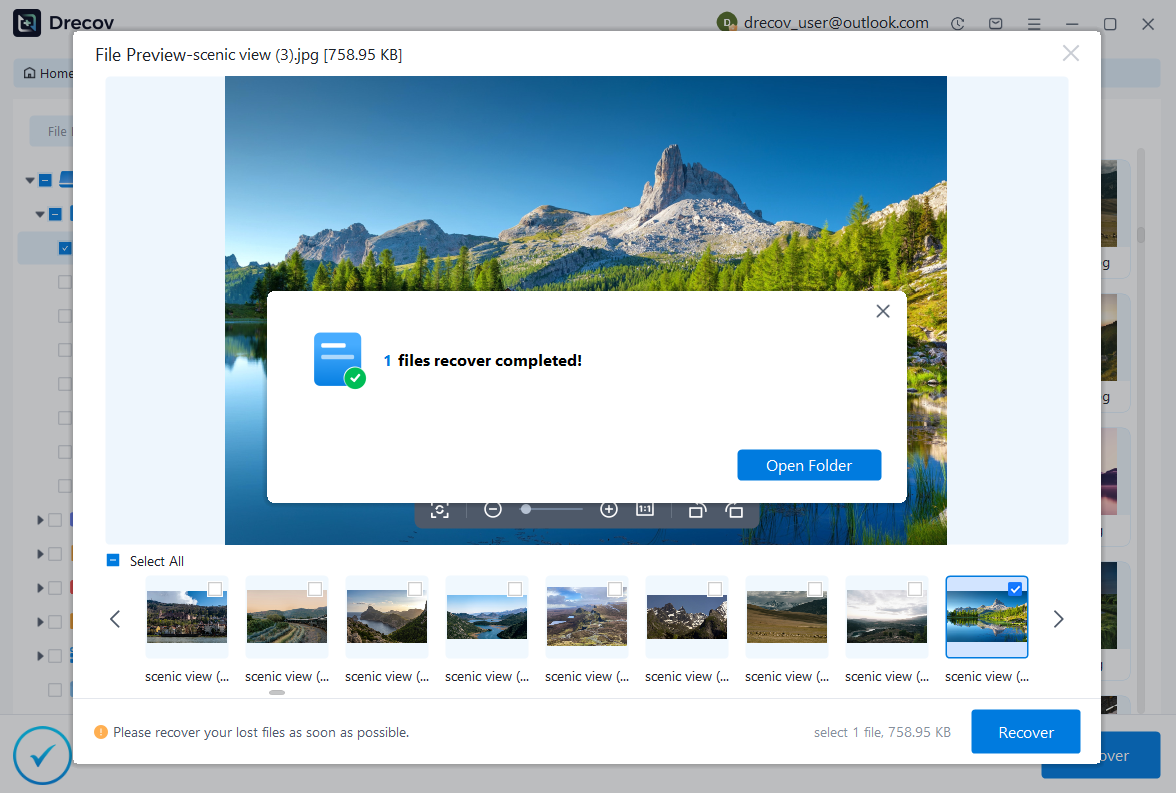
When all other methods fail, professional recovery software like PandaOffice Drecov can help you recover deleted Instagram photos from device storage.
Steps:
- Connect your phone to a computer.
- Launch PandaOffice Drecov.
- Select the storage location (internal memory or SD card).
- Run a deep scan for deleted images.
- Preview and recover the desired files.

Why Choose PandaOffice Drecov?
PandaOffice Drecov is a versatile and reliable solution for recovering a wide range of lost or inaccessible files. Whether you need audio recovery, video recovery, or excel recovery files, PandaOffice Drecov provides fast and efficient results, ensuring your important data is safely restored.
For creative professionals, it supports file recovery Illustrator projects, allowing designers to retrieve unsaved or accidentally deleted artwork without compromising file integrity. Businesses and individuals can also benefit from its restore Windows previous date feature, which helps recover documents or spreadsheets that were lost due to system errors or accidental deletions.
When external storage devices fail, such as a Lacie hard drive not showing up, PandaOffice Drecov can detect and restore files from these drives, ensuring you do not lose critical data. Even deleted files in the recycle bin can be recovered using its advanced recycle bin recovery software capabilities.
Additionally, the software supports recovering data from lost partitions, making lost partition recovery straightforward and reliable. Its intuitive interface allows users to perform audio recovery, video recovery, and excel recovery effortlessly, even for large or complex files.
This method is particularly effective for users asking how do you recover deleted Instagram photos after permanent deletion.
⚠️Warning: Stop using the device immediately after deletion to avoid overwriting recoverable data.
Method 5: Request Instagram Data Download to Retrieve Photos
Test Environment:
- Device: Desktop (Windows 11) / Mobile Browser
- Account Status: Active and accessible
- Scenario: Photos deleted but account still intact
Instagram allows users to download a copy of their data, which may include previously uploaded images. This method is helpful for users searching how to recover a deleted photo on Instagram when direct recovery options are unavailable.
Steps:
- Open Instagram and go to “Settings.”
- Navigate to “Accounts Center” → “Your Information.”
- Select “Download Your Information.”
- Request a data file in JSON or HTML format.
- Wait for Instagram to email your download link.
- Extract the file and locate your images folder.
While not guaranteed, this method can sometimes help recover deleted Instagram photos on Instagram indirectly through stored archives.
⚠️Warning: The download process may take several hours or days depending on account size.
Method 6: Check Archived Posts Instead of Deleted Content
Test Environment:
- Device: iPhone / Android
- App Version: Latest Instagram version
- Scenario: Photos mistakenly archived
Sometimes users think photos are deleted when they are actually archived. The Archive feature hides posts without removing them permanently.
Steps:
- Open Instagram and go to your profile.
- Tap the menu icon and select “Archive.”
- Browse through archived posts.
- Select a photo and tap “Show on Profile.”
This is a quick fix for users asking how can I recover deleted photos on Instagram, especially when the issue is simply misclassification rather than deletion.
Test Environment:
- Device: Android / iPhone
- Scenario: Photo shared via DM or tagged in posts
If your photo was shared with others or tagged in posts, you may still find a copy in conversations or other users’ profiles.
Steps:
- Open Instagram Direct Messages.
- Search for conversations where the photo was shared.
- Check tagged posts in your profile section.
- Screenshot or save the image again.
This indirect method can help recover Instagram deleted photos even when original files are gone.
⚠️Warning: Image quality may be reduced when saving from messages or screenshots.
Method 8: Restore Photos from Third-Party Backup Apps
Test Environment:
- Device: Android with third-party backup app installed
- Backup: Automatic backup enabled
- Scenario: Backup created before deletion
Many users install backup apps that automatically save photos. If such an app was active, it may contain your deleted Instagram images.
Steps:
- Open your backup application.
- Navigate to stored media or image backups.
- Search for Instagram-related folders.
- Restore the required photos.
This approach is useful for those wondering how do I recover deleted Instagram photos without relying on Instagram itself.
Frequently Asked Questions About Instagram Photo Recovery
Can I Recover Permanently Deleted Instagram Photos After 30 Days?
In most cases, once the “Recently Deleted” period expires, recovery through Instagram becomes impossible. However, you may still recover deleted Instagram photos using backups, cloud storage, or recovery software.
The success rate depends on whether the data has been overwritten. Acting quickly significantly increases your chances.
How Do I Recover Deleted Instagram Photos Without Backup?
If no backup exists, your best option is to use data recovery tools or search for cached versions on your device. This is often the answer to how do you recover deleted Instagram photos when traditional methods fail.
You can also try checking shared content, tagged posts, or downloaded data archives.
Is It Possible to Recover Deleted Instagram Photos on Instagram Directly?
Yes, but only within a limited timeframe using the “Recently Deleted” feature. This is the primary way to recover deleted Instagram photos on Instagram without external tools.
After the retention period, alternative methods are required.
Why Can’t I Find My Deleted Instagram Photos Anywhere?
There are several reasons:
- The retention period has expired
- No backups were created
- Storage has been overwritten
- Photos were never saved locally
In such cases, even advanced recovery may not guarantee success.
Best Practices to Prevent Losing Instagram Photos Again
Enable Automatic Backups and Sync
To avoid future data loss, always enable cloud synchronization services like Google Photos or iCloud. These tools automatically store copies of your images, making it easier to recover Instagram deleted photos later.
Regular backups are the most reliable safety net for digital content.
Save Original Photos Before Posting
Always keep a copy of your photos on your device before uploading them to Instagram. This ensures you have a local version even if the online version is deleted.
This simple habit can eliminate the need to search how can I recover deleted photos on Instagram in the future.
Use Archive Instead of Delete
If you’re unsure about removing a post, use the Archive feature instead. This keeps your content hidden but retrievable at any time.
It’s a safer alternative to deletion and helps avoid unnecessary recovery efforts.
Regularly Export Your Instagram Data
Downloading your Instagram data periodically ensures you always have a backup of your content. This is especially useful for creators and businesses managing large amounts of media.
Conclusion: Key Takeaways on Recovering Instagram Photos
Recovering lost images from Instagram is often possible, but success depends on timing, available backups, and the method used. Whether you’re trying to recover deleted Instagram photos, recover deleted Instagram photos on Instagram, or searching how do I recover deleted Instagram photos, the right approach makes all the difference.
The built-in “Recently Deleted” feature is the fastest and easiest solution, while cloud backups and device storage provide additional recovery paths. For more complex situations, tools like PandaOffice Drecov offer a deeper level of recovery when files are no longer accessible through standard means.
Understanding the causes of photo loss—whether accidental deletion, app issues, or account problems—can help you choose the most effective solution. More importantly, adopting preventive measures such as backups and archiving can save you time and frustration in the future.
In the end, knowing how to recover a deleted photo on Instagram is not just about fixing a problem—it’s about protecting your digital memories and ensuring they remain accessible whenever you need them.






