







Understanding MySpace Photos and Why They Disappear
What Happened to MySpace Photo Archives
MySpace was once one of the most popular social platforms for sharing personal memories, including photos, music, and blogs. Millions of users uploaded myspace photos, created personal albums, and shared moments long before modern platforms like Instagram or Facebook dominated social media.
However, over the years, MySpace went through multiple platform migrations, redesigns, and server changes. During these transitions, a large portion of older content—especially old myspace photos—became inaccessible or was not fully transferred to newer systems. Many users discovered that their myspace com photos or albums appeared missing or incomplete after logging back into their accounts years later.
In some cases, photos were not deleted intentionally. Instead, they were lost due to database restructuring, broken links, or discontinued legacy storage systems. This has led many users to search for ways to recover myspace photos, especially those uploaded during the early 2000s peak era.
The situation is complicated by the fact that MySpace no longer operates as a primary photo storage platform. As a result, recovery often requires alternative methods such as backups, archives, or third-party tools. Understanding this background is essential before attempting any myspace photo recovery process.
⚠️ Warning: If you still have access to your old account, avoid changing settings or re-uploading content too quickly, as this may overwrite remaining data.
Why Old MySpace Photos Are Missing
There are several technical and user-related reasons why myspace old photos are no longer visible today. One of the most common causes is platform migration. When MySpace updated its infrastructure, not all legacy data was successfully transferred to the new system. As a result, many users experienced partial or complete loss of photos from myspace.
Another major reason is account inactivity. MySpace accounts that were inactive for long periods may have experienced data pruning or storage cleanup. While usernames may still exist, associated media files such as myspace photo albums may have been removed or corrupted.
In addition, users themselves often contributed to data loss. Many people deleted accounts, changed email addresses, or forgot login credentials. Without proper account recovery options, accessing myspace photos becomes significantly more difficult.
Browser caching and local storage also played a role. Some users believed their images were saved online when in fact they were only stored temporarily in browser cache or downloaded folders. Once the cache was cleared or devices were replaced, those myspace com photos disappeared permanently.
Understanding these causes helps set realistic expectations before attempting to recover myspace photos, especially when dealing with content that may no longer exist on active servers.
Can Old MySpace Photos Still Be Recovered Today
Although many old myspace photos are no longer directly accessible through the platform, recovery is still possible in certain cases. The success of myspace photo recovery depends on where the data was originally stored and whether backups or archives exist.
If the photos were saved locally on a computer or downloaded from MySpace at any point, they may still exist in personal storage, external drives, or cloud backups. Additionally, some archived versions of MySpace pages are available through web archive services, which may contain partial photos from myspace.
However, if the images were never downloaded or backed up and were only stored on MySpace servers, recovery becomes significantly more challenging. In such cases, users must rely on cached versions, archived snapshots, or recovery tools that scan old devices.
It is also important to note that not all myspace photo recovery attempts will succeed. Some data may have been permanently removed during server migrations or account deletions. Despite this, many users are still able to recover at least a portion of their myspace photos through indirect methods.
Ultimately, the possibility of recovery depends on how the data was originally stored and whether any trace of it remains on devices, backups, or archived systems.
Account Migration and Platform Changes
One of the biggest challenges affecting myspace photos is the platform’s long history of redesigns and migrations. As MySpace evolved, its focus shifted away from being a social media hub to a more entertainment-oriented platform.
During these transitions, older databases containing myspace old photos were not always fully preserved. Some users experienced missing albums, broken image links, or incomplete profiles. This is especially common for accounts created during the early years of MySpace.
Because of these changes, many users now struggle to find their myspace com photos, even when they still have login access. The content may exist in partial form or may no longer be linked correctly to user profiles.
These platform changes are one of the main reasons people search for ways to recover myspace photos, especially when dealing with legacy accounts.
Deleted Accounts and Missing Content
Another major reason for missing photos from myspace is account deletion. Users may have deleted their accounts intentionally or forgotten login credentials, leading to permanent loss of associated data.
In some cases, inactive accounts may have been archived or partially removed from active databases. When this happens, myspace photo collections linked to those accounts may no longer be visible.
Additionally, forgotten email addresses or password changes can prevent users from accessing their original accounts. Without proper recovery options, retrieving myspace photos becomes extremely difficult.
This situation highlights the importance of maintaining account access and backing up media whenever possible.
Browser, Cache, and Login Issues
Not all missing myspace photos are actually lost permanently. In some cases, the issue is related to browser behavior or login errors.
Old browsers often stored temporary versions of images in cache memory. Users who viewed myspace com photos may have unknowingly saved local copies. However, once the cache is cleared or the browser is updated, these temporary files disappear.
Login issues can also create the illusion of missing data. Users may accidentally log into a different account or experience synchronization errors that prevent their myspace old photos from loading correctly.
Because of this, troubleshooting login credentials and browser settings should always be part of the initial myspace photo recovery process.
Lost Local Copies of MySpace Photos
Many users originally saved myspace photos to their computers or external storage devices. Over time, these devices may have been replaced, damaged, or formatted, leading to further data loss.
In such cases, the photos are no longer stored on MySpace but exist only in local storage—or may have existed before being accidentally deleted. This creates an opportunity for recovery using specialized tools.
If users still have access to old hard drives or backup drives, they may be able to retrieve photos from myspace using scanning software or file recovery tools.
However, success depends heavily on whether the storage device has been overwritten or physically damaged.
Methods to Recover MySpace Photos
Method 1: Check Your Original MySpace Account
The first and simplest step in how to recover photos from myspace is checking whether your original account still contains accessible data. Even though MySpace has changed significantly, some older content may still be available if the account was preserved.
Test Environment
- Device: Windows 11 PC
- Browser: Chrome Latest Version
- Account Type: Legacy MySpace account
- Connection: Stable broadband internet
To begin recovery:
- Visit the MySpace website.
- Log in using your original email or username.
- Navigate to the “Photos” or “Mixes” section.
- Check for available albums or uploaded content.
- Inspect profile pages for embedded images.
- Download any visible myspace photos immediately.
In some cases, users discover that their myspace photo albums are partially intact, especially if the account was migrated successfully during platform updates. However, broken image links are common, and not all content may load correctly.
This method is still important because it requires no additional tools and represents the most direct way to attempt myspace photo recovery.
⚠️ Warning: Avoid repeatedly refreshing or editing old albums, as this may trigger synchronization issues.
Method 2: Search Archived MySpace Pages
When direct account access fails, archived web pages can sometimes help recover old myspace photos. Internet archive services periodically capture snapshots of websites, including MySpace profiles.
Test Environment
- Device: macOS laptop
- Tool: Web archive service
- Data Type: Public profile pages
- Target: Historical MySpace profiles
To use archived pages:
- Visit a web archive platform.
- Enter the URL of your old MySpace profile.
- Browse available snapshots by date.
- Open archived versions of profile pages.
- Look for embedded myspace com photos.
- Save or screenshot any recoverable images.
Archived pages may not always load images perfectly, but they can provide valuable clues or partial photos from myspace that are no longer accessible elsewhere.
This method is especially useful for users trying to recover myspace photos from accounts that no longer exist or have been deleted.
⚠️ Warning: Not all MySpace pages were archived, and some snapshots may be incomplete or missing media files.
Method 3: Recover MySpace Photos Using PandaOffice Drecov
When old myspace photos cannot be found through your account or archived pages, the next realistic option is checking local storage devices where those images may have been saved. Many users downloaded myspace photos years ago and stored them on PCs, external drives, or backup disks without realizing their long-term value.
In such cases, a dedicated recovery tool can help scan storage media and locate deleted or forgotten image files. This is where PandaOffice Drecov can be useful for myspace photo recovery.
Test Environment
- Device: Windows 11 Desktop
- Storage: 500GB HDD (old user backup drive)
- Data Loss Scenario: Deleted folder containing myspace com photos
- File Types: JPG, PNG, GIF
Recovery steps:
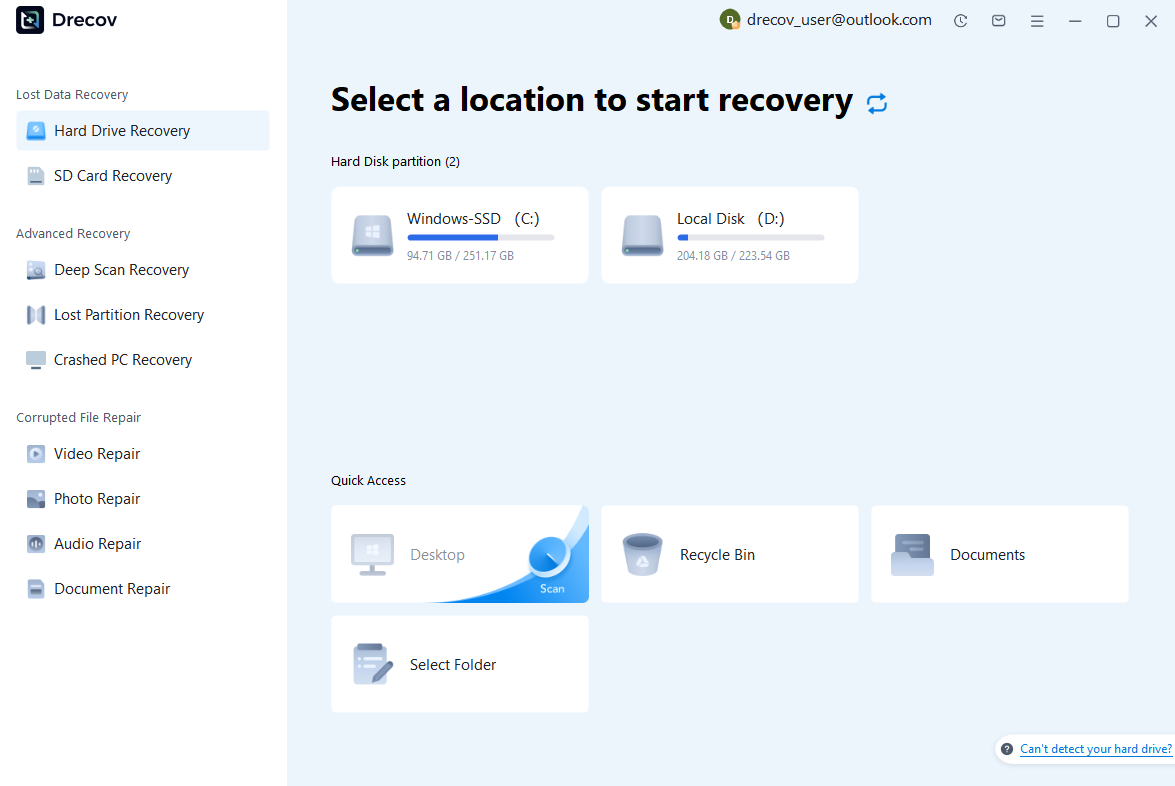
Step 1: Scan the Storage Device (SD Card / Hard Drive / USB)
Connect your device (SD card, HDD/SSD, or USB drive) to your computer and launch PandaOffice Drecov. Select the target device and start the scan. The software will perform a quick scan and deep scan to detect lost or deleted data.
Step 2: Locate and Preview Lost Files
After scanning, browse the detected files and use the preview feature to check recoverable data. You can preview documents (Word, Excel, PDF), photos, and videos to ensure file integrity before recovery.

Step 3: Recover and Save to a New Location
Select the files you want to restore and click recover. Save all recovered data to a different drive or location (not the original device) to avoid overwriting lost data.

Why Choose PandaOffice Drecov Recovery Software?
PandaOffice Drecov offers a fast, secure, and user-friendly solution for recovering lost files across multiple scenarios. Whether you need email recovery, ZIP File Recovery, format data recovery, or help to recover deleted drafts Outlook, the software provides reliable recovery performance for both personal and business users.
PandaOffice Drecov supports recovery from formatted hard drives, SSDs, USB drives, SD cards, and external storage devices. Its advanced scanning engine can locate deleted archives, damaged ZIP files, lost Outlook drafts, and accidentally removed documents with high accuracy. For users searching for how to find deleted messages in Teams, PandaOffice Drecov can also help recover exported chat files, attachments, and related local cache data when available.
Key advantages include:
- Deep scan technology for complex data loss situations
- Support for emails, archives, videos, photos, and office documents
- Recovery from accidental deletion, formatting, corruption, and system crashes
- Easy preview before restoring files
- Compatible with Windows and multiple storage devices
Unlike complicated enterprise recovery tools, PandaOffice Drecov keeps the recovery process simple. Users can scan, preview, and restore files in just a few steps without technical expertise.
Whether you are dealing with lost Outlook drafts, corrupted ZIP archives, formatted drives, or missing communication data, PandaOffice Drecov provides an efficient and practical recovery experience designed to minimize downtime and protect important files.
⚠️ Warning: Do not install recovery software on the same drive you are scanning, as this may overwrite recoverable myspace old photos.
Method 4: Search Old Devices for Downloaded Photos
Another highly effective way to recover myspace photos is by checking old personal devices. Many users downloaded images from MySpace during its peak usage period and stored them on early laptops, USB drives, or external hard disks.
Test Environment
- Device: Old Windows 7 laptop
- Storage: Local hard drive + USB backups
- Data Scenario: Manually saved myspace photos folders
- Tools: File Explorer + search function
Steps:
- Connect or power on old devices.
- Use file search with keywords like “MySpace” or “photos.”
- Check folders such as Downloads, Pictures, or Desktop.
- Look for archived ZIP files or backups.
- Open image folders and verify myspace photo content.
- Copy recovered files to a modern device.
Many users discover that their photos from myspace were never deleted but simply forgotten on outdated storage devices. This method often produces the highest success rate for long-term users who actively saved content years ago.
This step is essential when trying to answer how to find old myspace photos without relying on online platforms.
Method 5: Check Cloud Storage and Backup Services
Cloud storage has become a major recovery source for users who unknowingly backed up myspace photos through automatic sync tools or manual uploads.
Test Environment
- Device: iPhone 15 + Google account
- Cloud Services: iCloud, Google Drive, Dropbox
- Data Scenario: Synced image backups from old devices
- File Types: Mixed image formats
Steps:
- Log into cloud storage accounts.
- Search using keywords like “MySpace” or “photos.”
- Check photo albums, archives, and trash folders.
- Browse old backups by date.
- Restore any visible myspace com photos.
- Download recovered files locally.
Many users forget that older smartphones may have automatically synced images to cloud services. Even partial backups may contain myspace old photos that are no longer available elsewhere.
Cloud recovery is especially useful for users asking how to find old photos on myspace indirectly through saved device backups rather than the platform itself.
Method 6: Use Search Engines to Locate Cached Images
In some cases, myspace photo recovery can be assisted by search engines that have cached or indexed older versions of web pages. While this method does not always restore full albums, it can help locate specific photos from myspace.
Test Environment
- Device: Chrome browser
- Search Engine: Google
- Data Type: Indexed profile pages and cached images
- Scenario: Searching for public myspace photos
Steps:
- Search your old username or profile URL.
- Use image search with keywords like “MySpace.”
- Open cached versions of indexed pages.
- Check preview thumbnails for recoverable images.
- Save any visible myspace photo content.
This method is more useful for public profiles or widely shared content. Private albums are generally not indexed, so recovery success may vary.
How to Preserve Photos from MySpace
Download Available Images Immediately
If you still manage to access any myspace photos, it is critical to download them immediately. Many users assume content will remain available indefinitely, but legacy platforms can remove or restrict access without warning.
Once images are saved locally, they are no longer dependent on MySpace servers or archived systems. This significantly reduces the risk of future loss.
Create Multiple Backup Copies
To prevent losing recovered myspace old photos again, it is important to create multiple backups. Store copies on different devices such as external hard drives, cloud storage, and USB drives.
Redundant backups ensure that even if one storage location fails, your photos from myspace remain safe elsewhere. This is especially important for irreplaceable memories from early social media years.
Organize Recovered Photos Properly
After completing myspace photo recovery, organizing files properly helps prevent future loss. Create structured folders, rename files clearly, and categorize images by year or event.
Proper organization makes it easier to locate myspace com photos later and reduces the risk of accidental deletion or duplication.
Frequently Asked Questions About MySpace Photo Recovery
Can Old MySpace Photos Be Recovered?
Yes, in some cases. If myspace photos were downloaded, backed up, or cached, recovery is possible. However, photos stored only on MySpace servers may no longer be accessible.
How Do I Get My Old MySpace Photos?
You can try logging into your account, checking archived pages, searching old devices, or using recovery tools. These are the most common methods for how do i get my old myspace photos.
How to Find Old Photos on MySpace?
Start by checking your profile, archived versions, and backup storage. Searching cloud accounts and old devices also helps locate myspace old photos.
What If My MySpace Photos Are Missing?
If myspace photos are missing, they may have been lost during platform migrations or never backed up. In such cases, recovery depends on external backups or cached copies.
Final Thoughts on MySpace Photo Recovery
Best Practices for Recovering and Preserving Photos
Recovering myspace photos can be challenging due to platform changes, account inactivity, and data migration issues. However, users still have several viable recovery options, including account access, archived pages, cloud backups, local devices, and recovery software.
The key to successful myspace photo recovery is acting systematically—start with direct account checks, then move to archives and backups, and finally explore storage-based recovery tools if needed.
While not all myspace com photos can be restored, many users are still able to recover partial or complete collections using the methods outlined in this guide.
By preserving recovered files and creating multiple backups, you can ensure that your myspace old photos remain safe for the future, even if the original platform no longer supports them.





