







Understanding Vimeo Video Deletion and Recovery
What Happens When a Vimeo Video Is Deleted
Vimeo is widely used by creators, businesses, educators, and filmmakers to host and share video content. However, accidental deletion remains a common issue, especially for users managing large video libraries.
When a video is deleted from Vimeo, several things may happen depending on the account type and deletion method. In some cases, the video may enter a temporary recovery area. In other situations, the video may be removed from public access immediately while certain account records remain available.
Many users searching for ways to recover deleted video Vimeo content are often surprised to learn that recovery options depend on whether the original source file still exists. Vimeo primarily functions as a hosting platform rather than a long-term backup solution.
Because of this, creators should never assume that uploaded videos are the only copy of important content. Local backups remain essential.
If a Vimeo video disappears unexpectedly, it is important to determine:
- Whether the video was actually deleted
- Whether account permissions changed
- Whether a backup copy exists
- Whether the original upload file remains available
Understanding the source of the problem helps identify the most effective recovery approach.
Is Vimeo Video Recovery Possible
The answer depends on how the video was lost.
Recovery is often possible when:
- The video still exists in Vimeo account records
- The original source file is available
- Local backups are accessible
- Storage devices containing uploads remain intact
Recovery becomes more difficult when:
- Videos are permanently removed
- Local source files are deleted
- Backup copies do not exist
- Storage media has been overwritten
Users frequently ask how to recover deleted video from Vimeo after discovering important uploads are no longer available online. Fortunately, recovery may still be achievable if the original video file can be located on the device used for uploading.
⚠️ Warning: Do not continue writing new data to the drive that originally stored the uploaded video. Overwriting can significantly reduce recovery success.
The sooner action is taken, the greater the chance of restoring the original content.
Common Reasons Vimeo Videos Are Lost
Accidental Deletion from Vimeo Accounts
Human error remains one of the leading causes of Vimeo video loss.
Many creators manage hundreds or even thousands of videos simultaneously. During routine maintenance, outdated projects are removed, folders are reorganized, and permissions are adjusted.
Common deletion scenarios include:
- Selecting the wrong video
- Bulk deleting content
- Removing archived projects
- Cleaning account storage
- Administrative mistakes
A single incorrect click can remove valuable content that took weeks or months to produce.
Users attempting to recover deleted Vimeo video files often discover the issue shortly after deletion. This is beneficial because recent losses typically provide more recovery opportunities than older incidents.
Reviewing account activity and recently deleted content should always be the first step.
Account Changes and Permission Issues
Sometimes a video appears deleted when it is actually inaccessible.
Permission-related issues can occur after:
- Team member changes
- Account transfers
- Subscription modifications
- Privacy setting updates
- Workspace restructuring
A video may still exist on Vimeo servers but become hidden due to configuration changes.
Before beginning recovery procedures, verify:
- Account ownership
- User permissions
- Team access rights
- Privacy settings
- Folder organization
Many cases initially reported as vimeo recover deleted video situations are ultimately resolved by restoring proper account access.
This simple verification can save significant time and effort.
Local Source File Deletion
Even if a Vimeo upload disappears, recovery may still be possible through the original source file.
Most creators maintain local copies on:
- Internal SSDs
- External drives
- NAS devices
- Memory cards
- Video editing workstations
Unfortunately, these files can also be deleted accidentally.
Common causes include:
- Storage cleanup
- Drive formatting
- Project archiving mistakes
- Synchronization conflicts
- Operating system errors
When both the Vimeo version and local file disappear, recovery becomes more challenging but is often still possible if the storage sectors remain intact.
This is where dedicated recovery methods become important.
Storage Device Failures
Hardware problems represent another major cause of video loss.
Storage devices may fail due to:
- SSD wear
- HDD mechanical damage
- Power surges
- Controller failures
- Bad sectors
- File system corruption
When the drive containing the original upload file becomes inaccessible, users often assume the footage is permanently gone.
However, many failed devices still contain recoverable data.
⚠️ Warning: Avoid repeatedly reconnecting failing drives. Continued usage may worsen damage and reduce recovery potential.
In these situations, recovery efforts should focus on preserving the existing data before attempting repairs.
How to Recover Deleted Vimeo Videos
Method 1: Check Vimeo Trash and Account History
Before attempting file recovery, verify whether the missing video still exists within your Vimeo account. Depending on your account settings and the timing of deletion, the video may still be accessible through account management features.
Test Environment
- Vimeo Pro Account
- Windows 11
- Google Chrome
- Recently Deleted Video Project
Steps
- Sign in to your Vimeo account.
- Navigate to your video management dashboard.
- Review recently modified content.
- Check archived or deleted sections if available.
- Examine account activity logs.
- Verify ownership and permissions.
- Restore available content.
When creators ask how do I recover a deleted Vimeo video, the first step should always be checking the account itself. In many situations, videos are not permanently removed but instead moved, hidden, archived, or affected by permission changes.
You should also review:
- Shared team workspaces
- Archived folders
- Private collections
- User access settings
This method is quick, safe, and does not involve any risk to your original files.
Method 2: Restore Videos from Local Backups
Many Vimeo creators maintain backups of their original uploads. These backups may exist even when the online version has been removed.
Test Environment
- Windows 10
- External Backup SSD
- Adobe Premiere Project Files
- Vimeo Source Footage
Steps
- Connect your backup storage device.
- Search for the original project name.
- Review backup folders.
- Check cloud backup services.
- Locate exported video files.
- Copy recovered footage to a secure location.
- Re-upload the video to Vimeo if necessary.
Common backup sources include:
- External SSDs
- NAS systems
- Google Drive
- OneDrive
- Dropbox
- Project archives
Creators frequently keep multiple versions of completed videos. Even if the uploaded Vimeo version is unavailable, the original rendered file may still exist elsewhere.
Users searching for how to recover deleted video from Vimeo often discover that local backups provide the fastest recovery solution.
⚠️ Warning: Always create duplicate copies of recovered videos before editing or re-uploading them.
Method 3: Recover Deleted Vimeo Videos with PandaOffice Drecov
If the original upload file has been deleted from your computer, recovery software may help retrieve it.
Test Environment
- Windows 11
- 1TB NVMe SSD
- Deleted MP4 Upload File
- Vimeo Project Archive Removed
Steps
Step 1: Connect the Drive / USB)
Connect your device (SD card, HDD/SSD, or USB drive) to your computer and launch PandaOffice Drecov. Select the target device and start the scan. The software will perform a quick scan and deep scan to detect lost or deleted data.
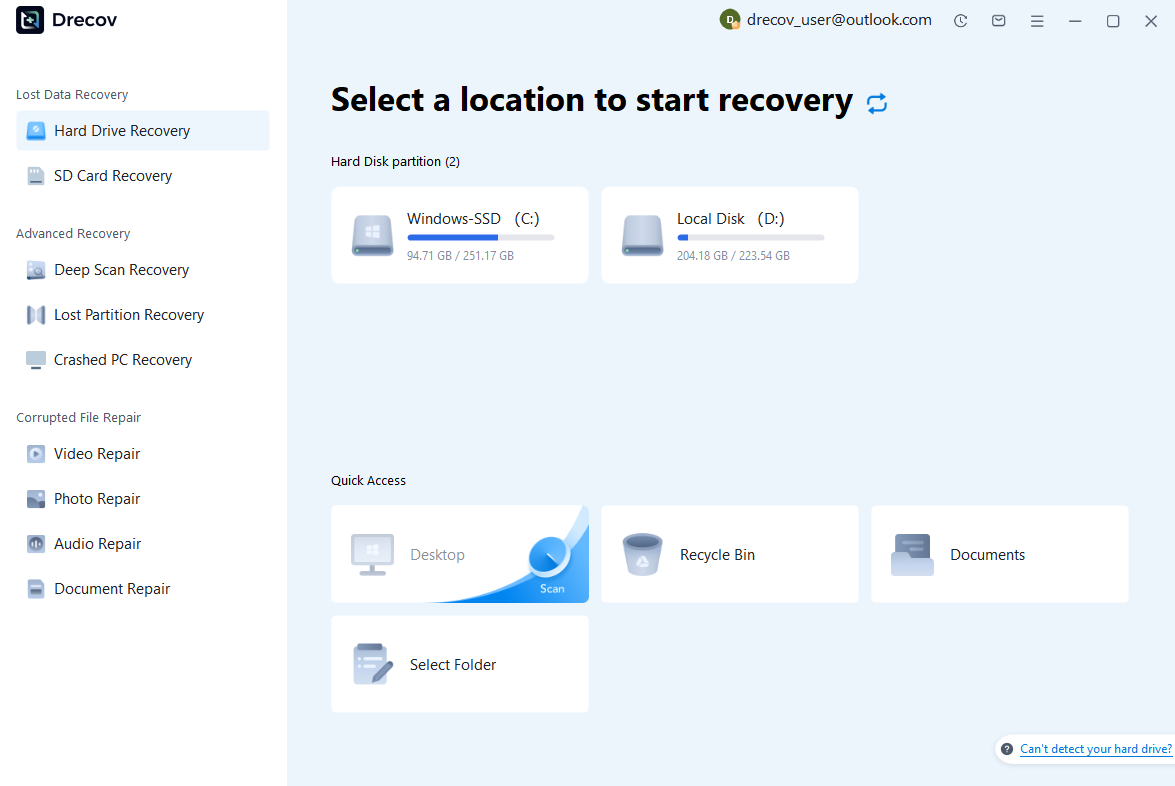
Step 2: Locate and Preview Lost Files
After scanning, browse the detected files and use the preview feature to check recoverable data. You can preview documents (Word, Excel, PDF), photos, and videos to ensure file integrity before recovery.

Step 3: Recover and Save to a New Location
Select the files you want to restore and click recover. Save all recovered data to a different drive or location (not the original device) to avoid overwriting lost data.

Why Choose PandaOffice Drecov Recovery Software?
PandaOffice Drecov offers a fast, secure, and user-friendly solution for recovering lost files across multiple scenarios. Whether you need email recovery, ZIP File Recovery, format data recovery, or help to recover deleted drafts Outlook, the software provides reliable recovery performance for both personal and business users.
PandaOffice Drecov supports recovery from formatted hard drives, SSDs, USB drives, SD cards, and external storage devices. Its advanced scanning engine can locate deleted archives, damaged ZIP files, lost Outlook drafts, and accidentally removed documents with high accuracy. For users searching for how to find deleted messages in Teams, PandaOffice Drecov can also help recover exported chat files, attachments, and related local cache data when available.
After recovery, test the file again. If the audio stream was damaged because of storage issues, a recovered version may play normally.
This method is particularly useful when only a few files exhibit audio problems while VLC works correctly with all other media.
This method can help users recover files from floppy disk storage after accidental deletion, formatting, or logical corruption.
If valuable files are stored on a problematic drive, tools such as PandaOffice Drecov can help recover documents, photos, videos, and other data before proceeding with more aggressive troubleshooting steps.
This approach minimizes risk and ensures that important information remains protected throughout the repair process.
Advanced Vimeo Video Recovery Strategies
Recovering Original Upload Files from Storage Devices
Many Vimeo videos originate from professional editing systems. Even when the uploaded version disappears, source files may remain scattered across various storage devices.
Test Environment
- Windows Workstation
- Multiple Project Drives
- Adobe Premiere Exports
- Deleted Vimeo Upload
Recovery Process
- Search all connected drives.
- Examine project export folders.
- Review temporary render locations.
- Check archived projects.
- Recover missing files if necessary.
Professional editors frequently export several versions of the same video. These duplicates may survive even after the primary file is deleted.
Users trying to recover deleted Vimeo video content should always inspect project directories before assuming the file is lost permanently.
Video editing applications often save:
- Draft exports
- Auto-save projects
- Render caches
- Proxy media
- Backup versions
Locating these assets can significantly simplify recovery.
Recovering Videos After Drive Formatting
Formatting mistakes are a common cause of source file loss.
Test Environment
- Quick-Formatted SSD
- Windows 11
- Vimeo Upload Files Previously Stored
- No New Data Written
Steps
- Stop using the formatted drive immediately.
- Disconnect unnecessary storage devices.
- Perform a deep recovery scan.
- Search for video file formats.
- Recover files to another location.
- Verify playback integrity.
Quick formatting often removes file references without immediately destroying the underlying data.
Recovery success depends on:
- Amount of overwritten data
- Drive condition
- Storage technology
- Recovery timing
When users ask vimeo recover deleted video questions after formatting a drive, acting quickly can dramatically improve results.
⚠️ Warning: Installing new software on the formatted drive may overwrite recoverable video sectors.
Restoring Corrupted Video Files
Sometimes a recovered file exists but cannot be played properly.
Corruption may occur because of:
- Interrupted transfers
- Drive failures
- Incomplete downloads
- System crashes
- Power interruptions
Test Environment
- Recovered MP4 File
- Windows 11
- Video Editing Software Installed
- Partial Corruption Present
Recovery Procedure
- Create a backup copy of the damaged file.
- Test playback in multiple media players.
- Import the file into video editing software.
- Export usable portions.
- Verify the final output.
Even partially damaged videos can often provide usable footage.
For creators managing commercial projects, recovering part of the content is frequently better than starting production from scratch.
Frequently Asked Questions About Vimeo Recovery
Can I Recover a Permanently Deleted Vimeo Video?
Possibly.
If the original source file still exists on a computer, backup device, or cloud storage service, recovery is usually straightforward.
Even when the source file has been deleted, specialized recovery tools may help restore it if the storage sectors have not been overwritten.
The outcome depends on:
- Storage device condition
- Time since deletion
- Amount of new data written
- Availability of backups
How Long Does Vimeo Keep Deleted Videos?
Retention policies may vary depending on account type and platform updates.
Because policies can change over time, users should not rely solely on platform storage as a backup strategy.
Maintaining independent copies of important videos remains the safest approach.
How Do I Recover a Deleted Vimeo Video Without a Backup?
If no backup exists, recovery should focus on the device that originally stored the upload file.
Recommended steps include:
- Stop using the affected drive.
- Avoid saving new data.
- Scan the storage device.
- Recover located video files.
- Save recovered content elsewhere.
This process offers the best chance of recovering deleted source footage.
Can Videos Be Recovered After Emptying the Recycle Bin?
Yes.
Emptying the Recycle Bin removes file references but often leaves the actual video data intact until it is overwritten.
Immediate recovery attempts generally provide the highest success rates.
Final Thoughts
Losing an important Vimeo video can be stressful, particularly when the original project required significant time, effort, and resources to create. Fortunately, many deleted videos can still be recovered through account checks, backup restoration, or source file recovery.
The recovery process should begin by verifying whether the video remains accessible through Vimeo account settings or team permissions. If the online copy is unavailable, local backups and archived project files should be examined next. For situations involving deleted source footage, formatted drives, or file system issues, recovery software such as PandaOffice Drecov can help locate recoverable video data.
Whether you need to recover deleted Vimeo video content, learn how to recover deleted video from Vimeo, or determine how do I recover a deleted Vimeo video, acting quickly and avoiding unnecessary drive activity will provide the greatest chance of success. A strong backup strategy remains the best long-term protection against future video loss.





