







SD cards are widely used in digital cameras, smartphones, drones, gaming consoles, and security systems. However, accidental deletion, formatting, corruption, or virus attacks can lead to sudden data loss. Choosing the right sd card file recovery software becomes critical when important files disappear.
This guide explores how recovery tools work, what features to look for, and how to select the best sd card file recovery software for different scenarios. We will also cover free and advanced solutions, including how to use free sd file recovery software effectively.
If you are searching for reliable file recovery software sd card solutions, this comprehensive guide provides clear, structured answers.
A user at work accidentally formatted her SD card prematurely and we are looking for options to recover the files. Nothing has yet been overwritten. I saw some people talk about drill disk but people seem to not be fans here on reddit. Is there a different tool we should be looking into?—from Reddit
Why You Need SD Card File Recovery Software
Data loss on SD cards often occurs without warning. A simple formatting operation, file system error, or unsafe removal can make files inaccessible. Unlike cloud storage, SD cards do not automatically create backups, making recovery tools essential.
When files are deleted, they are not immediately erased. Instead, the storage space is marked as available. Professional sd card file recovery software scans the storage sectors to locate file signatures and reconstruct lost data.
Basic system tools may repair minor file errors, but they cannot perform deep recovery scans. That’s where specialized tools come in.
⚠️Warning: Stop using the SD card immediately after data loss. Continued use may overwrite recoverable files.
How SD Card File Recovery Software Works
Modern file recovery software sd card tools operate using two primary scanning technologies: quick scan and deep scan.
A quick scan searches recently deleted file records stored in the file allocation table. This method is fast but limited to simple deletion cases.
Deep scan performs sector-by-sector analysis. It identifies file patterns such as JPEG, MP4, DOCX, and RAW formats even when directory structures are damaged. This makes deep scan essential for formatted or corrupted cards.
High-quality best sd card file recovery software also supports multiple file systems including FAT16, FAT32, exFAT, and NTFS. Compatibility ensures effective recovery across cameras, smartphones, and gaming devices.
Advanced algorithms reconstruct fragmented data and allow preview before recovery. This prevents restoring corrupted files unnecessarily.
⚠️Warning: Do not install recovery software directly onto the affected SD card.
Key Features of the Best SD Card File Recovery Software
Not all recovery tools deliver the same results. When evaluating sd card file recovery software, consider the following features.
- Deep scanning capability for formatted or corrupted SD cards.
- File preview functionality to verify integrity before restoring.
- Format compatibility to handle images, videos, documents, and RAW camera files.
- User-friendly interface suitable for beginners.
- Device versatility for SD cards, USB drives, and external hard drives.
Some tools provide sd card file recovery software free download options with limitations. Advanced cases usually require full-feature tools for better success rates.
Method 1: Recover Deleted Files Using SD Card File Recovery Software
When files are permanently deleted, professional sd card file recovery software offers the highest chance of restoration.
Steps:
- Connect the SD card to a computer using a card reader.
- Launch the recovery software.
- Select the SD card from the device list.
- Run a deep scan.
- Preview recoverable files.
- Save restored files to a different drive.
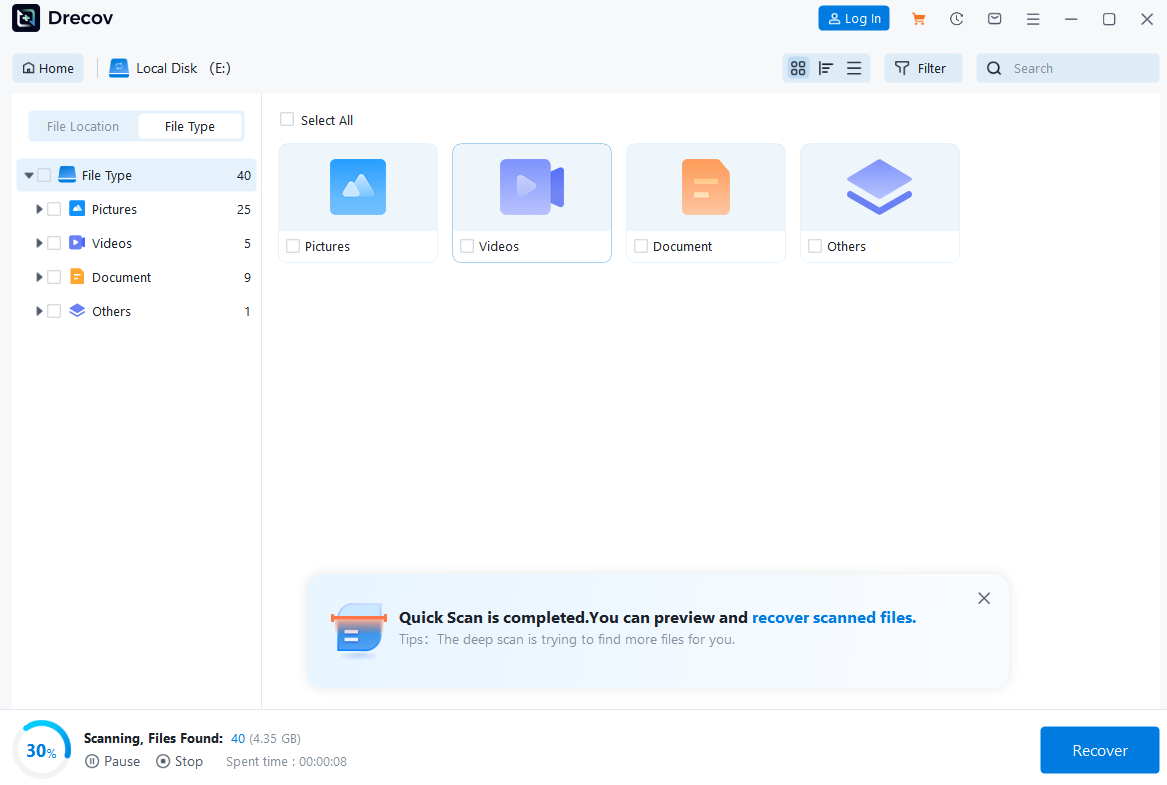
One recommended solution is PandaOffice Drecov, designed for advanced SD card recovery scenarios. It supports FAT/exFAT systems and performs deep sector scanning to retrieve photos, videos, and documents even after formatting or corruption. The preview function allows accurate selection before restoration.
Unlike basic free file recovery software for sd card, professional-grade tools provide higher recovery precision and broader format compatibility.
Method 2: Restore from Backup
If backups were created previously, restoration becomes straightforward. Windows File History, macOS Time Machine, or cloud synchronization services may contain previous copies of SD card files.
Steps for Windows:
- Connect backup storage.
- Open File History.
- Navigate to the original folder.
- Restore selected files.
This method eliminates the need for sd card file recovery software free download, as original data is restored directly. Backup recovery remains the safest and fastest method when available.
Method 3: Repair Corrupted SD Cards Using CHKDSK
For SD cards showing file system errors, using system tools like CHKDSK can fix logical corruption.
Steps:
- Connect the SD card to your PC.
- Open Command Prompt as Administrator.
- Type
chkdsk X: /f(replace X with the SD card drive letter). - Press Enter.
CHKDSK scans for and repairs logical errors, sometimes restoring accessibility to previously unreadable files. If the SD card remains inaccessible, using professional file recovery software sd card tools becomes necessary.
⚠️Warning: Do not interrupt the process. Removing the SD card mid-scan can worsen corruption.
Method 4: Recover Data from a Formatted SD Card
Formatting an SD card is one of the most common causes of data loss. Many users perform a format SD card operation to fix errors or improve compatibility, often without realizing that important files remain recoverable. Quick formatting rebuilds the file system structure but leaves underlying data intact, making it possible to retrieve files with the right tool.
To recover from a formatted SD card:
- Stop using the SD card immediately to avoid overwriting data.
- Connect it to your computer via a card reader.
- Launch recovery software.
- Select the formatted SD card and perform a deep scan.
- Preview and restore files to a separate drive.
Professional software such as PandaOffice Drecov excels at restoring files from formatted media. It supports FAT16, FAT32, exFAT, and NTFS, enabling recovery of photos, videos, documents, and even RAW camera files. By performing a sector-level deep scan, Drecov reconstructs fragmented files that are inaccessible through standard file tables.
⚠️Warning: Never restore files to the same SD card you are scanning, as this may overwrite unrecovered data.
Even if you previously attempted to format SD card to FAT32, using advanced recovery software ensures that lost files can still be restored safely.
Method 5: Recover Data from a Corrupted SD Card
SD cards may become corrupted due to improper ejection, virus infection, or power interruption. In these cases, the device may display a RAW file system or prompt you to format. Instead of formatting immediately, use professional file recovery software sd card to retrieve lost data.
Steps to recover from a corrupted SD card:
- Connect the SD card to your computer.
- Launch sd card file recovery software.
- Select the corrupted SD card and run a deep scan.
- Preview recoverable files.
- Restore them to a secure location.
⚠️Warning: Do not attempt multiple repairs or formatting cycles on a corrupted SD card. Excessive attempts may permanently erase data.
By using professional recovery software, users can safely recover deleted files or entire folders from corrupted media.
Method 6: Recover Data Using Free SD Card File Recovery Software
For users with minor data loss, free solutions exist. Free sd file recovery software often provides limited scanning and recovery functionality. While not as powerful as professional tools, it can restore a few files without cost.
Steps:
- Connect the SD card to your computer.
- Launch free recovery software or free file recovery software for sd cards.
- Select the SD card for scanning.
- Preview recoverable files.
- Export restored files to another storage location.
Free software is ideal for small-scale recovery, such as accidentally deleted photos or documents. Popular sd card file recovery software free download options allow limited recovery before requiring a premium upgrade.
For larger data loss or complex cases, professional software like PandaOffice Drecov offers higher success rates and more file type support. Free software is best suited for quick, small-scale recovery needs.
Method 7: Recover RAW or Unreadable SD Cards
RAW SD cards are unreadable due to file system corruption. They require specialized recovery software. Best sd card file recovery software detects file signatures in RAW storage and reconstructs the directory structure.
Steps:
- Connect the RAW SD card to your computer.
- Launch software.
- Choose a deep scan.
- Preview detected files.
- Restore to a separate drive.
⚠️Warning: Avoid writing new data to RAW SD cards before recovery, as this may overwrite files permanently.
Method 8: Recover Data from Multiple SD Cards and Devices
Some users maintain multiple SD cards for cameras, smartphones, or gaming consoles. The best sd card file recovery software should support multiple device types and formats.
Steps:
- Connect the SD card or external device.
- Launch sd card file recovery software.
- Select the target device and run a deep scan.
- Preview files and restore them to a separate storage location.
PandaOffice Drecov supports FAT16, FAT32, exFAT, and NTFS, making it compatible with devices like DSLR cameras, drones, smartphones, and Nintendo 3DS consoles. Its intuitive interface ensures recovery is straightforward for beginners and professionals alike.
Best Practices for SD Card File Recovery
- Stop using the SD card immediately after data loss to prevent overwriting.
- Use deep-scan recovery tools like PandaOffice Drecov for complex scenarios.
- Preview files before recovery to avoid unnecessary restoration of corrupted files.
- Store recovered data on a separate drive to ensure safety.
- Maintain regular backups to reduce reliance on free sd file recovery software.


Why Choose PandaOffice Drecov for File Data Recovery?
Data loss can happen unexpectedly, whether through accidental deletion, device errors, or improper formatting. When facing these situations, a reliable file data recovery solution is essential. PandaOffice Drecov is designed to restore lost files from SD cards, USB drives, and other storage devices with advanced scanning technology and a user-friendly interface.
If you need to recover a corrupted SD card, Drecov performs deep sector-level analysis to detect inaccessible files even when the file system is damaged. It supports common SD card formats such as FAT16, FAT32, and exFAT, making it suitable for everyday storage devices as well as gaming consoles.
Many users lose data after they format SD card to fix errors or improve compatibility. Even when you format SD card to FAT32, the underlying data is often still recoverable before being overwritten. Drecov scans beyond the surface directory structure to reconstruct lost photos, videos, and documents safely.
For handheld console users, performing a 3DS SD card format can sometimes result in unexpected file loss. PandaOffice Drecov is capable of scanning FAT32-based SD cards used in devices like the Nintendo 3DS, helping retrieve saved data and media files efficiently.
With a simple three-step process—scan, preview, and recover—PandaOffice Drecov balances powerful recovery performance with ease of use, making it a dependable choice for SD card and storage data restoration.
Following these practices increases recovery success rates and preserves file integrity.
Frequently Asked Questions
Q1: Can I recover deleted files from a formatted SD card?
Yes. Even after formatting, files remain on the device until overwritten. Deep-scan can retrieve these files safely.
Q2: Is free SD card recovery software reliable?
Free tools are suitable for minor data loss, but professional software like PandaOffice Drecov provides higher success rates and supports more file types.
Q3: Can corrupted SD cards be recovered?
Yes. Tools with sector-level scanning and RAW recovery capabilities can restore data from corrupted or unreadable SD cards.
Q4: Does SD card type affect recovery?
Professional recovery tools support FAT16, FAT32, exFAT, and NTFS, covering most SD card types including those used in cameras and consoles.
Conclusion
Data loss on SD cards is common but often recoverable. Whether you need free file recovery software for sd card, a professional solution for severe corruption, or a tool for multiple devices, the right software makes all the difference.
PandaOffice Drecov offers advanced deep scanning, wide device compatibility, and user-friendly operation. It ensures maximum recovery success while keeping your files safe. By following proper recovery methods and best practices, lost files can be restored efficiently and securely.





