







Many content creators and casual users face a frustrating issue when uploading content to social media. You spend time capturing the perfect shot, yet the final upload looks pixelated and soft. This leaves you wondering why are my instagram posts blurry and how you can resolve this quality loss. When your photos lose their crispness, it degrades your entire profile aesthetic. This problem can stem from in-app compression settings, network drops, or underlying file corruption on your storage drive.
To combat severe file corruption that ruins your original images before upload, PandaOffice Drecov data recovery software provides a comprehensive solution. This advanced tool helps users retrieve lost or corrupted media files in their original high-resolution formats. Furthermore, it addresses data degradation at the source. If you notice that your source files look distorted or damaged across multiple platforms, an underlying system issue might be the culprit. Understanding the root causes of this visual degradation will help you maintain a polished online presence.
Understanding the Basics of Why Are My Instagram Posts Blurry
To fix a problem, you must first understand why it happens. The main reason behind why are my instagram posts blurry involves aggressive platform compression. Instagram processes millions of uploads daily, so it automatically downsizes files to save server bandwidth. If your image resolution is too high or too low, the platform forces a dramatic resize. Consequently, you experience blurred instagram photos that look completely different from the original files stored on your phone gallery.
Beyond compression, several everyday factors contribute to instagram photos blurry artifacts:
- A poor network connection: When upload speeds drop, the platform lowers media quality to ensure the post completes.
- Incorrect aspect ratios: Images that do not match the standard dimensions get stretched or cropped aggressively.
- Incorrect in-app settings: Data saving options often restrict high-quality media rendering over cellular networks.
Introducing PandaOffice Drecov Data Recovery Software
Sometimes the platform algorithm is not the main culprit. If your source files are corrupted due to a bad storage drive or a system crash, they will display poorly everywhere. In these specific technical scenarios, PandaOffice Drecov data recovery software is an excellent resource. This professional software scans storage devices deeply to rebuild damaged headers and recover uncompressed source images.
⚠ Warning: Install it on a drive different from the one where your data was lost to prevent overwriting.
You can use this software across various situations:
- Restoring raw image files deleted by accident from an external memory card.
- Fixing file system errors that cause your phone gallery to display blurry thumbnails.
- Recovering original high-fidelity graphics after an unexpected partition failure.
For other digital troubleshooting scenarios, you can read the Steam No Licenses Error Fix Guide Windows 11 10 to optimize your operating system performance.
Top Ways to Fix Blurry Instagram Posts: Full Resolution Guide
Fixing unexpected quality drops requires a few targeted, actionable adjustments. If you want to eliminate compression artifacts entirely, use these proven methods to restore absolute clarity to your media uploads.
Method 1: Adjust In-App Settings for High-Quality Uploads
The most common reason why does instagram make my photos blurry is a disabled quality toggle inside the mobile application. By default, the app optimizes for speed rather than visual fidelity.
Follow these exact steps to enable maximum resolution:
- Open the application and navigate to your personal profile tab.
- Tap the three horizontal lines in the top right corner to open the main menu.
- Scroll down to the section labeled Your App and Media.
- Select the option named Data Usage and Media Quality.
- Toggle the switch next to Upload at Highest Quality to the on position.
Furthermore, ensure that the Data Saver option is turned off. This prevents the platform from compressing files heavily when you use mobile networks.
Method 2: Recover High-Resolution Source Files Using PandaOffice Drecov
If your original photos were corrupted on your local drive, they will upload as broken, low-resolution files. This explains why is my instagram picture blurry before posting. Using PandaOffice Drecov data recovery software version 5.2.0 allows you to extract the undamaged, full-sized originals directly from your storage device.
⚠ Warning: Install it on a drive different from the one where your data was lost to prevent overwriting.
Follow these exact steps to recover your files:
- Step 1: Connect your phone or memory card to the computer using a high-speed USB cable.
- Step 2: Launch the application and select the target drive from the main dashboard.
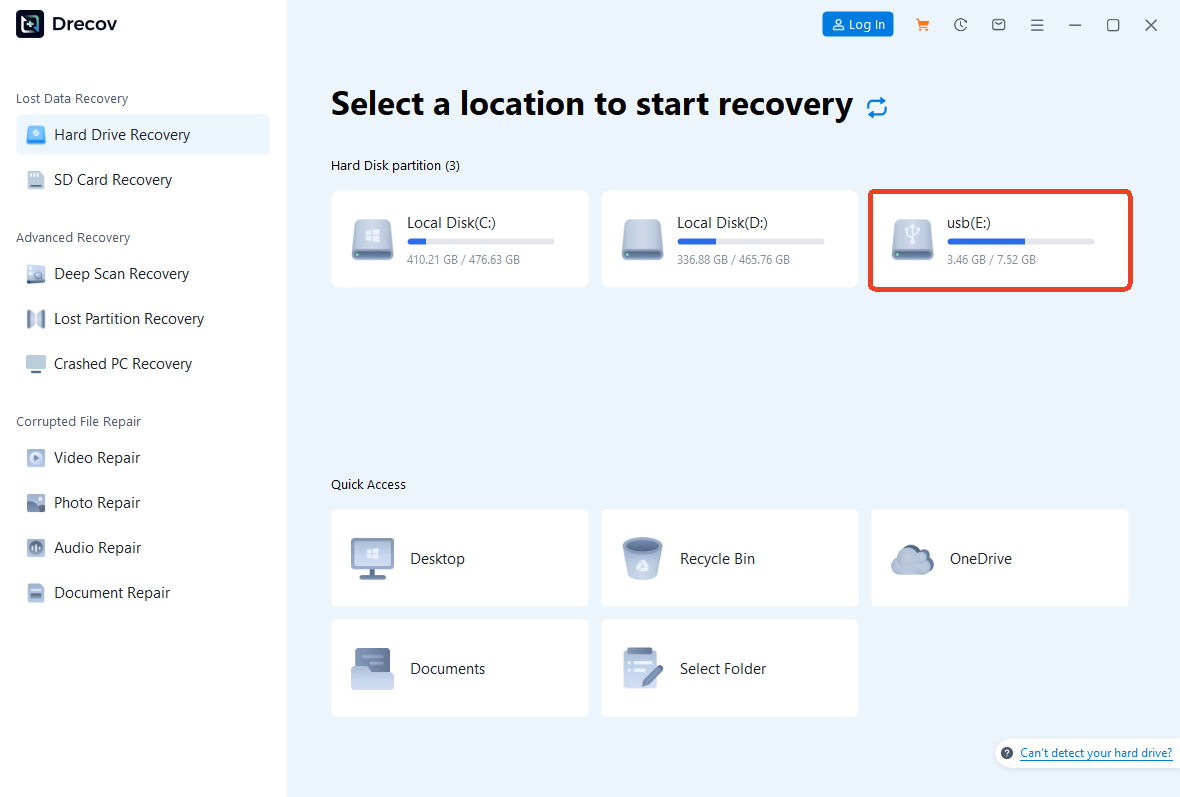
- Step 3: Click the Scan button to initiate a deep analysis of the storage sectors.
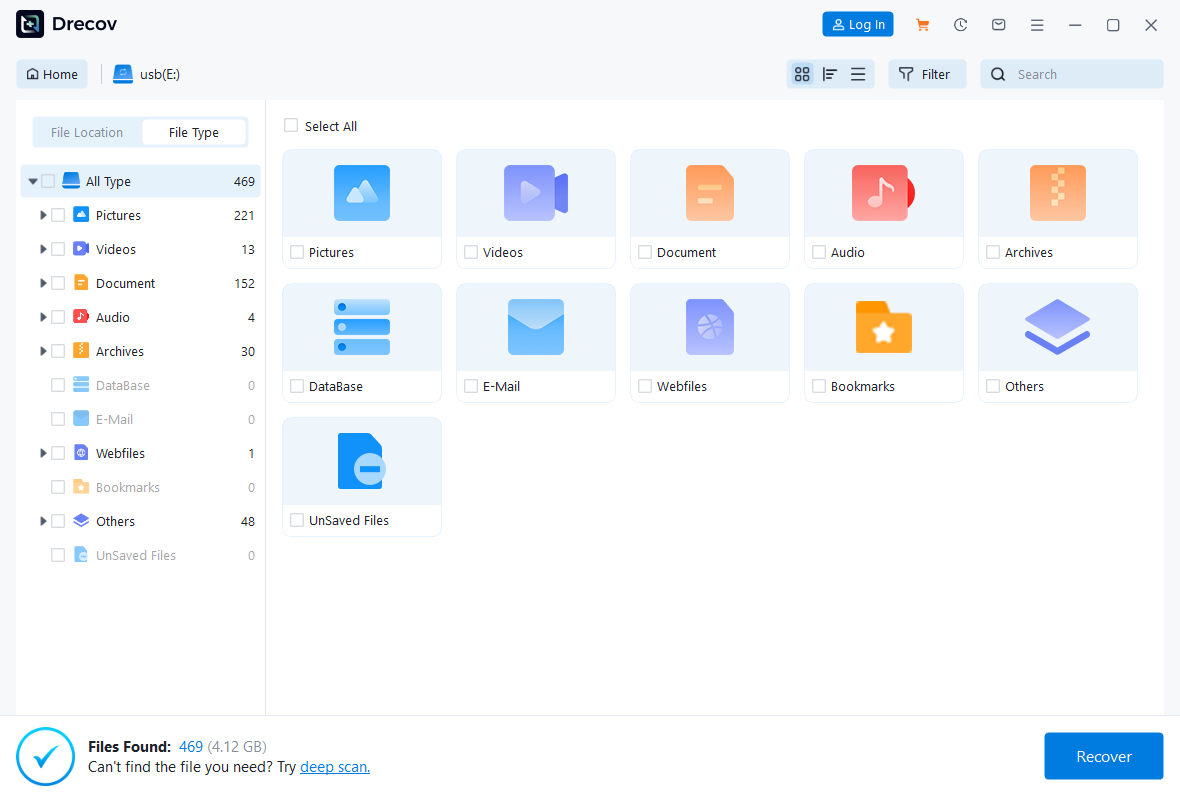
- Step 4: Preview the discovered JPEG or PNG files to ensure they are crisp.
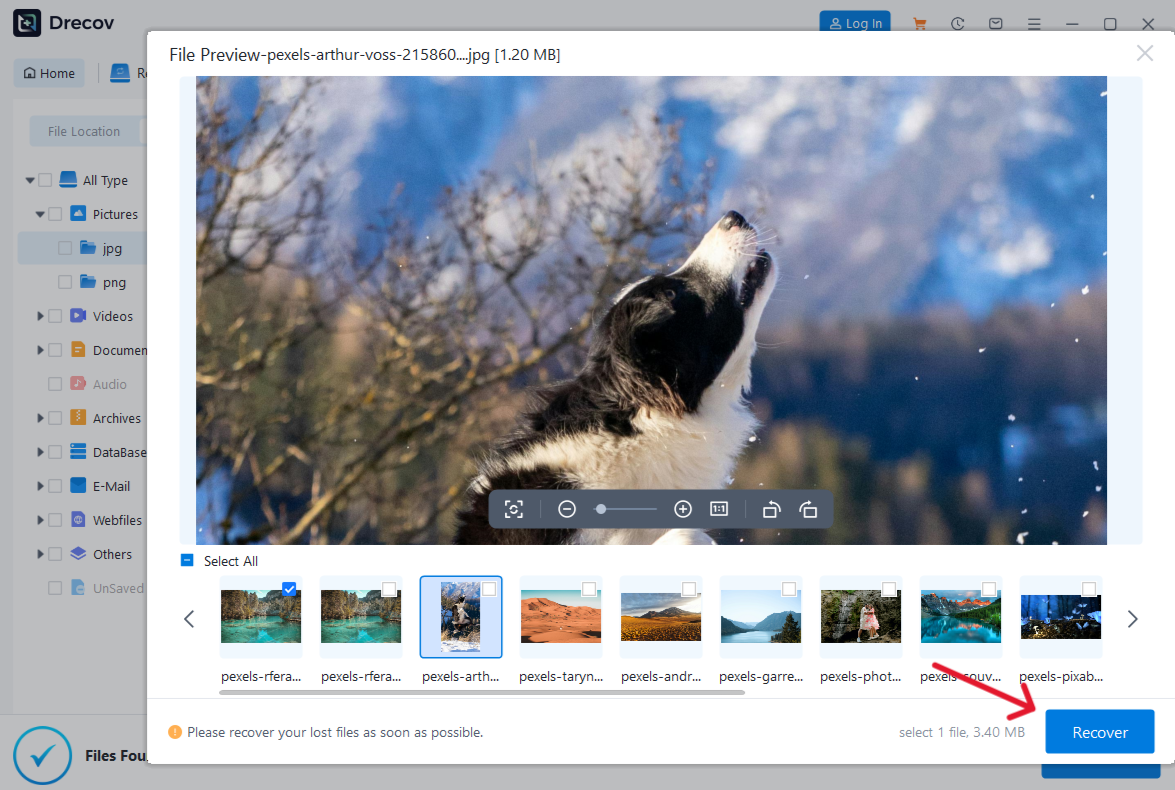
- Step 5: Select your desired items and click Recover to save them to a secure local folder.
If you regularly transfer files from gaming systems or external drives, check out this guide on How to Install PS3 ISO Games From USB to keep your storage configurations clean.
Method 3: Format Your Images to Match Platform Dimensions
When you wonder why is my instagram post blurry, look at your pixel dimensions. If your file is wider than 1080 pixels, the compression engine crops and reshapes it.
Follow these optimization guidelines before uploading:
- Square posts: Always crop your images to exactly 1080 pixels by 1080 pixels.
- Portrait posts: Use an aspect ratio of 4 to 5, which means 1080 pixels by 1350 pixels.
- Landscape posts: Maintain a ratio of 1.91 to 1, or 1080 pixels by 566 pixels.
In addition, always export your finalized edits as JPEG files with a color space set to sRGB. This ensures accurate color translation and prevents unexpected blur.
Method 4: Clear the Application Cache to Remove Temporary Files
An overloaded local cache can cause why are my ig posts blurry glitches. Corrupted temporary data restricts the application from processing your crisp uploads properly.
Follow this path on Android devices to clear the cache:
- Open your smartphone device Settings menu.
- Navigate to the Apps or Application Manager section.
- Find and tap on the entry for Instagram.
- Select the Storage option.
- Tap the Clear Cache button located at the bottom of the screen.
For iOS devices, a direct cache clear button is unavailable. However, you can achieve the same result by deleting the application entirely and installing it fresh from the official App Store.
Alternative or Complementary Methods
Aside from adjusting settings or performing data recovery, you can utilize external digital editing tools to prep your media. These tools ensure your visual content remains clean before it touches any compression algorithms.
Editing Software versus Native Cameras
Many users notice why do my instagram posts look blurry when they capture content directly inside the social media application. The native app camera takes a quick screen capture of the viewfinder rather than using your phone lens to its full potential.
| Method | Pros | Cons |
| Phone Camera App | Utilizes full hardware sensor capabilities, HDR processing, and maximum resolution output. | Requires an extra step to import the media into the social media app. |
| In-App Camera | Quick to use, offers instant access to creative filters and interactive stickers. | Lowers overall resolution, prone to compression artifacts, and creates why are my ig highlights blurry issues. |
| Desktop Software | Advanced sharpening tools, precise export parameters, and pixel-perfect control. | Steep learning curve, requires a computer, and takes more time to export. |
Furthermore, utilizing advanced upscaling software can help fix images that look soft. If you encounter browser errors or downsampling issues while gathering creative assets online, read the Fixing the Can’t Download Files From ChatGPT Error 2026 Guide to keep your download streams functioning optimally.
Tips & Best Practices
Maintaining high data integrity is essential for consistent content delivery. Follow these top strategies to ensure your files remain unblemished across all platforms.
Optimizing Upload Quality consistently
To prevent why does my instagram post look blurry errors, always perform your final content reviews under a strong Wi-Fi network. Cellular data fluctuations trigger automatic downscaling during the upload process. In addition, avoid sending photos via standard text messaging apps before uploading them, as these apps compress files heavily. Use cloud storage links or direct file transfers to preserve original data structures.
Avoiding Common Formatting Pitfalls
Many creators accidentally cause why do my pictures look blurry on instagram problems by over-sharpening their graphics during the editing phase. High-frequency details confuse the compression algorithm. Consequently, the platform aggressive filter applies extra blur to counteract the noise.
Keep your file sizes under 30 megabytes. If a file is too large, the system will compress it heavily, resulting in an automated instagram story blurry upload.
Frequently Asked Questions
Why is instagram making my photos blurry on stories?
Stories utilize a specific vertical aspect ratio of 9 to 16. If you upload a horizontal photo, the system stretches the pixels out to fit the full screen. This stretching causes immediate pixelation. To avoid this, pre-crop your stories to 1080 pixels by 1920 pixels in an external editor.
Why do my ig posts look blurry when using cellular data?
The application includes a built-in data saver mechanism designed to reduce bandwidth consumption. When active, it lowers the rendering resolution of your media uploads. Turn off the Data Saver toggle in your media settings to fix this.
Can corrupted files cause why are my instagram highlights blurry issues?
Yes, if the original story files stored in your archive were corrupted by a failing storage drive, the highlights will render as low-resolution placeholders. You can use PandaOffice Drecov data recovery software to rescue the healthy, original files from your storage backup.
Why are my instagram highlights blurry after a phone update?
System updates sometimes reset your application preferences back to default. This can silently disable your high-quality upload settings. Always check your media quality preferences after updating your mobile operating system.
How do I stop blurred instagram photos when uploading from a computer?
When using a web browser, ensure you export your work via official guidelines provided by tech resources like Meta Web Upload Standards. Avoid dragging low-resolution thumbnails directly into your browser window.
Conclusion
Resolving the headache of why are my instagram posts blurry comes down to smart file preparation and correct app settings. By enforcing proper aspect ratios, toggling high-quality uploads, and maintaining stable network connections, you can eliminate compression artifacts completely.
When structural file errors or system corruption ruin your source files, PandaOffice Drecov data recovery software stands as the ultimate line of defense. It restores your media to its original clarity so your portfolio remains pristine. Take control of your digital assets today, maintain strict backup routines, and ensure your creative content looks exactly as intended.






