







In the rapidly evolving landscape of 2026, the intersection of artificial intelligence and content creation has birthed a new technical phenomenon: chatgpt hidden markers. Whether you are a digital marketer, a concerned educator, or an SEO specialist, understanding these microscopic digital fingerprints is essential. While many users perceive AI output as simple “plain text,” there is often a layer of data beneath the surface that tells a much deeper story about the content’s origin and integrity.
What Are ChatGPT Hidden Markers?
Definition of Hidden Markers
Let’s cut through the noise right away—chatgpt hidden markers are not visible stamps, logos, or obvious tags sitting inside your text. Instead, they are subtle, often invisible elements that exist beneath the surface of AI-generated content. Think of them like microscopic fingerprints embedded in the writing—completely unseen to the naked eye but detectable with the right digital forensic tools.
These markers usually fall into two primary categories: invisible characters and structural patterns. Invisible characters include elements like zero-width spaces or non-breaking spaces, which look like regular spacing but behave differently in code or formatting environments. According to recent findings in 2026, AI-generated text may include such hidden Unicode artifacts that subtly influence how text behaves without changing its appearance.
At the same time, there are also structural or statistical patterns—things like sentence rhythm, word probability, and punctuation style—that act as a kind of “behavioral signature.” These aren’t embedded like characters but emerge from the mathematical way the AI generates language.
Are They Real or Just a Myth?
Here’s where things get interesting. The internet is full of claims that ChatGPT secretly watermarks everything it writes to help Google identify AI content. The truth is more nuanced than a simple yes or no.
While OpenAI has not officially confirmed a universal, permanent “watermark” for all text, technical analyses show that hidden Unicode artifacts and consistent linguistic patterns do appear in outputs. In 2026, evidence suggests that these markers are often a byproduct of the reinforcement learning process or specific tokenization choices made by the model. So, the myth comes from a misunderstanding: people imagine a deliberate tracking system, while in reality, most markers are either side effects of generation or experimental features designed for AI detection and transparency.
Types of ChatGPT Hidden Markers
Invisible Unicode Characters
If hidden markers had a physical form, this would be it. Invisible Unicode characters are the most widely discussed type of marker. These include elements like zero-width spaces, soft hyphens, and non-breaking spaces—characters that don’t visibly appear on your screen but exist in the underlying data.
Imagine writing a sentence that looks perfectly normal, but between some words, there are invisible gaps that only software can detect. This is exactly what happens when you copy text from certain AI interfaces. These characters can affect formatting, copying behavior, and even how search engines like Google interpret your content.
Identify Invisible Markers in Copied Text
When you copy content directly from a chat interface into a CMS like WordPress or a code editor like VS Code, you might unknowingly bring along “ghost” characters. To identify invisible markers in copied text, you often need to toggle “Show Hidden Characters” in your editor or paste the text into a hex editor.
In the context of SEO, these markers are critical. If a zero-width space is inserted in the middle of a primary keyword, a search engine crawler might see “keyword” as two separate entities, potentially damaging your rankings.
Zero-Width Space Characters in AI Output
One of the most frequent findings in forensic text analysis is the presence of zero-width space characters in AI output. These specific characters (Unicode U+200B) are used to manage how text wraps or to provide subtle “anchors” for the model’s internal tracking.
Examples of Zero-Width Characters
Some common examples include:
- Zero-width space (U+200B): Adds no visible gap but separates character strings.
- Zero-width joiner (U+200D): Used to join two characters that wouldn’t normally connect.
- Non-breaking space (U+00A0): Prevents an automatic line break at its position.
- Soft hyphen (U+00AD): An invisible marker that only shows a hyphen if the word is broken at the end of a line.
Reports from Originality.ai indicate that such invisible markers are commonly found in AI-generated text, even if they aren’t always intended as a “gotcha” for users.
Statistical and Linguistic Patterns
Now let’s move into more subtle territory. Even if you strip out every hidden character, AI-generated text still carries patterns. These are not “markers” in the traditional sense but are just as important for identification.
Token Bias and Writing Style Signals
AI models generate text based on probabilities. That means certain words, phrases, and sentence structures appear more frequently than others. Over time, this creates a recognizable style—a kind of fingerprint that detection tools can analyze. For example, AI-generated content often shows:
- Consistent sentence length: AI tends to avoid very short or very long “bursty” sentences.
- Predictable transitions: Frequent use of “Furthermore,” “Moreover,” and “In conclusion.”
- Balanced tone: A lack of strong emotional variance or “human” slang.
Why Do Hidden Markers Exist?
AI Detection and Transparency
You might be wondering—why would these markers exist at all? The answer lies in transparency and accountability. As AI-generated content now accounts for over 50% of web content in 2026, there’s growing pressure to distinguish human writing from machine-generated text.
Hidden markers offer a potential solution for verifying the provenance of information. They help platforms identify AI content to prevent misinformation and maintain trust in digital communication. Some researchers are even exploring “cryptographic watermarking,” which embeds detectable signals into the mathematical probability of word choices.
Technical Artifacts vs Intentional Watermarks
It is vital to distinguish between technical artifacts and intentional watermarks. Many chatgpt hidden markers are simply artifacts of how the system processes language. For example, during the “tokenization” phase—where words are turned into numbers—small inconsistencies can appear.
Conversely, intentional watermarking is a deliberate engineering choice. These systems encode signals into the text using mathematical patterns, making them detectable only with specialized tools. As of 2026, these are increasingly being used to comply with global regulations like the EU AI Act.
PandaOffice Drecov Data Recovery Software
While managing hidden markers is a concern for content quality, the technical side of data management often leads to another problem: accidental data loss. Whether you’ve deleted a cleaned document or lost a file during a formatting error, having a reliable recovery tool is paramount.
PandaOffice Drecov Data Recovery Software: Overview
PandaOffice Drecov data recovery software is a professional-grade utility designed to retrieve lost, deleted, or corrupted files from a variety of storage media. Whether you are dealing with a local SSD, an external USB drive, or an SD card, Drecov uses advanced scanning algorithms to rebuild file structures that have been flagged as “deleted” by the operating system.
One of the standout features of PandaOffice Drecov is its ability to handle over 2,000 file types, making it indispensable for users who work with complex document formats and AI-generated datasets.
⚠ Warning: Install it on a drive different from the one where your data was lost to prevent overwriting.
Step-by-Step Guide to Using PandaOffice Drecov
If you have lost important documents due to system crashes or accidental deletion while trying to remove chatgpt hidden markers, follow these steps to recover your data:
- Step 1: Select the Location. Upon opening the software, you will see a list of available drives. Select the partition or external device where your lost files were originally stored.

- Step 2: Initiate the Scan. Click the “Scan” button. PandaOffice Drecov will perform a “Quick Scan” followed by a “Deep Scan.”
- Note: The Deep Scan is essential for recovering files from formatted drives or corrupted partitions.

- Step 3: Preview and Filter. Once the scan is complete, use the sidebar to filter by file type (e.g., .docx, .pdf, .txt). You can double-click on a file to preview its content before committed to the recovery.
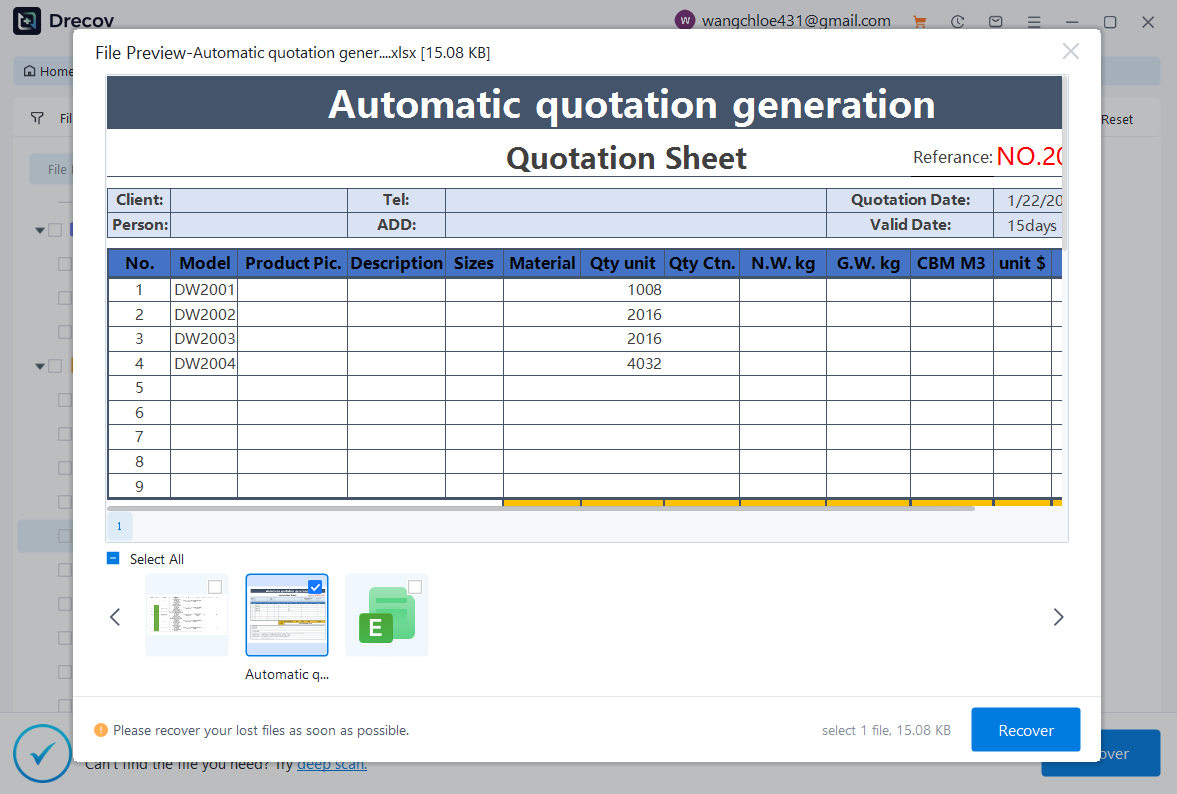
- Step 4: Execute Recovery. Select the files you wish to restore and click the “Recover” button.
Warning: Always save your recovered files to a different drive than the original to prevent permanent data corruption.
Internal Resources
- Troubleshooting file upload errors in ChatGPT
- Managing your ChatGPT Pro subscription settings
- What to do if ChatGPT-5 features are missing
How ChatGPT Hidden Markers Work
Behind-the-Scenes Text Generation
To understand chatgpt hidden markers, you must understand that the AI doesn’t “write” in the human sense—it predicts the next “token” (a piece of a word) based on complex probability distributions. This process is called “inference.” During inference, the model selects the most likely next token from a pool of thousands.
How Markers Get Embedded
Markers can appear during different stages of this process:
- Token Selection Bias: The model is “nudged” to pick certain synonyms over others, creating a statistical pattern.
- Formatting and Rendering: The interface adds Unicode characters like
U+202F(Narrow No-Break Space) to manage how the text looks on your screen. - Copy-Paste Interactions: When you copy text, the “rich text” metadata can sometimes carry hidden HTML tags or invisible markers.
Can Hidden Markers Identify AI Content?
Accuracy of Detection Tools
In 2026, AI detection tools have become highly sophisticated. By looking for chatgpt hidden markers and analyzing the “perplexity” and “burstiness” of text, these tools can often flag AI content with high confidence. However, they are not 100% accurate.
Limitations and False Positives
A major issue remains the “false positive.” If a human writer uses a very structured, formal tone, detection software might incorrectly flag their work as AI-generated. This is why hidden markers are used as a signal, not a definitive verdict.
Impact of Hidden Markers on SEO and Content
Effects on Ranking and Indexing
Do chatgpt hidden markers affect SEO? Not directly—Google’s official stance is that they reward high-quality content regardless of how it is produced (E-E-A-T: Experience, Expertise, Authoritativeness, and Trustworthiness). However, if markers cause “keyword splitting” or formatting glitches, your technical SEO will suffer.
Formatting and Rendering Issues
Excessive hidden characters can cause unexpected layout breaks. For example, if you paste text with hidden markers into a meta description field, it might exceed the character limit even if it looks short enough, because those invisible characters still count toward the byte limit.
How to Detect and Remove Hidden Markers Safely
Manual Detection Methods
You can detect markers manually without expensive software:
- Paste into a Plain Text Editor: Use Notepad (Windows) or TextEdit (Mac, in Plain Text mode). These often strip out complex Unicode.
- Use a Hex Editor: For a deep dive, open your file in a Hex editor to see if there are bytes like
E2 80 8B(the UTF-8 for a zero-width space). - Regex Search: In advanced editors like VS Code, search for
[^\x00-\x7F]to find non-standard ASCII characters.
Best Practices for Publishing
To ensure your content is clean and professional:
- Always paste as plain text: Use
Ctrl + Shift + Vto strip formatting. - Use a Unicode “Sanitizer”: There are free web tools specifically designed to remove zero-width characters.
- Final Human Pass: Always have a human editor read the text to break up the “AI rhythm” that statistical markers create.
Chatgpt Hidden Markers FAQs
1. Does ChatGPT add hidden markers intentionally?
OpenAI has experimented with watermarking, but many markers found in 2026 are unintentional technical artifacts from the generation process.
2. Can I get penalized by Google for hidden markers?
Google prioritizes quality. However, if markers break your site’s code or keywords, your rankings may drop due to technical errors.
3. How does PandaOffice Drecov help with AI content?
If you accidentally delete “cleaned” versions of your AI content or lose files during a system crash while using detection tools, Drecov can recover those lost documents.
4. Are zero-width spaces the only type of marker?
No, markers also include statistical biases, such as the frequent use of specific synonyms or a lack of sentence variety.
5. Will all AI text eventually have mandatory watermarks?
Global regulations are moving toward mandatory disclosure for AI content, so official watermarking will likely become standard by 2027.
Conclusion
Chatgpt hidden markers are a reality of the modern digital age. They represent the “DNA” of AI-generated content, consisting of both invisible Unicode characters and predictable linguistic patterns. While they serve a purpose in transparency and AI detection, they can also cause technical headaches for SEO and web formatting.
By using tools like PandaOffice Drecov for data safety and following rigorous text-cleaning protocols, you can master the use of AI while maintaining the highest standards of content integrity. Stay informed, stay technical, and always keep the human element at the center of your work.






