







Understanding BIOS Reset and System-Level Configuration Recovery
What BIOS reset means in modern computer systems
A BIOS reset refers to restoring the Basic Input Output System (BIOS) or UEFI firmware settings back to their default factory configuration. This process is essential when system-level settings become misconfigured, causing boot failures, hardware detection issues, or system instability.
Many users search for how do i reset bios when their computer suddenly fails to start properly or when they accidentally change advanced settings in the firmware interface. Unlike operating system resets, BIOS reset operates at a deeper hardware initialization level and directly affects how the computer communicates with components such as the CPU, RAM, storage drives, and GPU.
When performing a how to reset bios on computer operation, the system does not reinstall Windows or Linux. Instead, it resets configuration values stored in CMOS memory or firmware storage. These values control boot priority, hardware overclocking, fan curves, virtualization settings, and security features.
BIOS systems are typically divided into:
- Legacy BIOS (older systems)
- UEFI firmware (modern systems)
Both types support reset functions, but the interface and access methods vary depending on motherboard manufacturer.
Understanding how BIOS works is critical before attempting any reset process, because incorrect adjustments can lead to boot loops or system failure.
When BIOS reset becomes necessary in real-world scenarios
There are several situations where users may need to perform a BIOS reset, especially when searching for how do i reset bios or how to reset pc bios due to system malfunction.
One of the most common triggers is boot failure. If the computer cannot detect a bootable drive, it may be due to incorrect boot priority settings inside BIOS. Another common issue is hardware upgrade failure, where newly installed RAM or SSD is not recognized by the system.
BIOS reset is also frequently used when overclocking settings cause instability. Overclocking modifies CPU or RAM performance beyond default specifications, which can lead to crashes or failure to boot.
Other scenarios include:
- Incorrect SATA configuration
- Disabled integrated graphics
- Corrupted firmware settings
- Failed BIOS update
In enterprise environments, technicians often use BIOS reset as a first troubleshooting step before deeper hardware diagnostics.
For users asking how to reset to bios, the goal is usually to return the system to a known stable configuration that allows successful booting.
⚠️Warning: Important precautions before BIOS reset
Before performing any BIOS reset, it is critical to understand the risks involved. Although BIOS reset is generally safe, improper handling may lead to system instability or temporary inability to boot.
Key precautions include:
- Ensure power stability (especially on laptops)
- Do not interrupt reset process once started
- Record custom BIOS settings before reset
- Avoid unnecessary firmware modifications
If a system is already unstable, attempting repeated BIOS changes without understanding configuration may worsen the problem.
Common Reasons for Performing a BIOS Reset on Computers
Boot failure and system startup configuration errors
Test environment: Desktop PC + Windows 11 + NVMe SSD + misconfigured boot order
One of the most frequent reasons users search how do i reset bios is due to boot failure issues. When the system cannot locate a valid boot device, it may display errors such as “No Bootable Device” or remain stuck on the manufacturer logo screen.
This often happens when boot order settings are changed unintentionally. For example, switching from SSD to USB boot priority without a connected device can prevent the system from starting correctly.
A how to reset bios on computer process restores default boot configuration, ensuring that the system automatically detects available storage devices.
Resetting BIOS in this case helps:
- Restore default boot sequence
- Re-enable system drive detection
- Clear incorrect boot entries
This is one of the most effective recovery steps before reinstalling an operating system.
Hardware compatibility issues after upgrades
Test environment: Gaming PC + upgraded DDR5 RAM + RTX GPU + ASUS motherboard
Another common reason for BIOS reset is hardware upgrade failure. When users install new components, such as RAM or graphics cards, the system may not recognize them correctly due to outdated or misconfigured BIOS settings.
For example, incorrect memory frequency settings can prevent RAM from running at full speed or even stop the system from booting entirely.
In such cases, users often search how to reset bios on computer or how to reset pc bios to restore compatibility defaults.
A BIOS reset can resolve:
- Memory recognition issues
- GPU detection errors
- PCIe lane configuration conflicts
After reset, the motherboard reinitializes hardware detection parameters, ensuring compatibility with newly installed components.
User misconfiguration and overclocking instability
Test environment: High-performance PC + CPU overclock enabled + unstable voltage settings
Overclocking is a common practice among performance users, but incorrect settings can lead to system crashes or failure to boot. Adjustments to CPU multiplier, voltage, or RAM timings can push hardware beyond stable limits.
When instability occurs, users frequently search how to reset the acer laptop BIOS equivalent process or general how do you reset the bios methods to restore system stability.
BIOS reset removes all manual overclocking configurations and returns CPU and RAM settings to safe defaults.
This helps:
- Eliminate system crashes
- Restore stable voltage levels
- Reset thermal management profiles
It is one of the fastest ways to recover from unstable system tuning.
⚠️Warning: Do not repeatedly modify BIOS without testing stability
Frequent changes without proper testing can increase system instability and make troubleshooting more difficult.
Step-by-Step Methods: How to Reset BIOS on Computer Safely
Method 1: Reset BIOS through UEFI interface (standard method)
Test environment: Windows 11 PC + UEFI firmware + SSD boot drive
The simplest and most common method for how do i reset bios is using the built-in UEFI interface.
Steps:
- Restart the computer
- Press DEL, F2, or ESC during startup
- Enter BIOS/UEFI menu
- Navigate to “Exit” or “Save & Exit” section
- Select “Load Setup Defaults” or “Restore Defaults”
- Confirm and save changes
- Reboot system
This method is safe and widely used for how to reset pc bios situations where the system still boots normally.
Method 2: CMOS battery removal method (hardware reset)
Test environment: Desktop PC + removable CMOS battery + ATX motherboard
This is a physical reset method used when BIOS cannot be accessed.
Steps:
- Power off system completely
- Disconnect power cable
- Open PC case
- Remove CMOS battery
- Wait 5–10 minutes
- Reinsert battery
- Restart system
This method is commonly used for how to manually reset bios scenarios.
Method 3: CMOS jumper reset method (motherboard reset pins)
Test environment: Gaming motherboard + clear CMOS jumper + BIOS lock state
Some motherboards include a jumper specifically for resetting BIOS.
Steps:
- Locate CMOS jumper on motherboard
- Move jumper to reset position
- Wait 10–15 seconds
- Return jumper to original position
- Boot system
This method is often used when users search how to reset pc bios in advanced hardware troubleshooting cases.
Method 4: Laptop power drain reset method
Test environment: Acer laptop + internal battery + UEFI firmware
For laptops without removable CMOS batteries, power drain reset is used.
Steps:
- Power off laptop
- Disconnect charger
- Hold power button for 30–60 seconds
- Reconnect power
- Restart system
This is a common answer for how to reset bios on computer in portable devices.
⚠️Warning: Always ensure stable power during reset
Power interruption during BIOS reset can lead to corrupted firmware settings or boot failure.
Advanced BIOS Repair and Troubleshooting Techniques
BIOS reset not working or settings not restoring
Test environment: Desktop PC + ASUS motherboard + UEFI firmware + corrupted CMOS settings
In some cases, users performing an acer system reset-style BIOS recovery equivalent or general BIOS reset may notice that settings do not properly restore. This can happen when CMOS memory is partially corrupted or when firmware settings are locked by manufacturer protections.
If users are searching how can i reset bios but standard methods fail, the issue may require deeper troubleshooting.
Solutions include:
- Repeating CMOS battery removal for longer duration
- Using motherboard jumper reset instead of software reset
- Disconnecting all power sources including PSU switch
- Checking for dual BIOS recovery mode
In enterprise or gaming systems, BIOS corruption can sometimes persist even after standard reset attempts. In these cases, hardware-level reset methods become necessary.
Boot failure after BIOS reset attempt
Test environment: Gaming PC + SSD boot drive + incorrect boot configuration after reset
A common issue after performing how to reset pc bios is that the system fails to boot properly. This usually happens because BIOS reset restores default boot priority, which may not match installed operating systems.
For example:
- Legacy mode enabled instead of UEFI
- Wrong boot drive selected
- Secure Boot conflicts
To fix this:
- Re-enter BIOS setup
- Set correct boot device priority
- Enable UEFI mode if required
- Save and restart system
This is especially common after a full how do you reset the bios operation on custom-built PCs.
Missing BIOS interface or locked BIOS settings
Test environment: Laptop + manufacturer locked firmware + restricted BIOS access
Some laptops and OEM systems restrict BIOS access or hide advanced settings. Users searching how to reset bios on computer may find that reset options are unavailable.
In such cases:
- Use manufacturer recovery hotkeys
- Perform EC reset (embedded controller reset)
- Use firmware update utility to restore defaults
- Contact OEM support if BIOS is locked
Locked BIOS systems require careful handling because incorrect modification attempts can permanently block system access.
⚠️Warning: Avoid forced BIOS flashing without expertise
Flashing BIOS incorrectly can permanently damage motherboard firmware and render the system unusable.
Linux-Based BIOS Recovery and System-Level Reset Scenarios
Test environment: Ubuntu Live USB + failed Windows boot system + UEFI motherboard
Linux live environments can help diagnose whether BIOS issues are hardware-related or OS-related. When users search how to reset bios on computer, they often confuse OS problems with firmware problems.
Using Linux live USB allows:
- Checking disk detection at hardware level
- Verifying boot mode (UEFI vs Legacy)
- Testing hardware stability without OS interference
Steps:
- Boot from Linux USB drive
- Open disk utility tools
- Verify storage detection
- Check system logs for boot issues
- Compare BIOS settings with hardware behavior
This helps isolate whether a BIOS reset is truly necessary.
Test environment: Dual boot PC + Ubuntu + Windows + GRUB bootloader
In Linux dual-boot systems, BIOS issues often appear as bootloader problems. Users searching how to reset to bios may actually need to repair GRUB instead.
Steps:
- Boot into Linux recovery mode or live USB
- Mount system partition
- Repair GRUB bootloader
- Reinstall boot configuration
- Reboot and verify BIOS boot order
This ensures BIOS settings align with Linux boot structure.
Advanced firmware recovery and BIOS restoration workflow
Test environment: Corrupted BIOS settings + failed POST + USB recovery tool
When BIOS corruption is severe, standard reset methods may not work. In such cases, firmware recovery tools are required.
Steps:
- Download correct BIOS version from manufacturer
- Create BIOS recovery USB
- Insert USB into system
- Trigger BIOS recovery mode
- Restore firmware defaults or reflash BIOS
- Reboot system
This process is often used in advanced how do i reset bios failure cases where systems cannot even enter setup menu.
In data-critical environments, tools like Pandaoffice Drecov may be used beforehand to recover important files before performing firmware-level recovery or system rebuild operations.
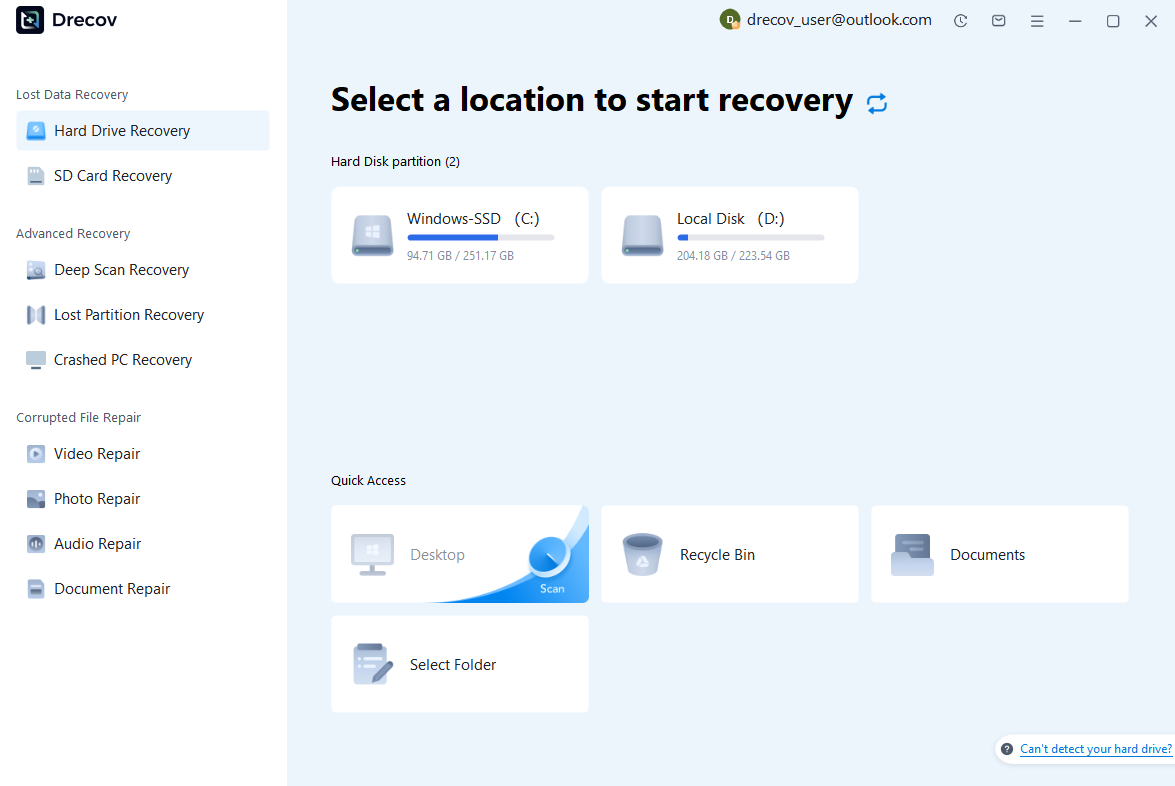
Step 1: Connect the Drive / USB)
Connect your device (SD card, HDD/SSD, or USB drive) to your computer and launch PandaOffice Drecov. Select the target device and start the scan. The software will perform a quick scan and deep scan to detect lost or deleted data.
Step 2: Locate and Preview Lost Files
After scanning, browse the detected files and use the preview feature to check recoverable data. You can preview documents (Word, Excel, PDF), photos, and videos to ensure file integrity before recovery.

Step 3: Recover and Save to a New Location
Select the files you want to restore and click recover. Save all recovered data to a different drive or location (not the original device) to avoid overwriting lost data.

Why Choose PandaOffice Drecov Recovery Software?
PandaOffice Drecov offers a fast, secure, and user-friendly solution for recovering lost files across multiple scenarios. Whether you need email recovery, ZIP File Recovery, format data recovery, or help to recover deleted drafts Outlook, the software provides reliable recovery performance for both personal and business users.
PandaOffice Drecov supports recovery from formatted hard drives, SSDs, USB drives, SD cards, and external storage devices. Its advanced scanning engine can locate deleted archives, damaged ZIP files, lost Outlook drafts, and accidentally removed documents with high accuracy. For users searching for how to find deleted messages in Teams, PandaOffice Drecov can also help recover exported chat files, attachments, and related local cache data when available.
After recovery, test the file again. If the audio stream was damaged because of storage issues, a recovered version may play normally.
This method is particularly useful when only a few files exhibit audio problems while VLC works correctly with all other media.
This method can help users recover files from floppy disk storage after accidental deletion, formatting, or logical corruption.
⚠️Warning: Never interrupt BIOS flashing process
Interrupting firmware flashing can permanently damage motherboard BIOS chips and require hardware replacement.
FAQ: BIOS Reset Common Questions
How can I reset BIOS safely?
You can safely reset BIOS using the UEFI interface, CMOS battery removal, or motherboard jumper method depending on system type.
How do you reset the BIOS if PC won’t boot?
Use CMOS reset (battery or jumper) or BIOS recovery USB tools.
How to reset computer from BIOS settings?
Enter BIOS, load default settings, save changes, and reboot system.
Is BIOS reset the same as factory reset?
No. BIOS reset restores firmware settings, while factory reset reinstalls the operating system.
What happens after BIOS reset?
System restores default hardware configuration and boot settings.
Conclusion: Best Practices for BIOS Reset and System Recovery
Key takeaways for BIOS reset process
Performing a BIOS reset is one of the most important low-level troubleshooting steps in computer repair. Whether users search how do i reset bios, how to reset pc bios, or how can i reset bios, the goal remains the same: restore stable hardware configuration.
The most effective approach depends on system condition:
- UEFI reset for normal systems
- CMOS reset for boot failures
- Jumper reset for hardware-level issues
- USB recovery for firmware corruption
- Linux tools for diagnostic validation
Understanding the correct method prevents unnecessary hardware damage and improves recovery success rates.
Final Optimization Insight
A successful BIOS recovery strategy depends on choosing the correct reset method based on system state. From simple UEFI resets to advanced firmware recovery, each method serves a specific level of system failure.






