







Overview of Acer System Reset and Factory Restoration Process
What is Acer system reset and how it works
An acer system reset is the process of restoring an Acer laptop or notebook to its original factory condition or a clean operating system state. This procedure is commonly used when a device becomes slow, unstable, infected with malware, or when the user wants to erase all data before selling or repurposing the machine.
When users search for terms like how do i reset a acer laptop, they are usually looking for methods that restore performance or fix system errors without requiring advanced technical knowledge. In most modern Acer devices, reset functions are integrated into Windows recovery tools or BIOS-level recovery partitions.
A typical reset process works by removing user-installed applications, restoring system files, and rebuilding the operating system environment. In some cases, a full acer reset factory settings option will completely wipe all data and reinstall Windows as if the device were brand new.
There are different levels of reset depending on system condition:
- Soft reset (keeping personal files)
- Full reset (removing everything)
- Advanced recovery reset (reinstalling OS from recovery partition)
The goal of a how to reset a laptop acer process is to return the system to stability while minimizing manual troubleshooting.
Why Acer users perform system reset operations
Users perform acer reset factory settings operations for several common reasons. One of the most frequent causes is system slowdown caused by long-term software usage, background applications, or storage fragmentation.
Another major reason is malware infection or system corruption. In such cases, traditional antivirus tools may not fully restore system integrity, making a reset the most effective solution.
Users also search for how do i reset acer laptop when preparing the device for resale or transfer. A full reset ensures that personal data, accounts, and stored files are completely removed.
In enterprise environments, IT teams often perform acer master reset operations to standardize devices across multiple employees, ensuring uniform system configurations.
Additionally, system updates or failed installations may cause boot errors, forcing users to reset the device to restore functionality.
In short, system reset is both a maintenance tool and a recovery solution for Acer devices.
⚠️Warning: Important preparation before Acer system reset
Before performing any reset operation, users must ensure that all important data is backed up. A full acer system reset may permanently erase documents, photos, and installed applications.
It is also important to ensure the device is connected to a stable power source. Interruptions during reset can lead to incomplete installation or system boot failure.
Avoid initiating reset processes when the system is overheating or unstable, as this may increase the risk of system corruption.
Common Reasons and Scenarios for Resetting an Acer Laptop
System errors requiring Acer reset factory settings
Test environment: Acer Aspire 5 + Windows 10 + corrupted system update
System errors are one of the most common triggers for acer reset factory settings procedures. These include boot failures, system crashes, blue screen errors, and corrupted system files.
When Windows becomes unstable due to failed updates or driver conflicts, users often cannot access normal settings. In such cases, reset functions built into recovery mode are used to restore system stability.
Users searching for how to reset the acer laptop in error scenarios are typically dealing with situations where standard troubleshooting methods no longer work.
A reset reinstalls core system components and removes conflicting configurations, effectively resolving many persistent software issues.
User-driven reset cases (performance and cleanup scenarios)
Test environment: Acer Nitro 5 + Windows 11 + heavy application usage over 2 years
Over time, laptops accumulate temporary files, unused applications, and background services that slow down performance. This leads many users to perform a how to reset acer notebook operation to restore system speed.
Unlike troubleshooting individual issues, system reset provides a clean slate. Users often choose this option instead of manually uninstalling software or cleaning registry entries.
This method is especially useful for gamers, developers, or content creators who need optimal system performance without legacy software interference.
A clean reset is often more efficient than long-term maintenance in heavily used systems.
Cross-version system issues (Windows 7/8/10 compatibility cases)
Test environment: Acer laptop dual boot Windows 7 + Windows 10
Different Windows versions handle recovery differently. Users searching how do you reset acer laptop often encounter confusion when switching between older and newer operating systems.
Windows 7 relies heavily on recovery partitions, while Windows 10 and 11 include built-in reset options within settings menus. Linux dual-boot systems require additional bootloader handling.
These differences can complicate reset procedures, especially when recovery partitions are missing or damaged.
⚠️Warning: Do not interrupt reset process
Interrupting a system reset can lead to incomplete installation, boot loops, or permanent OS failure. Always ensure uninterrupted power and avoid forced shutdowns.
Step-by-Step Methods: How to Reset Acer Laptop Safely
Method 1: Reset Acer laptop via Windows Settings
Test environment: Acer Swift 3 + Windows 10 + SSD storage + functional OS
This is the most straightforward method used in modern systems and is commonly searched as how do i reset acer laptop.
Steps:
- Open Windows Settings
- Navigate to Update & Security
- Select Recovery
- Click “Reset this PC”
- Choose either:
- Keep my files
- Remove everything
- Confirm reset operation
- Wait for system reinstallation
This method is ideal for users performing how to reset a laptop acer when the system is still accessible.
Method 2: Advanced startup reset (Windows 7/8/10 systems)
Test environment: Acer Aspire E series + Windows 8 + recovery partition available
For older systems or when Windows cannot boot normally, advanced startup options are required.
Steps:
- Restart laptop
- Press F8 / F12 / Alt+F10 depending on model
- Enter recovery environment
- Select repair or reset option
- Choose factory restore
- Confirm system reset
This method is commonly associated with acer reset factory settings operations.
Method 3: Acer master reset using recovery partition
Test environment: Acer laptop + intact OEM recovery partition
This is one of the most complete reset methods and is often referred to as acer master reset.
Steps:
- Turn off device completely
- Press Alt + F10 during startup
- Enter Acer recovery environment
- Select full factory restore
- Confirm system wipe and reinstall
- Wait for completion
This restores the laptop to its original factory state.
Method 4: BIOS-level reset and system recovery
Test environment: Acer laptop + corrupted boot configuration
When Windows cannot boot, BIOS-level recovery may be necessary.
Steps:
- Enter BIOS menu
- Load default settings
- Save and restart
- Trigger recovery partition
- Reinstall operating system
This method is useful when users search how to reset acer notebook but cannot access Windows.
Method 5: Linux dual boot reset environment
Test environment: Acer laptop + Ubuntu + Windows dual boot system
Linux users may need to reset Acer systems differently due to GRUB bootloader.
Steps:
- Access GRUB menu
- Select recovery mode
- Repair boot configuration
- Reinstall OS if required
- Restore system access
This applies to advanced how do you reset acer laptop scenarios involving multiple operating systems.
Method 6: Advanced recovery reset with data protection
Test environment: Windows 11 + corrupted system partition + external recovery drive
In severe system failure cases, data recovery may be required before reset.
Steps:
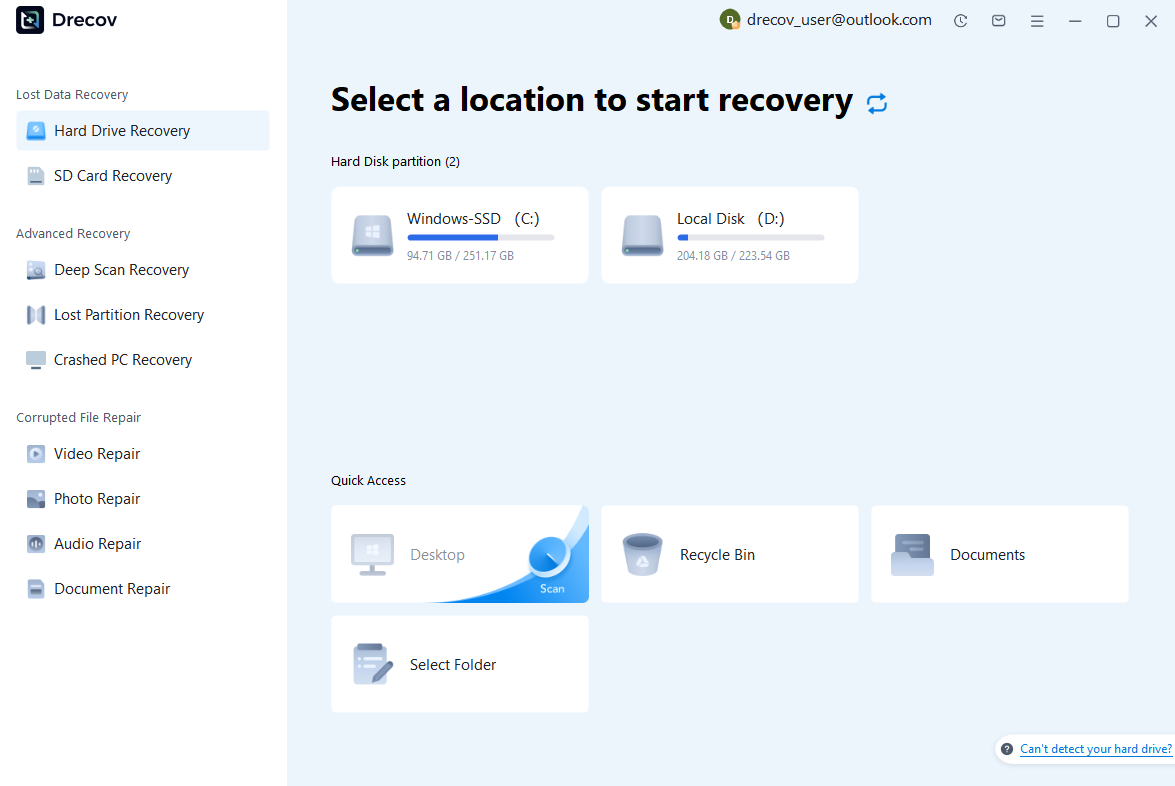
Step 1: Connect the Drive / USB)
Connect your device (SD card, HDD/SSD, or USB drive) to your computer and launch PandaOffice Drecov. Select the target device and start the scan. The software will perform a quick scan and deep scan to detect lost or deleted data.
Step 2: Locate and Preview Lost Files
After scanning, browse the detected files and use the preview feature to check recoverable data. You can preview documents (Word, Excel, PDF), photos, and videos to ensure file integrity before recovery.

Step 3: Recover and Save to a New Location
Select the files you want to restore and click recover. Save all recovered data to a different drive or location (not the original device) to avoid overwriting lost data.

Why Choose PandaOffice Drecov Recovery Software?
PandaOffice Drecov offers a fast, secure, and user-friendly solution for recovering lost files across multiple scenarios. Whether you need email recovery, ZIP File Recovery, format data recovery, or help to recover deleted drafts Outlook, the software provides reliable recovery performance for both personal and business users.
PandaOffice Drecov supports recovery from formatted hard drives, SSDs, USB drives, SD cards, and external storage devices. Its advanced scanning engine can locate deleted archives, damaged ZIP files, lost Outlook drafts, and accidentally removed documents with high accuracy. For users searching for how to find deleted messages in Teams, PandaOffice Drecov can also help recover exported chat files, attachments, and related local cache data when available.
After recovery, test the file again. If the audio stream was damaged because of storage issues, a recovered version may play normally.
This method is particularly useful when only a few files exhibit audio problems while VLC works correctly with all other media.
This method can help users recover files from floppy disk storage after accidental deletion, formatting, or logical corruption.
In some cases, tools like Pandaoffice Drecov can be used before reset to recover important files from corrupted partitions before performing a full system wipe.
Advanced Troubleshooting for Acer System Reset Failures
Reset stuck or frozen during Acer system reset process
Test environment: Acer Aspire 7 + Windows 11 + SSD system drive
One of the most common issues during an acer system reset is the process freezing at a certain percentage, often during “Resetting this PC” or “Preparing to reset” stages. This can happen due to corrupted system files, unstable storage, or interrupted update services.
When users search for how do i reset acer laptop, they often encounter this problem when the reset process takes longer than expected or appears stuck.
To resolve this issue:
- Wait at least 60–90 minutes before intervening
- Ensure power cable is connected
- If still frozen, perform a forced restart
- Boot into recovery mode again
- Restart reset process using advanced startup
In many cases, switching from a standard reset to recovery partition reset resolves the issue more effectively than repeating the same method.
Reset option missing in Acer laptop system settings
Test environment: Acer Swift 1 + Windows 10 Home + missing recovery features
Sometimes users trying how to reset a laptop acer notice that the reset option is missing in system settings. This usually happens when recovery partitions are deleted or system files are heavily damaged.
Possible solutions include:
- Using advanced startup recovery mode
- Booting from installation USB
- Reinstalling Windows manually
- Using Acer recovery hotkeys (Alt + F10)
This situation often forces users into full system reinstallation instead of standard acer reset factory settings procedures.
Boot loop after Acer master reset attempt
Test environment: Acer Nitro 5 + Windows 10 + incomplete reset process
A boot loop occurs when the system continuously restarts after an acer master reset. This usually indicates incomplete system installation or corrupted boot files.
To fix:
- Enter recovery environment
- Use startup repair tool
- Rebuild boot configuration (bootrec commands)
- Reattempt system reset or reinstall OS
This issue highlights why uninterrupted reset execution is critical for system stability.
⚠️Warning: Avoid repeated forced resets
Repeatedly interrupting or restarting the reset process may permanently damage system recovery partitions and make acer reset factory settings impossible without external installation media.
Linux-Based Acer System Reset and Recovery Methods
Resetting Acer laptop in dual boot Linux environments
Test environment: Acer laptop + Ubuntu Linux + Windows dual boot configuration
In dual boot systems, users searching how do you reset acer laptop often face additional complexity because Linux modifies the boot structure (GRUB).
To reset safely:
- Boot into Linux system
- Back up important files
- Access disk utility tools
- Identify Windows partition
- Reboot into Windows recovery or installation media
- Perform full system reset or reinstall
Unlike Windows-only systems, Linux requires careful partition handling before performing acer system reset operations.
Using Linux live USB for Acer system recovery
Test environment: Acer Extensa + Ubuntu Live USB + corrupted Windows partition
When Windows cannot boot, a Linux live USB can be used as a recovery environment.
Steps:
- Boot from Linux USB drive
- Access internal storage safely (read-only mode recommended)
- Copy important files to external drive
- Prepare Windows recovery USB
- Reinstall Windows or perform reset
This method is useful when traditional how to reset acer notebook methods fail due to system corruption.
Partition recovery before system reset in Linux environments
Test environment: Acer Aspire + damaged NTFS partition + Linux GParted tool
Before performing an acer system reset, Linux tools can sometimes recover partition structure.
Steps:
- Open GParted or disk utility
- Analyze partition table
- Attempt repair of damaged partitions
- Recover accessible files
- Proceed with reset or reinstall
This step is critical when system reset is required but important data is still at risk.
⚠️Warning: Do not format partitions blindly in Linux
Incorrect formatting or partition deletion in Linux can permanently destroy recovery options for acer reset factory settings procedures.
FAQ: Acer System Reset Common Questions
How do I reset a Acer laptop without password?
You can use recovery partition (Alt + F10) or bootable USB installation media to perform a full acer system reset even without login access.
How do you reset Acer laptop completely?
A full reset involves either factory recovery partition reset or clean OS reinstallation, which fully executes acer reset factory settings.
What is Acer master reset?
An acer master reset restores the laptop to original factory condition, removing all user data, applications, and settings.
How to reset Acer notebook when it won’t boot?
Use advanced startup options, recovery USB, or BIOS recovery mode depending on system state.
Is Acer system reset safe?
Yes, but only if data is backed up beforehand and reset process is not interrupted.
Conclusion: Best Practices for Acer System Reset
Key takeaways for Acer reset operations
Performing an acer system reset is one of the most effective ways to restore performance, fix system errors, and prepare a device for reuse or resale. However, the success of the process depends heavily on choosing the correct reset method.
For most users:
- Windows settings reset works for minor issues
- Recovery partition reset is best for system failure
- BIOS or USB reinstall is required for severe corruption
- Linux tools help in dual boot environments
Understanding how to properly execute how do i reset acer laptop procedures ensures data safety and system stability.
Final summary
Acer reset operations range from simple settings-based resets to advanced recovery methods involving boot media and partition repair. Whether users are searching for how to reset acer laptop, how to reset acer notebook, or acer reset factory settings, the key principle remains the same: choose the method that matches system condition and always protect important data before proceeding.






