







Introduction to Deleting a Gmail Account
Understanding What Happens When You Delete a Gmail Account
Choosing to delete gmail account means permanently removing access to your inbox, emails, and associated Gmail data. However, this action does not always mean deleting your entire Google account. Many users misunderstand this distinction when searching for how to delete a gmail account.
When you delete a gmail account, only Gmail-related data is removed. Services like Google Drive, Calendar, and YouTube can still remain accessible if you choose not to delete the full Google account.
If you’re exploring account gmail delete options, it’s important to know that the process is irreversible after a short recovery window. Once deleted, the Gmail address cannot be reused.
Users often ask questions like how do i delete a gmail account or can you delete a gmail account, and the answer is yes—but only with proper preparation and awareness of the consequences.
⚠️ Warning: Deleting Gmail will remove all emails permanently, including attachments and conversation history.
Differences Between Deleting Gmail and Google Account
Before following steps on how do you delete a gmail account, you need to understand the difference between deleting Gmail and deleting a full Google account.
Deleting Gmail:
- Removes only your Gmail service
- Keeps other Google services active
- Requires adding a non-Gmail recovery email
Deleting Google Account:
- Removes all Google services
- Deletes all associated data permanently
- Cannot be reversed easily
Many users searching how to delete gmail account actually want to remove only their email service, not everything else. Clarifying this helps prevent accidental data loss.
Why People Decide to Delete a Gmail Account
Common Reasons Behind Gmail Account Deletion
There are many practical reasons why users choose to delete a gmail account. As digital habits evolve, people often reassess how many accounts they actually need.
Some common motivations include:
- Managing multiple unused email accounts
- Reducing spam and unwanted messages
- Switching to a more professional email provider
- Improving privacy and data control
- Recovering from security issues
If you’ve ever wondered how do i delete a gmail account, chances are you’re dealing with one of these scenarios. Removing unused accounts can simplify your online presence and reduce risks.
In addition, users often search how do you delete a gmail account when they want to clean up old digital identities that are no longer relevant.
Potential Risks You Should Consider
Before proceeding with delete gmail account, it’s important to understand the risks involved. Deleting Gmail can impact more than just your inbox.
Potential risks include:
- Losing access to linked services (apps, subscriptions, websites)
- Losing important emails and documents
- Breaking login methods tied to Gmail
- Losing account recovery options
⚠️ Warning: If your Gmail is used for password recovery on other platforms, deleting it may permanently lock you out.
Understanding these risks ensures that when you perform account gmail delete, you do so safely and intentionally.
Preparation Before Deleting Your Gmail Account
Backing Up Emails and Important Data
Before you begin the process of how to delete a gmail account, backing up your data is essential. Gmail stores valuable information such as emails, attachments, and contacts.
To protect your data:
- Export emails using Google’s data download tool
- Save important attachments locally
- Export your contact list
This step ensures that even after you delete a gmail account, your important information remains accessible.
Users asking can you delete a gmail account should always be advised to back up data first. Skipping this step can lead to permanent loss.
Recovering Lost Backup Files with Pandaoffice Drecov
During the process of delete gmail account, some users accidentally delete their exported backup files. This is where recovery tools can help.
Test Environment:
- Device: Windows 11 PC
- Scenario: Deleted Gmail backup files from local storage
- Storage Type: NTFS hard drive
Steps to Recover Files:
- Install Pandaoffice Drecov on your computer
- Launch the software and select the drive where backups were stored
- Run a deep scan to locate deleted files
- Preview recoverable email archives
- Restore selected files to a secure location
Pandaoffice Drecov provides an additional safety layer for users performing account gmail delete, especially when accidental file loss occurs.
This method is optional but highly useful if you want extra protection during the deletion process.
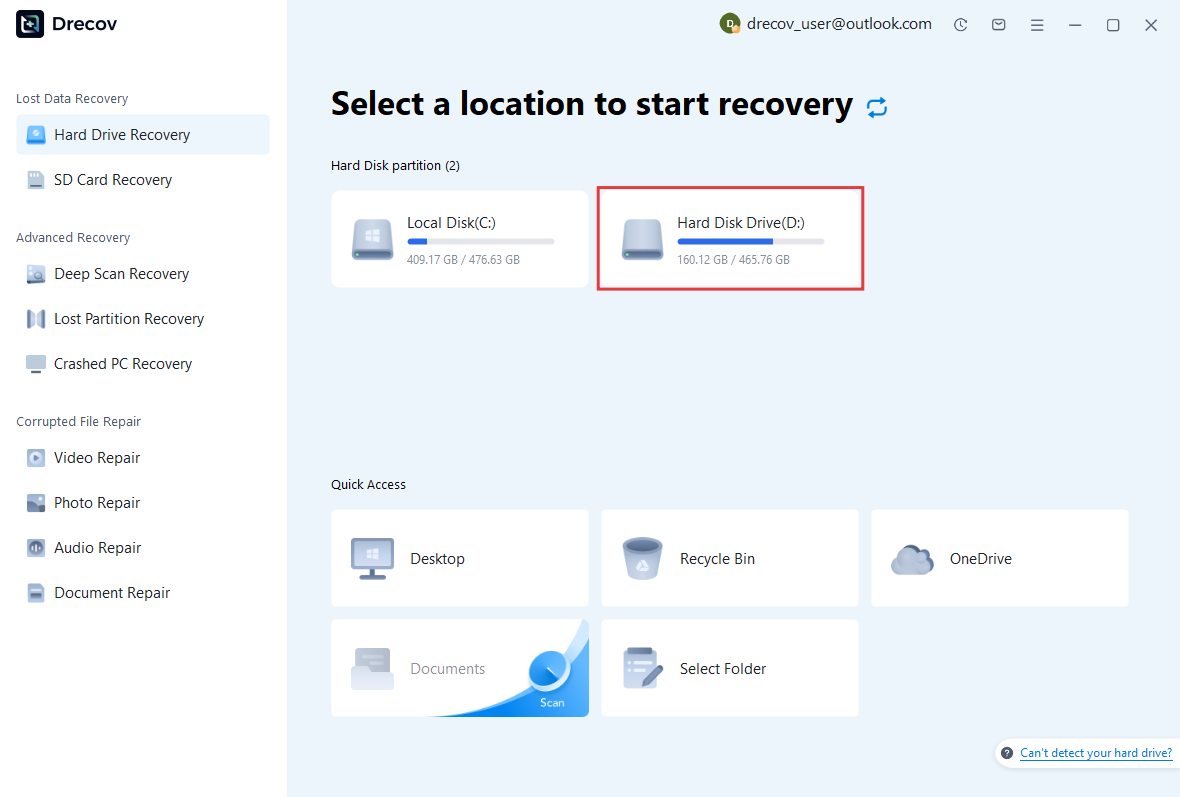


Why Choose PandaOffice Drecov Data Recovery Software?
When it comes to reliable data recovery, PandaOffice Drecov stands out as a powerful, all-in-one solution designed to handle a wide range of data loss scenarios. Whether you’re trying to perform TikTok deleted video recovery, restore files after formatting, or recover important documents, Drecov delivers fast and dependable results.
One of its biggest advantages is versatility. From format data recovery to lost partition recovery, the software can scan deeply and accurately locate files that other tools often miss. Even if your drive has been accidentally formatted or a partition has disappeared, Drecov uses advanced algorithms to reconstruct and retrieve your data with high success rates.
Drecov also supports specialized recovery needs. If you’ve lost important documents, its PDF recovery tool ensures that files retain their original structure and quality. For media users, the audio recovery feature helps restore music, recordings, and other sound files without corruption, making it ideal for both personal and professional use.
Ease of use is another key benefit. The intuitive interface allows beginners to recover files in just a few clicks, while still offering advanced options for more experienced users. Plus, it supports a wide range of storage devices, including HDDs, SSDs, USB drives, and memory cards.
In short, PandaOffice Drecov combines powerful recovery capabilities with user-friendly design, making it a trusted choice for anyone facing data loss.
How to Delete a Gmail Account on a Computer (PC Method)
Method 1: Deleting Gmail Through Google Account Settings
Test Environment:
- Device: Windows 10/11 PC
- Browser: Google Chrome (latest version)
- Account Type: Personal Gmail account
For users searching how to delete gmail account on PC, this method is the most effective and widely used.
Steps:
- Open your web browser and sign in to your Google account
- Navigate to the “Data & Privacy” section
- Scroll to “Data from apps and services you use”
- Select “Delete a Google service”
- Enter your password to verify identity
- Find Gmail and click the delete icon
- Provide a non-Gmail email address
- Confirm the request through the verification email
Following these steps allows you to delete a gmail account without removing your entire Google account.
What Happens After Deleting Gmail on PC
After completing the how do i delete a gmail account process:
- Your Gmail inbox is permanently removed
- Emails and attachments are deleted
- Your Google account remains active
You can still use services like Google Drive or YouTube, but Gmail functionality will no longer exist.
⚠️ Warning: The deleted Gmail address cannot be recreated or reused in the future.
How to Delete a Gmail Account on Android Devices
Method 2: Removing Gmail Account from Android Settings
Test Environment:
- Device: Android 13 smartphone
- Gmail App Version: Latest version
- Account Type: Synced Google account
If you’re looking for how do you delete a gmail account on Android, this method is quick and easy.
Steps:
- Open the “Settings” app on your Android device
- Tap “Accounts” or “Passwords & Accounts”
- Select your Gmail account
- Tap “Remove Account”
- Confirm the removal
This method disconnects the Gmail account from your device.
Understanding Removal vs Full Deletion
It’s important to understand that removing an account from Android is not the same as fully delete gmail account.
When you remove it:
- The account still exists on Google servers
- Emails are not deleted
- You can sign in again anytime
To fully complete account gmail delete, you must follow the PC method using Google account settings.
Method 3: Deleting Your Entire Google Account (Including Gmail)
Test Environment:
- Device: Windows 11 PC
- Browser: Chrome (latest version)
- Account Type: Google account with multiple active services
If you’re not just looking to delete gmail account but want to remove all Google services, deleting your full Google account is the correct approach. This method is often searched by users asking how to delete a gmail account completely.
Steps:
- Go to your Google Account settings page
- Navigate to “Data & Privacy”
- Scroll down to “More options”
- Click “Delete your Google Account”
- Verify your password
- Review the data that will be deleted
- Confirm by checking required boxes
- Click “Delete Account”
This process ensures that you not only delete a gmail account but also remove all associated Google data permanently.
⚠️ Warning: This action deletes all services including Google Drive, Photos, and YouTube data.
When to Choose Full Account Deletion
Users searching how do you delete a gmail account may not always realize that sometimes a full account deletion is more appropriate.
You should consider deleting your entire Google account if:
- You no longer use any Google services
- You want to erase your digital footprint completely
- You are switching to a different ecosystem
Unlike partial account gmail delete, this method leaves no remaining Google data behind.
What Happens After You Delete a Gmail Account
Immediate Changes After Deletion
Once you complete the how to delete gmail account process, several changes take effect immediately.
These include:
- Loss of access to Gmail inbox
- Emails and attachments are permanently removed
- Incoming emails will bounce back to senders
- Gmail login will no longer work
For users wondering can you delete a gmail account, the answer includes understanding these consequences.
The system does not retain your email address for reuse, meaning once you delete gmail account, that address is gone permanently.
⚠️ Warning: You cannot recreate the same Gmail address after deletion.
Impact on Linked Services and Accounts
Many users underestimate how deeply Gmail is integrated into other services. When you delete a gmail account, it may affect:
- Social media accounts linked to Gmail
- Banking or subscription services
- Cloud storage access
- App logins using Google authentication
If you searched how do i delete a gmail account, you should also review all linked platforms beforehand.
To avoid disruptions:
- Update email addresses on important accounts
- Add alternative recovery emails
- Verify login methods before deletion
Troubleshooting Gmail Account Deletion Issues
Unable to Delete Gmail Account: Common Fixes
Sometimes users trying how to delete a gmail account encounter issues such as verification failures or missing options.
Common problems include:
- Incorrect password entry
- Two-factor authentication issues
- Browser cache problems
- Account restrictions or security flags
Solutions:
- Clear browser cache and cookies
- Try a different browser or device
- Ensure recovery email is accessible
- Disable VPN if causing login issues
If you’re stuck during account gmail delete, these fixes usually resolve the problem.
Recovering a Recently Deleted Gmail Account
If you accidentally delete gmail account, Google may allow recovery within a limited timeframe.
Recovery steps:
- Visit the Google Account recovery page
- Enter your deleted Gmail address
- Follow identity verification steps
- Restore access if eligible
Users searching how do you delete a gmail account should be aware that recovery is not guaranteed.
⚠️ Warning: After the recovery window expires, Gmail data is permanently lost.
FAQ About Deleting Gmail Accounts
Can You Delete a Gmail Account Without Losing Google Services?
Yes, can you delete a gmail account without deleting your full Google account. Google allows selective removal of Gmail while keeping services like Drive and YouTube active.
This is the most common approach for users who:
- Want to switch email providers
- Still rely on other Google tools
- Need to maintain their Google account
How Do I Delete a Gmail Account Permanently?
To delete a gmail account permanently:
- Access Google Account settings
- Choose “Delete a Google service”
- Select Gmail
- Confirm deletion
This answers the common query how do i delete a gmail account and ensures complete removal of Gmail data.
How Long Does Gmail Account Deletion Take?
The process of how to delete gmail account is immediate after confirmation. However, recovery may be possible for a short time.
After that:
- Emails are permanently deleted
- Account cannot be restored
- Address cannot be reused
Can I Use the Same Email Again After Deletion?
No, once you delete gmail account, the email address cannot be registered again. This is a permanent restriction by Google.
Users asking how do you delete a gmail account should consider this before proceeding.
Conclusion: Key Takeaways for Deleting a Gmail Account
Deleting Gmail is a simple but irreversible process. Whether you are learning how to delete a gmail account on PC or Android, preparation and understanding are essential.
Key takeaways:
- Always back up your data before deletion
- Decide whether to delete only Gmail or the full Google account
- Understand the impact on linked services
- Act quickly if recovery is needed
For users exploring account gmail delete, the safest approach is to follow step-by-step methods and double-check all dependencies.
By following this guide, you can confidently delete a gmail account without unexpected issues while protecting your important data.





