







Losing precious memories from your social media profile can be incredibly frustrating. However, you do not have to panic if you accidentally wipe out an important post or story. This comprehensive guide will walk you through exactly how to tackle a deleted photo instagram dilemma and restore your files successfully.
Whether your application glitched or you cleared your media library by mistake, solutions exist to reverse the damage. While standard cloud backups sometimes fail, dedicated recovery tools can scan your device storage to retrieve what you thought was gone forever. We highly recommend using PandaOffice Drecov data recovery software as a premier solution to safely scan, detect, and restore your missing Instagram files with just a few clicks.
Understanding the Basics of Deleted Photo Instagram
When you deal with a deleted photo instagram issue, it helps to understand where the files actually go. Instagram does not immediately erase your media from your phone storage when you remove a post. Instead, the application unlinks the media from your public feed while the temporary cache data remains hidden deep within your system directories.
Common challenges include localized cache expiration, platform synchronization delays, and accidental permanent deletion from your device gallery. If you wait too long, new data might overwrite those hidden files.
This is where PandaOffice Drecov data recovery software becomes invaluable. It is a robust, professional utility designed to dig into storage sectors and extract fragmented data. You can rely on this software across various scenarios:
- Accidental deletion of the local Instagram folder on your storage drive
- Data loss due to an unexpected Android or iOS system crash
- Formatting errors on SD cards used as expanded phone storage
Before diving into deep software retrieval, you can check out general troubleshooting methods such as the PandaOffice ChatGPT download error fix to see how system permissions impact file downloads.
How to Get Back Deleted Photos on Instagram Successfully
If you want to know how to get back deleted photos on instagram, you should first leverage the built-in native features of the app. Instagram includes a Recently Deleted folder that holds removed items for 30 days.
To access this folder, open your Instagram profile and tap the three horizontal lines in the top right corner to open Settings. Next, navigate to Your Activity and scroll down to find Recently Deleted. Here, you can select your missing post and tap Restore to send it back to your live profile feed.
How to Recover Deleted Photos on IG via PandaOffice Drecov
When native app features fail, turning to professional tools is the most reliable strategy. PandaOffice Drecov data recovery software provides a specialized platform to recover deeply buried app cache files.
⚠ Warning: Install it on a drive different from the one where your data was lost to prevent overwriting.
Follow these precise steps to retrieve your media:
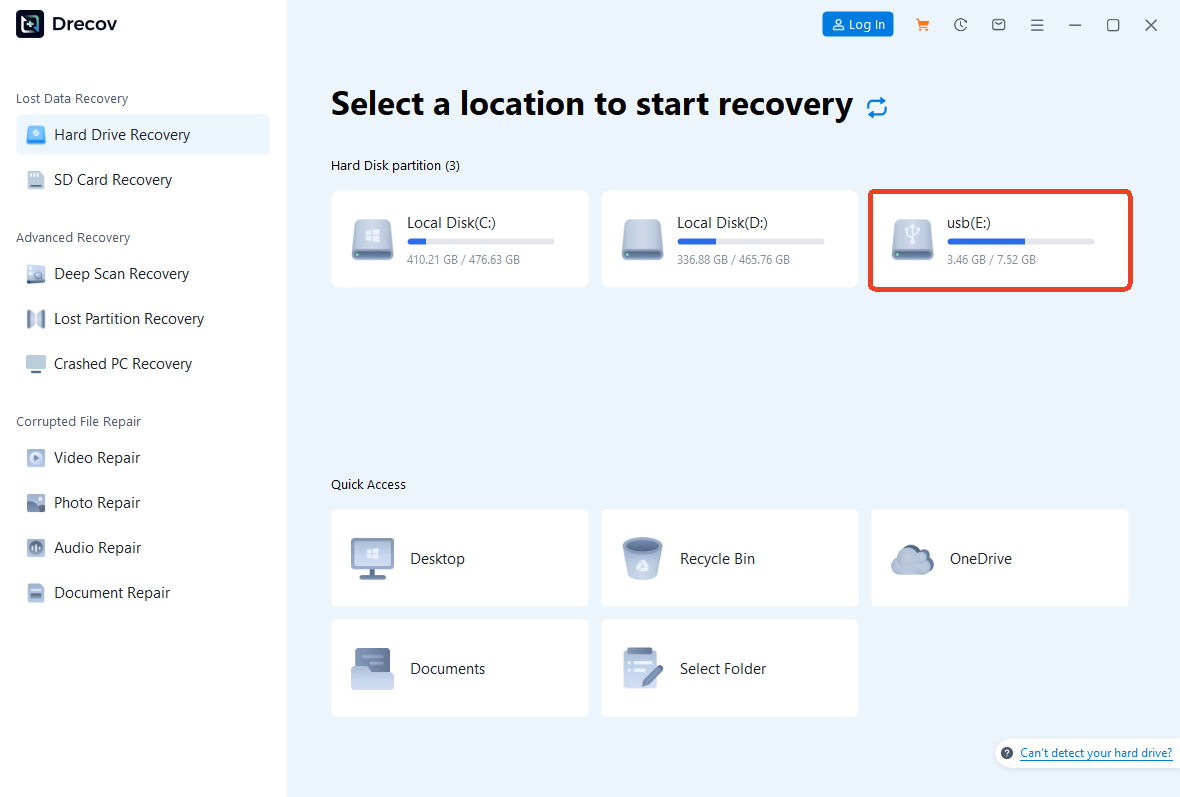
Step 1: Connect Your Device and Select Location
Launch the latest version of the application on your computer. Connect your smartphone or external storage card via a stable USB connection. On the main dashboard, select the specific drive letter corresponding to your device or select the exact local folder where Instagram stores its media cache.
Step 2: Initiate the Deep Scan Process
Click the Scan button to start looking for your deleted photo instagram files. The software will deploy an advanced algorithmic scan to piece together broken file headers. You can monitor the progress bar at the top of the interface.

Step 3: Preview and Restore Your Media
Once the scan concludes, filter the results by choosing the JPG or PNG format tabs. Locate your missing Instagram pictures, select them, and click the Recover button to save them to a secure location on your local drive.
Crucial Warning: Never save the recovered pictures back onto the exact same drive or storage card during the recovery process. Doing so can cause permanent file corruption and overwrite the very data you are trying to save.
For advanced users managing storage environments, optimizing your system configuration can prevent app crashes. Review the PandaOffice Steam no licenses guide for insights into fixing directory access errors on Windows systems.
How to Find Deleted Instagram Pictures Without Software: Alternative Methods
If you are exploring how to find deleted instagram pictures without running recovery software immediately, you can try several highly effective manual verification methods. Fortunately, smartphone operating systems and cloud services frequently preserve copies of your media files without your direct knowledge.
Before assuming your images are permanently lost, check your device internal storage folders and cloud archives. Often, a quick look into your system backup settings will reveal the exact files you need to restore your missing social media feed.
Checking the Device Gallery Archive
Both Android and iOS platforms maintain their own system recycle bins. On an iPhone, open the Photos app, scroll down to Utilities, and check the Recently Deleted album. On Android devices, open Google Photos, tap Library, and check the Trash folder. Furthermore, always check your local device storage path:
Internal Storage/Android/data/com.instagram.android/cache
Utilizing Cloud Backup Services
Many smartphones automatically sync media to iCloud or Google Drive. Log into your cloud account via a desktop browser to ensure you do not miss hidden files that failed to sync back to your phone gallery.
Pros and Cons of Recovery Methods
| Method | Pros | Cons |
| Instagram Built-in Folder | Completely free and instant | Limited to a strict 30-day window |
| Manual Cache Checking | No software installation needed | Complex folder navigation for beginners |
| PandaOffice Drecov Software | Highest recovery success rate | Requires access to a desktop computer |
If you frequently transfer media via external storage to free up phone space, read the PandaOffice PS3 ISO USB guide to learn how to format storage devices correctly without losing data.
Tips & Best Practices
To maximize your chances of success when figuring out how to retrieve deleted instagram photos, act immediately. Stop taking new photos or installing new apps on your phone because this prevents old data blocks from being overwritten.
Furthermore, maintain strict data integrity by enabling the Original Posts feature within your Instagram account settings. This toggle forces the application to save an unedited copy of every post directly to your phone camera roll.
Avoid downloading untrusted third-party APK tools that promise instant social media restoration. These malicious programs often carry spyware designed to steal your account credentials rather than solve your deleted photo instagram problem.
Frequently Asked Questions
How to retrieve deleted instagram pictures if they vanished from Recently Deleted?
When files vanish from the native app folder, it means the 30-day grace period expired. You must use PandaOffice Drecov data recovery software to scan the physical memory sectors of your phone to extract the remaining cache remnants.
Is there a reliable way how to retrieve deleted photos on instagram for free?
Yes, checking your phone local trash bin or checking cloud backups cost nothing. However, if those methods fail, professional software remains the safest path forward.
Can I run an instagram data recovery process on an old account?
Recovery depends entirely on physical device data availability. If you still possess the exact smartphone you used to post those images, a deep system scan can often find old image fragments.
What is the most effective way how to recover deleted photos on ig safely?
The safest method involves connecting your phone to a computer and running a read-only scan using professional recovery utilities. This prevents the phone from writing new data over the lost images.
Where can I find official information regarding Instagram data policies?
You can review the official Instagram Help Center to understand how the platform stores, archives, and manages user media data over time.
Conclusion
Resolving a deleted photo instagram issue is highly achievable if you utilize the correct strategies. Always begin by checking your internal app folders and phone backups. Furthermore, if the native options let you down, do not hesitate to deploy PandaOffice Drecov data recovery software to run a comprehensive system scan. Consistent cloud archiving and proactive data management will guarantee that your favorite social media memories remain safe for years to come.






