







In the modern era of artificial intelligence, ChatGPT has become an indispensable companion for students, developers, and creative professionals alike. However, with the massive amount of data we generate daily, accidental deletions are bound to happen. You might find yourself staring at a blank sidebar, wondering: Can You Recover Deleted ChatGPT Chats?
As an SEO expert with years of experience in the data recovery industry, I have seen countless users lose sleep over vanished digital assets. The sinking feeling of losing a complex coding solution or a well-crafted essay is universal. In this comprehensive guide, we will dive deep into the mechanics of how OpenAI handles your data, explore whether ChatGPT recovery is truly possible, and introduce professional-grade tools like PandaOffice Drecov to safeguard your local digital environment.
Understanding How ChatGPT Stores Conversations
Where Your Chat Data Actually Lives
Let’s clear something up right away—your ChatGPT conversations are not stored on your device like WhatsApp or Telegram messages. Instead, they live securely on cloud servers linked directly to your account. That means when you log in from a different device, your chats magically appear, almost like picking up a book exactly where you left off. This cloud-based system is incredibly convenient, but it also comes with a trade-off: you don’t have local control over backups.
Every time you send a message, it gets saved to your account unless you’re using temporary chat mode. According to official documentation, chats remain stored indefinitely until you manually delete them. That sounds reassuring, right? But here’s the catch—once you choose to delete a chat, you’re essentially telling the system to remove it permanently.
Think of it like storing files in Google Drive versus your computer. If you delete something from the cloud and empty the trash, there’s no hard drive recovery trick to save you. ChatGPT operates similarly—your data is account-based, not device-based.
How Chat History Sync Works Across Devices
Here’s where things get interesting. ChatGPT uses account synchronization, meaning your conversations are mirrored across all devices logged into the same account. Open your laptop, phone, or tablet—it’s all there. But this also means if you delete a chat on one device, it disappears everywhere.
There’s no “device-specific copy” hiding somewhere. No secret backup on your phone. Once deleted, the system syncs that deletion instantly. This design keeps everything consistent, but it also removes any safety net. So if you’ve ever thought, “Maybe it’s still on my phone,” unfortunately, that’s not how it works. The system doesn’t give you multiple independent copies—it gives you one unified version of your chat history.
What Happens When You Delete a Chat
Immediate Deletion vs. Backend Retention
When you hit that delete button, the chat vanishes instantly from your sidebar. It’s gone—no warning, no recycle bin, no “undo” button. But behind the scenes, things are slightly more nuanced.
The conversation is scheduled for permanent deletion from servers within 30 days. That might sound like a recovery window—but it isn’t. You don’t have access to that data during this period, and neither does customer support in a way that allows restoration. Think of it like shredding a document but keeping the pieces locked in a vault temporarily for compliance reasons. You can’t reassemble it, even though technically it still exists somewhere in fragments.
The 30-Day Deletion Window Explained
That 30-day period exists mainly for legal, compliance, and system integrity reasons—not for user recovery. The data may be retained temporarily unless it has already been anonymized or required for legal obligations.
Here’s the important takeaway: Retention does not equal recoverability. This is where many users get confused. They assume, “If it’s still on the server, I can get it back.” Unfortunately, that’s not how the system is designed.
Can You Recover Deleted ChatGPT Chats?
Official Answer from OpenAI
Let’s not sugarcoat it. No, you cannot recover deleted ChatGPT chats. According to official OpenAI support documentation, once a chat is deleted, it is not retrievable through the interface, APIs, or even support channels. That’s the final answer—clear and firm.
Why Recovery Is Not Supported
You might be wondering—why not just add a restore feature? It comes down to privacy and system design. When you delete a conversation, the platform treats it as a permanent action. This ensures your data is actually removed when you request it, which is important for compliance with global data protection laws like GDPR.
Imagine if deleted chats could be recovered easily—it would defeat the purpose of secure deletion. So while it may feel inconvenient, it’s actually a deliberate privacy-first approach.
Archived vs. Deleted Chats (Critical Difference)
What Is Chat Archiving?
Here’s where things get interesting—and where many people make mistakes. Archiving a chat is NOT the same as deleting it. When you archive a conversation, it simply disappears from your main chat list but remains safely stored in your account. You can bring it back anytime with a few clicks. Think of archiving like putting a file into a drawer instead of throwing it away.
How to Restore Archived Chats
If you are lucky enough to have only archived your chat, Recover Deleted ChatGPT Chats becomes a simple task of retrieval rather than a technical miracle.
- Step 1: Click on your profile icon or name in the bottom-left corner of the ChatGPT interface.
- Step 2: Navigate to Settings.
- Step 3: Under the General or Data Controls tab, find the Archived Chats section and click Manage.
- Step 4: Look through the list of archived conversations. When you find the one you need, click the Unarchive icon (usually a small folder with an arrow).
Boom—your conversation is back in your sidebar. This is why archiving is always safer than deleting if you’re unsure about the long-term value of a thread.
Situations Where Chats Seem Deleted but Aren’t
Sometimes, a “deleted” chat is just a hidden one. Before you panic about ChatGPT recovery, check these common scenarios:
Logged Into the Wrong Account
Sometimes, the simplest explanation is the correct one. You might be logged into a different account—especially if you use Google, Apple, or multiple email logins. Since chats are account-bound, they won’t show up if you’re on the wrong profile.
Chat History Disabled
If chat history is turned off, your conversations won’t be saved at all. That means once you leave the session, they’re effectively gone. It’s like writing on a whiteboard and wiping it clean every time you walk away. If you see a message saying “Chat History is off for this browser,” that is your primary culprit.
Temporary Glitches or Sync Issues
Occasionally, chats may disappear due to syncing issues or platform glitches. Logging out and back in, refreshing the page, or switching devices can sometimes bring them back. But don’t rely on this—it’s not a recovery method, just a temporary fix for a display bug.
Workarounds That Might Help (Before It’s Too Late)
Checking Data Export Files
If you’ve previously requested a data export, there’s a chance your conversations are saved there. This is one of the few legitimate ways to Recover Deleted ChatGPT Chats—but only if you exported them before deletion.
- Step 1: Log in to your email account associated with ChatGPT.
- Step 2: Search for an email from OpenAI with the subject line “Your ChatGPT data export is ready.”
- Step 3: Download the
.zipfile and extract it. - Step 4: Open the
chat.htmlorconversations.jsonfile to view your history.
Browser Cache & Local Storage
In rare cases, browser cache or local storage might temporarily hold fragments of conversations. However, this is unreliable and often disappears once the page refreshes or the cache is cleared. It’s more of a last-ditch attempt than a real solution for full ChatGPT recovery.
Professional Data Recovery: Introducing PandaOffice Drecov
While ChatGPT chats are stored in the cloud, the results of those chats are often saved locally on your computer—perhaps as a Word document, a text file, or a PDF you created from the AI’s output. If you lost the file containing your ChatGPT data, that is where professional software comes into play.
PandaOffice Drecov is a top-tier data recovery tool designed to retrieve lost, deleted, or formatted files from your local drives. If you copied your ChatGPT response into a document and then accidentally deleted that document, Drecov is your best friend.
⚠ Warning: Install it on a drive different from the one where your data was lost to prevent overwriting.
How to Use PandaOffice Drecov for File Recovery
- Step 1: Select the Scan Location. Identify where your file was last saved (e.g., Desktop, Documents, or a specific folder). Select the drive and click the Scan button.

- Step 2: Preview and Filter. As the scan progresses, you can use the filter sidebar to find specific file types (like
.docxor.txt). Drecov allows you to preview the file content to ensure it’s the correct one before proceeding.
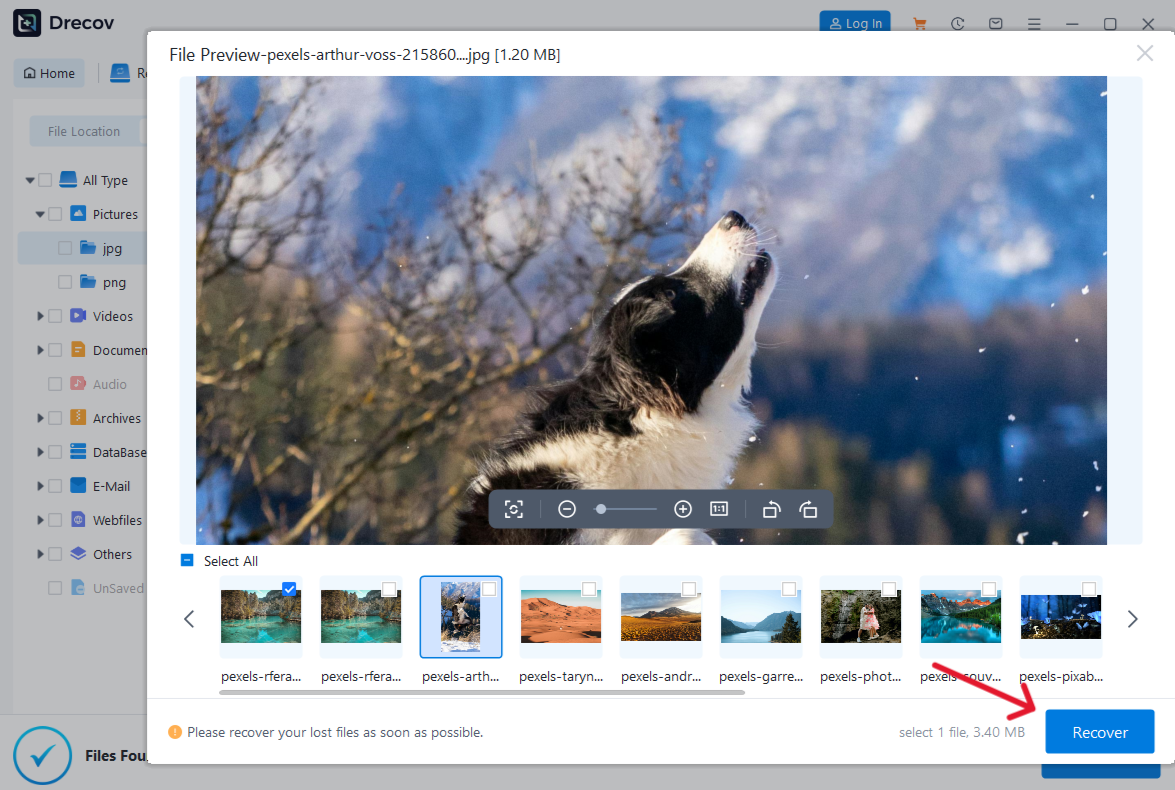
- Step 3: Execute Recovery. Once you’ve found your file, click Recover and choose a safe destination on an external drive or a different partition.
Warning: Avoid saving the recovered files back onto the same drive they were lost from. This prevents overwriting the very data you are trying to save!
The real lesson here isn’t about recovery—it’s about prevention. If a conversation matters to you, don’t leave it sitting in your chat history like a forgotten note. Save it, back it up, and treat it like the valuable data it is.
For more expert tips on managing your digital life, check out our guides on:
- How to unsync OneDrive without losing data
- Complete guide to Illustrator file recovery
- How to delete files from OneDrive without losing data
Why Some Chats Disappear Unexpectedly
Bugs, Updates, and Account Changes
Technology isn’t perfect. Updates, bugs, or account changes can sometimes cause chats to disappear or become inaccessible. There have even been reported cases where users lost months of work with no recovery option available.
Real-World Data Loss Cases
These incidents highlight a harsh reality: relying solely on ChatGPT for long-term storage is risky. Without backups, losing chats can mean losing valuable information permanently. Whether it’s a server-side glitch or an accidental click, the result is the same: silence where there used to be data.
How to Prevent Losing Important Chats
Best Backup Strategies
If your chats matter, treat them like important documents. Save them externally.
- Manual Copy-Paste: The most reliable way. Move text to Google Docs or Microsoft Word.
- Regular Data Exports: Go to Settings > Data Controls > Export Data once a month.
- Use Note-Taking Apps: Integration with tools like Notion or Obsidian can automate this process.
Using Screenshots and External Tools
Sometimes, the simplest method is the best. Screenshots or printing to PDF can act as reliable backups. It might feel old-school, but it works when the cloud goes dark.
Comparing ChatGPT With Other Apps’ Recovery Options
Unlike many modern applications, ChatGPT lacks a “safety net.” Here is how it stacks up:
| Platform | Recovery Option | Time Limit | Backup Available |
| ChatGPT | ❌ No | None | Manual only |
| ✅ Yes | Backup-based | Cloud backups | |
| Gmail | ✅ Yes | 30 days | Automatic |
| Google Drive | ✅ Yes | 30 days | Trash folder |
The Future of Chat Recovery in AI Platforms
Memory Features and Improvements
Recent updates have introduced “Memory” and improved chat recall features, allowing users to revisit past conversations more easily. However, this doesn’t change the fundamental rule—deleted chats are still gone forever.
Will Recovery Ever Be Possible?
It’s possible that future versions may introduce a recycle bin or “undo” feature. But for now, the system prioritizes privacy and simplicity over recoverability. Until a “Trash” folder is added to the UI, your best defense is a proactive backup.
Recover Deleted ChatGPT Chats FAQs
1. Can ChatGPT support restore deleted chats?
No, support cannot recover deleted chats under any circumstances. They do not have a “restore” button for user accounts.
2. Are deleted chats stored anywhere temporarily?
Yes, they may remain in backend systems for up to 30 days for legal compliance, but they are not accessible or recoverable by the user.
3. Is there a recycle bin in ChatGPT?
No, there is currently no trash or recycle bin feature. Deletion is instantaneous and final.
4. Can I recover chats using third-party tools?
No reliable third-party tools can access OpenAI’s private servers to restore deleted chats. Be wary of any “hacker” or “recovery service” claiming they can do this—it is likely a scam.
5. What’s the safest way to keep important chats?
Export your data regularly and copy-paste critical information into a local document. Then, use PandaOffice Drecov to ensure those local files are never lost to accidental deletion or drive failure.
Conclusion
So, can you Recover Deleted ChatGPT Chats? Strictly speaking, from the OpenAI servers, the answer remains a firm no. However, by understanding the difference between archiving and deleting, and by using local recovery tools like PandaOffice Drecov for your exported files, you can minimize the impact of data loss.






