







Losing access to important video content can disrupt your workflow and cause significant frustration. Creators and viewers frequently ask: can youtube review deleted videos? When a video vanishes due to accidental deletion, copyright claims, or channel termination, finding a way to restore that file becomes a top priority. Consequently, users seek reliable ways to recover their original media files directly from their local storage devices.
PandaOffice Drecov data recovery software provides an efficient solution for retrieving lost local video files. This tool specializes in scanning hard drives, solid-state drives, and external storage to recover deleted files before they are permanently overwritten. Meanwhile, understanding how YouTube manages data can help you navigate the platform policies effectively.
Understanding the Basics of Can YouTube Review Deleted Videos
When a creator deletes a video, YouTube removes it from public view and starts erasing it from its main servers. However, people still wonder: can youtube review deleted videos? The platform can review video data under specific legal conditions or policy appeals, but standard users cannot access deleted content through the dashboard.
Common issues regarding deleted youtube videos stem from accidental clicks or sudden policy violations. Creators often need a youtube deleted video finder to locate their original uploads. If you lose your source file, you can attempt to recover the original recording from your computer.
PandaOffice Drecov data recovery software handles these precise scenarios. For example, if you accidentally cleared your Recycle Bin or formatted the SD card containing your raw footage, this software scans the deep sectors of your drive. Furthermore, you can use it to rescue lost browser downloads or browser assets. For instance, you can learn more about managing browser data in the PandaOffice Firefox Guide.
How to Find Removed YouTube Videos: Two Practical Approaches
When you need a reliable youtube deleted video finder or want to know how to watch deleted youtube videos, you can use two primary methods to resolve the issue.
Whether the content was removed due to an accidental click or a sudden platform policy violation, recovering the original file or accessing cached versions is entirely possible. The following approaches outline how to contact platform support or leverage dedicated tools to regain access to your valuable media.
Method 1: Contact YouTube Creator Support
If your channel belongs to the YouTube Partner Program, you can request an internal review. YouTube staff might restore an accidentally deleted video if you contact them immediately.
- Log into your YouTube account.
- Navigate to the Help section.
- Select Contact Creator Support to submit a restoration request.
Method 2: Recover Raw Footage via PandaOffice Drecov Data Recovery Software
When the platform cannot recover your file, recovering the local source file is the most reliable alternative. PandaOffice Drecov data recovery software recovers files directly from your computer storage. This software supports deep scanning for various video formats like MP4, MOV, and AVI. It works effectively even after drive formatting or partition loss.
⚠ Warning: Install it on a drive different from the one where your data was lost to prevent overwriting.
1.Select the Target Storage Drive
Launch the program. Select the specific drive partition or external storage card where your deleted youtube videos were saved.

2.Execute the Scan Process
Click the Scan button to initiate the search. The software will perform a quick scan followed by a deep scan to discover fragment files.

3.Filter and Preview Video Files
Navigate to the Video category in the left panel. Preview the file fragments to verify the integrity of your missing footage.
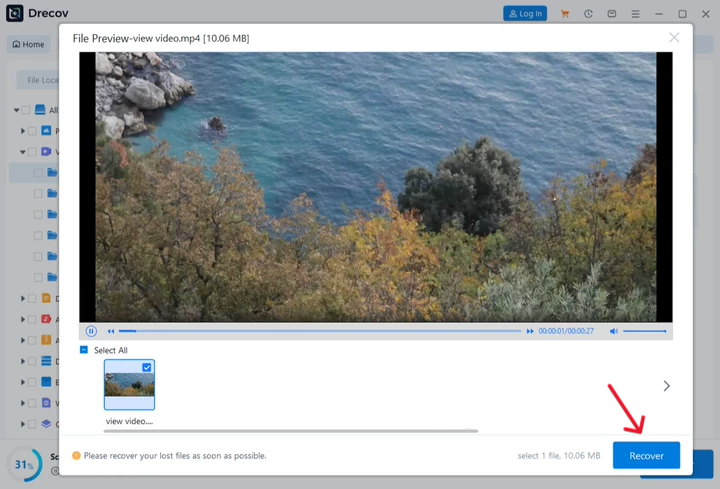
4.Recover and Save Your Data
Mark the checkboxes next to your target files. Click Recover and choose a safe storage location on a separate disk.
How to Watch a YouTube Video That Was Removed: Manual Methods
If you do not have the original local file, several manual solutions can help you find removed youtube videos or access a public youtube video archive.
These alternative methods rely on web crawlers and search footprints left behind across the internet. By utilizing archived platform historical snapshots and advanced search logic, you can often locate metadata or complete mirrors of missing content.
The Wayback Machine Internet Archive
The Internet Archive allows you to view deleted youtube videos if the URL was crawled before deletion.
- Locate the original link of the video from your browser history or social media posts.
- Paste the URL into the Wayback Machine search bar.
- Select a saved snapshot calendar date to watch how can you watch deleted youtube videos from the past.
Google Search Operators
You can extract text clues to find transcript of terminated youtube videos or discover alternative uploads.
- Copy the unique eleven character video identifier from the original link.
- Paste that identifier into Google search using quotation marks.
- Search for forum shares or video platforms that might host a duplicate copy.
Comparison of Methods
| Recovery Method | Success Rate | Primary Advantage | Main Limitation |
| PandaOffice Drecov | High | Restores original high quality source file | Requires access to original local drive |
| Wayback Machine | Medium | Can view deleted youtube videos without files | Only works if URL was previously indexed |
| Creator Support | Low | Direct platform restoration | Limited to partner channels with valid claims |
For a broader perspective on file rescue tools, you can read the PandaOffice Recuva Guide.
Tips and Best Practices for YouTube Deleted Videos
Maximizing your chances to see deleted youtube videos or restore your files requires careful data management.
- Avoid Writing New Data: Stop using the drive immediately after you discover a file loss to keep your deleted youtube videos from being overwritten.
- Employ Regular Backups: Maintain cloud storage backups of all raw video files before uploading them to the web.
- Keep Your Browser History: Do not clear your browser data instantly. Your history contains the specific URLs needed for a youtube deleted video finder search. If you accidentally clear your browser settings, you can check the PandaOffice Chrome Bookmarks Guide to understand profile recovery.
FAQs Regarding Can YouTube Review Deleted Videos
Can youtube review deleted videos for policy violations?
Yes, Google systems can temporarily retain metadata and video hashes to ensure compliance with legal requests or to handle community guideline appeals.
How to find deleted youtube videos if I only have the title?
You can search the exact title on alternative video platforms or search the internet archive using specific keywords to find removed youtube videos.
What is the best youtube deleted video finder method?
The most reliable approach is checking the Wayback Machine using the original video link or utilizing PandaOffice Drecov data recovery software to locate the local file on your computer.
How can you watch deleted youtube videos that were terminated?
You can try to watch terminated youtube videos by looking up the channel identifier in the video archive databases or by extracting the audio transcripts from search engine caches.
Can I recover a video if my whole channel is gone?
Furthermore, if you need to watch a youtube video that was removed due to account termination, you must appeal the termination via the official help forms provided by Google.
conclusion
Managing video assets requires both platform knowledge and solid backup habits. While the question of whether can youtube review deleted videos depends on internal policy, you can take control of your media by protecting your local storage. Utilizing PandaOffice Drecov data recovery software ensures that your hard work remains safe even when web platforms remove your content.






