







Need to recover some deleted videos from an SD card that was in an android device.. what’s the best free software to preview the files before recovery?—from Reddit
Introduction to SD Card Video Recovery
Why Video Recovery from SD Card Is Important
SD cards are widely used in cameras, smartphones, and other devices to store videos due to their portability and high capacity. However, data loss is a common problem, making sd card video recovery essential for users who lose valuable recordings.
Video files can be deleted accidentally, corrupted, or lost due to formatting or hardware failure. Without proper recovery methods, these files may be permanently inaccessible. Reliable video sd card recovery solutions help retrieve lost or deleted videos safely and efficiently.
Understanding the storage structure and limitations of SD cards is crucial for successful recovery. SD cards use flash memory, which stores data in cells that can be overwritten if the card continues to be used after file deletion. This makes prompt action critical for recovery videos from sd card scenarios.
Common Causes of Video Loss on SD Cards
Why Videos Are Lost and How It Happens
Video loss can occur for several reasons. Accidental deletion is one of the most frequent causes, where users remove videos unintentionally while managing files.
Formatting the SD card is another common reason. Many users format cards without backup, resulting in permanent data loss. Corruption due to improper ejection, virus attacks, or software errors can also make videos inaccessible.
Hardware failure, including damaged card slots or worn-out memory cells, can prevent video access. Even power interruptions during file transfers may corrupt data.
⚠️Warning: Continuing to use the SD card after losing files increases the risk of overwriting and reduces the success of video recovery from sd card.
By understanding these causes, users can choose the right method for sd card and disk video recovery free to maximize their chances of restoring lost files.
Methods for SD Card Video Recovery
Method 1: Use Professional SD Card Video Recovery Software (Recommended)
Professional recovery software is the most reliable method for sd card video recovery, particularly when videos are deleted or the card is formatted. Pandaoffice Drecov offers deep scanning capabilities and supports multiple video formats.
Download DrecovTest Environment:
- Device: Digital camera SD card connected to Windows 11 PC
- Storage: 32GB SD card
- Scenario: Deleted multiple video clips
Steps:
- Download and install Pandaoffice Drecov.
- Insert the SD card into your computer using a card reader.
- Select the SD card for scanning.
- Perform a deep scan to locate recoverable videos.
- Preview detected video files.
- Recover selected videos to a separate storage location.
This method ensures high recovery success rates for best sd card video recovery software.

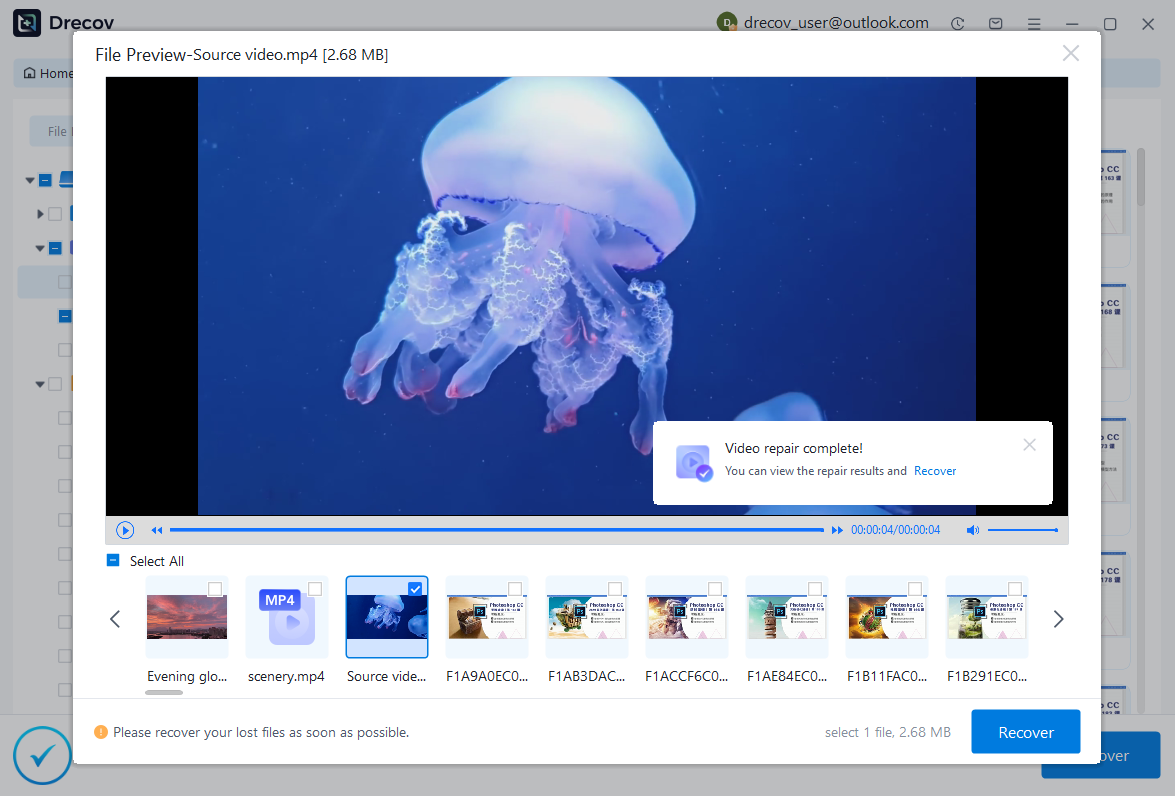

Why Choose PandaOffice Drecov?
When it comes to reliable file data recovery, PandaOffice Drecov offers a balanced combination of performance, ease of use, and broad compatibility. Whether you’ve lost important business files or personal memories, it provides an efficient way to restore data from various loss scenarios, including system crashes, accidental deletion, and formatted drives.
For users looking for advanced Photo Data Recovery Software, PandaOffice Drecov supports a wide range of image formats and storage devices. It can recover high-quality photos from SD cards, cameras, and internal drives while preserving original resolution and file structure. This makes it especially useful for photographers and everyday users alike.
If you are dealing with storage device issues, its external hard drive recovery capability ensures that data can be retrieved from USB drives, HDDs, and SSDs with minimal effort. The software performs deep scans to locate hidden or lost files, even in complex situations like partition loss.
In addition, PandaOffice Drecov excels in Document Recovery, helping users restore essential files such as Word, Excel, and PDFs. It also supports powerpoint recovery, allowing you to retrieve unsaved or deleted presentation files quickly—ideal for professionals working under tight deadlines.
With an intuitive interface, preview functionality, and powerful scanning modes, PandaOffice Drecov simplifies the recovery process while maintaining high success rates.
⚠️Warning: Do not save recovered videos to the same SD card to prevent overwriting.
Method 2: Restore Videos from Backup
Many users back up their SD card data to computers or cloud services. Recovering videos from these backups is a simple and risk-free method for video recovery from sd card.
Test Environment:
- Device: Smartphone SD card backed up to Google Drive
- Scenario: Videos deleted accidentally
Steps:
- Access your cloud or local backup.
- Locate the backup folder containing video files.
- Download or restore videos to your SD card or computer.
- Verify the recovered files for completeness.
Backup-based recovery is quick and highly reliable, especially for large collections of video files.
Method 3: Recover Deleted Videos Using File Explorer
Deleted videos may still exist in the SD card’s hidden folders. This manual approach is a basic sd card video recovery method.
Test Environment:
- Device: Windows PC with SD card inserted
- Scenario: Videos deleted but not overwritten
Steps:
- Open File Explorer.
- Navigate to the SD card’s folder.
- Enable “Show hidden files” in the View tab.
- Look for the missing video files.
- Copy recovered videos to another folder.
This method works best when videos are not permanently deleted.
⚠️Warning: Avoid modifying system or hidden folders excessively.
Method 4: Recover Videos After Formatting
Even after formatting, SD card videos can often be recovered if the data has not been overwritten. Video sd card recovery software can reconstruct deleted files effectively.
Test Environment:
- Device: 64GB SD card formatted accidentally
- Scenario: All videos lost due to formatting
Steps:
- Connect the formatted SD card to a computer.
- Launch recovery software.
- Select the formatted SD card as the scan target.
- Perform a deep scan.
- Preview and select videos for recovery.
- Save recovered videos to a different storage device.
This approach works for multiple video formats and sizes, making it one of the most efficient free video recovery from sd card solutions.
Method 5: Free Video Recovery Software for SD Card
For users seeking sd card and disk video recovery free, there are several free tools available. While they may have limitations, they can handle basic recovery scenarios.
Test Environment:
- Device: 16GB SD card
- Scenario: Single video accidentally deleted
Steps:
- Download a trusted free video recovery software for SD card.
- Connect the SD card and select it for scanning.
- Use quick scan for recently deleted files.
- Preview and recover videos to a safe location.
Free tools are ideal for light recovery tasks, but professional software provides higher success rates for complex data loss.
⚠️Warning: Ensure free software is downloaded from reputable sources to avoid malware.
Method 6: Recover Videos from Corrupted SD Cards
Sometimes SD cards get corrupted due to improper ejection, virus attacks, or system errors. Even in these cases, sd card video recovery software can often retrieve lost videos.
Test Environment:
- Device: 32GB SD card from a DSLR camera
- Scenario: SD card corrupted after improper removal
Steps:
- Connect the corrupted SD card to a computer.
- Launch recovery software like Pandaoffice Drecov.
- Select the SD card as the target for scanning.
- Perform a deep scan to detect recoverable videos.
- Preview the files to ensure integrity.
- Recover videos to a separate storage device.
This method is highly effective for recovery videos from sd card when corruption occurs.
⚠️Warning: Avoid attempting repairs with unknown tools that may further damage the card.
Method 7: Recover Videos After Accidental Formatting
Even after formatting an SD card, recovery is possible if new data has not overwritten the deleted videos. Software with deep scanning capabilities can rebuild the file structure and restore videos effectively.
Test Environment:
- Device: 64GB SD card formatted by mistake
- Scenario: Multiple videos lost
Steps:
- Insert the formatted SD card into your computer.
- Launch recovery software.
- Select the formatted SD card for scanning.
- Use the deep scan mode for thorough detection.
- Preview recoverable videos.
- Recover them to a safe location.
This method is part of the best sd card video recovery software practices, ensuring maximum data retrieval.
Method 8: Use Free Video Recovery Software for SD Card
Users looking for free video recovery from sd card options can try reputable free tools. These are suitable for small-scale recovery and simple deletions.
Test Environment:
- Device: 16GB SD card from smartphone
- Scenario: Single video accidentally deleted
Steps:
- Download a reliable free video recovery software.
- Connect the SD card to your computer.
- Select the SD card and perform a quick scan.
- Preview recoverable videos.
- Restore videos to a different storage location.
Free tools are convenient but may have limitations in deep scanning and file preview compared to professional software.
⚠️Warning: Only download from official sources to avoid malware.
How to Maximize Success in SD Card Video Recovery
Immediate Actions After Video Loss
- Stop using the SD card immediately to prevent overwriting deleted videos.
- Avoid saving new files on the same SD card.
- Choose reliable recovery software like Pandaoffice Drecov for the highest success rates.
- Recover videos to a separate drive or computer folder.
Quick response and careful handling significantly increase the chances of successful video sd card recovery.
Preventing Future Video Loss
- Always back up SD card videos to cloud storage or external drives.
- Safely eject SD cards from devices to prevent corruption.
- Use trusted apps and antivirus protection to prevent malware.
- Periodically check SD cards for errors and format only when necessary.
Following these practices reduces the need for sd card and disk video recovery free in the future.
FAQs About SD Card Video Recovery
Can I Recover Videos After Deleting Them Permanently?
Yes, if the videos have not been overwritten. Using video recovery from sd card software, deleted videos can be restored even after emptying the recycle bin or deleting from the SD card.
What Is the Best SD Card Video Recovery Software?
Professional tools with deep scanning, multiple format support, and preview functionality, like Pandaoffice Drecov, are recommended. Free tools are suitable for light recovery tasks but may not handle complex scenarios.
How Long Does Video Recovery from SD Card Take?
The time depends on the SD card size, number of videos, and scan depth. Quick scans take minutes, while deep scans may take hours.
Can I Recover Videos from a Damaged SD Card?
Yes, specialized recovery software can detect and reconstruct files from corrupted or damaged SD cards, though success depends on the extent of damage.
Conclusion: Restore and Protect Your SD Card Videos
Key Takeaways for Successful SD Card Video Recovery
Recovering lost or deleted SD card videos is achievable using proper methods and tools. Whether the loss is due to accidental deletion, formatting, or corruption, multiple solutions exist including backups, manual recovery, and professional sd card video recovery software.
Pandaoffice Drecov provides high success rates for recovering videos from SD cards while ensuring file integrity. Combining recovery methods with preventive measures—like regular backups and safe handling—helps protect valuable video content long-term.
By acting quickly, using trusted software, and maintaining preventive practices, users can effectively perform free video recovery software for sd card or professional recovery to safeguard their recordings.





