







Businesses often ask: is it Google Suite or Google Workspace? The short answer is that Google Suite was the former name, and Google Workspace is the modern evolution of the same productivity ecosystem. However, the transformation involved more than rebranding. Understanding what is the difference between Google Workspace and G Suite is critical for IT managers, business owners, and decision-makers comparing cloud platforms.
The discussion becomes even more relevant when placed alongside broader comparisons such as workspace vs office 365, microsoft vs google workspace, and microsoft 365 versus google workspace. This guide explores functional changes, pricing structure updates, collaboration philosophy, and enterprise security implications.
⚠️Warning: Before modifying subscriptions or switching collaboration platforms, always back up critical company data to prevent accidental loss during transitions.
I am trying to figure out what is G Suite vs. Google Workspace Vs. Google Cloud? Are they all names for the same thing? If not, what are the differences?—from Google help
The Evolution From G Suite to Google Workspace
Why Google Repositioned Its Productivity Platform
Google originally launched G Suite as a business-focused extension of Gmail and Google Apps. It bundled Gmail, Docs, Drive, Calendar, and Meet into a unified subscription model aimed at professional teams. Over time, remote collaboration needs increased, and Google redesigned its ecosystem to reflect a more connected work experience.
The shift to Google Workspace introduced deeper integration between communication and document tools. Gmail now embeds Meet sessions, Chat rooms integrate directly into collaborative spaces, and shared files connect seamlessly across applications. This transition clarified confusion surrounding gsuite vs google workspace, as many users believed it was only a name update.
In reality, Workspace emphasizes a digital headquarters model, where conversations, files, and meetings coexist within a single workflow.
⚠️Warning: Legacy G Suite plans may still operate under older storage and licensing conditions that differ from current Workspace tiers.
Structural Differences Between G Suite and Workspace
When analyzing what is the difference between google workspace and g suite, several structural updates become clear:
- Revised subscription tiers
- Expanded smart collaboration features
- Centralized identity management
- Enhanced cross-application embedding
Workspace integrates Google Chat and Meet directly into Gmail, reducing reliance on separate tabs. Smart Canvas technology allows users to embed checklists, live data, and collaboration blocks within documents.
Compared to older G Suite workflows, Workspace supports more fluid teamwork. The focus shifted from standalone apps to interconnected productivity modules.
⚠️Warning: Feature availability depends heavily on the selected Workspace plan, so reviewing licensing tiers is essential before upgrading.
Core Features Comparison
Communication and Collaboration Capabilities
Under G Suite, Gmail, Meet, and Chat functioned independently. Google Workspace unified them into a seamless communication hub. Meetings can launch from inbox threads, shared documents automatically link to conversation spaces, and task assignments integrate directly into collaborative files.
In discussions about workspace vs office 365, Google’s strength lies in browser-native real-time editing. Microsoft emphasizes robust desktop software. The difference reflects contrasting productivity philosophies rather than superiority of one system over the other.
Businesses conducting a google workspace vs office 365 comparison chart evaluation often identify Google’s real-time editing and automatic version history as major strengths.
⚠️Warning: Organizations relying heavily on offline editing may find browser-first systems limiting without proper configuration.
Storage and Subscription Structure
Google Workspace reorganized pricing tiers into Business Starter, Standard, Plus, and Enterprise levels. Storage allocations vary per user, and higher tiers include advanced security controls.
When comparing microsoft 365 versus google workspace, storage pooling and OneDrive integration become key considerations. Microsoft offers local sync flexibility, while Google prioritizes centralized cloud management.
For companies evaluating microsoft vs google workspace, scalability and document compatibility often determine the preferred ecosystem.
⚠️Warning: Exceeding storage quotas can restrict account functionality, so monitoring usage is critical.
Integration and Ecosystem Flexibility
Google Workspace integrates with third-party SaaS platforms through APIs and marketplace extensions. Automation tools streamline workflows across CRM, HR, and finance systems.
In a broader workspace vs office 365 analysis, Microsoft offers tighter integration with Windows environments, Active Directory, and enterprise software stacks. Google Workspace focuses on lightweight, cloud-native architecture.
A well-structured google workspace vs office 365 comparison chart should include ecosystem compatibility, device management, API access, and automation depth.
⚠️Warning: Migration between ecosystems may require retraining staff and reconfiguring security permissions.
Security and Compliance Considerations
Administrative Controls and Identity Management
Google Workspace significantly upgraded its Admin Console compared to legacy G Suite. IT administrators now gain:
- Granular device control
- Advanced audit logging
- Endpoint management tools
- Enhanced two-factor authentication enforcement
When assessing microsoft vs google workspace, identity governance plays a crucial role. Microsoft integrates deeply with enterprise directory services, while Google emphasizes zero-trust cloud security architecture.
Understanding these differences helps decision-makers align platform capabilities with regulatory requirements.
⚠️Warning: Improper admin configuration can unintentionally expose sensitive business data.
Data Protection and Backup Strategy
Neither Google Workspace nor Microsoft 365 guarantees immunity from accidental deletion, insider threats, or ransomware. Native retention policies may not always meet long-term recovery needs.
For this reason, businesses should implement independent recovery solutions. Pandaoffice Drecov provides:
- Deep file scanning and restoration
- Recovery of deleted documents and emails
- Preview-before-restore capability
- Backup validation during platform transitions
During any evaluation of microsoft 365 versus google workspace, backup resilience should be included in the decision matrix.
⚠️Warning: Cloud storage does not automatically equal comprehensive backup protection.
Google Workspace vs Office 365 Comparison
Collaboration Philosophy and Productivity Model
The debate surrounding workspace vs office 365 reflects two productivity ideologies. Google prioritizes browser-based collaboration with minimal installation. Microsoft blends cloud functionality with advanced desktop tools.
In a google workspace vs office 365 comparison chart, categories often include:
- Real-time collaboration
- Desktop application depth
- File compatibility
- Offline capabilities
- Enterprise security controls
For businesses evaluating microsoft vs google workspace, workflow preference often outweighs feature lists.
⚠️Warning: Switching productivity ecosystems may temporarily reduce efficiency during adjustment periods.
Business Use Cases and Migration Considerations
Choosing Between Google Workspace and Office 365
Selecting a productivity platform depends on business size, workflow preferences, and security needs. Google Workspace excels in:
- Browser-first real-time collaboration
- Lightweight mobile and web access
- Seamless cloud-native document management
Microsoft 365 is advantageous for:
- Advanced desktop Office applications
- Deep integration with Windows environments
- Extensive compliance and enterprise security options
A google workspace vs office 365 comparison chart often highlights trade-offs between collaboration agility and feature depth. Organizations with remote-first teams may prefer Workspace, while enterprises with complex compliance requirements may lean toward Microsoft 365.
⚠️Warning: Switching platforms without assessing workflow impact can reduce productivity and require retraining.
Migration and Data Protection Strategy
During platform transitions, businesses face risks such as:
- Accidental data deletion
- File corruption
- Sync conflicts
Even when evaluating microsoft 365 versus google workspace, relying solely on native retention policies may not be enough. Implementing a third-party solution like Pandaoffice Drecov provides:
- Recovery of deleted or lost emails, contacts, and documents
- Deep scanning of local drives and cloud-synced files
- Backup verification and preview prior to restoration
Proper planning ensures continuity while minimizing downtime and preventing permanent data loss.
⚠️Warning: Not preparing a secure backup before migration can lead to irreversible file loss.
Advanced Feature Comparison
Collaboration Tools and File Management
Google Workspace integrates Gmail, Chat, Meet, Docs, Sheets, and Slides into a connected hub. Users can:
- Embed live meeting notes in documents
- Convert tasks directly into project boards
- Collaborate simultaneously on shared files
Microsoft 365 integrates Outlook, Teams, Word, Excel, and PowerPoint with a hybrid desktop-cloud approach. Key advantages include:
- Advanced offline editing
- Rich formatting and analytical tools
- Enterprise-level workflow automation
When performing a workspace vs office 365 comparison, organizations should weigh:
- Real-time collaboration efficiency
- Compatibility with existing enterprise applications
- User familiarity and training requirements
⚠️Warning: Migrating between ecosystems without thorough planning may disrupt ongoing projects.
Security, Compliance, and Administration
Security remains a key differentiator. Google Workspace provides cloud-native zero-trust architecture with:
- Granular admin controls
- Endpoint management
- Audit logs and compliance reporting
Microsoft 365 emphasizes enterprise compliance integration, supporting:
- Active Directory synchronization
- Advanced retention and eDiscovery
- Endpoint security integration
Comparing microsoft vs google workspace, decision-makers must align platform capabilities with internal IT policies and regulatory requirements. Combining native controls with Pandaoffice Drecov backup ensures recovery of critical files even if policies fail.
⚠️Warning: Misconfigured permissions or policy gaps can compromise sensitive corporate data.
Pricing and Licensing Insights
Evaluating Costs Across Platforms
Cost comparison involves subscription tiers, storage capacity, and included features:
- Google Workspace tiers: Business Starter, Standard, Plus, Enterprise
- Microsoft 365 tiers: Business Basic, Standard, Premium, E3/E5
Key considerations when analyzing microsoft 365 versus google workspace include:
- Cost per user per month
- Included storage and sharing limits
- Security and compliance features
- Additional migration or integration costs
Many small businesses favor Workspace for simplicity, while larger organizations may find Microsoft more flexible for complex IT environments.
⚠️Warning: Ignoring hidden migration costs can inflate total ownership expenses significantly.
Final Evaluation and Recommendations
Strategic Decision Framework
To decide between platforms, businesses should evaluate:
- Collaboration Needs – Real-time browser editing vs desktop feature depth
- Compliance Requirements – Regulatory obligations and audit trails
- Cost and Licensing – Per-user pricing, storage, and add-ons
- Migration Complexity – Potential downtime and training requirements
- Backup and Recovery – Use Pandaoffice Drecov to safeguard critical files
By assessing each factor, companies can align technology choices with long-term productivity goals.
⚠️Warning: Skipping proper evaluation can lead to underutilized tools and increased IT overhead.
Integrating Pandaoffice Drecov for Data Safety
Regardless of platform choice, Pandaoffice Drecov enhances business resilience by:
- Selecting the right recovery software is essential when unexpected data loss occurs. Pandaoffice Drecov provides a powerful, secure, and efficient solution designed to handle a wide range of storage failure scenarios across different devices.
- Advanced Recovery for SD Cards and Hard Drives
- Pandaoffice Drecov supports recovering photos from an SD card as well as performing professional hard drive recovery. Whether files were accidentally deleted, a storage device was formatted, or data was lost due to corruption, its deep scan technology thoroughly analyzes storage sectors to locate recoverable content. The software is compatible with internal drives, memory cards, and various file systems, ensuring flexible recovery options in different environments.
- Reliable Support for Recovering External Hard Drives
- The software also specializes in recovering external hard drives that become inaccessible due to accidental formatting, partition loss, or file system damage. It automatically detects connected devices and performs comprehensive scans without altering original data, helping improve recovery success rates.
- Efficient Recovery of Deleted Photos
- One of its strongest capabilities is recovering deleted photos, even after permanent deletion from the Recycle Bin. The built-in preview feature allows users to verify files before restoration, ensuring accurate and controlled recovery.
- With strong scanning performance, broad device compatibility, and an intuitive interface, Pandaoffice Drecov offers a dependable and professional solution for modern data recovery needs.
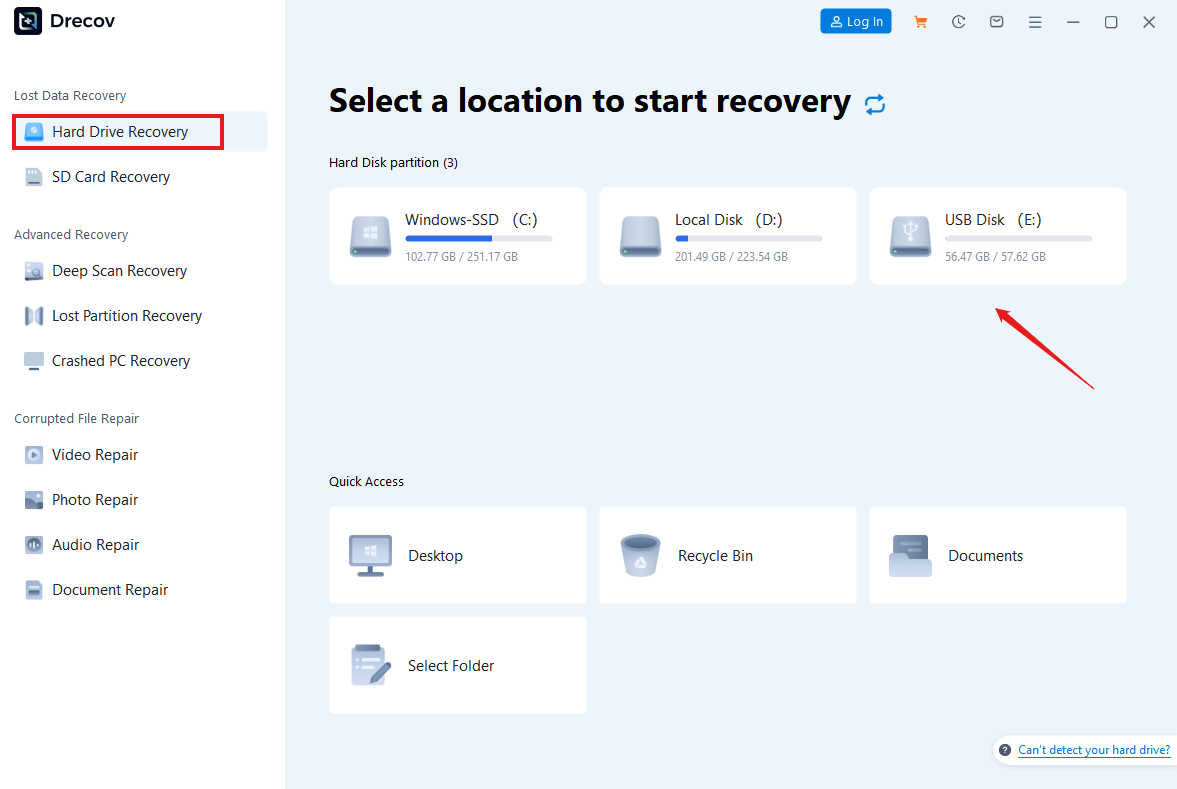


Integrating Drecov into migration plans ensures that accidental deletion or corruption does not disrupt business operations.
⚠️Warning: Always validate recovered data to confirm integrity before deployment.
Conclusion
Google Workspace and Microsoft 365 each offer distinct advantages. Workspace focuses on cloud-native, real-time collaboration, while Microsoft provides rich desktop functionality, deep compliance, and enterprise integration. A thorough google workspace vs office 365 comparison chart evaluation, combined with careful migration planning and Pandaoffice Drecov data protection, ensures organizations select the best platform for their operational needs.






