







Trying to see a deleted TikTok video? Start by identifying who owned the post and where a copy might still exist. If you deleted your own published video within the past 30 days, TikTok’s Recently deleted folder is the first place to check. If the post is no longer available there, look for a copy you saved to your phone, computer, cloud storage, or removable drive. For someone else’s deleted video, a public archive or a copy saved before deletion may help, but no website can reliably retrieve every removed TikTok.
This guide keeps those situations separate. It explains TikTok’s official restore option, when PandaOffice Drecov can help recover a locally saved video file, and what an online deleted TikTok videos finder can realistically show.
Understanding How Deleted TikTok Videos Can Still Be Found
Deleting a TikTok post, losing an unpublished draft, and deleting an MP4 from a storage drive are different events. They need different solutions.
TikTok says an eligible deleted post can remain in its system for up to 30 days and be restored through the account’s Recently deleted folder. An unpublished draft depends on the original device and app; TikTok warns that drafts may be removed if the app is uninstalled and reinstalled or the account is moved to another device. A saved video file is separate again: it may still exist in a phone gallery, an editing project, a computer folder, an SD card, or a backup even after the TikTok post disappears.
Before trying any recovery tool, ask:
- Is this my published post? Check TikTok’s Recently deleted folder.
- Is this my draft or an exported copy? Check the original device and places where you saved files.
- Is it someone else’s post? Look for a copy you already have, a creator-approved repost, or a public archive capture.
This distinction also clarifies searches such as “TikTok archive deleted,” “deleted TikTok videos finder,” and “deleted TikTok viewer.” An account-data download, a local backup, and a public web archive are all sometimes called an “archive,” but they do not contain the same material.
Method 1: Restore Your Own Video Through TikTok
For a post you deleted within the past 30 days, use TikTok’s built-in option before trying anything else.
- Sign in to the TikTok account that published the video.
- Tap Profile, then Menu ☰.
- Go to Settings and privacy → Activity center → Recently deleted.
- Select the post and tap Restore.
- Check your profile to make sure the video plays and the expected post has returned.
TikTok says restoring an eligible post also restores its associated comments and likes. If you cannot see the video, confirm that you are using the right account and that the deletion was within the 30-day window. The Recently deleted folder applies to deleted posts; do not assume an unpublished draft will appear there.
If the post is not in Recently deleted
Check the phone’s Photos or Gallery app for the original recording or a TikTok export. Look in video albums, downloads, and the photo app’s own Recently Deleted or trash area. Then check the editing app you used, cloud photos, computer folders, and any external drive where you may have copied the finished clip.
Open a candidate file and verify its picture, sound, and full length. A thumbnail or old TikTok link may help identify the video without containing a playable copy. If you find the file, save another copy before editing or reposting it.
You can also request your TikTok account data under Profile → Menu ☰ → Settings and privacy → Account → Download your data. The resulting file may help you identify account activity or a missing post, but TikTok does not promise that it will contain a playable copy of a deleted video. Inspect the downloaded file before treating it as a video backup.
Method 2: Recover a Locally Saved Video With Drecov
If the missing TikTok video was previously saved as a file on a Windows PC, USB drive, external drive, or removable SD card, local file recovery may be worth trying. This is where PandaOffice Drecov fits into the process.
Drecov is Windows data recovery software that can scan supported storage devices, show candidate files for preview, and recover selected files to another location. It is useful for a deleted export or original recording on a readable drive. It cannot restore a TikTok post from TikTok’s servers, display another creator’s removed post, or guarantee that an unpublished phone draft can be recovered by connecting a phone over USB. See PandaOffice Drecov’s video recovery for the product workflow.
Before scanning, stop adding files to the drive that held the lost video. Do not install recovery software on that same drive or save recovered results back to it. If the drive disconnects repeatedly, makes unusual noises, or reports serious read errors, avoid repeated scans and seek specialist help.
⚠ Warning: Install it on a drive different from the one where your data was lost to prevent overwriting.
You can deploy PandaOffice Drecov data recovery software in several scenarios:
- Recovering original drafts that disappeared during an app crash.
- Extracting local TikTok caches after an accidental app uninstallation.
- Restoring videos from formatted SD cards or corrupted phone storage.
For broader browser-based recovery needs, you can check out this guide on how to download video from browser Firefox.
Step 1: Select the original file location
Open Drecov on a Windows computer and select the PC drive, USB drive, external drive, or SD card where the video file was actually saved. If you exported a TikTok to your computer, start with its Downloads, Videos, or chosen export location. If the video was on a removable card, use that card as the source.
Selecting an unrelated drive will not recover a video that was never stored there. Likewise, seeing a phone in File Explorer does not mean its internal TikTok data is available for a raw file scan.

Step 2: Review Quick Scan results
Run Quick Scan and look for video files by folder, file type, name, or approximate date. Preview promising results when possible. Check whether the clip is the original recording, an edited export, or merely a short cached preview.

Step 3: Use Deep Scan when appropriate
If Quick Scan does not locate the file and the source device is stable, try Deep Scan. It may find additional candidates on supported storage, but it cannot recreate a file that was never on the selected drive or whose data has been fully overwritten.
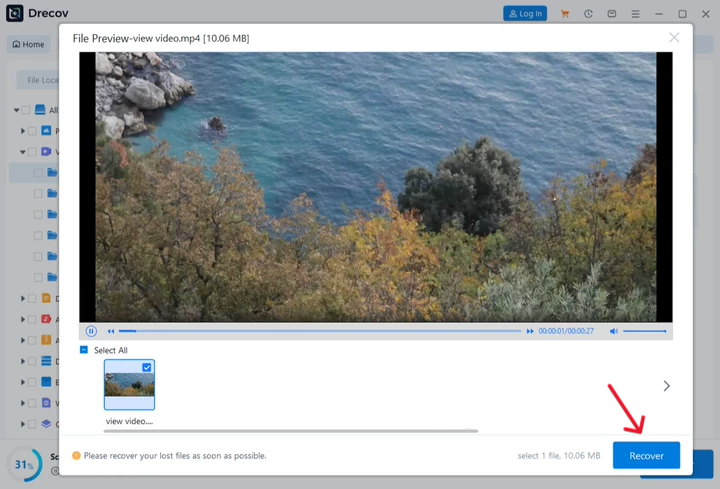
Step 4: Recover and verify the file
Select the matching video and recover it to a different, healthy drive. Play the recovered file from beginning to end and check both picture and audio. If you cannot find the result at the expected destination, check the selected output path and any Drecov or Recovery folder created for the recovered files.
This method recovers a local video file, not its former TikTok URL, comments, likes, or visibility on the platform. If your loss involves a removable card, the separate SD card video recovery guide can help you assess that storage case before changing anything on the card.
Method 3: Look for a Saved Copy or Public Archive
People searching for a “watch deleted TikTok videos website” are often looking for a video posted by someone else. You cannot use the creator’s Recently deleted folder or scan your own computer to retrieve a file you never saved. Instead, check whether a copy existed before the post was removed.
Start with messages and downloads. If someone sent you the video as a file, check the conversation’s media area. If they sent only a TikTok link, that link may no longer play. Search your own saved videos and any collection where you placed the clip. You can also check whether the creator has reposted it through an account they control.
If you have the exact public video URL or creator-page URL, try it in the Wayback Machine. A capture might preserve a page, caption, or thumbnail; it may not preserve a playable video. Enter the URL, inspect any available capture, and confirm what was actually saved rather than assuming that a visible snapshot contains the media.
Be cautious with a third-party deleted TikTok videos finder, TikTok archive website, or deleted TikTok viewer that promises access to any removed clip. No service can retrieve a video it never captured or a private post it was not authorized to see. Avoid entering your TikTok password into such a site, installing an unneeded extension, or uploading private account data in the hope of unlocking a deleted post.
If no copy or archive capture exists and the creator intentionally deleted the video, there may be no legitimate way to watch it again. Asking the creator whether they still have a copy is more realistic than relying on a site that claims universal access.
Tips & Best Practices
Maximizing your chances of video recovery requires swift action and a clear strategy.
- Stop Using the Device Immediately: As soon as you realize a tiktok video deleted issue has occurred, turn off your Wi-Fi and mobile data. This prevents background apps from writing new data over the deleted video sectors.
- Check Your Liked Videos Video Feed: If you are wondering how to watch deleted tiktok videos that you did not create, check your watch history or liked list. Sometimes the thumbnail cache remains viewable even if the main link breaks.
- Keep Local Backups: Always toggle the Save to Device option on before posting any content to the platform.
How to see deleted tiktok videos FAQs
Can I recover a TikTok video I deleted more than 30 days ago?
TikTok’s Recently deleted restore option is for eligible posts within its stated 30-day period. After that, check for an original recording, a saved export, an editing project, or a backup. A local recovery tool is relevant only if a copy was stored on a supported device. None of these methods guarantees that the original TikTok post can be restored.
Can I watch someone else’s deleted TikTok videos?
Only if a viewable copy is available to you, such as a file you saved, a repost by the creator, or a public archive that actually captured the media. There is no reliable viewer for every deleted TikTok post, and another person’s Recently deleted folder is private to their account.
Does downloading my TikTok data restore deleted videos?
Do not count on it. TikTok’s data download may contain account information and activity records, but the available contents can vary. A record or link is not the same as a playable video file. For an eligible recent deletion, check Recently deleted first.
Can Drecov recover a deleted TikTok draft from my phone?
Do not assume so. The Drecov method in this article applies to a video file previously stored on a supported PC or removable drive. A TikTok draft kept only inside a phone app is a different case. First check the original phone and any real backup or exported footage. Avoid reinstalling TikTok merely to test recovery, because drafts may be lost when the app is removed.
Why does a web archive show the TikTok page but not the video?
A saved page and its media are separate. The archive may have captured the caption or thumbnail without preserving a playable copy. If the archived page does not play, look for a copy you saved earlier or a repost from the creator; changing to another “viewer” website does not create a missing recording.
Conclusion
For your own recently deleted post, begin with TikTok’s Recently deleted folder. For your own missing file, check saved copies and backups, then consider Drecov if that file was deleted from a supported local drive. Keeping these cases separate helps you spend time on methods that can actually work—and recognize when a post or video file is no longer available.
⚠ Warning: Install it on a drive different from the one where your data was lost to prevent overwriting.






