









4.9 from 100,000+ reviews

Easy Recovery
Powerful Features for
Easy Recovery
PandaOffice Drecov offers comprehensive external hard drive data recovery solutions to meet all your recovery needs

Deep Scan Technology
Advanced deep scan algorithms quickly locate lost files, boosting recovery success rate.

Preview Function
Preview file content before recovery to verify file integrity and usability.

Safe Recovery
Read-only mode operation that does not cause secondary damage to original data, ensuring data security.

Easy to Use
Intuitive user interface that completes data recovery in three steps, no professional technical knowledge required.
reasons for loss
Why Does External Hard Drive Data Get Lost?
PandaOffice Drecov provides a comprehensive external hard drive data recovery solution to meet all your recovery needs
deleting important files

Accidental Deletion
Mistakenly deleting important files and realizing you need them after emptying the Recycle Bin.
Formatting Errors
Accidentally formatting an external hard drive, resulting in all data being erased.

Errors
Virus Attacks

Virus Attacks
External hard drives infected with viruses or malware, resulting in file corruption or loss.
preventing data access

Hardware Failure
Physical damage to the hard drive, interface failure, or power supply issues preventing data access.
System Crash
Sudden system crash when connecting an external hard drive, resulting in file system corruption.

file system corruption
Partition Loss

Partition Loss
Hard drive partition table damaged or lost, making partitions unrecognizable and inaccessible.
reasons for loss
Video Tutorials
Watch detailed demonstrations to quickly master the usage of Panda Data Recovery
How to Recover Deleted/Formatted Data on Windows
Detailed introduction to shows you how to fix all 3 scenarios with PandaOffice Drecov, the ultimate data recovery tool for Windows!
Detailed
installation
quickly
data recovery
How to Recover Lost USB Drive Data | PandaOffice Drecov Step-by-Step
This quick tutorial shows you how to recover them with PandaOffice Drecov—simple, straightforward, and no tech expertise required!
step by step
deletion/format/corruption
USB drive recovery
How to Recover Deleted Files Windows 11
This no-nonsense guide shows you 5 proven ways to get your data back—from built-in Windows tools to deep recovery with PandaOffice Drecov—no tech skills required!
computer file recovery
delete file recovery
How to Recover Data from Hard Drive (Internal/External)
In-depth explain of advanced recovery techniques and solutions to common problems
hard drive recovery
Internal/External
4 steps
Simple Four Steps to Recover External Hard Drive Data
No professional knowledge required, easily complete the data recovery process
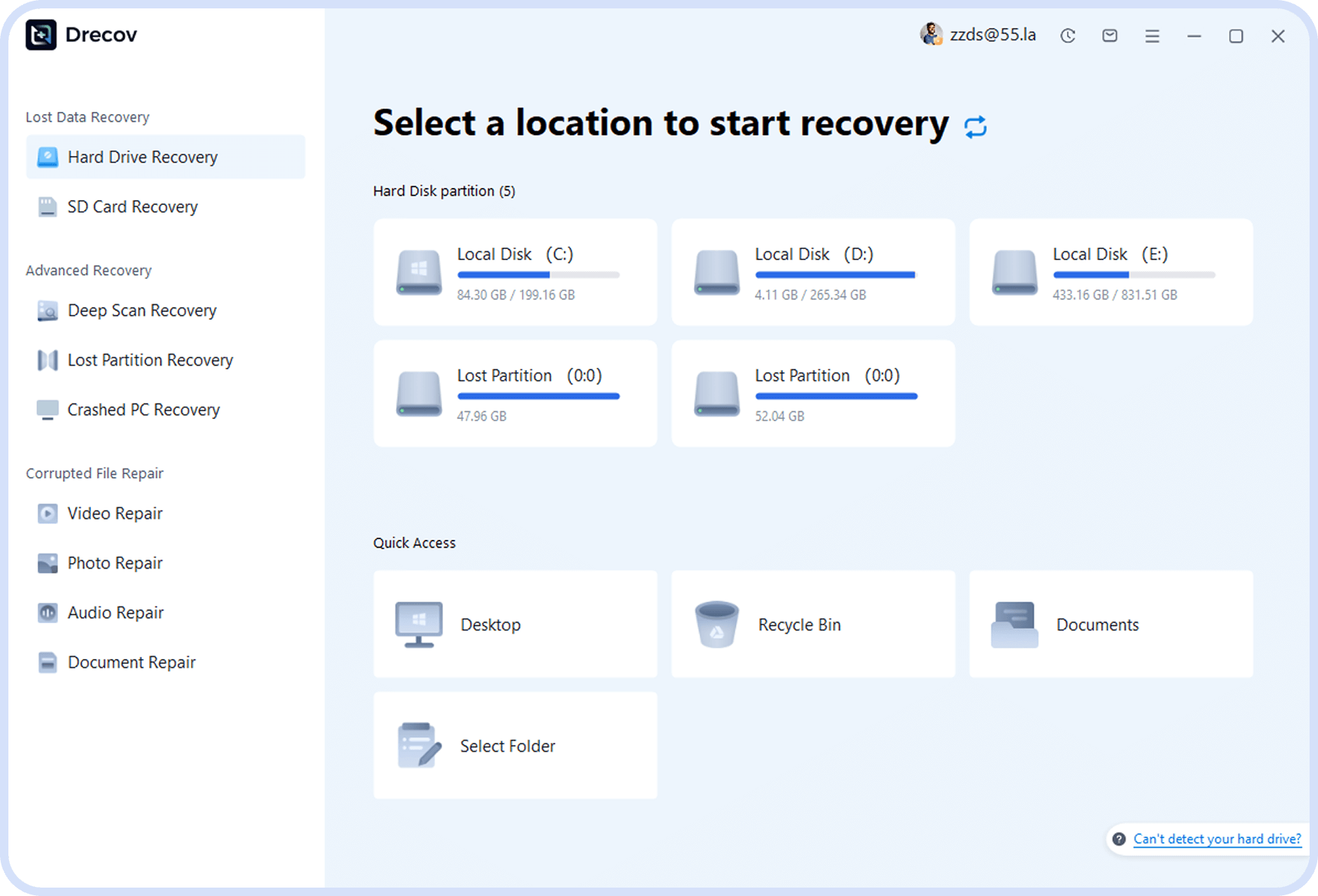
Step 1
Select Recovery Mode
Launch PandaOffice Drecov and choose the appropriate recovery mode based on your data loss scenario.
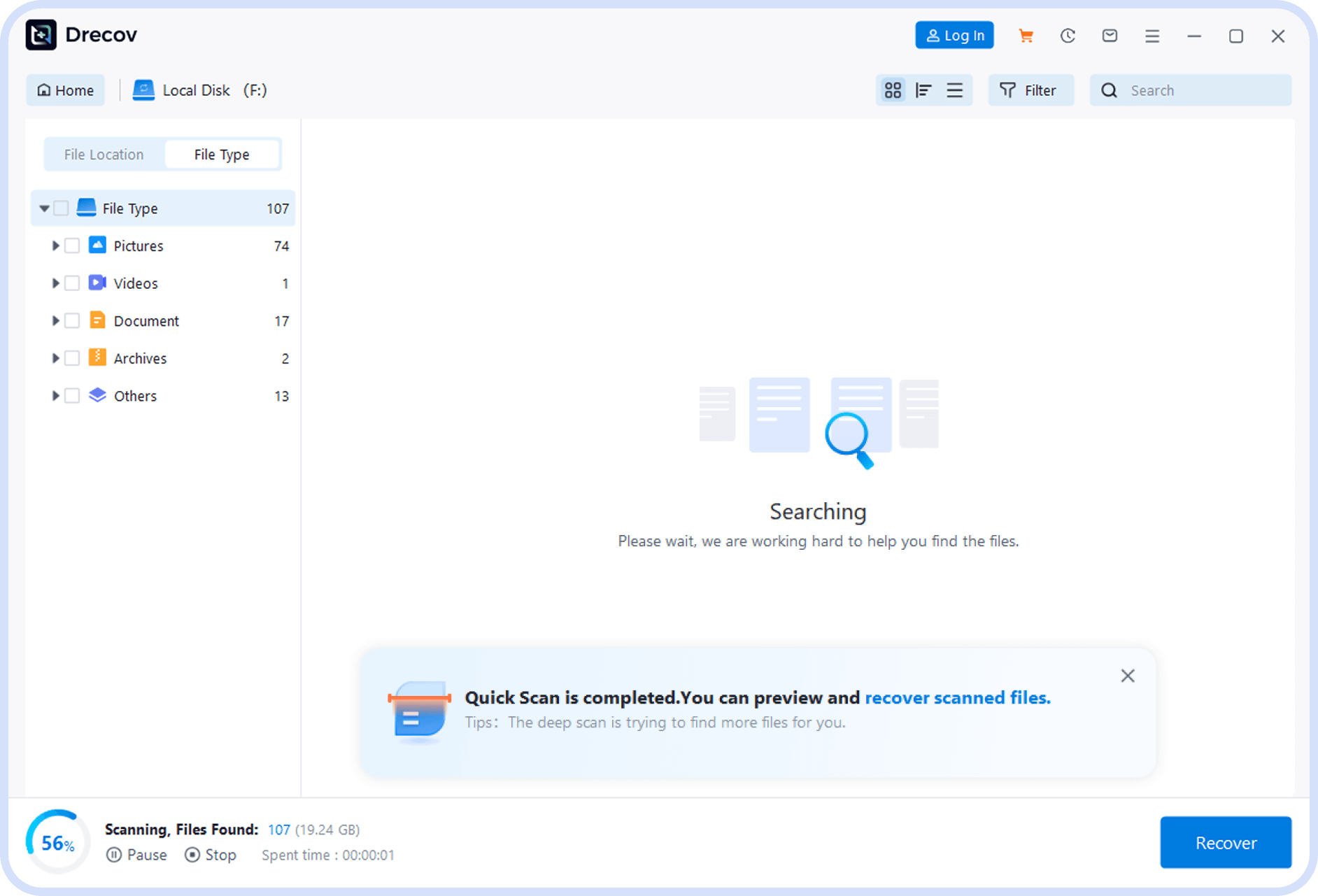
Step 2
Scan External Hard Drive
Select the external hard drive partition you need to recover and click the scan button to start scanning.
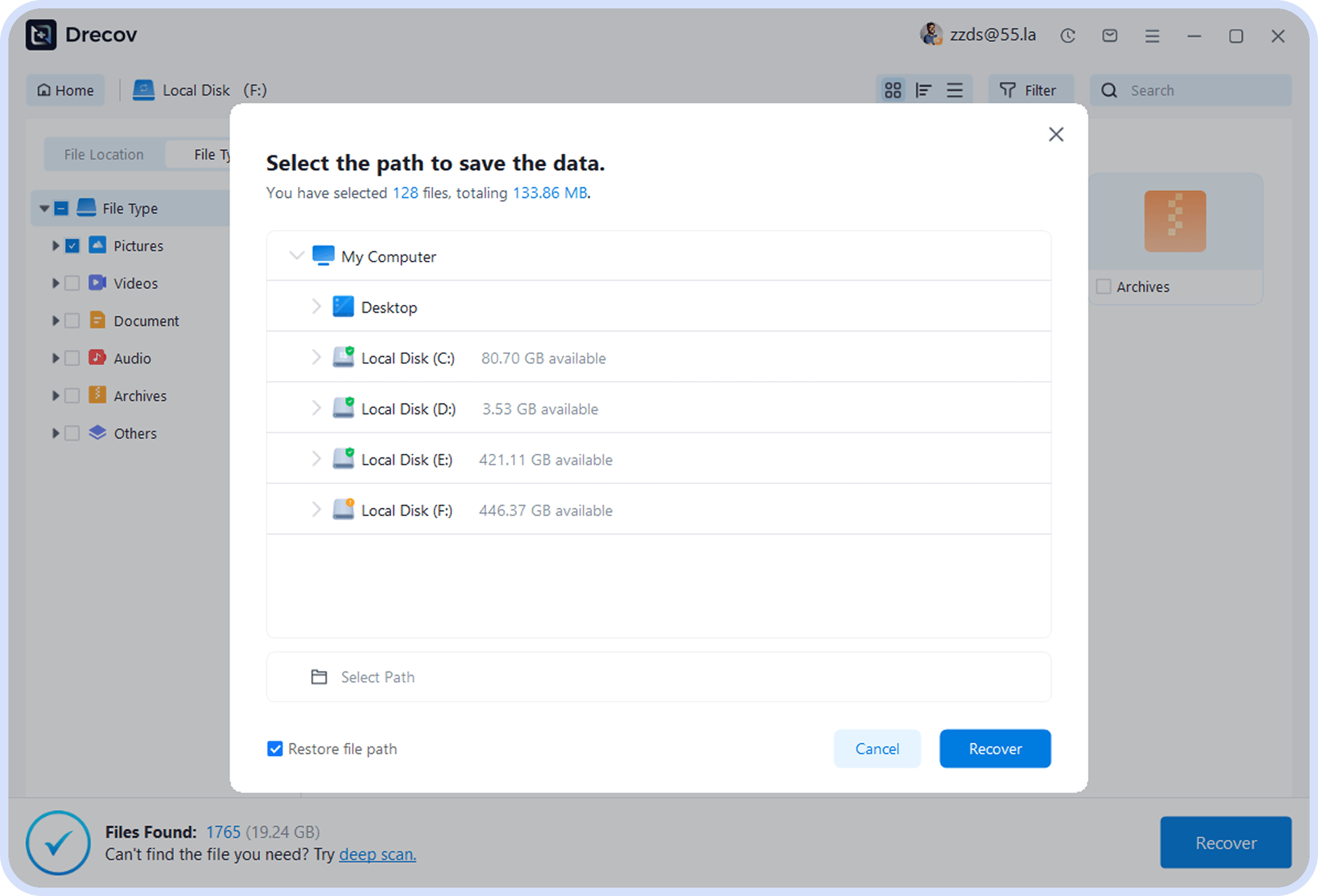
Step 3
Preview and Select Files
After scanning is complete, preview recoverable files and check the files you need to recover.
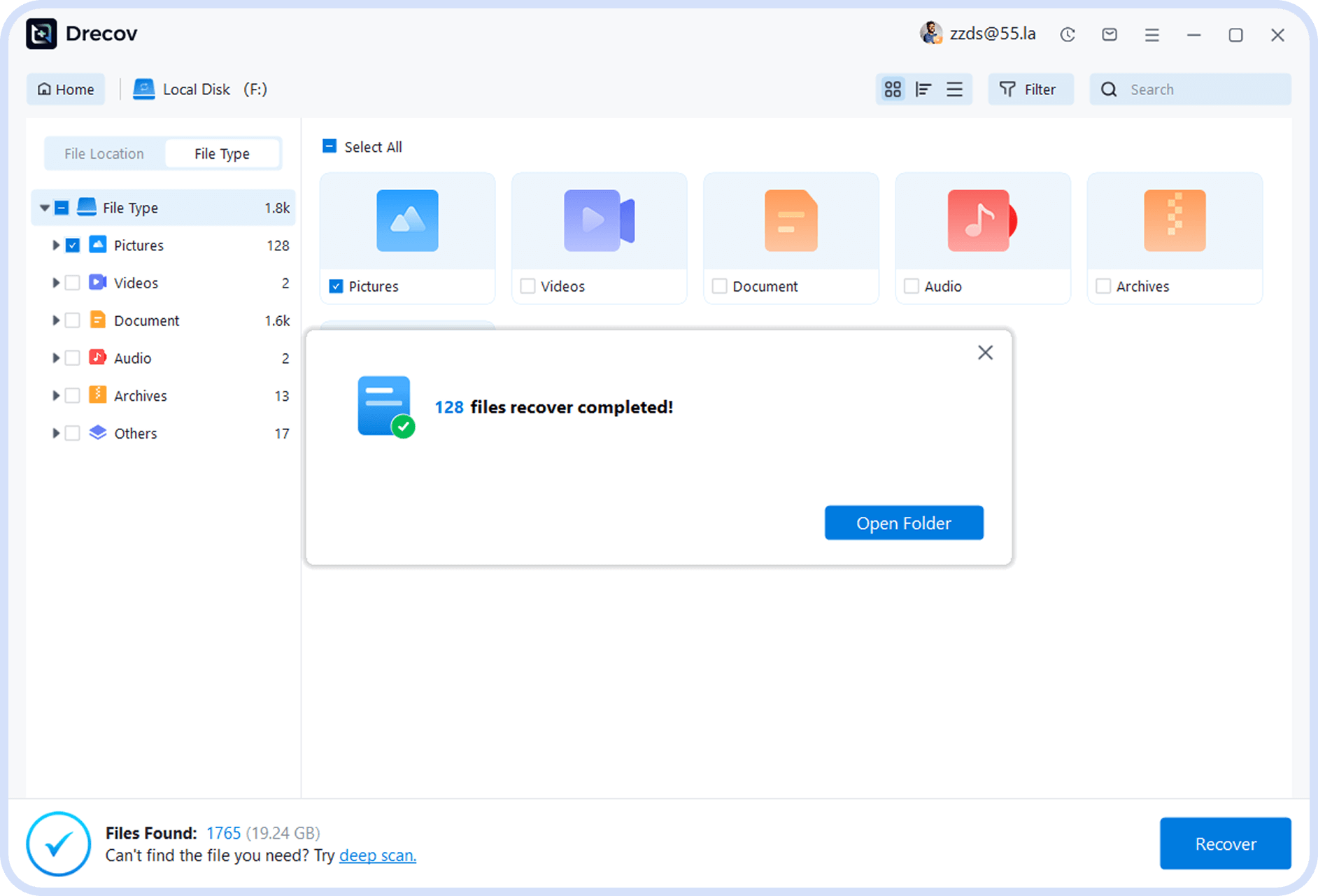
Step 4
Recover Files
Select a file save location and click the recover button to complete the data recovery process.

Expert Recommendation
For most users, using professional data recovery software is the most cost-effective option with high success rates and simple operation, allowing you to complete data recovery without professional knowledge.
Support
Supported Devices & File Types
PandaOffice Drecov supports a wide range of storage devices and file formats

External Hard Drive

USB Flash Drive

SD Card

Computer Hard Drive

Camera

Computer Data
type
Supported File Types
Support one click recovery of multiple format files

Documents
Word、PDF、TXT、Excel、PPT、RTF


Images
JPG、PNG、GIF、BMP、TIF、RAW


Videos
MP4、MOV、FLV、AVI、WMV、MKV


Audio
MP3、WAV、FLAC、AAC、M4A、WMA


Compressed Files
ZIP、7Z、GZIP、RAR、TAR


Other
Email、Database、Executable files

reason
Why Choose PandaOffice Drecov?
Professional, efficient, and secure data recovery solutions
98
%
Recovery Success Rate
Uses advanced scanning algorithms that can deeply dig lost data with industry-leading recovery success rates.
30
%
Faster Scan Technology
Optimized scanning engine that is 30% faster than similar software, saving you valuable time.
99.8
%
Recovery Success Rate
Read-only mode operation that does not cause secondary damage to original data, protecting your data security.
Testimonial
Real User Reviews for External Hard Drive Data Recovery
See what other users say about our data recovery software
Charles
“Very useful software! My external hard drive suddenly became unrecognizable, and this software successfully recovered all my important files with simple operation.”
3 years License
2024-05-30
Ava
“I formatted my hard drive and then realized I hadn’t backed up important files. I tried this software with little hope, and most files were recovered. Very satisfied.”
1 year License
2023-07-20
Angelina
“As a photographer, I accidentally deleted an entire photo album. This software helped me recover years of precious photos. Thank you so much! Fast scanning speed and high recovery rate.”
10 Month License
2025-01-30
Asked Questions
Frequently
Asked Questions
Answers to common questions about data recovery
Recovery time depends on the drive size, file types, and scan method. Small drives may take minutes, large or deeply scanned drives can take hours.
The free version allows scanning and previewing recoverable files, while the paid version enables full recovery and saving of files.
Once data is overwritten, recovery is usually impossible. Stop using the drive immediately to maximize recovery chances.
Recovered files should be saved to a different drive or storage device to avoid overwriting existing data.
Yes, certain recovery tools support Mac file systems, but check system requirements for full compatibility.
knowledge
External Hard Drive Data Recovery Articles
Learn more data recovery knowledge and techniques


5 Critical Things
August 31,2025
How to Restore Lost Files from Hard Drive | For Free
Learn how to restore lost files from hard drive with step-by-step methods, Windows tools, and safe recovery software for corrupted or deleted data.

5 Critical Things
August 31,2025
How to Recover Hard Drive: A Technical Protocol
This enterprise-focused guide outlines a technical protocol for how to recover hard drive data. It covers immediate drive isolation, step-by-step restoration using PandaOffice Drecov for deep-sector scanning, and professional CLI techniques.

5 Critical Things
August 31,2025
How Data Recovery from External Hard Drive: A Practical Guide
This article explores data recovery from external hard drive in depth, explaining how data loss occurs, how recovery works, and comparing practical methods

5 Critical Things
August 31,2025
A Storyteller’s Guide on How to Recover Deleted Files from Hard Drives
This narrative-driven guide explores the emotional and technical journey of data loss, framed through a “Data Rescue Chronicle” that resonates with anyone who has accidentally deleted vital information.

5 Critical Things
August 31,2025
How Do I Recover Files from An External Hard Drive?
Learn how do I recover files from an external hard drive with step-by-step guidance using PandaOffice Drecov and Recuva.


