







Available on:

4.9/5
Rating
100% Safe



100% Safe

24/7 Support

Money-Back Guarantee

Common Scenarios of Word Document Loss
Whether it’s a mistake, system crash, or storage failure, lost Word docs can derail work and study. We’ve got solutions for them all

Accidental Deletion
Hitting “Delete” by mistake or emptying the Recycle Bin—losing critical Word documents in an instant.

Software Conflicts
Unexpected closure of Microsoft Word or conflicts with other apps—leaving documents unopenable.

System Crashes
Sudden computer freezes, power outages, or system failures that stop you from saving an ongoing Word edit.

Virus Infections
Viruses or malware that encrypt, delete, or corrupt Word files, making them inaccessible.

Storage Device Damage
Bad sectors, formatting, or physical damage to hard drives, USB drives, or SD cards where Word docs are stored.

Unopenable Word Docs
Errors like “format not supported” or garbled content, often caused by file corruption or version incompatibility.
PandaOffice Drecov – Your Word Data Recovery Solution
It’s a professional word file recovery tool designed for every Word loss scenario. Whether you’re a casual user or a pro, recovering docs is a breeze.

Supports All Major Word Formats

3 Simple Steps

Free Scan & Preview

Safe & No Risk
Core Features of PandaOffice Drecov for Word Recovery
Drecov combines advanced recovery tech to protect and retrieve your Word docs comprehensively
Deep Scan Technology
Advanced algorithms dig out hidden Word file fragments others miss.
Multi-Scenario Support
Recovers Word docs lost to deletion, formatting, partition loss, virus attacks, and more.
File Preview
Check Word content before recovery to make sure you’re getting the right document.
User-Friendly Design
Intuitive interface and guided steps—anyone can master it in minutes
Industry-Leading Success Rate
Pro-specific algorithms for Word docs deliver top-tier recovery results.
No Data Harm
Read-only operation—your original files stay intact.
3 Simple Steps to Recover Word Documents
PandaOffice Drecov guided process means no tech know-how is required—just follow these steps:

Download & Install
Grab PandaOffice Drecov from our official site and install it following the prompts..
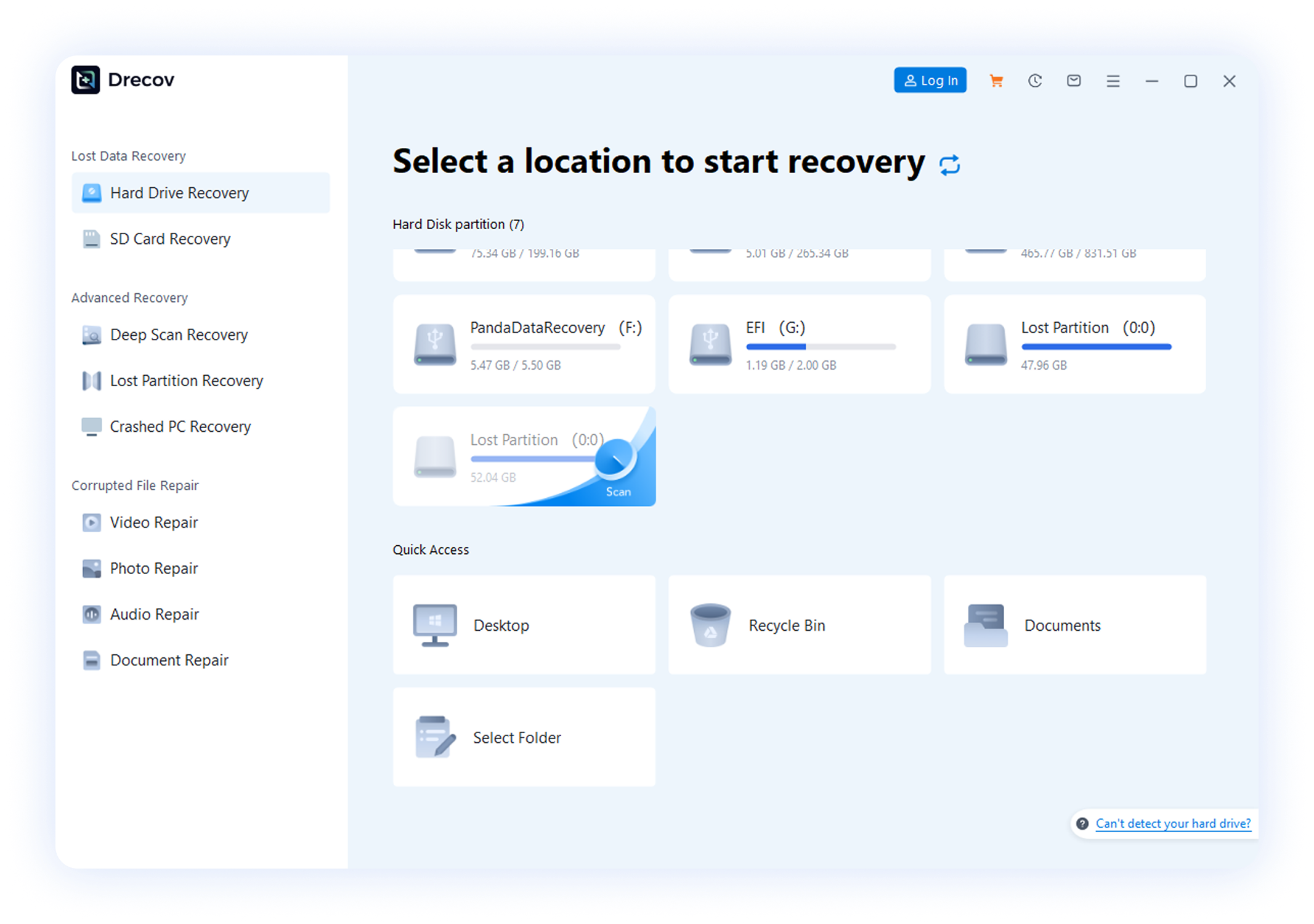

Select Scan Location
Launch the tool, choose where your Word docs were lost (e.g., a hard drive partition, USB drive), and start scanning.
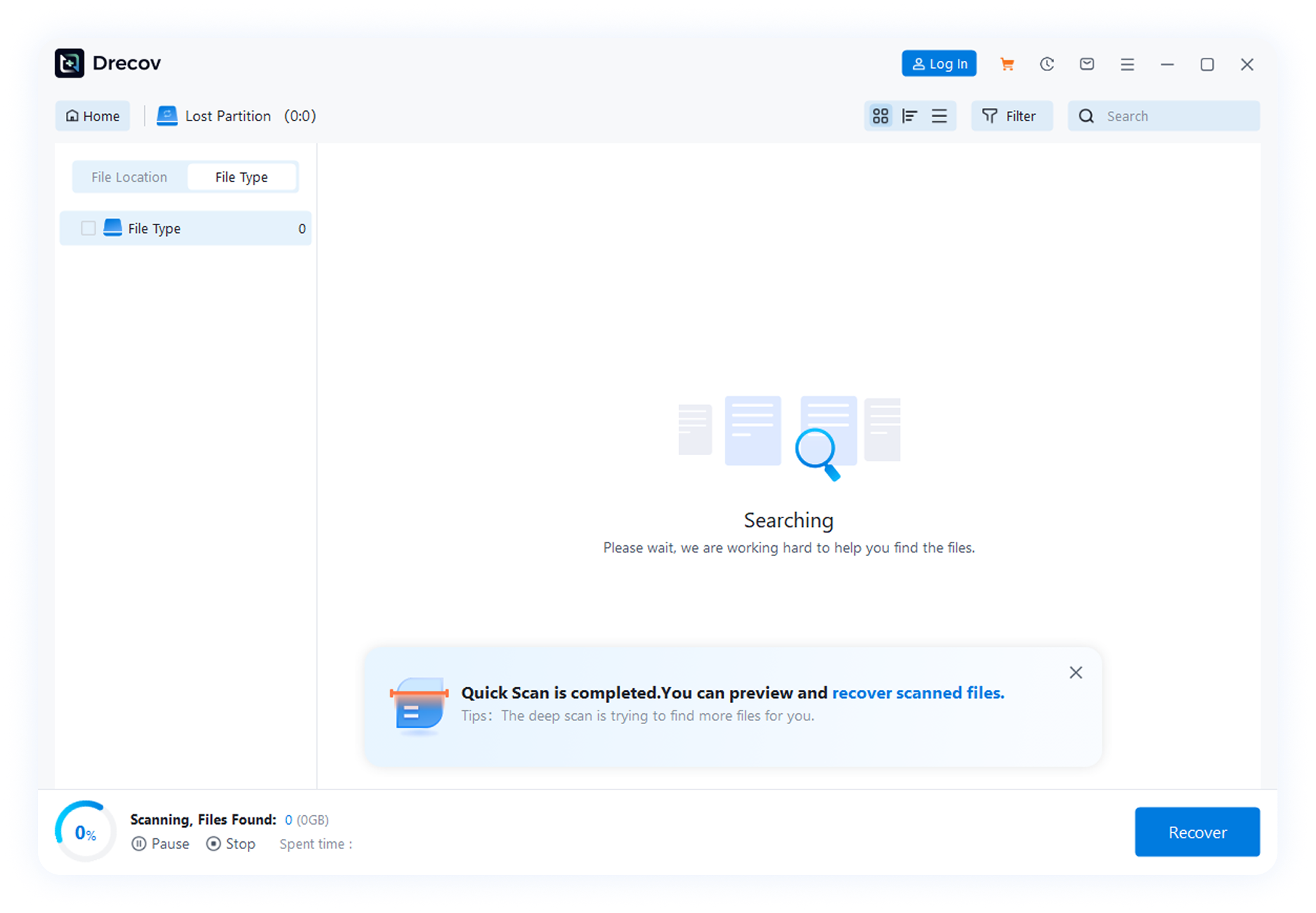

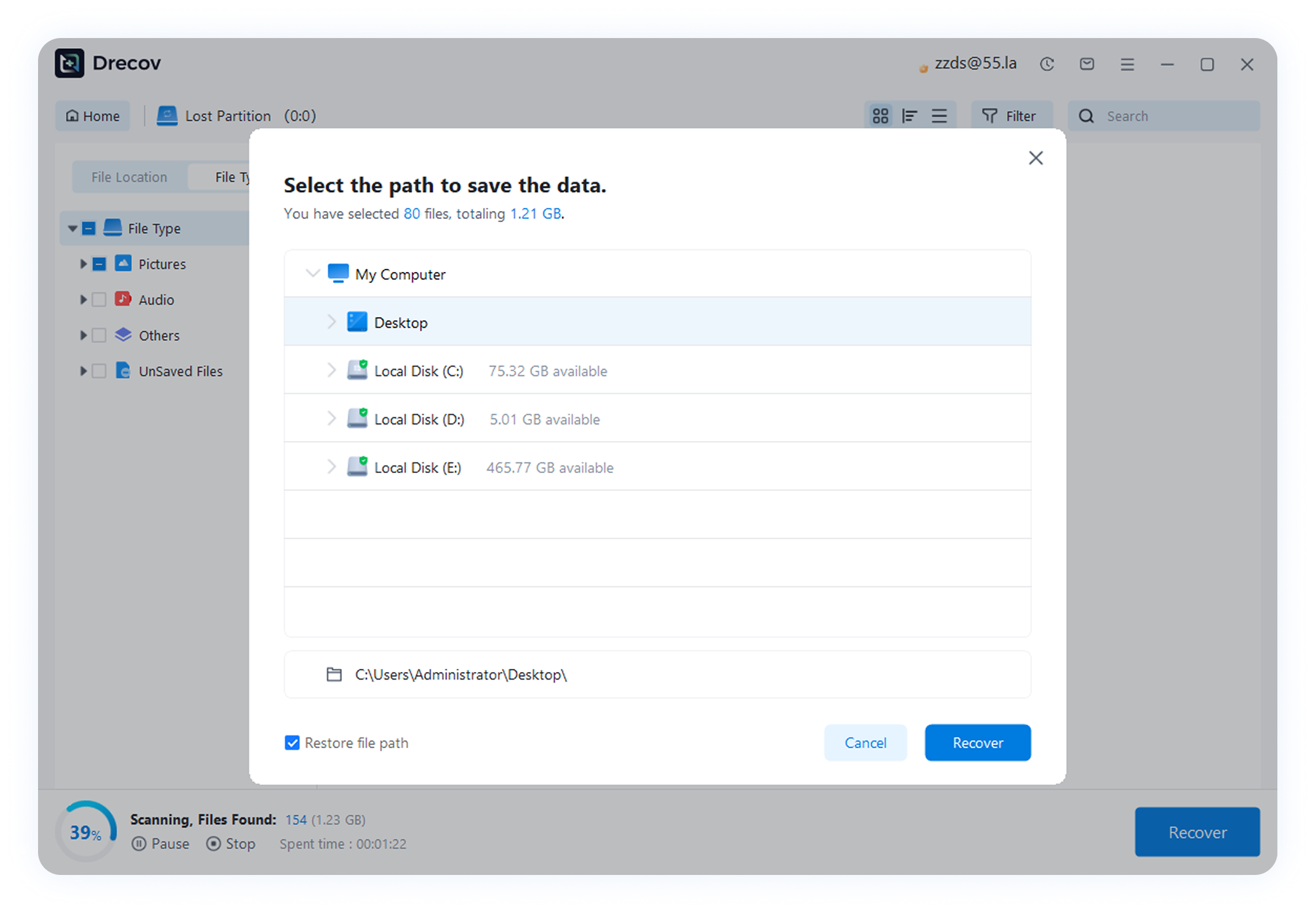
Preview & Recover
After scanning, preview the found Word files, select the ones you need, and click “Recover”.
Word Data Recovery Articles & Tutorials
We’ve got full guides to help you master document recovery and avoid future loss

How to Recovery Microsoft Word Unsaved Document
Lost an unsaved Word file? Learn Microsoft Word unsaved document recovery using built-in tools, temporary files, backups, or Drecov software to restore your documents safely and easily.

How to Recover Overwritten Word Documents?
Accidentally replaced a Word file? This guide shows how to recover overwritten Word files using Word’s version history, AutoRecover, backups, system tools, and software like Drecov for safe and easy restoration.

How Can I Recover a Deleted Word Document?
Step-by-step guide to recover deleted Word document on Windows/Mac. Use Recycle Bin, AutoRecover, backups, or Drecov for permanent recovery.
Real User Reviews
Hear from users who got their critical Word docs back with PandaOffice Drecov

Kaia
Accidental Deletion
“I accidentally deleted an important Word document while cleaning my computer. Drecov scanned my drive and recovered it within minutes. Super easy and reliable!”


Adam
Word Crashed Without Saving
“Word crashed before I could save my file, and I thought all my work was gone. Drecov helped me recover the unsaved document quickly. Lifesaver!”

Calliope
Formatted Drive Recovery
“I formatted my drive by mistake and lost several DOCX files. Drecov found and restored all my Word documents with their original names intact.”

Mr. Wang
Corrupted Word Fileval
“My Word file wouldn’t open and showed a corruption error. Drecov successfully recovered a readable version of the document. Very impressed!”

Mr. Liu
System Crash / Blue Screen
“After a system crash, many of my Word files disappeared. Drecov’s Word data recovery brought everything back. Highly recommended!”

Ms. Zhao
External Drive Loss
“I lost important Word documents from an external hard drive. Drecov detected the drive instantly and recovered my files without any hassle.”


